A good 240mm AIO CPU cooler matters more than many first-time PC builders think. If your processor runs hot, your clock speeds drop, fan noise goes up, and the whole system feels less refined. For gamers, streamers, editors, and people who run long renders, a solid liquid cooler helps keep temperatures under control without filling the cabinet with the bulk of a large air tower.
When you pick a 240mm AIO, you need to check more than looks. Socket support, radiator thickness, pump quality, fan airflow, noise levels, tubing length, software needs, and cabinet clearance all matter. In India, heat and dust also play a big role. A cooler that looks nice on a product page but has weak fans or poor service support can become a headache after a few months.
The Indian market has options at many budgets, from entry-level Ant Value models to premium NZXT units with LCD features. I feel most buyers should first match the cooler to their CPU and case, then think about RGB or display extras. Below, I have picked five 240mm AIOs from your list that suit different types of users, from value-focused gaming builds to premium white-theme setups.
Ant Value AV240
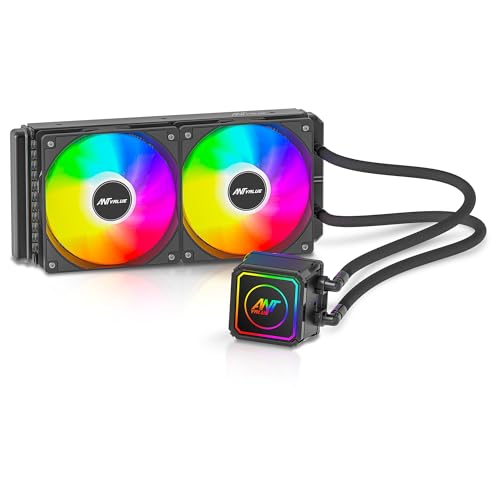
The Ant Value AV240 is a budget-focused 240mm liquid cooler built for users who want AIO cooling without spending too much. It covers a wide range of Intel and AMD sockets and keeps the setup simple with static RGB lighting.
Pros
- Wide socket support, including newer Intel and AMD platforms
- 425mm braided tubing helps during installation in mid-tower cases
- Static RGB pump and fans suit budget gaming builds
- Doorstep pickup and drop warranty is useful for first-time buyers
Cons
- Static RGB feels basic next to ARGB rivals
- Fan speed and airflow figures are modest for heavy overclocking
- One-year warranty is shorter than some competitors
- Brand service experience can vary by city
The AV240 targets builders who want the clean look of liquid cooling without moving into the premium segment. Its 240mm radiator, 1600 RPM fans, and rated airflow of 49.77 CFM put it in the entry-level bracket, which makes sense for mainstream CPUs and everyday gaming systems. If you are using a Ryzen 5, Core i5, or even some higher chips at stock settings, this cooler makes more sense than its price-first branding might suggest.
I also like that Ant Value kept installation practical. The 425mm braided rubber tubing gives decent flexibility in common Indian cabinets, where top-mount and front-mount layouts differ a lot. Tube management becomes easier, and the risk of awkward bends goes down. The static RGB lighting is simple, but for many users, especially in closed-glass cabinets, simple lighting is easier to live with than software-heavy RGB.
For Indian buyers, the biggest reason to consider this model is value. You get broad socket support, including LGA1700, LGA1851, AM4, and AM5, which helps if you upgrade later. Ant’s pickup and drop warranty process is a comfort point for budget buyers, though the one-year cover is still on the shorter side. If your goal is a neat AIO build for a mid-range processor, the AV240 stays practical and easy to recommend.
Ant Esports ICE-240

The Ant Esports ICE-240 is a stronger all-rounder with ARGB lighting, higher rated airflow, and a longer warranty. It suits gamers who want better thermal headroom and a more polished look for a mainstream performance build.
Pros
- ARGB lighting gives better visual control than static RGB
- Up to 75 CFM airflow offers stronger cooling on paper
- Three-year manufacturer warranty adds peace of mind
- Broad socket compatibility across Intel and AMD platforms
Cons
- Fan noise may rise at higher RPM levels
- Software sync experience depends on motherboard ecosystem
- Pump and fan acoustics may not suit silent PC users
- Design is less premium than some higher-end rivals
The ICE-240 sits in a sweet spot for many Indian builders. On paper, it offers a healthy step up from basic 240mm AIOs with airflow rated up to 75 CFM, air pressure up to 2.9 mmAq, and support for a wide mix of Intel and AMD sockets. For gaming PCs with chips like a Core i7 or Ryzen 7, this sort of spec sheet gives more breathing room during long sessions, especially in warmer rooms where ambient temperature already starts high.
Its ARGB setup also makes more sense for current builds. Many buyers now want motherboard sync support and cleaner lighting control, and this model fits well in those setups. The black finish stays easy to pair with most cabinets, and the 274 x 120 x 27 mm radiator size is standard enough for many Indian mid-towers. I would still suggest checking top RAM clearance and front mount space before buying, because case specs in this segment are often written loosely.
One thing that helps this cooler stand out is the three-year warranty. In this category, longer coverage matters because an AIO has more points of failure than a normal air cooler. Ant Esports has a visible presence in the Indian budget PC market, and spare unit availability is usually better than many obscure imported brands. If you want a balance of looks, wider thermal ability, and longer support, the ICE-240 feels like a safer buy than the cheapest options.
Ant Esports ICEStorm 240

The Ant Esports ICEStorm 240 is the most feature-packed Ant model here, with a magnetic temperature display, fast pump, and high-airflow fans. It is a strong pick for users who want both strong cooling numbers and a more premium feel without jumping to an imported flagship.
Pros
- Magnetic rotatable temperature display adds useful visual feedback
- High pump speed and 89.33 CFM fan airflow look strong on paper
- Leak-resistant braided tubing suits intensive workloads
- Three-year replacement warranty is a major plus
Cons
- Display feature adds complexity compared to simpler AIOs
- Aesthetic style may not suit minimal, non-RGB builds
- Long-term software and sensor behavior need user trust
- Availability may vary more than older Ant Esports models
The ICEStorm 240 feels like Ant Esports trying to move beyond the budget-only image. The rated specs are aggressive for this class, with a 2650 RPM pump and 2000 RPM ARGB fans pushing up to 89.33 CFM. Those numbers suggest stronger heat handling than basic 240mm coolers, which is good news if your processor spends a lot of time under sustained load. This is the kind of cooler I would place in a gaming and productivity PC where a CPU faces long hours of rendering, compiling, or heavy multiplayer sessions.
The magnetic, rotatable temperature display is the talking point here. For many builders, this is more useful than decorative branding because you get direct thermal readout on the block itself. The detachable design through a USB-C connector is also smart. If your motherboard orientation or tube routing changes how the block sits, you are less likely to end up with a crooked display. Small touches like this make a difference in tempered-glass builds where visual alignment matters.
For Indian users, this model has two practical strengths. First, the brand’s replacement warranty period is decent at three years, which adds trust in a category where people often worry about pump life. Second, the feature set feels modern enough for new AM5 and LGA1851 systems. If you want a 240mm AIO with stronger thermal intent and a display feature, but do not want to move to a much pricier premium brand, the ICEStorm 240 stands out.
Ant Esports ICE Glow 240

The Ant Esports ICE Glow 240 is made for themed builds, especially white PCs where the cooler needs to look as good as the rest of the setup. Its ARGB tubes and display-focused styling make it one of the flashiest options in this list.
Pros
- White finish suits premium white cabinet builds
- ARGB sleeves on the tubes create a rare visual effect
- PWM fans and fluid dynamic bearings help with control and lifespan
- RGB sync support works with common motherboard lighting suites
Cons
- White hardware needs more cleaning in dusty rooms
- Style-first design will not appeal to every buyer
- Exact cooling numbers are less clear than some rivals
- Availability of the white version can be inconsistent
The ICE Glow 240 is built for buyers who care a lot about presentation. Most AIOs focus on lit fans and a lit pump cap, but this one adds ARGB tubing sleeves, which changes the whole visual character of the PC. In a white build with a glass side panel, those glowing tubes pull attention immediately. If you are building around white RAM, a white motherboard, or pastel lighting themes, this cooler fits the brief better than a standard black model ever will.
Looks aside, the core design still covers the basics well. Ant Esports mentions a dual-chamber pump, a large copper base, PWM fan support, fluid dynamic bearings, and evaporation-resistant tubing. Those are the features you want in an AIO that is meant for daily use and long gaming sessions. The adjustable pump orientation is also useful because many builders run into logo alignment issues after mounting, especially when top-mount and front-mount positions force different tube directions.
For Indian users, there is one thing to keep in mind. White parts collect visible dust and yellowing concerns faster than black components, so regular cabinet cleaning matters more here, especially in hot and dusty cities. On the support front, Ant Esports is at least a familiar name in the Indian DIY market, which makes service less uncertain than random imported aesthetic brands. If your build theme matters as much as thermal performance, the ICE Glow 240 deserves a close look.
NZXT Kraken Plus 240 RGB

The NZXT Kraken Plus 240 RGB is the premium choice in this list, aimed at buyers who want polished build quality, cleaner installation, strong cooling hardware, and a customizable LCD screen. It suits high-end gaming or creator PCs where looks and refinement matter.
Pros
- 1.54-inch LCD adds real system info and personal customization
- NZXT pump design focuses on strong flow with low noise intent
- Single-frame RGB fan setup keeps cable management cleaner
- Tool-free mounting and pre-applied paste simplify installation
Cons
- Premium feature set makes sense only for higher-end builds
- NZXT CAM software is another layer some users may not want
- White finish needs regular cleaning in Indian conditions
- Brand service reach in India is not as broad as mass-market local brands
The Kraken Plus 240 RGB is for buyers who want a polished AIO from a globally known enthusiast brand. The headline feature is the 1.54-inch square LCD on the pump block, which lets you show system temperatures, custom images, GIFs, and connected web data through NZXT CAM. For many people this is not a necessity, but in a premium build, small quality-of-life extras and cleaner visual presentation matter a lot. The screen looks more purposeful than decorative LEDs pasted onto a pump cap.
NZXT also pays attention to installation details. The pre-applied thermal paste saves a step, and the single breakout cable from the pump cap cuts down on clutter around the CPU area. The included F240 RGB Core single-frame fan approach also helps here. Fewer separate cables and fewer loose screws make the build process less frustrating, especially if this is your first AIO or if your case has tight top clearance. That cleaner install is a genuine advantage in compact mid-towers.
For Indian users, the main question is not style, but whether the rest of the system matches this class of cooler. If you are running a premium AM5 or Intel build, the Kraken Plus 240 RGB fits well and brings a more refined ownership feel than entry-level options. NZXT has strong brand recall among enthusiasts, though service reach and claim speed in India may depend on the seller and distributor channel. If you care about finish quality, cable management, and LCD customization, this is the most premium option in this list.
Buying Guide
1. Check your CPU before you pick the cooler
Start with your processor, not the cooler design. A 240mm AIO makes good sense for mid-range and upper-mid-range CPUs, especially if you game for long hours, stream, edit video, or run heavy workloads. For a locked mid-range chip, a basic 240mm unit is enough. For a hotter Ryzen 7, Ryzen 9, Core i7, or Core i9 setup, look for stronger pump specs, better airflow, and a longer warranty.
2. Case compatibility is the first filter
Many buyers skip this step and regret it later. Check if your case supports a 240mm radiator on the top, front, or both. Also check radiator thickness, fan thickness, motherboard heatsink clearance, and RAM clearance. In many Indian budget cabinets, top support is claimed on the box, but real clearance gets tight once tall RAM or VRM heatsinks enter the picture.
3. Fan airflow and static pressure matter more than RGB
A radiator needs fans that push air through dense fins well. So do not focus only on fan RPM. Look at airflow and static pressure together. A higher RPM number alone means little if the fan gets noisy and fails to move enough air through the radiator. For hotter CPUs and warmer Indian ambient conditions, stronger radiator fans make a visible difference.
4. Pump quality and tubing design affect long-term use
An AIO is more than fans and lighting. Pump performance affects cooling consistency, while tubing quality affects ease of installation and long-term reliability. Braided or reinforced tubes tend to feel better during routing. Evaporation-resistant tubing is also worth having, especially if the PC runs for long hours in warmer rooms without air conditioning.
5. Noise matters if your PC sits close to you
Many gaming setups in India place the cabinet on the desk, close to ear level. In such cases, fan tuning and pump sound matter a lot. Some coolers stay quiet at idle but grow sharp under load. PWM fan control helps because you can tune the curve in BIOS or motherboard software. If silent operation matters to you, avoid buying only on max speed numbers.
6. RGB, displays, and software should match your setup
Extra features look fun, but think about whether you will use them daily. ARGB support works best if your motherboard has a compatible 5V header and decent sync software. LCD screens look great, but they often depend on USB connection and brand software running in the background. If you prefer a clean, low-maintenance build, a simpler cooler may suit you better.
7. Warranty and service support are a big deal in India
A liquid cooler has more risk than a simple air cooler, so warranty length matters. Three years feels more reassuring than one year, especially for a main gaming PC. Also think about brand service reputation, pickup support, and how easy replacement is in your city. A cooler with average specs and solid support often becomes the smarter long-term buy.
8. Match the cooler to Indian weather and dust levels
High room temperature changes cooling behavior. A system that looks cool in an air-conditioned showroom may run much warmer in summer at home. Dust also hurts radiator performance over time. Pick a case with good airflow, clean your filters often, and leave enough space around the cabinet. White coolers and RGB builds need more frequent cleaning if you want them to keep looking fresh.
Feature Importance
| Feature | Importance |
|---|---|
| Socket compatibility | High |
| Case radiator support | High |
| Fan airflow | High |
| Static pressure | High |
| Pump reliability | High |
| Warranty period | High |
| Noise levels | Medium |
| Tubing quality and length | Medium |
| RGB or LCD features | Medium |
| Brand service network in India | High |