If you are building a gaming PC or a serious editing rig in India, a good AIO liquid cooler can keep your CPU temperatures under control and your system stable. Modern Intel and AMD processors boost hard and run hot, especially in Indian summers where ambient room temperature stays high for long hours. A 360 mm AIO gives more radiator surface area, better heat dissipation, and usually quieter operation compared to basic air coolers, which helps during long gaming nights or heavy 4K rendering.
When you pick an AIO, you need to think about socket support, radiator size and cabinet compatibility, fan noise, pump reliability, RGB preferences, and warranty. In India, service network and after-sales support also matter a lot because RMA and replacement can become painful if the brand is not active here. This guide focuses on 360 mm AIO liquid coolers that suit Indian buyers who want strong performance, clean looks, and good value without worrying about constant thermal throttling or noisy fans.
Ant Esports ICEStorm 360 AIO
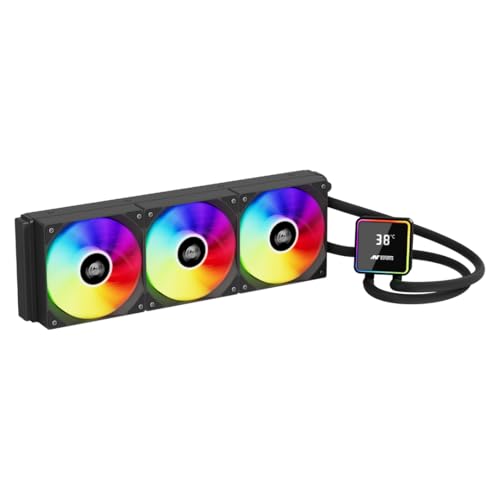
High performance 360 mm AIO with magnetic temperature display and strong cooling for modern Intel and AMD CPUs.
Pros
- Strong pump speed for better coolant flow
- High airflow 120 mm ARGB fans with good static pressure
- Magnetic, rotatable temperature display for quick monitoring
- Braided leak resistant tubing and 3 year replacement warranty
Cons
- Display needs USB connection and extra cable routing
- ARGB control depends on motherboard support
- Fans can get audible at full 2000 RPM
- Brand perception is still budget tier for some buyers
Ant Esports ICEStorm 360 AIO targets users who want serious cooling along with some flair on the CPU block. The pump spins at around 2650 RPM and the three 120 mm ARGB fans reach up to 2000 RPM with about 89 CFM airflow and 2.12 mmH2O static pressure. This combination suits high core count Intel and AMD processors that tend to run hot during gaming or multi core workloads. For Indian homes where ambient temperature can cross 30 degrees easily, the extra headroom helps to hold boost clocks longer.
The standout feature is the magnetic temperature display on top of the CPU block. It attaches with magnets and uses a USB C connector, so you can detach, rotate, and reattach to match your case orientation. For someone who likes to see CPU temp at a glance without opening software, this feels handy. The braided nylon tubing uses leak resistant design that gives some confidence for long term use, especially in Indian conditions with long power cuts and frequent system restarts.
Socket support is wide, including Intel LGA1851, 1700, 1200, 115x, 1366, and AMD AM5, AM4, older AM and FM sockets. This helps if you plan to move the cooler between builds over a few years. Ant Esports has grown fast in India with decent presence in major cities and through online sellers, and the 3 year replacement warranty adds a bit of peace of mind. Service quality varies by region, but overall, parts availability is better today compared to older times when such brands were rare. For buyers who want an aggressive looking cooler with a functional display and do not mind some tuning of fan curves to manage noise, ICEStorm 360 is a strong value option.
For RGB lovers, the ARGB fans integrate with standard 5 V headers on most modern boards, so you can sync lighting with the rest of your build. If your focus is raw cooling plus a fun temperature readout on the block, this cooler gives a lot of features at this segment. If you prefer a more minimal aesthetic, the design might feel a bit busy, but in most tempered glass cases it will look quite eye catching.
Ant Esports ICE 360 ARGB
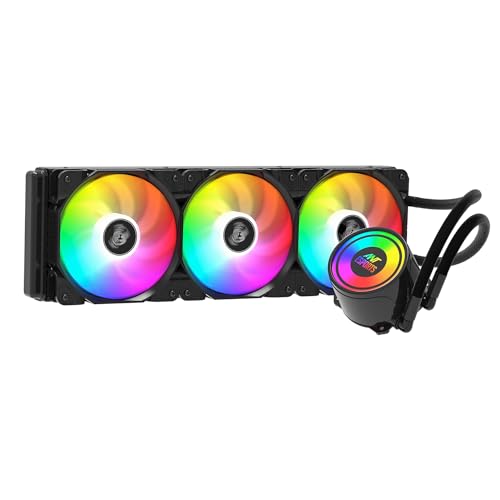
Budget friendly 360 mm ARGB AIO with solid cooling and wide socket support for Intel and AMD builds.
Pros
- Three 120 mm PWM fans with up to 75 CFM airflow
- Decent static pressure and 32 dB rated noise level
- Supports most popular Intel and AMD sockets including AM5
- Aluminium radiator with compact 27 mm thickness for easier case fit
Cons
- No fancy LCD or temperature display on the pump
- ARGB control depends fully on motherboard or external controller
- Fan noise becomes noticeable at higher speeds
- Brand service quality can vary by city
Ant Esports ICE 360 ARGB targets users who want strong cooling without spending on extra display features. The 360 mm aluminium radiator has a 394 by 120 by 27 mm size which fits most mid tower cabinets that support 360 mm front or top mounting. The included 120 mm fans spin from around 800 to 2000 RPM with up to 75 CFM airflow and 2.9 mmAq static pressure, which is good for pushing air through the radiator fins when the CPU is under heavy load.
For gaming builds in cities like Delhi, Mumbai or Chennai where room temperature stays high for longer periods, this cooler helps control CPU spikes during long sessions of titles such as Cyberpunk or competitive shooters. The rated fan noise of about 32 dB is reasonable, especially if you set custom fan curves in BIOS so that they do not hit maximum RPM unless the CPU temperature is very high. For daily browsing or office use, the cooler will usually sit in the lower RPM range where sound levels stay softer.
Compatibility is wide, covering Intel LGA115x, 1200, 1700, 1366, 2011, 2066 and AMD FM1, FM2, AM2 family, AM3 family, AM4, AM5. This helps if you recycle parts across family systems or upgrade platforms later. The ARGB fans hook into a 3 pin 5 V header and sync with motherboard software from brands like Asus, MSI or Gigabyte. Visually, the cooler brings a clean black look that fits gaming themes without being too flashy. Ant Esports offers a 3 year manufacturer warranty in India, with support through online ticket systems and partner service centers. For users on a tighter budget who still want a 360 mm AIO for better thermals than basic air coolers, the ICE 360 ARGB works well as long as you are okay with a functional design without a fancy pump display.
Corsair Nautilus 360 RS ARGB

Premium 360 mm AIO from Corsair with low noise pump, daisy chain ARGB fans, and strong control options for performance tuning.
Pros
- Renowned Corsair engineering with strong cooling and low noise
- Low noise pump with around 20 dBA rating
- PWM fans support Zero RPM mode at low temps
- Daisy chain fan and ARGB connections reduce cable clutter
Cons
- Higher price compared to budget brands
- Needs compatible motherboard headers for ARGB and PWM control
- White color may not suit all builds
- Corsair service is region dependent in smaller towns
Corsair Nautilus 360 RS ARGB targets enthusiasts who want a balance of cooling, silence, and clean cabling. Corsair uses a refined pump that keeps coolant moving at a high flow rate but stays around 20 dBA, which is comparatively quiet. This helps a lot in Indian apartments where your PC sits in the same room where you sleep or work. You avoid constant pump whine while still keeping your CPU stable at high boost speeds.
The three RS120 ARGB fans use PWM control and support speeds up to about 2100 RPM. The interesting part is the Zero RPM support where fans can stop completely when CPU temperature is low enough. During light browsing work or video streaming, you often get a silent system as long as the case airflow is decent. RS ARGB fans use Corsair AirGuide technology and Magnetic Dome bearings to provide strong static pressure and stable airflow through the radiator while also keeping vibration under control, which supports long term reliability in dusty Indian conditions.
Daisy chain support is a big practical plus. You can link the RS120 fans together with a single chain so you need only one 4 pin PWM header and one 5 V ARGB header on the motherboard. Cable clutter reduces a lot which is helpful in tight mid tower cases and for first time builders. The cooler works with Intel LGA 1851 and 1700, and AMD AM4 and AM5, so you cover all current mainstream platforms. Corsair has an established brand presence in India with distributors and service partners in metros and many tier 2 cities. Warranty handling is usually smoother than pure budget brands, though experience still varies by location. For users who want a refined white themed build with strong thermals, quiet behavior, and easier cable work, Nautilus 360 RS ARGB stands out as a strong choice.
ARGB customisation connects to compatible motherboards for control over fan lighting. You can sync with RAM, GPU and other Corsair or non Corsair components if your board has the needed headers. This cooler fits well for users who care about acoustic tuning, who stream or record and want low noise during mic capture, and who do not mind paying more for a polished experience and established brand support in India.
Ant Esports ICE Glow 360 ARGB

All white 360 mm AIO with ARGB tubing, display on the pump, and dual chamber design for style focused builds.
Pros
- Striking all white design with ARGB tubing glow
- Dual chamber pump with large copper base for efficient heat transfer
- PWM fans with fluid dynamic bearings for longer life
- Syncs ARGB across pump, tubing, and fans through standard 5 V header
Cons
- White finish needs more frequent cleaning in dusty rooms
- ARGB heavy design may not suit minimal builds
- Needs good cable routing for lighting connectors
- Service still depends on Ant Esports partner network
Ant Esports ICE Glow 360 ARGB is built for users who treat their PC as a showpiece. The entire unit uses an all white color scheme, and even the tubes carry ARGB sleeves so the lighting does not stay limited to fans or pump. In a tempered glass case, especially with a white motherboard or GPU, the cooler stands out and gives a proper showcase vibe. For users who stream on camera or share build photos, this cooler helps create that clean aesthetic many people want.
Under the design layer, Ant Esports uses a dual chamber pump with a large copper base. This arrangement improves heat spread across the contact plate and helps move hot coolant away from the block efficiently. The pump head can rotate, which is helpful if you want the logo or the display aligned properly based on whether you front mount or top mount the radiator. For Indian users in warmer states, this extra performance buffer helps keep modern CPUs away from the throttle point during long gaming or 3D rendering sessions.
The three 120 mm ARGB fans use PWM control and fluid dynamic bearings, which are known for better durability and stable operation over years, even in dustier environments. Noise levels stay under control if you tune fan curves, and the radiator size gives enough headroom for medium to high TDP processors. ARGB integration is extensive, with a 3 pin 5 V header allowing sync with motherboard utilities such as MSI Mystic Light, Asus Aura Sync, or Gigabyte RGB Fusion. Tubing uses evaporation resistant design which reduces long term coolant loss, a useful detail when service centers are not always nearby.
Support in India comes through Ant Esports warranty channels, typically 3 years, and while response varies by region, the brand has become more common in online PC communities. If you plan a white themed build and want both performance and strong visual impact without going to imported boutique brands, ICE Glow 360 ARGB checks many boxes. For a simple dark and subtle workstation, the heavy ARGB focus might feel extra, but for a show build this is a strong option.
MSI MAG CORELIQUID A13 360

MSI 360 mm AIO with enhanced copper cold plate, high speed pump, and Rifle Bearing fans for balanced performance and noise.
Pros
- Enlarged copper cold plate targets off center CPU hotspots
- Pump up to 3800 RPM with ceramic bearings for better reliability
- Rifle Bearing fans with good static pressure and airflow
- Pre installed fans simplify assembly for first time builders
Cons
- Design is more minimal, RGB limited to logo accent
- Cabinet must support 360 mm radiator length
- Rifle bearings are solid but not as quiet as premium FDB at full speed
- MSI service quality differs across regions
MSI MAG CORELIQUID A13 360 aims at users who value functional engineering with a bit of subtle lighting. MSI uses an enlarged copper cold plate designed to handle off center hotspots that are common on modern CPUs where the die does not sit exactly at the geometric center. More internal micro channels on the cold plate increase the contact area and help move heat away quickly, which is important for high power Intel i7 or Ryzen 7 and above processors running under heavy loads in Indian heat.
The pump in this series runs up to about 3800 RPM and uses ceramic bearings. Ceramic bearings tend to offer longer life and maintain performance better over time than simple sleeve designs. This is useful in Indian conditions where dust, long usage hours, and voltage fluctuations punish components. The pump and radiator work together with three Rifle Bearing fans that spin between 500 and 2000 RPM. They provide around 62.6 CFM airflow and 2.361 mmH2O static pressure with a rated noise of about 31.1 dBA. In day to day use, with proper fan curves, the system stays reasonably quiet while still controlling CPU temperature under gaming or productivity work.
MSI pays some attention to aesthetics too. The frosted exterior finish of the pump cover, combined with a semi transparent MSI logo, gives a clean industrial look. The ARGB logo lighting pairs well with motherboard RGB, without flooding the system with too much color. Many Indian users who prefer a serious workstation style build like this more subtle approach compared to full ARGB tubes and fans. Pre installed fans on the radiator save time and reduce mistakes during installation, which helps first time PC builders who feel nervous about mounting a liquid cooler.
Service wise, MSI has an established network in major Indian cities and works through authorized service centers. Experience can differ by state, but overall support is better than unknown brands. If you already use an MSI motherboard or GPU, going with an MSI cooler also gives a uniform look to your build. For users who want a balance of solid engineering, neat design, and less flashy RGB in a 360 mm AIO, MAG CORELIQUID A13 360 is a practical and reliable choice for Indian conditions.
Buying Guide
Set your budget and use case first
Before rushing to buy a 360 mm AIO, think about how you use your PC. If you run heavy games, 3D rendering, streaming, or long compile times, an AIO makes sense. If you only browse, do office work, or watch movies, a good air cooler is often enough. In India, pricing fluctuates with sales, imports, and stock, so wait for festival offers if possible. Decide if you want extra features like LCD or ARGB tubes, or if you prefer a simple performance cooler. This decision helps you avoid paying for lighting features you will not use.
Check CPU socket and platform compatibility
Always confirm that the AIO supports your exact CPU socket. For Intel users, look for support for LGA1700 or LGA1851 for latest chips, and LGA1200 or LGA115x for previous generations. For AMD, AM4 and AM5 matter most today. Some coolers still include brackets for older AM3 or FM sockets, which helps if you are refreshing an older PC. Read the product page or manual and confirm that the mounting kit is inside the box. Buying extra brackets in India is possible but often involves waiting and additional cost.
Cabinet size, radiator mounting, and airflow
A 360 mm radiator is long, so your case must support it. Check if the cabinet has official 360 mm support on the top or front. Also think about clearance with RAM height, motherboard heatsinks, and front panel cables. Top mounting helps with exhaust but needs good case height. Front mounting is easier for smaller cases, though coolant temperature may run slightly higher if the GPU dumps heat inside the case. In Indian homes where rooms get warmer, better overall case airflow is important, so plan intake and exhaust fan positions before finalizing the cooler.
Pump, fan noise, and acoustic tuning
In many Indian flats you sit close to your PC, so noise matters. Look at fan RPM, airflow (CFM), static pressure (mmH2O), and rated noise in dB. Pumps with low dB ratings and quality bearings reduce hum. PWM fans help you fine tune speed using BIOS or software so at idle and light loads your system stays quiet. Some coolers offer Zero RPM fan mode where fans stop at low temperatures, which gives silent operation during media consumption and browsing. Spend some time setting smart fan curves once you install the cooler.
Build quality, tubing, and long term reliability
Good tubing and radiator quality matter as much as raw cooling. Look for braided or nylon sleeved tubes with leak resistant or evaporation resistant design. Radiators made from aluminium alloy are standard, but fin density and assembly finish differ. Fans with fluid dynamic or rifle bearings tend to last longer in Indian dust and heat compared to basic sleeve bearings. Check user reviews specifically from Indian buyers about leaks, pump noise after one or two years, and general durability before making a choice.
Warranty, service network, and RMA in India
Liquid coolers include more moving parts than air coolers, so warranty and service network are important. Prefer brands that offer at least 3 years warranty on AIO coolers. Check where their service centers are located and how RMA works. In India, some brands handle RMA through distributors while others handle it directly. Look for feedback about response time, approval rate, and whether they support advance replacement or ask you to send the old unit first. Strong service support reduces stress if your pump fails after long usage.
RGB, aesthetics, and cable management
If you care about looks, decide if you want simple ARGB fans, an illuminated pump logo, or full extras like ARGB tubes or LCD displays. Each added lighting element means more cables and headers. Make sure your motherboard has enough 5 V ARGB headers and 4 pin PWM headers, or plan to use splitters and hubs. For users who prefer a clean minimalist build, a cooler with limited but tasteful lighting is often easier to manage and maintain. Remember that Indian homes gather dust quickly, so very bright white builds require more frequent cleaning to stay sharp.
Suitability for Indian climate and power conditions
High ambient temperatures in Indian summers raise coolant temperature and reduce headroom. Choose a cooler that has some extra performance margin for your CPU TDP. Also think about power stability. Frequent power cuts or voltage fluctuations can stress pumps and fans. Use a good quality UPS and surge protector to extend the life of your cooler and the entire PC. Regularly clean dust filters and radiator fins every few months, more often if you live near a main road or in a humid coastal area where dust and moisture mix and clog fins faster.
Feature Importance
| Feature | Importance |
|---|---|
| CPU socket support (Intel / AMD) | High |
| Radiator size and cabinet compatibility | High |
| Cooling performance (airflow, static pressure, fin design) | High |
| Pump quality and noise level | High |
| Fan bearing type and noise rating | High |
| Tubing quality and leak or evaporation resistance | High |
| RGB and aesthetics (fans, pump, tubing) | Medium |
| Cable management features such as daisy chain support | Medium |
| Brand warranty period and Indian service network | High |
| Extra features such as temperature or LCD display | Medium |