


AI laptops have started to make proper sense in India now, especially if you work with productivity apps, attend a lot of video calls, or like to experiment with local AI tools. These new models use special NPUs to handle AI tasks without hammering the CPU or draining the battery, and when you pair that with OLED screens, you get thin, light machines that feel fast and look premium.
When you choose an AI laptop, you need to think about processor type, NPU performance (TOPS), RAM, SSD size, display quality, build, battery backup, and ports. For India, service network, thermals in hot weather, and battery life on power cuts matter a lot. I have picked 5 solid OLED AI laptops that suit students, working professionals, and creators who want something portable but still powerful.
All these laptops are available in the Indian market, with proper GST bills and warranty, and they focus on long battery life, great displays, and strong everyday performance. Prices change during Amazon and Flipkart sales, so treat them as premium mid to high tier machines, not budget options.
HP OmniBook 5 OLED he0014QU

A Snapdragon X Plus based AI laptop with a sharp 2K OLED display and marathon battery life in a light body.
Pros
- Extremely long claimed battery life for video playback
- 2K OLED panel with 95% DCI P3 coverage
- Cool and quiet ARM platform ideal for light work
- Good HP service reach in Tier 1 and Tier 2 cities
Cons
- ARM platform still has app compatibility gaps with some legacy Windows software
- Not suited for heavy x86-only games or specialised pro apps
- Only 300 nits brightness which feels limited outdoors
- Limited upgrade options due to LPDDR5x soldered RAM
HP OmniBook 5 OLED he0014QU is one of the first proper Snapdragon X Plus AI laptops to reach Indian shelves. It focuses on battery life, silent operation, and a consistent experience for work and entertainment. With an 8 core Snapdragon X Plus processor and a strong on chip NPU rated up to 47 TOPS, it handles AI features inside Windows 11 and HP AI Companion without stressing the CPU. Tasks like background blur in video calls, live captions, and basic local AI assistance run smoothly and save battery.
The 14 inch 2K OLED panel with 1920 x 1200 resolution, 0.2 ms response time, and 95 percent DCI P3 coverage is great for binge watching and light content work. Blacks look deep, and colours feel punchy enough for Netflix, YouTube and photo viewing. At 300 nits brightness it suits indoor use in Indian homes, cafes and offices, though direct sunlight legibility is limited. The integrated Adreno GPU is tuned more for efficiency than raw gaming power, so you should think of casual titles and media rather than AAA games.
HP packs 16 GB LPDDR5x RAM and a 512 GB PCIe Gen 4 SSD, which is fine for students and office users who keep most heavy data on cloud or external drives. Connectivity covers Wi Fi 6E and Bluetooth 5.3, with USB C and USB A ports for your existing peripherals. At about 1.35 kg, it is easy to carry on metro rides and flights. HP has one of the better service networks in India, especially in metros and larger Tier 2 cities, so warranty support and spare parts are more accessible than many smaller brands. If you want an always cool, long battery, OLED AI laptop mainly for work, study, and OTT, this one fits that use case strongly for Indian conditions and power cut scenarios.
ASUS Vivobook S14 M3407KA
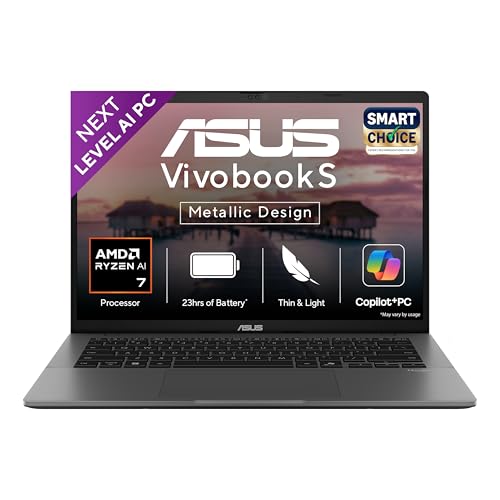
A Ryzen AI 7 powered OLED laptop with 1 TB SSD, strong NPU, and a stylish metallic build for students and professionals.
Pros
- AMD Ryzen AI 7 350 with strong CPU and NPU performance
- 16 GB DDR5 RAM and 1 TB PCIe 4.0 SSD
- OLED FHD+ 16:10 display with 95% DCI P3
- Good balance of ports including HDMI and dual USB C
Cons
- 1.4 kg is portable but not the lightest in this list
- 60 Hz refresh rate feels basic if you are used to 120 Hz
- Fan noise can pick up under sustained heavy loads
- ASUS service quality varies across smaller towns
ASUS Vivobook S14 M3407KA uses the new AMD Ryzen AI 7 350 processor, which brings 8 cores, 16 threads, and an XDNA NPU up to 50 TOPS. For real world use in India, that translates into smooth multitasking with Office, many Chrome tabs, coding environments and occasional photo work, while the NPU handles AI tasks like Windows Studio Effects and future Copilot+ features. The integrated Radeon graphics are good enough for casual gaming and light photo or video work, especially at the laptop’s FHD+ resolution.
The 14 inch OLED panel with 1920 x 1200 resolution, 16:10 ratio, 0.2 ms response time and 95 percent DCI P3 coverage is a strong point. Colours feel accurate for content viewing, and the anti glare coating helps with harsh indoor lighting, which we see a lot in Indian offices and classrooms. At 300 nits brightness, indoor work is fine, though harsh outdoor sunlight will still be a challenge. The backlit keyboard, added Copilot key, and large touchpad make this a comfortable machine for long typing sessions, so good for college notes and office documentation.
You get 16 GB DDR5 RAM and a 1 TB PCIe 4.0 SSD, so storage will not be a worry even if you keep large project files, offline videos, and datasets. Ports include two USB A, two USB C with display and power delivery support, HDMI 2.1, and a 3.5 mm jack. Wi Fi 6 and Bluetooth 5.3 handle wireless needs. At around 1.4 kg with a metal design, it looks and feels premium without being too bulky in a backpack. ASUS has a decent service presence in metros and many Tier 2 cities, though experiences differ a bit by region. For Indian buyers who want a single all rounder AI laptop for studies, work, OTT and light creative tasks, the Vivobook S14 hits a sweet balance of performance and features.
ASUS Zenbook 14 OLED UX3405CA

A thin and light Intel Core Ultra 5 AI laptop with a sharp 3K 120 Hz OLED touch screen and strong connectivity.
Pros
- 3K 120 Hz OLED touch display with rich colours
- Intel Core Ultra 5 with Arc graphics for better media and light creative work
- Wi Fi 7 and Bluetooth 5.4 support for future proof wireless
- 1 TB SSD with 16 GB LPDDR5X RAM
Cons
- High resolution and 120 Hz reduce battery life faster if not tuned
- Touch screen panel is more fragile and needs careful handling
- Limited USB A ports, you rely more on USB C
- Service quality for premium Zenbook line differs by city
ASUS Zenbook 14 OLED UX3405CA targets users who want a premium feel with strong display quality. The Intel Core Ultra 5 225H processor combines performance cores and efficiency cores with an Intel AI Boost NPU up to 13 TOPS. That NPU is lower than the 50 TOPS figures on some others, but still handles AI enhancements in Windows, video calls and some creative apps that use Intel’s local AI features. The integrated Intel Arc graphics are stronger than older Intel iGPUs, helpful for light video editing, Lightroom style photo work and 3D previews at moderate settings.
The 14 inch 3K OLED touch screen with 2880 x 1800 resolution, 120 Hz refresh rate and 400 nits brightness stands out in daily use. Text looks sharp, motion feels smooth while scrolling and gaming, and colours are punchy for entertainment. Touch support makes sense for quick navigation, reading and annotation oriented work, especially in cramped Indian transport or while standing. Just remember that high brightness and 120 Hz raise power draw, so for longer train or flight journeys you might want to fix the refresh rate to 60 Hz and reduce brightness.
You get 16 GB LPDDR5X RAM and a 1 TB PCIe 4.0 SSD, which suits heavy multitaskers and creators who store lots of local files. Connectivity is strong, with Wi Fi 7 and Bluetooth 5.4 for future routers and accessories. Ports include one USB A, two Thunderbolt 4 with display and power delivery support, HDMI 2.1, and a 3.5 mm jack. The 75 Wh battery, combined with the efficient OLED display and hybrid CPU, delivers a solid workday if you tune settings smartly. At about 1.28 kg and a slim profile, it feels easy to carry around crowded Indian offices and colleges. ASUS service for Zenbook is present in most big cities, though for smaller towns you might need to depend on courier based service.
HP OmniBook 7 OLED fr0789TU

A premium Intel Core Ultra 5 AI laptop with a 3K 120 Hz OLED display, Intel Arc GPU, and a sharp 5 MP camera for professionals.
Pros
- High resolution 3K 120 Hz OLED panel with HDR 500 support
- Intel Core Ultra 5 255H with Intel Arc 130T GPU
- Strong port selection including Thunderbolt 4 and HDMI 2.1
- 5 MP IR camera with privacy shutter and good audio setup
Cons
- Slightly heavier at around 1.5 kg
- OLED 120 Hz panel affects battery backup in high brightness
- Premium build targets higher budget buyers
- HP service in smaller towns can involve longer turnaround times
HP OmniBook 7 OLED fr0789TU is built for users who want a serious work machine with a fantastic display and strong collaboration features. Inside, the Intel Core Ultra 5 225H processor handles CPU tasks, while Intel’s AI Boost NPU manages supported AI workloads. The big change compared to older HP Pavilion style models is the dedicated Intel Arc 130T GPU, which gives you better graphics performance for video editing, heavier photo work and light 3D tasks. For creators and professionals in India who deal with presentations, design mockups or short form video, this combination works well.
The 14 inch 3K OLED display with 2880 x 1800 resolution, variable refresh up to 120 Hz, 0.2 ms response time, SDR 400 nits, HDR 500 nits and 100 percent DCI P3 feels ideal for both content and work. HDR content on supported platforms looks punchy, and colours suit semi professional creative usage with some calibration. The Low Blue Light treatment helps during long office hours under tube light or LED lighting, which we see commonly in Indian workplaces. The backlit soft grey keyboard and large touchpad provide a comfortable typing experience for long documents and mails.
Ports are generous. You get two USB A ports at different speeds, one HDMI 2.1, a Thunderbolt 4 Type C with DisplayPort 2.1 and USB PD 3.1, and another USB C 10 Gbps with DisplayPort 1.4a, plus a combo audio jack. Intel Wi Fi 7 and Bluetooth 5.4 keep you ready for faster routers and accessories. A 5 MP IR camera with temporal noise reduction and dual array mics sits on top, paired with DTS:X Ultra speakers tuned with Poly Studio. This combination is helpful for frequent Teams or Zoom meetings in Indian homes where lighting and background noise are not always ideal. HP’s service footprint across India is strong for OmniBook level devices, though in interior areas support might depend on authorised partners and involve some waiting. For professionals who need a reliable AI laptop with a brilliant screen for office, hybrid work and creative side projects, this model stands out strongly.
Acer Swift Lite 14 SFL14-54M
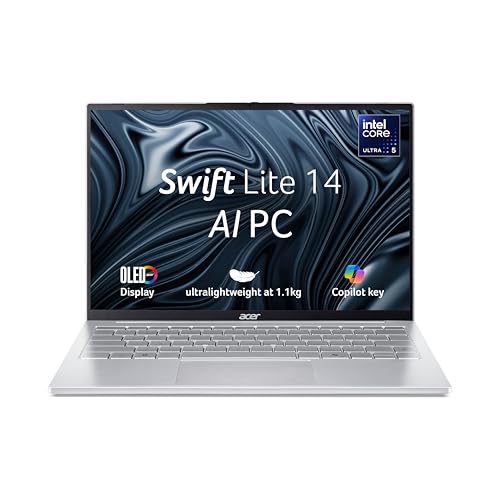
An ultra light Intel Core Ultra 5 AI laptop with WUXGA OLED display, ideal for frequent travelers and students.
Pros
- Very light at about 1.1 kg, great for travel
- WUXGA OLED panel with 400 nits brightness
- Backlit keyboard with Copilot key
- Often priced more aggressively than other premium OLED rivals
Cons
- Processor variant uses fewer cores than H series chips
- RAM and storage details are limited in spec sheet and might confuse buyers
- Limited port selection compared to rivals
- Acer service network is good in metros but patchier in smaller towns
Acer Swift Lite 14 SFL14-54M targets those who value low weight and portability above everything else. At roughly 1.1 kg, it slips into a backpack without feeling like a burden on daily commutes in Indian cities. The Intel Core Ultra 5 115U processor focuses on efficiency, with a base clock of 1.5 GHz and turbo up to 4.2 GHz, plus an on chip NPU for local AI workloads. This combination suits office work, online classes, browsing, OTT streaming and basic AI assisted tasks more than heavy editing or 3D work.
The 14 inch WUXGA OLED display with 1920 x 1200 resolution, 400 nits typical brightness and AcerCineCrystal treatment looks crisp for reading and content viewing. At 400 nits, it fares better than many 300 nit panels when you sit near windows or under bright indoor lighting, which is common in Indian homes and coaching centres. Intel integrated graphics handle daily visuals well, from HD streaming to light photo edits. The backlit keyboard with Copilot key and FHD camera with microphone support online classes and video calls comfortably.
Port selection includes one USB 3.2 port and two USB Type C ports with DC in, which means you might need adapters or a hub if you have many older USB A devices. For many younger users who depend on wireless accessories and cloud storage, this is still manageable. Acer bundles Windows 11 Home and Microsoft Office, which fits most student and office workflows. Acer’s service network is decent in large cities and bigger towns, though in smaller regions service might require travel or shipping to a centre. For users in India who travel a lot by bus, train or flight, and want a light AI ready OLED laptop for mail, notes, OTT and casual work, the Swift Lite 14 is a sensible, backpack friendly option.
Buying Guide
Set your budget and usage first
AI OLED laptops sit in the premium segment in India, so you need to be honest about how you use your machine. If your work is mainly Office, web, OTT and calls, a mid level AI CPU with integrated graphics is enough. If you also edit video, work with RAW photos, or run heavier AI workloads locally, you should aim for the stronger CPUs and GPUs mentioned above. Prices also swing a lot during festive and bank card sales, so plan your purchase around those if you want better deals.
Understand CPU, NPU and GPU balance
For AI laptops, the CPU, GPU and NPU work together. Snapdragon X Plus and AMD Ryzen AI 7 bring strong NPUs, which help with Windows Studio Effects and future Copilot+ features. Intel Core Ultra chips combine a more traditional x86 CPU, Intel AI Boost NPU and either Intel Arc graphics or integrated graphics. If your work is more AI and office focused, a strong NPU with efficient CPU is useful. If you are more into editing and light 3D, give priority to better GPU and higher sustained CPU performance.
Display quality and refresh rate
Since all these laptops use OLED, you already get deep blacks and strong contrast, which suits OTT watching in Indian rooms with low ambient light. The key differences are resolution, refresh rate and brightness. 2K or 3K panels look sharper, especially on 14 inch screens, while WUXGA and FHD+ still look clean for normal use. 120 Hz refresh rate feels smoother while scrolling and gaming, but draws more power. For frequent travel without charging, locking the refresh rate to 60 Hz helps. For outdoor use, aim for 400 nits or higher.
RAM, storage and upgradability
Most AI OLED laptops use soldered LPDDR5 or LPDDR5X RAM, which means you cannot upgrade memory later. For 2025 and beyond, 16 GB is a sensible minimum for smooth multitasking and AI tasks. Storage in these models usually starts at 512 GB and goes up to 1 TB with PCIe 4.0 SSDs. For Indian users who save movies, project files and local datasets, 1 TB feels safer. Before you buy, check if the SSD is replaceable, in case you want to upgrade storage later or replace a faulty drive after warranty.
Battery life and Indian power conditions
Indian power conditions are not always stable. Frequent travel and power cuts mean you should care about battery size and efficiency. Snapdragon and U series Intel chips usually draw less power, while H series Intel and powerful AMD chips need more. Higher resolution and 120 Hz OLED displays also impact endurance. Look for models with larger battery capacities, fast charging, and good user reports on real world backup. Also plan for using battery saver modes, capping refresh rate and reducing brightness when you are on the move.
Build quality, thermals and weight
Thin and light laptops look sleek, but they have tighter thermal space. In hot Indian summers, especially in rooms without AC, cooling design becomes important. Metal bodies help with heat spread and feel more solid in a backpack. Weight between 1.1 and 1.5 kg is comfortable for daily commuting. If you travel daily on bike or public transport, aim closer to the lower end of this range, like the Acer Swift Lite. For desk heavy users, slightly heavier machines with better cooling and more ports are fine.
Ports, wireless and accessories
Modern AI laptops lean towards USB C, with fewer USB A ports. Before buying, list your devices, like printer, external HDD, SD card reader, HDMI display and audio gear, and check if you need adapters or a USB hub. HDMI 2.1 support helps for external monitors and TVs. Wi Fi 6 or better is standard now, but Wi Fi 7 laptops will pair well with future routers and office upgrades. Bluetooth 5.3 and 5.4 give better stability for TWS earbuds and keyboards, which matter during long classes and meetings.
Warranty, service and resale in India
Service network is a big factor for Indian buyers. HP and Acer have wide coverage, ASUS is strong in metros and larger towns. Before purchase, check the nearest service centre on the brand website. Standard warranty is one year, and extended warranty or accidental damage plans make sense if you travel a lot or carry the laptop to college daily. AI OLED laptops hold value better because of premium screens and newer CPUs, but resale price also depends on brand perception and physical condition, so always use a good sleeve or backpack.
Feature Importance
| Feature | Importance |
|---|---|
| Processor (CPU generation and series) | High |
| NPU performance (TOPS rating) | High |
| RAM capacity and type | High |
| SSD capacity and speed | High |
| Display type, resolution and refresh rate | High |
| Battery capacity and real world backup | High |
| Weight and build quality | Medium |
| Port selection and wireless standard | Medium |
| Brand service network in India | High |
| Keyboard, trackpad and webcam quality | Medium |











Wow Acer Swift Lite 14 at this price point is such a steal! Seriously the specs for that money are just unbelievable. This could be a real game changer for many people looking for a good daily driver.
Arre bhai this HP OmniBook 5 OLED looks solid yaar! That display must be next level for sure. Thinking of upgrading, what’s the battery life like practical use mein?
uff this zenbook 14 oled is fire! the design is just chaka-chak, and that screen? matlab mind-blowing. ab bas paise jama karne hain! my current laptop is so old, lagta hai retirement le lega.
interesting review on the vivobook s14. but i’m a bit confused, how does it stack up against the zenbook 14 in terms of raw performance and portability? like for a student who travels a lot.
Nice article very informative about the HP OmniBook 5 OLED Maybe add a section on the thermal performance under heavy load in your next review Just to get a complete picture before buying Keep up the good work
A good initial overview of the HP OmniBook 7 OLED. For future articles, it would be really helpful to include a direct comparison table with its closest competitors, especially regarding price-to-performance ratio in the Indian market. Thanks for the info.