A good mechanical keyboard changes how you work, study, and play games. Keys feel more consistent, your typing becomes faster, and long hours at the desk feel less tiring. For gamers, fast response and anti‑ghosting matter a lot. For office users and students, comfort, low noise, and durability are more important. Compact 75 percent keyboards hit a sweet spot, since they save desk space but still keep the arrow keys and function row that many of us use daily.
In the Indian market you also need to think about dust, power backup situations, late‑night usage in shared rooms, and long term value. Switch type, build quality, wired or wireless connection, RGB control, and software support all play a role. At the same time budgets are tight, so every rupee should go into features you actually use, not gimmicks. I have picked five 75 percent mechanical keyboards that suit different needs, from entry‑level wired options to a premium wireless model, all available in India with local support and service in mind.
Ant Esports Scorpion MK20

A compact 75 percent wired keyboard with smooth linear red switches, RGB backlight, and durable PBT keycaps for gamers and typists on a tight budget.
Pros
- Linear red switches feel smooth and fast for gaming
- Full anti‑ghosting with 87 keys for reliable input
- Premium double‑shot PBT keycaps resist wear
- Detachable USB cable for easier travel and cable management
Cons
- Wired only, no Bluetooth or 2.4 GHz wireless
- Linear reds might feel too sensitive for heavy typists
- No dedicated volume knob or media wheel
- Software support in India is limited
Ant Esports Scorpion MK20 targets gamers and students who want a compact 75 percent layout without spending too much. The 87 key design keeps the arrows, function row, and essential keys, while still freeing up mouse space on smaller Indian desks. The linear red switches feel smooth with light actuation, so fast double taps in FPS games or MOBAs feel effortless. There is no tactile bump, which suits gaming and quick typing, though some users who love strong feedback might need a short adjustment period.
The RGB backlight offers about 19 lighting modes, from static to wave effects, controlled with simple function key shortcuts. This works well for late‑night sessions during college projects or ranked matches when room lights are off. PBT keycaps are a big plus at this price. They resist shine from sweat in humid Indian weather and keep legends visible even after long use in non‑AC rooms. The anti‑ghosting design means multiple keys pressed together still register correctly, which matters when you are strafing, jumping, and triggering abilities at the same time.
The detachable USB cable helps if you carry the keyboard between home and hostel or to a gaming café. You avoid strain at the port and can replace a damaged cable easily from any local shop. Ant Esports has built a decent presence in Indian gaming accessories, so warranty support and parts availability are better than many no‑name imports. For users who want a robust, no‑nonsense wired 75 percent board with smooth reds and strong keycaps, this fits day‑to‑day Indian use quite well.
EvoFox Katana X2 TKL

A feature‑rich TKL mechanical keyboard with hot‑swappable clicky blue switches, RGB backlight, a multi‑function knob, and dedicated shortcut keys.
Pros
- Hot‑swappable 3‑pin switches for custom feel
- Clicky blue switches give strong tactile feedback
- Multi‑function knob for quick volume or brightness control
- Dedicated keys for Copilot, Xbox Game Bar, and screenshots
Cons
- Blue switches are noisy for shared rooms and offices
- Wired only, no wireless modes
- Plastic build, not as dense as premium boards
- Software ecosystem is basic compared to high‑end brands
EvoFox Katana X2 TKL suits users who enjoy a loud, clicky typing feel and want extra control keys without going full size. The TKL layout removes only the number pad, so it still feels familiar to most users coming from standard office keyboards. Clicky blue switches give crisp feedback for each keystroke, which feels satisfying for coding, writing, or MOBA and strategy titles where you hit a lot of keys in sequence. They are noisy though, so this is better for personal setups than quiet offices or late‑night usage in a shared bedroom.
The hot‑swappable 3‑pin sockets let you replace switches without soldering. If a switch fails due to dust or rough usage, or you want to mix linear and tactile switches, you buy only the switches and push them in by hand. For Indian users, where importing an entirely new board is costly, this adds long term value. The keyboard has RGB backlighting with multiple modes and brightness settings that you control without any complicated software. This helps during load shedding or when you work in dim light to avoid eye strain.
The standout feature is the multi‑function knob and dedicated shortcut keys. You quickly adjust volume or lighting while gaming, or use the Game Bar and Screenshot keys for recording clips. The braided cable and double‑injection keycaps handle daily abuse in hot and dusty conditions. EvoFox as a brand focuses on the Indian gaming market, so you get reachable support and warranty service through local channels. For streamers, coders, and gamers who want control and customization in a budget‑friendly TKL package, Katana X2 makes sense.
AULA F75 Wireless

A premium 75 percent wireless mechanical keyboard with tri‑mode connectivity, hot‑swappable pre‑lubed linear switches, and advanced RGB for serious gamers and enthusiasts.
Pros
- Tri‑mode connection with Bluetooth, 2.4 GHz, and USB wired
- Large 4000 mAh battery for long sessions
- Hot‑swappable 3‑pin and 5‑pin switches
- Gasket structure with sound dampening for soft, solid feel
Cons
- Higher price compared to wired budget options
- Software and driver support focused on Windows
- Plastic housing, not as heavy as metal boards
- Advanced features need some setup time for new users
AULA F75 Wireless targets users who want enthusiast‑level features without importing from abroad. It supports three modes of connection, Bluetooth, 2.4 GHz wireless with a dongle, and standard USB wired. You link up to five devices at once and switch between a PC, laptop, tablet, or phone with shortcuts. This suits Indian users who work from home on a laptop, game on a desktop, and sometimes pair a keyboard with a smart TV. The 4000 mAh battery offers long usage between charges, suited to areas where charging points are limited near the desk.
The board ships with pre‑lubed LEOBOG Graywood V3 linear switches. They feel smooth and slightly muted, with a deeper sound compared to basic red switches. Combined with the gasket mounting and multiple layers of internal foam, keystrokes sound soft and pleasant instead of hollow. This helps a lot in Indian apartments with thin walls where loud keyboards annoy family members. The hot‑swappable PCB supports both 3‑pin and 5‑pin switches, which opens a lot of upgrade paths if you ever want to try tactile or silent switches without changing the entire board.
The RGB system is advanced, with 16.8 million colors, multiple preset effects, and special music reactive modes through the driver. You adjust brightness and speed with shortcuts or the multifunction knob. The knob also toggles between gaming and office mode. In gaming mode you handle lighting, in office mode the knob controls volume and play or pause. The 75 percent layout keeps arrows and navigation keys while saving space for low DPI mouse movement, which many FPS players in India prefer on smaller desks. AULA offers a stated one year warranty for manufacturing defects, and the brand has started to maintain better service ties in India through online marketplaces. For users who want wireless freedom, enthusiast features, and a comfortable sound profile, AULA F75 stands out in this list.
Kreo Hive 75
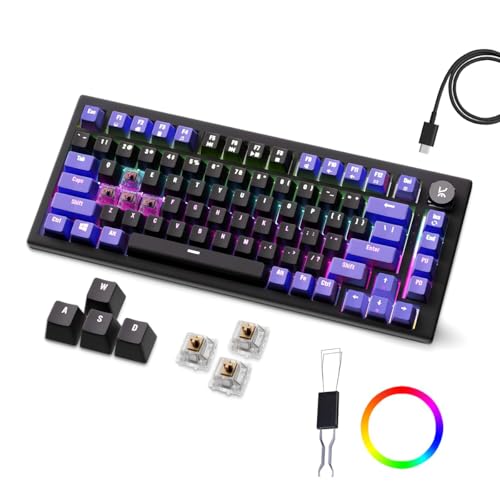
A compact mechanical gaming keyboard with Outemu switches, per‑key RGB backlight, hot‑swappable design, and detachable USB‑C cable for flexible use.
Pros
- Per‑key RGB backlight for fine tuning effects
- Hot‑swappable Outemu switches for easy replacement
- Anti‑ghosting keys suitable for fast gaming
- Detachable USB‑C cable for portability
Cons
- Brand is newer with a smaller service footprint in India
- Limited switch options compared to big global brands
- Software features are basic
- No wireless connectivity
Kreo Hive 75 targets gamers who like compact layouts and colorful RGB control without going into expensive enthusiast territory. The keyboard uses Outemu mechanical switches, which are known for decent performance at a lower cost. The listing mentions blue switches in the feature text even though the color choice says brown switch. So you should double check the switch type before ordering, because blue feels loud and clicky while brown is more balanced and quieter. Either way, the switches suit gaming and general typing, which fits students and office workers who also game at night.
Per‑key RGB backlighting means each key has its own LED. You set effects to match your setup, highlight gaming keys, or keep a simple static color for office use. The key response is fast, and anti‑ghosting support lets multiple inputs register correctly during intense fights or combo moves. The compact 75 percent layout fits smaller desks common in hostels and shared apartments, while still keeping arrow keys and important function keys within reach.
The detachable USB‑C cable makes the keyboard easier to transport and maintain. If the cable wears out due to bending or heat, you replace it with any standard USB‑C cable from a local shop. This matters in Indian conditions where cable quality often breaks first. Since Kreo is a newer name in peripherals, you should factor in service support, usually handled through online replacement during warranty. For users who want a modern RGB‑heavy compact keyboard with hot‑swap support and a clean look, Kreo Hive 75 offers a balanced middle ground.
MageGee MK‑Star 75%

An affordable 75 percent wired keyboard with brown switches, white LED backlight, metal top plate, and splash‑resistant design for home and office users.
Pros
- Brown switches offer a good balance between clicky and linear feel
- Multiple white LED backlight modes for low light use
- Metal panel adds rigidity and durability
- Extra orange keycaps for a custom look
Cons
- Single‑color backlight, no full RGB
- Wired only with fixed cable
- Keycaps are ABS, more prone to shine over time
- Brand support in India is mostly through online marketplaces
MageGee MK‑Star 75 percent keyboard is designed for users who want a mechanical feel without loud clicks or high cost. The brown switches sit between clicky and linear. They give a mild bump without a sharp click sound. This makes them comfortable for long office work, coding, and late‑night gaming in shared rooms, because noise levels stay moderate. The 87 key layout keeps the keyboard compact while preserving all the familiar keys from a standard layout, so there is no steep learning curve for new mechanical users.
The keyboard has a classic white LED backlight with around 19 modes. You switch effects and adjust brightness and speed using simple function key shortcuts. A single color backlight keeps things clean and professional for office use, while still helping in power cut situations or dimly lit PG rooms. The metal top panel strengthens the structure and reduces flex, which helps when you type hard or carry the keyboard in a bag. The splash‑proof design gives a bit of safety against accidental chai or coffee spills that happen on busy days.
MageGee includes 16 extra orange keycaps so you can highlight WASD or other important keys. The keycaps use double‑shot injection, so legends stay visible for a longer period, though they are more prone to shine over years of use compared to PBT. The keyboard connects through a USB 2.0 cable and works with Windows, Linux, and Mac without drivers, helpful for users who switch between systems in college labs and home PCs. Service for MageGee in India is mostly handled through online platforms with replacement policies, so you should buy from sellers with clear return and warranty terms. For budget buyers who want a safe first mechanical keyboard with a comfortable switch and strong build, MK‑Star 75 percent delivers good day‑to‑day value.
Buying Guide
Set a realistic budget for Indian conditions
Before picking a 75 percent mechanical keyboard, decide how much you are ready to spend after looking at your full setup. If you are building a PC from scratch, allocate most of the money to CPU, GPU, and monitor first. Then see what range is left for the keyboard. Entry‑level wired boards like Ant Esports Scorpion MK20 and MageGee MK‑Star give strong value under tight budgets. Mid‑range wired options add features like hot‑swap sockets and knobs. Premium boards such as AULA F75 bring wireless, better sound, and higher quality switches, which suit users who type or game for long hours every day. Also factor in spare cables, switch packs, and keycap sets in case you plan to upgrade later, since buying these locally or during sale periods reduces long term cost.
Choose the right switch type for your usage
Switch choice affects sound, feel, and typing fatigue. Linear switches like the red switches in Ant Esports Scorpion MK20 and the Graywood V3 in AULA F75 move straight down with no bump. They suit fast gaming and soft typing and are better if you share your room with others and want a smoother sound. Clicky blue switches, as used in EvoFox Katana X2, give a sharp click and strong feedback that many typists love, but they are noisy for Indian apartments and offices. Brown switches on MageGee MK‑Star and some versions of Kreo Hive offer a middle path, a small bump with less noise. If you feel unsure, brown switches are usually safer for mixed use. Hot‑swappable boards let you try different switches over time without changing the keyboard body.
Decide between wired and wireless connectivity
Wired keyboards give stable performance and zero input lag, which suits competitive gaming and setups where the PC stays fixed in one place. They also avoid battery worries during long nights with power cuts. Scorpion MK20, Katana X2, Kreo Hive 75, and MageGee MK‑Star follow this approach. Wireless keyboards such as AULA F75 use Bluetooth and 2.4 GHz dongles to cut cable clutter and pair with multiple devices, which helps if you often move between a laptop on the bed and a desktop on the table. Bluetooth is handy for tablets and phones, while 2.4 GHz is preferred for gaming. In areas with many Wi‑Fi routers, 2.4 GHz performance can vary, so keep the dongle close to the keyboard and away from metal obstacles.
Check build quality, keycaps, and durability
In Indian homes, dust, heat, and occasional spills are common. Look for a solid frame, preferably with a metal top plate like on the MageGee MK‑Star, since it handles rough usage and travel better. PBT keycaps, as on the Ant Esports Scorpion MK20, resist shine and fading from sweaty hands in hot weather. ABS keycaps feel smooth but show shine sooner, so consider replacing them later with an aftermarket set if aesthetics matter. Detachable cables, as on Scorpion MK20, AULA F75, and Kreo Hive 75, reduce the chance of damage at the port and let you use better braided or shorter cables as per your desk. Splash resistance is a bonus if you keep chai or coffee close to your keyboard during long work sessions.
Understand anti‑ghosting and performance needs
Anti‑ghosting and n‑key rollover matter if you play fast games or type quickly. All the keyboards in this list support multiple key presses without losing inputs. For casual office work you do not need very high rollover, but for FPS, racing, and rhythm games, stronger anti‑ghosting reduces missed commands. Response speed also depends on switch type and how comfortable you are with the actuation point. Lighter linear switches work best for fast double taps and strafing, while brown or blue switches help reduce typing errors for long documents. If you compete in online games, choose a board with stable firmware and simple on‑board controls so you are not dependent on complex software profiles that may break after OS updates.
Look at RGB, lighting, and eye comfort
Lighting is not only for looks. Backlit keys help during late‑night study or work when others are sleeping and room lights are dim. RGB heavy boards like AULA F75, EvoFox Katana X2, and Kreo Hive 75 let you tune brightness, choose calmer modes, or turn off lighting during serious work. Single‑color white backlight on MageGee MK‑Star feels more subtle for office use. Make sure the keyboard offers easy brightness control so you avoid eye strain in dark rooms. Function shortcuts and knobs are better than relying only on software, since they work even on systems where you do not install drivers, such as office PCs or shared college computers.
Check compatibility and extra features
Most of these keyboards work out of the box on Windows. Some also support macOS, Linux, PS, and Xbox through standard USB or Bluetooth. If you use function keys often on Mac, confirm that the layout and legends match your shortcuts, or be ready to remap keys. Extra features like volume knobs on EvoFox Katana X2 and AULA F75, dedicated media keys, and system shortcuts help a lot in daily life. Students recording lectures, streamers clipping gameplay, and office workers switching songs all benefit from these direct controls. Hot‑swappable PCBs on AULA F75, EvoFox Katana X2, and Kreo Hive 75 add long term flexibility since you replace or upgrade switches without soldering. This suits Indian buyers who want a one‑time body investment with the option to refresh feel and sound later.
Warranty, brand support, and availability in India
Before buying, check warranty duration, how to claim support, and where the brand stands in the Indian market. Ant Esports and EvoFox actively sell in India and handle support through local service networks and online channels. AULA offers a one year warranty on the F75 for manufacturing defects, usually processed via the marketplace or distributor. Kreo and MageGee are newer or more import focused brands, so most support runs through replacement by the online seller. Always buy from listings that clearly mention Indian warranty terms and keep the box, invoice, and accessories safe. Given courier issues in some regions, choose sellers with good ratings and clear return policies in case of defects on arrival.
Feature Importance
| Feature | Importance |
|---|---|
| Switch type (linear, tactile, clicky) | High |
| Anti‑ghosting and key rollover | High |
| Build quality and metal or reinforced frame | High |
| Keycap material (PBT vs ABS) | Medium |
| Wired vs wireless connectivity | High |
| Battery capacity for wireless models | Medium |
| Hot‑swappable switches | Medium |
| RGB or backlight control options | Medium |
| Detachable USB cable | Medium |
| Brand warranty and service support in India | High |