
A good gaming mouse changes the way you play. Better tracking, lower click delay, cleaner grip, and extra buttons make a real difference in FPS, MOBA, and even daily work. If you play for long hours, the shape and weight matter as much as the sensor. A mouse that feels right in hand helps you aim with less strain and keeps your wrist happier during those late night matches.
When you pick a gaming mouse, look at sensor quality, DPI range, polling rate, button count, switch life, cable quality, software support, and weight. For Indian buyers, I also look at after-sales support, spare availability, and how well the mouse suits our dusty rooms, humid weather, and mixed usage on cloth and hard mousepads. Value for money matters a lot in this segment, because many buyers want proper gaming features without spending too much.
The Indian market now has some strong budget options from EvoFox, Cosmic Byte, and Ant Esports. These brands are easy to spot online, and they target gamers who want better specs than a basic office mouse. The five options below cover different styles, from lightweight wired models for fast flicks to dual mode use for people who want a cleaner desk setup.
EvoFox Blaze Ultra

The EvoFox Blaze Ultra is a feature-heavy wired gaming mouse with eight programmable buttons, high polling rate support, and a wide DPI range. It suits players who want extra controls for shooters and action games without moving to a costly brand.
Pros
- 8 programmable buttons, including a dedicated fire button
- Up to 12800 DPI with 1000Hz polling rate
- Ergonomic shape with lightweight body and UPE foot pads
- Windows software for macros, RGB, and button setup
Cons
- Windows software focus limits customization for other systems
- Wired design may not suit users who want a clean wireless desk
- RGB music sync is more style than function
- Shape may feel better for medium hands than larger palms
The Blaze Ultra goes after buyers who want a lot of features in one package. You get eight buttons, which is useful if you play FPS titles and want quick access to reload, melee, crouch, or push-to-talk. The DPI range goes from 200 to 12800, so you get room to tune sensitivity for both fast swipes and slower aim control. The 1000Hz polling rate and 7000 FPS tracking spec make this mouse feel quick in normal gaming use.
I like that EvoFox has paid attention to the practical stuff too. The UPE foot pads help the mouse glide with less drag, and the braided cable should handle rough desk use better than a plain rubber cable. The ergonomic shell is built for longer sessions, which matters in Indian summers when your hand gets sweaty and a badly shaped mouse starts to feel tiring after an hour.
For Indian users, software support and warranty matter a lot in this category. EvoFox mentions a one year manufacturing warranty and direct support through call or WhatsApp, which gives some peace of mind for first-time buyers. Service reach is not on the same level as the biggest global brands, but for an online-focused budget gaming brand in India, the support setup looks more approachable than many no-name options.
EvoFox Phantom Air
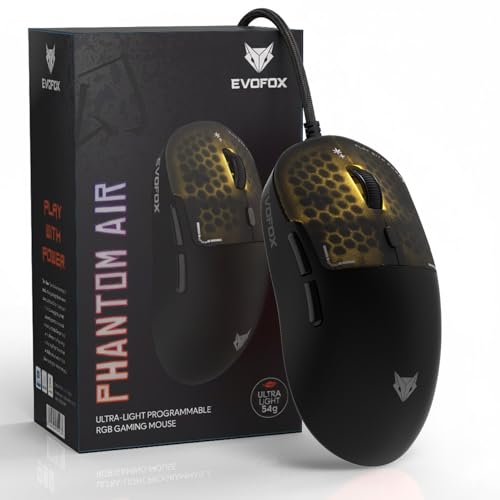
The EvoFox Phantom Air is made for players who want a light mouse for quick flicks and less hand fatigue. Its 54 gram body, 1000Hz polling rate, and programmable controls make it one of the more focused options for competitive play.
Pros
- Ultra lightweight 54g design for quick movement
- Up to 12800 DPI and 1000Hz polling rate
- Huano switches rated for 10 million clicks
- On-board memory and programmable software support
Cons
- Honeycomb shell is not for everyone
- 6 buttons give less flexibility than some 8-button rivals
- Open shell design may collect dust faster
- Wired only, despite the airy wireless-style feel
The Phantom Air is built around speed. At 54 grams, it is one of the lightest mice in this list, and that low weight makes a big difference if you play Valorant, CS2, Apex, or any game where fast aim correction matters. The sensor specs are strong for the segment, with up to 12800 DPI and a 1000Hz polling rate. In daily use, this gives you smoother cursor movement and a more direct feel during quick swipes.
Its honeycomb shell has two effects. First, it cuts down weight, which many gamers love. Second, it improves airflow around your palm, and that is helpful in Indian conditions where long gaming sessions often mean sweaty hands. On the flip side, this style tends to collect dust more easily, so you need to keep your setup cleaner. The inclusion of Huano switches and on-board memory is a nice touch because your saved settings stay with the mouse.
EvoFox also gives this mouse a braided cable with EMI shielding, which sounds technical but mainly means more durability and less chance of interference-related issues. For software users on Windows, button remapping and macro setup are simple enough. Brand support in India is still budget-brand level rather than premium-brand level, though EvoFox has become easier to find online and is building a decent image among entry-level PC gamers.
Cosmic Byte Raptor
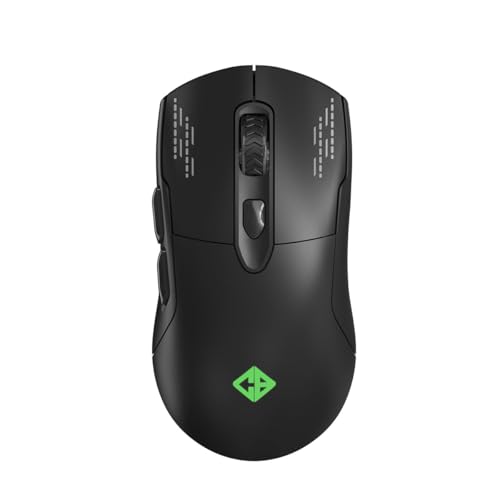
The Cosmic Byte Raptor stands out because it offers both wired and wireless use. It is a smart pick for gamers who want flexibility for gaming, work, and casual laptop use without switching devices all the time.
Pros
- Dual mode wired and wireless connectivity
- Pixart 3212 sensor with up to 4800 DPI
- PTFE feet for smoother glide
- 11 RGB effects with ergonomic shell
Cons
- 500Hz polling rate is lower than 1000Hz rivals
- 4800 DPI ceiling is modest on paper
- Wireless mode may not appeal to strict competitive players
- Fewer advanced tuning claims than some newer models
The Raptor takes a different route from the pure lightweight wired mice here. Its main selling point is dual mode connectivity. If you want a mouse for both gaming and regular desk use, this setup feels convenient. Use wired mode during play, then switch to wireless mode when you want a cleaner desk for work or media use. For students and hostel users in India, that flexibility is a real plus.
The Pixart 3212 sensor and 500Hz polling rate place it a step below the sharper competitive options on this list, but for casual and mid-level gaming, the performance should still feel solid. The PTFE feet are a strong addition because they help the mouse glide better across cloth mousepads, which most Indian gamers use. The ergonomic shape and light build should also suit long play sessions without too much strain.
Cosmic Byte has built a strong presence in India’s budget gaming market, and that counts for something. The brand is widely available, easier to replace than obscure imports, and fairly familiar to local gamers. Its service image is mixed in some user circles, but the company has enough visibility in India that many buyers feel more comfortable choosing it over a random unbranded mouse. If you want one mouse for mixed use, the Raptor has a clear place.
Cosmic Byte Firestorm

The Cosmic Byte Firestorm is a lightweight wired gaming mouse aimed at players who care about sensor quality, low weight, and a cable that stays out of the way. It is one of the more serious picks here for competitive use.
Pros
- Pixart 3327 sensor with up to 12400 DPI
- 1000Hz polling rate for quick response
- 67g lightweight body with honeycomb design
- Paracord cable and upgraded PTFE feet
Cons
- Honeycomb shell needs more regular cleaning
- Wired-only use limits desk freedom
- Shape may not suit every grip style
- Software support is Windows-focused
The Firestorm gets many of the basics right for a budget gaming mouse. You get a Pixart 3327 sensor, which is a known step up from generic sensor options found in cheap mice. Add the 1000Hz polling rate, and the mouse feels more ready for competitive shooters than many entry models. The 67 gram body is light enough for fast flicks but not so light that new users lose control.
What I find most useful here is the paracord cable. A bad cable ruins a wired mouse, because drag on the desk makes aiming feel uneven. The Firestorm’s cable is designed to feel lighter in use, closer to a wireless-style movement. Upgraded PTFE feet help again here, giving smoother travel on common cloth pads. If you are shifting from a basic office mouse, this step up feels easy to notice.
Cosmic Byte’s software support adds room for custom DPI stages, macros, and RGB changes, which many gamers want even in this segment. The brand has decent recognition in India, and that matters when you need spare replacement or warranty help. Its support reputation is not flawless, though it is better known than a lot of low-cost marketplace brands. For buyers who care more about play feel than flashy extras, the Firestorm makes a lot of sense.
Ant Esports GM320

The Ant Esports GM320 is a familiar budget gaming mouse with eight programmable buttons, a high DPI ceiling, and broad compatibility. It suits gamers who want many controls and a shape that works for both play and regular PC use.
Pros
- 8 programmable buttons with dedicated fire button
- Up to 12800 DPI with adjustable polling rate
- 20 million click switch life claim
- Works with PC, Mac, Xbox, and PlayStation
Cons
- Symmetrical shape may feel less locked-in for some right-handed users
- Heavier feel than ultra-light rivals
- Software depth is not class-leading
- Best customization experience is still on PC
The GM320 has been around long enough to become a common recommendation in India’s budget gaming scene. The biggest draw is the mix of features. You get eight programmable buttons, a fire button for quick actions, and support for DPI changes up to 12800. For FPS and MOBA players, those extra controls add convenience without needing keyboard gymnastics in the middle of a match.
Its symmetrical and streamlined design makes it easier for a wider range of users to adapt to, especially if you switch between gaming and office work on the same PC. This is not an ultra-light mouse, so the movement style feels more planted than a honeycomb model. Some players prefer that. The braided cable and RGB controls also add to the package, while the optical sensor keeps tracking responsive for mainstream gaming use.
Ant Esports has one of the strongest names in India’s value gaming accessories market. Availability is wide, and many buyers already know the brand from cabinets, keyboards, and headsets. Service quality can vary by location and seller, but the company has a visible presence and a one year warranty on this model. If your goal is a feature-rich wired mouse from a brand with broad reach in India, the GM320 is still easy to recommend.
Buying Guide
1. Pick the right shape before raw specs
Many buyers look at DPI first. I would start with shape and grip. If a mouse does not fit your hand, long sessions become tiring no matter how good the sensor is. Palm grip users often prefer a fuller rear hump. Claw grip users usually like a shorter body with better finger control. Fingertip grip users often lean toward lighter mice. If your hand sweats a lot in Indian summer, shell design and side texture matter more than you think.
2. Sensor quality matters more than huge DPI numbers
A giant DPI number looks good on a box, but most gamers play at much lower sensitivity. Focus on sensor consistency, tracking stability, and polling rate. For competitive use, 1000Hz polling gives a snappier feel than 500Hz. A better sensor also reduces spin-outs and uneven tracking on quick swipes. In this list, models with Pixart 3327 or stronger 1000Hz implementations make more sense for serious FPS play.
3. Weight changes the whole feel
Lightweight mice help with fast flicks and repeated movement. They suit shooter players and people who get wrist fatigue. Heavier mice feel steadier and some users prefer that for slower aim or mixed office use. A 54g to 67g mouse feels easier to throw across the pad than a bulkier design. If you are moving from a basic office mouse, the change is noticeable from day one.
4. Cable quality is a big deal in wired mice
A poor cable drags on the desk and makes aim feel awkward. Braided cables look durable, but some stiff braids add resistance. Paracord-style cables usually feel lighter in motion. If you buy a wired mouse, pay attention to cable length, flexibility, and strain relief near the shell. This matters even more if your desk space is tight or your CPU sits far away.
5. Buttons and software should match your games
Extra buttons help a lot in shooters, battle royale titles, MOBAs, and productivity work. If you use Discord push-to-talk, quick melee, grenade, or weapon swap, programmable buttons save time. Good software also helps you set macros, RGB, debounce options, and DPI steps. If you use Windows, most budget gaming mice work fine. If you use Mac or console, customization support drops and onboard memory becomes more useful.
6. Build quality and switch life affect long-term value
In the budget segment, small quality differences show up after months of use. Switch rating, foot material, wheel feel, and shell flex all matter. PTFE feet give smoother glide than cheaper plastic feet. Huano switches are common and usually give crisp clicks. A mouse used in dusty Indian rooms should also be cleaned now and then, especially honeycomb models where dirt gets inside faster.
7. Wired or wireless depends on your routine
If your main focus is low-latency gaming, a good wired mouse is still the safe choice in this segment. If you want one mouse for laptop work, classes, and casual gaming, dual mode use feels more convenient. Wireless adds freedom, though battery handling and charging habits become part of the routine. A dual mode model like the Raptor suits mixed users more than strict competitive players.
8. Brand support in India should not be ignored
This part gets missed often. Before you buy, check warranty period, service contact options, seller reputation, and how easy the brand is to find in India. A cheap mouse with no support becomes a bad deal if a switch fails early. EvoFox, Cosmic Byte, and Ant Esports all have visible online presence in India, which is better than taking a risk on an unknown import with no real service path.
Feature Importance
| Feature | Importance |
|---|---|
| Shape and grip comfort | High |
| Sensor quality | High |
| Polling rate | High |
| Weight | High |
| Programmable buttons | Medium |
| Cable quality | High |
| Mouse feet material | Medium |
| Software support | Medium |
| Build quality and switch life | High |
| Warranty and service in India | High |