
A good budget laptop still matters a lot in India. Students need one for classes, assignments, exams, and video calls. Office users need one for documents, browsing, billing, and daily admin work. When your phone feels too small and a premium laptop feels out of reach, this category makes the most sense.
While picking a budget laptop, I look at the basics first. The processor decides how smooth the system feels. RAM and storage affect multitasking and boot speed. The display matters if you study or work for long hours. Battery life, keyboard quality, weight, and port selection also shape daily use. In India, after-sales support matters more than many buyers expect, because small issues like charger failure or keyboard problems are easier to handle when the brand has service reach.
The Indian market now has an interesting mix of Windows laptops, Chromebooks, and Android-based laptops. Each one suits a different kind of user. If your work lives inside a browser and apps, you have more choices. If you need classic desktop software, you need to be more careful. Value for money is the key here, and the right pick depends on how you study, work, travel, and use the internet every day.
Primebook 2 Pro 2025
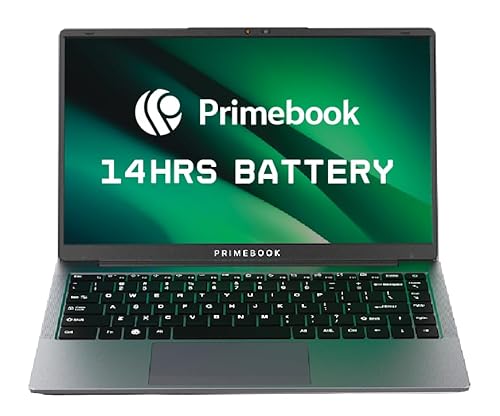
This is an Android-based laptop made for students and light productivity users who spend most of their time in apps, browser tabs, online classes, and content viewing. Its Full HD display, Helio G99 chip, and long battery life make it one of the more fresh options in this segment.
Pros
- Sharp 14.1-inch Full HD IPS anti-glare display
- MediaTek Helio G99 feels quicker than basic entry chips
- Long battery backup with a 60.3Wh battery
- Useful port mix with USB-A, USB-C, audio jack, and microSD
Cons
- Android-based workflow will not suit users who need full Windows software
- App compatibility on laptop-style layouts still depends on each app
- Brand service reach is smaller than major laptop brands
- Storage is good for light use, but heavy offline users may need expansion
Primebook 2 Pro 2025 takes a different route from the usual entry-level Windows laptop. Instead of a weak desktop chip and a basic screen, it gives you a more responsive MediaTek Helio G99 platform paired with 8GB RAM and 128GB UFS storage. For web work, classes, note-taking, streaming, and Android apps, this setup feels modern. The 14.1-inch Full HD IPS panel is also a strong point because many low-cost laptops still cut corners with lower-resolution displays.
I like this machine more for students who live inside Google Docs, PDFs, YouTube lectures, email, and app-based learning tools. PrimeOS 3.0 is built around Android 15, so the laptop feels familiar if you already use an Android phone daily. Multi-window support and keyboard-trackpad input make the experience better than a large tablet with a keyboard cover. Battery life is another plus for Indian users dealing with long college days, travel, coaching classes, or patchy access to charging points.
The catch is simple. This is not a true replacement for a regular Windows laptop if your course or office work depends on desktop software. Primebook does offer cloud PC access for heavier software use, which is useful for some people, though internet quality then becomes part of the experience. As a brand, Primebook is still building its name and service trust in India, so buyers in metro cities will feel more comfortable than buyers in smaller towns. If your work style matches the platform, this laptop gives a lot of daily ease.
Acer Aspire 3 A325-45
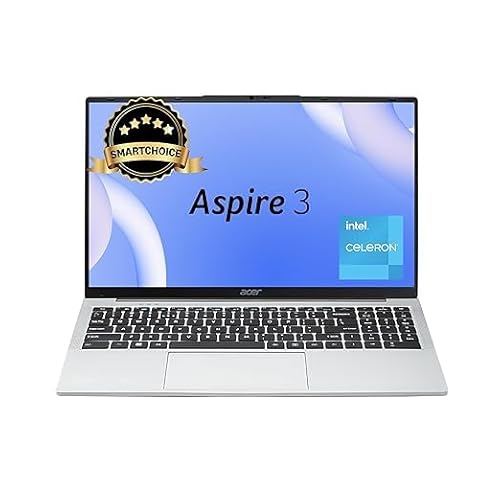
Acer Aspire 3 is a familiar Windows laptop for buyers who want a simple machine from a known brand. It suits document work, browsing, online classes, and basic home use, with the comfort of Acer’s better-known support network in India.
Pros
- Windows 11 out of the box for familiar desktop use
- 256GB SSD helps with faster boot and app loading
- 15.6-inch large display suits study and office work
- Acer service network is stronger than smaller new brands
Cons
- Intel Celeron N4500 is suited only for light workloads
- HD resolution screen looks basic next to Full HD rivals
- LPDDR4X memory is not user-upgradable in most such designs
- Not a good fit for editing, coding-heavy work, or demanding multitasking
The Acer Aspire 3 A325-45 is the safer pick for a buyer who wants a standard Windows laptop and does not want to learn a new platform. You get 8GB RAM, a 256GB SSD, and Windows 11 Home, which is enough for files, browser-based tasks, MS Office work, school projects, and video meetings. The 15.6-inch display gives more room for spreadsheets and documents, which many students and home users still prefer over compact 14-inch screens.
Its weak point is the Intel Celeron N4500. For basic work, it does the job, but you need to keep expectations grounded. A few Chrome tabs, a video call, and some office work are fine. Push beyond that and the system will start to feel slow. The HD screen is another compromise. It is usable, though text sharpness and viewing comfort do not match Full HD panels, especially if you spend long hours reading PDFs or watching recorded lectures.
Where Acer gains ground is trust. In India, service availability matters a lot once the honeymoon phase ends. Acer has a far better footprint than many niche brands, and spare parts or basic support are easier to find in more cities. For a parent buying a first laptop for school or college use, or for someone who needs a no-surprise Windows machine for home billing and office files, this Aspire 3 still makes sense.
Primebook 2 Max 2025

Primebook 2 Max 2025 is the bigger-screen version for buyers who like the Primebook idea but want more room for classes, multitasking, and entertainment. The 15.6-inch Full HD display and 256GB storage make it better suited to longer daily use than many entry machines.
Pros
- Large 15.6-inch Full HD IPS display
- 256GB UFS storage gives more breathing room
- Helio G99 offers smoother app use than basic Celeron laptops
- Good battery life for travel, college, and casual work
Cons
- Android platform still limits access to traditional Windows software
- Large chassis is less travel-friendly than smaller options
- Service and support network is still developing in India
- Cloud PC features depend heavily on stable internet
Primebook 2 Max 2025 feels closer to a mainstream laptop in size and screen comfort. The 15.6-inch Full HD IPS panel is a real plus if you split windows, watch long lectures, read e-books, or type assignments for hours. Compared with many low-end Windows models using entry Celeron chips, the Helio G99 gives this machine a more fluid feel in app launches, scrolling, and daily multitasking. Add 8GB RAM and 256GB UFS storage, and the package looks strong for app-first users.
I see this model working well for college students, online learners, and families who want one shared device for education and media. Android 15-based PrimeOS 3.0 brings app familiarity, and the included AI search and assistant tools add some convenience for research and quick summaries. For Indian homes where one laptop often serves multiple roles, screen size matters more than spec sheets suggest. This one feels easier on the eyes than small low-resolution panels.
At the same time, you should buy it only after being clear about your software needs. If your college demands full Windows apps, local engineering software, or desktop-only exam tools, this is the wrong match. Primebook’s cloud desktop idea is smart, though dependence on stable broadband limits how useful it will be in every town. Brand support is still maturing, so I would place this above generic no-name machines, but below Acer and ASUS for service confidence. For the right user, though, the value is strong.
Neopticon BrowseBook 14.1

Neopticon BrowseBook 14.1 is a lightweight Windows laptop aimed at students and office users who want portability and a Full HD IPS display without moving to Chrome OS or Android. It keeps the basics in place and looks practical on paper for travel-heavy use.
Pros
- 14.1-inch Full HD IPS screen is a big plus in this category
- Light 1.3kg body is easy to carry daily
- 256GB SSD and 8GB RAM suit basic work
- Useful ports including Type-C, USB 3.0, Mini HDMI, and microSD
Cons
- Intel Celeron N4020 is an old and limited processor
- Brand awareness and support network are unclear in India
- Long-term reliability is less proven than established brands
- Battery size is moderate, not class-leading
The Neopticon BrowseBook 14.1 looks appealing because it fixes two common budget-laptop issues at once. First, you get a Full HD IPS display, which is better for reading, writing, and watching classes. Second, the laptop stays light at 1.3kg, which is useful for students carrying books, chargers, and water bottles across campus every day. The 8GB RAM and 256GB SSD setup also sounds right for daily office files, browsers, and study work.
The concern is the Intel Celeron N4020. This processor is old, and you will feel the limits if you multitask hard or keep many tabs open. For typing assignments, attending online classes, browsing, and light office tasks, it should be fine. For heavier work, the system will struggle. So this laptop makes sense only if your usage stays basic and your display quality matters more than raw speed.
Support is the big question mark. Lesser-known brands sometimes look attractive because the spec sheet is good, but after-sales service decides the real experience. In India, this becomes even more important in smaller cities where service pickup and part replacement are not smooth. If you are comfortable with some risk and you want a light Windows laptop with a better screen than many rivals, the BrowseBook 14.1 is worth a look. If service peace of mind matters most, bigger brands feel safer.
ASUS Chromebook CM14

The ASUS Chromebook CM14 is a solid choice for buyers whose work happens in the browser, on Google services, and through Android apps. It brings a Full HD screen, 8GB RAM, long battery life, and the backing of ASUS, which gives it extra confidence for Indian buyers.
Pros
- Chrome OS feels light and responsive for web-first use
- 14-inch Full HD display is better than many entry laptops
- Good battery life for classes and travel
- ASUS has a strong service presence in India
Cons
- Chrome OS is not suited for users who need regular Windows desktop software
- 128GB eMMC storage is slower than SSD or UFS options
- 220-nit screen brightness is average for bright rooms
- Offline heavy users may feel limited by the software ecosystem
The ASUS Chromebook CM14 is one of the better-balanced picks here if your work style matches Chrome OS. The octa-core MediaTek Kompanio 520, 8GB RAM, and lean operating system keep daily tasks smooth. Browser tabs, online classes, Gmail, Docs, YouTube, note apps, and Android apps run well enough for students and casual users. Because Chrome OS is lighter than Windows, the hardware feels less strained during normal use.
The 14-inch Full HD display helps a lot. In this segment, display quality often decides whether a laptop feels cheap after a week. Text looks sharper here than on HD panels, and the battery life claim is also attractive for Indian users who commute, study in libraries, or work from cafes and coaching centers. At 1.45kg, the weight is still manageable for daily carry. The keyboard-first format also feels better for writing assignments than relying only on a tablet.
ASUS brings another major advantage, service support. Across India, ASUS has a more visible presence than smaller brands, and that matters when you need warranty help. The limitation is software compatibility. If your college software, office tools, or exam systems need Windows, this Chromebook will frustrate you. If your life runs on Chrome, Google Drive, web tools, and Android apps, the CM14 is one of the smartest low-cost choices.
Buying Guide
Choose the operating system before anything else
This is the first filter. A Windows laptop suits buyers who need MS Office desktop apps, regular file management, printers, local software, or exam tools used by schools and offices. A Chromebook suits browser-first users who work mainly on Chrome, Google Docs, email, and Android apps. An Android laptop like Primebook suits students who live in mobile apps and online tools. Pick the wrong system and even good hardware will feel like a bad purchase.
Do not ignore the processor class
In this segment, processor choice changes your experience more than marketing claims. Intel Celeron N4020 and N4500 chips are for light work only. Keep expectations limited to documents, browsing, classes, and simple multitasking. MediaTek Helio G99 and Kompanio-class chips, when paired with lighter software like Android or Chrome OS, often feel smoother in daily use. Match the processor with your workload, not with the brand sticker.
RAM and storage matter every single day
For 2025, 8GB RAM should be your minimum target in a budget laptop. Less than that feels restrictive fast. For storage, SSD and UFS feel quicker than eMMC in file access and app response. If you store movies, PDFs, photos, and offline course content, 256GB gives more comfort than 128GB. Also check if storage expansion is available through microSD or external drives.
A Full HD screen is worth chasing
If you read a lot, write assignments, attend long classes, or watch lectures, a Full HD display is much easier on the eyes than an HD panel. IPS panels also give better viewing angles, which helps during group study or casual entertainment. Anti-glare treatment is useful in Indian homes and hostels where lighting is not always ideal. Screen quality affects comfort every day, so do not treat it like a small detail.
Battery life should match your real routine
Think about where you use your laptop. If you travel by train, attend back-to-back classes, or work in places with limited plug points, battery life matters a lot. Marketing numbers are often measured under light use, so keep a buffer in mind. A larger battery and lighter operating system usually give better all-day confidence. Also check if the laptop supports modern Type-C charging, because that makes travel easier.
Weight, keyboard, and ports shape daily comfort
A laptop is not a spec sheet once you start carrying it every day. Students usually prefer lighter models around the 1.3kg to 1.5kg mark. A decent keyboard matters if you type notes or assignments often. Port selection matters too. USB-A is still useful in India for pen drives and accessories. HDMI helps with projectors and monitors. A microSD slot is helpful for cheap storage expansion.
After-sales service matters more in the budget segment
Budget buyers feel repair costs more sharply, so service quality should be part of the decision. Acer and ASUS usually offer stronger service confidence across India than smaller or newer brands. New brands may offer better specs, but support turnaround, spare part availability, and local service reach may vary. If you live outside a metro city, check service access before buying.
Feature Importance
| Feature | Importance |
|---|---|
| Operating system suitability | High |
| Processor performance | High |
| RAM capacity | High |
| Storage type and speed | High |
| Display resolution and panel quality | High |
| Battery life | High |
| Port selection | Medium |
| Weight and portability | Medium |
| After-sales service in India | High |
| Upgrade or expansion options | Medium |