
A reliable laptop has turned into a basic necessity for students, work-from-home users, and casual gamers in India. From online classes to video calls with family, from Tally and coding to Netflix and a bit of gaming, one good machine can handle almost everything. The confusion starts when you open any shopping site and see hundreds of models with similar names and long spec sheets that feel more like a headache than help.
When you choose a laptop, you need to think about your daily use, processor, RAM, storage, display quality, battery life, and after-sales support. For Indian users, factors like frequent travel in crowded buses and metros, hot weather in cities like Delhi or Nagpur, and voltage fluctuations at home also matter. Budget is always a big factor, so the aim is simple: get the best performance and reliability for the money you spend, without getting trapped by shiny features you will never use.
Here I have picked 5 laptops that stand out for students, entry-level professionals, and light to moderate gamers in India. They cover different use cases, from simple study and office work to gaming and content creation. All models are widely available in India and have known service networks, which is as important as the laptop itself.
HP 15 fc0500AU Ryzen 3
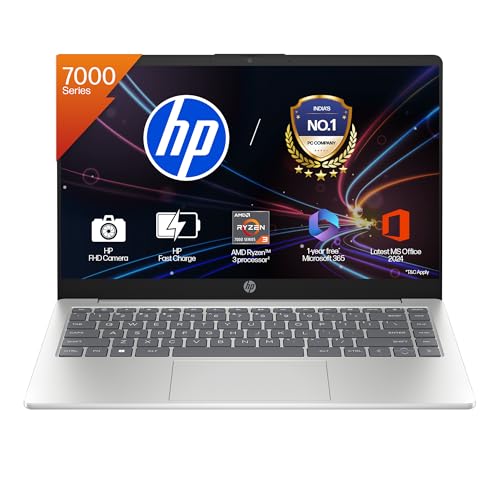
A thin and light 15.6 inch HP laptop suited for students and office users who focus on studies, browsing, and basic productivity work.
Pros
- Ryzen 3 7320U with decent performance for everyday tasks
- 8 GB DDR4 RAM with fast 512 GB SSD
- Full HD anti-glare 15.6 inch display
- Wi-Fi 6 and Bluetooth 5.4 for stable connectivity
Cons
- RAM is onboard, no easy upgrade path
- Not ideal for heavy gaming or video editing
- 250 nits brightness is average for outdoor use
- USB-C port does not support charging or external monitor
The HP 15 fc0500AU is a simple and practical choice for students and professionals who spend most of their time on browsers, MS Office, Zoom or Teams, and light multitasking. The AMD Ryzen 3 7320U handles day-to-day work smoothly and stays efficient, which helps with lower heat and better battery backup in Indian conditions. The 8 GB DDR4 RAM combined with a 512 GB PCIe NVMe SSD gives quick boot times and fast app launches, so you do not feel lag while switching between notes, PDFs, and a few browser tabs.
The 15.6 inch Full HD screen with anti-glare coating works well for long study sessions, especially under tube lights or near windows where reflections cause eye strain. The micro-edge design keeps the footprint compact for a 15.6 inch machine, which helps if you travel between college and home. Dual speakers are decent for online lectures and movies, though not tuned for audiophiles. The keyboard with numeric pad suits commerce students or anyone who deals with numbers often.
For Indian users, connectivity and support matter a lot. This HP model has Wi-Fi 6 support, which gives better stability on crowded home networks where several phones and smart TVs share the same router. You get enough ports for pendrives, HDMI connection to a TV or monitor, and a 3.5 mm combo jack. HP has one of the widest service networks in India, so you usually find service centers even in tier 2 or tier 3 cities. If you need a no-nonsense laptop for study, casual OTT streaming, and work-from-home tasks, this is a sensible choice as long as you do not plan heavy gaming or editing on it.
Lenovo V15 G4 Ryzen 5

A work-focused 15.6 inch laptop with Ryzen 5 and 16 GB RAM, ideal for heavy multitasking, coding, and office workloads.
Pros
- Ryzen 5 7520U gives better performance than entry-level chips
- 16 GB LPDDR5 RAM for smooth multitasking
- Supports up to 3 independent displays
- RJ-45 Ethernet port for stable wired internet
Cons
- RAM is not user upgradable
- Display is limited to 250 nits and 500:1 contrast
- Integrated graphics not meant for serious gaming
- Design is simple and office oriented, not stylish
The Lenovo V15 G4 targets students in technical courses, CA articles, and office users who need more power than a basic laptop. With the AMD Ryzen 5 7520U and 16 GB of fast LPDDR5 RAM, the machine handles many browser tabs, Excel sheets, coding IDEs, and light photo editing without slowing down quickly. The 512 GB SSD with support for expansion up to 1 TB gives room for project files, large PDFs, and offline media without running out of storage soon.
The 15.6 inch Full HD panel with anti-glare coating is standard but adequate for indoor use. Brightness is rated at 250 nits and contrast at 500:1, so the display feels fine in a typical room but not great under direct sunlight or bright outdoor light. For students who like to connect to external monitors at home or office, this model supports up to three independent displays using HDMI and USB-C with DisplayPort support, which is rare in this segment.
Indian users who work with unstable Wi-Fi will appreciate the presence of a full-size RJ-45 Ethernet port for direct broadband connection. This is especially helpful during important office calls or online exams where Wi-Fi drops can create stress. The 6-row spill resistant keyboard is practical in hostel and office environments where tea or water accidents happen. Lenovo has a strong business laptop service presence in metro cities and many tier 2 hubs, and on-site warranty support reduces the need to travel to a service center for every issue. If your focus is serious work, coding, accounts, or small business tasks rather than gaming, the Lenovo V15 G4 Ryzen 5 gives a strong balance of performance and practicality.
Acer SmartChoice ALG i5 RTX 3050
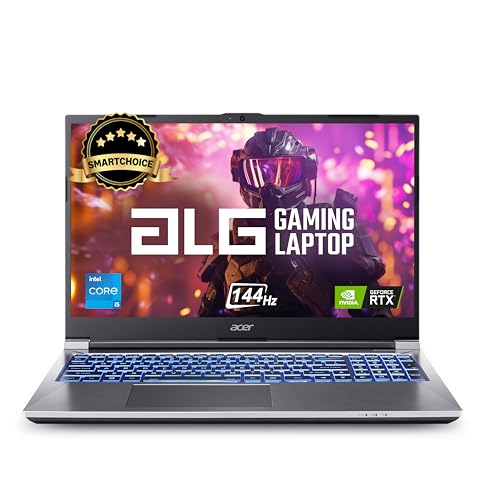
A performance focused gaming laptop with 13th Gen Intel Core i5 and RTX 3050, suitable for entry-level gaming and creative workloads.
Pros
- 13th Gen Intel Core i5-13420H with 8 cores
- RTX 3050 6 GB graphics for modern games at 1080p
- 16 GB DDR4 RAM upgradable up to 64 GB
- 144 Hz Full HD display enhances gaming smoothness
Cons
- Plastic build needs careful handling during travel
- Average webcam quality
- Fans can get loud under load
- Battery life drops quickly during gaming
The Acer SmartChoice ALG AL15G-53 is aimed at users who want a first serious gaming or creator laptop without jumping into premium pricing. The Intel Core i5-13420H has 8 cores with a high boost clock, which handles modern games, coding, and multitasking with ease. Paired with 16 GB of DDR4 RAM and a 512 GB NVMe SSD, load times in games and apps stay short and the system feels responsive even with background tasks running.
The star of this machine is the NVIDIA GeForce RTX 3050 with 6 GB GDDR6 memory. You get entry-level ray tracing support and solid performance in popular titles like Valorant, GTA V, FIFA series, and many e-sports games at Full HD resolution. The 15.6 inch 144 Hz display with 45 percent NTSC coverage is tuned more for gaming smoothness than color critical work, so it suits gamers and casual content creators better than professional photo editors. The high refresh rate also helps in fast paced games where each frame matters.
For Indian users, upgradability and service are important because you tend to use a laptop for several years. This Acer model allows RAM upgrades up to 64 GB with two SODIMM slots and supports up to 2 TB of NVMe storage using dual M.2 slots. That gives a long life cycle for future needs. Acer’s service network in India is decent in bigger cities and many service partners manage repairs and parts. Cooling performance matters in hot climates like Rajasthan or Chennai. H series Intel processors and RTX graphics generate heat under load, so you should use the laptop on a hard surface and consider a cooling pad for long gaming sessions. For students who want both study and gaming in one machine, this laptop offers strong value as long as you are okay with some fan noise and average battery backup during intense use.
ASUS TUF Gaming A15 FA506NCR

A rugged gaming laptop with Ryzen 7 and RTX 3050, built for users who want strong CPU performance and military grade durability.
Pros
- Ryzen 7 7435HS with 8 cores and 16 threads
- 16 GB DDR5 RAM for faster memory performance
- RTX 3050 4 GB GPU for solid 1080p gaming
- 144 Hz FHD display with anti-glare coating
Cons
- 2.3 kg weight feels heavy in a backpack
- RTX 3050 at 60 W TGP is mid level
- Battery capacity of 48 Wh is modest
- Chassis can get warm around WASD zone
The ASUS TUF Gaming A15 FA506NCR targets gamers and creators who want strong CPU performance along with a sturdy build that can handle rough Indian usage. The AMD Ryzen 7 7435HS with 8 cores and 16 threads handles CPU heavy games, programming work, and multi layer video timelines much better than basic chips. Combined with 16 GB DDR5 memory and a 512 GB PCIe 4.0 SSD, the laptop feels quick even with several apps open, and faster DDR5 RAM helps frame rates in some games.
The NVIDIA GeForce RTX 3050 Laptop GPU with 4 GB GDDR6 and 60 W TGP is aimed at Full HD gaming with medium to high settings in many titles. The 15.6 inch Full HD display with 144 Hz refresh rate and anti-glare coating suits long gaming and binge watching sessions. Color coverage is around 62.5 percent sRGB, which is acceptable for casual editing and content consumption. The TUF series is known for military grade durability testing, which gives peace of mind to Indian students who travel in crowded local trains or buses where bumps and knocks are common.
ASUS includes an RGB backlit keyboard with highlighted WASD keys, useful during night gaming and power cut situations. The 48 Wh battery supports fast charge from 0 to 50 percent in about 30 minutes, helpful when you get a short charging window during travel. For connectivity, you get a LAN port, multiple USB-A ports, USB-C with DisplayPort support, HDMI 2.1, and a combo audio jack. ASUS has expanded service coverage in India, especially in metro and tier 1 cities, and the TUF series has decent community support for drivers and updates. This model suits college gamers, engineering students, and young professionals who need a tough laptop for both work and serious play, while accepting the extra weight in the bag.
Acer Aspire Lite AL15-52H i5

A slim 15.6 inch laptop with 12th Gen Intel Core i5, 16 GB RAM, and IPS display, good for productivity and entertainment.
Pros
- 12th Gen Intel Core i5-12450H with 8 cores
- 16 GB LPDDR5 memory for smooth multitasking
- 512 GB Gen 4 SSD with expansion support
- Full HD IPS display with Acer ComfyView
Cons
- Integrated Intel UHD graphics not ideal for heavy gaming
- No dedicated RJ-45 Ethernet port
- Silver finish can show smudges
- Speakers are average for loud environments
The Acer Aspire Lite AL15-52H is a balanced option for users who want a responsive machine for work, study, and OTT content but do not need a dedicated gaming GPU. The Intel Core i5-12450H with 8 cores and high boost clock manages heavy office files, coding tools, and even some light editing tasks without much struggle. With 16 GB of LPDDR5 memory, multitasking feels smooth, so you can keep multiple Chrome tabs, spreadsheets, and note apps active together. The 512 GB Gen 4 PCIe SSD ensures quick boots and fast file transfers, and storage can be expanded up to 1 TB if your usage grows.
The 15.6 inch Full HD IPS panel is one of the strengths of this laptop. IPS technology offers better viewing angles than basic TN panels, which helps when you watch movies with friends or work with the laptop slightly off center. Acer’s ComfyView coating reduces reflections from tube lights and windows, useful in Indian homes where lighting is often not ideal for screens. Integrated Intel UHD graphics handle videos, streaming, and casual games but are not targeted at AAA titles or serious 3D work.
Acer gives a backlit keyboard which is handy during late night study sessions or power cuts. The 1.7 kg weight keeps it manageable for daily commute between home and college or office. For connectivity, you get multiple USB-A ports and a USB-C port, though you depend on Wi-Fi for internet since there is no dedicated Ethernet jack. Acer’s service presence in India is reasonable in cities and popular towns. For many students and professionals who want strong CPU performance, decent screen quality, and a light chassis without gaming features, the Aspire Lite sits in a sweet spot.
Buying Guide
1. Decide your usage first
Before you click on any offer, pause and think about how you spend most of your time on a laptop. If you are a school or college student attending online classes, taking notes, doing assignments, and watching videos, a Ryzen 3 or Intel Core i3/i5 with 8 GB RAM works fine. If you are into coding, engineering software, or commerce with heavy Excel work, 16 GB RAM gives a safer buffer. For gamers and budding creators, a machine with RTX 3050 level GPU changes the experience for AAA games and video editing. Once you are clear about your primary use, half the confusion disappears.
2. Budget planning for Indian buyers
In India, budgets are tight and laptops are long term purchases. Many families stretch during festival sales, education loans, or no cost EMI offers. While lower priced laptops look tempting, try to balance cost with specs that will not feel outdated in two years. For pure study and office work, focus on at least 8 GB RAM and SSD storage. For heavier users, prioritize 16 GB RAM and a capable CPU even if you skip fancy features like RGB lighting. Also keep some money aside for a cooling pad, good backpack, and a quality surge protector or UPS, because power cuts and voltage jumps are common in many areas.
3. Processor and RAM choices
Processor and RAM directly affect how fast your laptop feels. Ryzen 3 and Intel Core i3 suit lighter workloads and web use. Ryzen 5 and Intel Core i5 H or U series are better for multitasking, coding, and some editing. If you know you will run heavy software or many tabs together, pick Ryzen 5 or Core i5 or above. For RAM, 8 GB is a basic starting point. For engineering, design students, multitaskers, or anyone planning to keep the laptop for 4 to 5 years, 16 GB is much safer. Also check if RAM is upgradable. Some models have RAM soldered which locks you to the factory configuration.
4. Storage type and capacity
Today, SSD storage is a must for a smooth experience. All five laptops here use NVMe SSDs which are much faster than old hard disks. For most students, 512 GB is a good balance between capacity and cost, enough for OS, apps, offline videos, and project files. If you store many large games, raw photos, or video footage, look for models with upgradable storage or dual M.2 slots. External hard drives are an option, but internal upgrades give better performance and less clutter in your bag.
5. Display quality and refresh rate
Display quality has a big effect on your comfort, especially in the Indian context where many students use laptops for long hours due to coaching plus college plus part-time jobs. Check resolution, panel type, brightness, and refresh rate. Full HD resolution at 1920×1080 is standard now. IPS panels offer better viewing angles and are nicer for movies and long reading sessions. Brightness around 250 nits feels okay indoors but struggles in direct sunlight near balconies or windows. For gamers, a 144 Hz refresh rate, like on the Acer SmartChoice ALG and ASUS TUF A15, gives smoother motion and fast response in e-sports titles.
6. Build quality, weight, and thermals
Indian users travel a lot with laptops, from metro rides in Mumbai to bike commutes in small towns. So build quality and weight matter. Gaming laptops tend to be heavier but come with stronger cooling systems. Thin and light models like the HP 15 and Acer Aspire Lite are easier to carry but not meant for long gaming sessions. In hot regions, laptop temperature climbs quickly. Use a flat surface, keep vents clear, and consider an external cooling pad if you plan intensive tasks in non-AC rooms. A slightly heavier but better cooled machine often lasts longer than a paper-thin laptop constantly running hot.
7. Ports, connectivity, and compatibility
Before buying, think about what you will connect. Do you need HDMI for an external monitor or TV. Do you use wired LAN at home or office. Do you have USB-C storage devices. Laptops in this list offer a mix of USB-A, USB-C, HDMI, and headphone jacks. Some have RJ-45 Ethernet for stable wired internet which helps for online exams and office VPN usage. Also check Wi-Fi version and Bluetooth standard. Wi-Fi 6 and Bluetooth 5.x give better performance on modern routers and phones. If needed ports are missing, you must budget for a good USB hub or docking station.
8. Warranty, service network, and after-sales
In India, a laptop is often repaired instead of replaced. So a good service network saves time and stress. HP, Lenovo, Acer, and ASUS all have presence in major cities, but coverage in smaller towns differs. Check the brand’s service locator for your PIN code before you buy. Standard warranty is one year, which you can extend during purchase for extra peace of mind. On-site service, like Lenovo offers on many models, reduces the need to visit centers. Always keep bills and warranty cards safe, and use original chargers and parts to avoid warranty issues later.
Feature Importance
| Feature | Importance |
|---|---|
| Processor (CPU) | High |
| RAM capacity and speed | High |
| Type of storage (SSD vs HDD) | High |
| Graphics capability (integrated vs RTX 3050) | High |
| Display quality and refresh rate | Medium |
| Battery life and thermals | Medium |
| Build quality and durability | High |
| Weight and portability | Medium |
| Ports and connectivity options | Medium |
| Brand service network in India | High |