
Convertible 2‑in‑1 laptops have become a solid choice for students, office users, and creators in India. You get a full Windows laptop for work and classes, and with one flip of the hinge you have a touchscreen tablet for Netflix, note taking, or sketching. For Indian users who switch between desk, couch, and travel, this flexibility saves space and feels more practical than carrying a separate tablet.
When you choose a 2‑in‑1, you need to look at processor, RAM, storage, display quality, battery life, and pen support. Many Indian users also care about build quality, keyboard comfort for long typing sessions, and service network reach in their city. Budget always matters in India, so finding the right balance between performance and price is key. This list picks 4 Lenovo 2‑in‑1 laptops and 1 universal stylus that pair well with them, all relevant for Indian conditions and usage patterns. From online classes and WFH to photo editing and OTT, you will find something here that fits your style.
Lenovo IdeaPad 5 2‑in‑1 (Core i5‑13420H, 83KX0059IN)

A mid‑range 14‑inch convertible with a 13th Gen Intel Core i5 processor, 16 GB RAM, and a bright WUXGA touchscreen, suited for students and professionals who want an all‑round work and media machine.
Pros
- 13th Gen Core i5 H‑series chip is strong for productivity
- 16 GB LPDDR5x RAM is good for multitasking
- Light 1.6 kg chassis with 360‑degree hinge and pen in box
- Good battery optimization with Rapid Charge Boost
Cons
- RAM is soldered and not upgradable
- Glossy screen can reflect lights in bright rooms
- Integrated Intel UHD graphics are limited for heavy gaming
- HDMI 1.4b is not ideal for high‑refresh external monitors
The Lenovo IdeaPad 5 2‑in‑1 with Core i5‑13420H sits in a practical sweet spot for many Indian buyers. The 13th Gen H‑series processor offers solid performance for office tools, code editors, light video editing, and a lot of Chrome tabs. Paired with 16 GB of LPDDR5x RAM and a 512 GB PCIe 4.0 SSD, the laptop feels quick while switching between work apps, Teams or Zoom calls, and browser‑based tools. Integrated Intel UHD graphics are fine for casual games and media but not meant for AAA titles or heavy 3D work.
The 14‑inch WUXGA IPS display with 1920×1200 resolution has a taller 16:10 aspect ratio. This works well for spreadsheets, coding, and reading PDFs. With 300 nits brightness and TUV Low Blue Light, it suits indoor use in homes, hostels, and offices. Under harsh sunlight on trains or balconies you will see reflections, because the panel is glossy, but that gloss makes movies and photos look crisp indoors.
Weighing about 1.6 kg and 1.75 cm thick, the IdeaPad 5 2‑in‑1 is easy to carry in a backpack for college or office commute. The 360‑degree hinge lets you use it in laptop, stand, tent, or tablet mode, and Lenovo includes the Digital Pen 2 in the box. This helps for handwritten notes during lectures, annotating PDFs for UPSC or CA prep, or signing documents. The keyboard has backlighting for late‑night study sessions, and the fingerprint reader speeds up logins.
Battery life varies with use, but Lenovo quotes up to 8 hours in mixed workloads and longer for local video playback. Rapid Charge Boost is helpful in Indian fast‑paced routines, because a 15‑minute top‑up can add around 2 hours of light usage. Wi‑Fi 6 and Bluetooth 5.2 cover modern connectivity needs, and the port selection balances USB‑A and USB‑C along with HDMI and a microSD slot, which helps if you handle phone or camera storage cards.
Lenovo has one of the stronger service networks among PC brands in India, with support centers in metro cities and many tier‑2 locations. This model ships with 1 year onsite warranty, 1 year Accidental Damage Protection, and 1 year Premium Care, which adds some peace of mind against Indian power cuts, travel mishaps, or occasional knocks in crowded buses.
Elfora 2‑in‑1 Tablet Stylus Pen (Black)

A budget universal capacitive stylus with a fine tip, suitable for basic writing, tapping, and drawing on any capacitive touchscreen phone or tablet, including Windows 2‑in‑1 laptops.
Pros
- Universal support for iOS, Android, and Windows touchscreens
- Fine point tip gives better control than fingers for handwriting
- High sensitivity for smooth taps and swipes
- Light aluminum body makes it easy to carry daily
Cons
- Not an active pen, no pressure sensitivity or palm rejection
- Depends on the capacitive screen, accuracy varies by device
- No Bluetooth features like shortcut buttons
- Tip can wear out with rough use and need replacement
The Elfora 2‑in‑1 Tablet Stylus Pen targets users who want better control than finger input without spending on an expensive active pen. Since it works as a capacitive stylus, it is compatible with most touchscreen phones, tablets, and Windows convertibles that respond to normal touch. For many Indian buyers who use budget Android tablets or older 2‑in‑1 laptops without active pen support, this kind of stylus is one of the few workable options for handwriting and rough sketching.
The fine point tip gives more precision for writing WhatsApp replies, navigating menus, and drawing shapes in note apps. This helps students with digital note taking, especially on smaller screens where finger input feels clumsy. High sensitivity means light taps and short strokes are detected without pressing hard, which reduces strain during long writing sessions or casual drawing.
The pen uses a lightweight aluminum body, so it feels similar to a regular ball pen in hand. This makes it comfortable for people who are not used to thick stylus designs. The metal body also handles daily bag use, Indian heat, and travel without feeling fragile. Since there is no Bluetooth or built‑in battery, there are fewer points of failure and no need to worry about charging before exams or meetings.
You should remember that this is a basic capacitive stylus, not an active pen like Lenovo’s Digital Pen 2. That means there is no pressure sensitivity, no palm rejection, and no tilt detection. For detailed professional art or technical drawing, an active pen with digitizer support will work better. For simple notes, digital signatures, and casual sketching on a wide variety of devices across the family, the Elfora stylus offers good value.
Since Elfora is a smaller accessory brand, service tends to be limited to replacement through the seller rather than a big network of walk‑in centers. On the other hand, the simple design and low price reduce risk, so many Indian users treat it as a useful add‑on rather than a long‑term service heavy device.
Lenovo IdeaPad 5 2‑in‑1 OLED (Core i7‑13620H, 83KX004UIN)

A performance‑oriented 14‑inch convertible with a 13th Gen Intel Core i7 processor and a vivid WUXGA OLED display, aimed at power users who care about speed and rich visuals.
Pros
- 13th Gen Core i7 H‑series chip handles heavy multitasking
- 16 GB LPDDR5x RAM and 512 GB SSD keep workflows smooth
- OLED panel with 400 nits brightness and 100 percent DCI‑P3
- Includes Lenovo Digital Pen 2 and 360‑degree hinge
Cons
- Glossy OLED can reflect light in bright rooms
- Integrated graphics limit serious gaming and 3D work
- Higher power chip can run warm under load
- No RAM upgrade path as memory is soldered
The IdeaPad 5 2‑in‑1 OLED variant is aimed at users who push laptops harder, like engineers, media creators, and heavy multitaskers. The 13th Gen Intel Core i7‑13620H has 10 cores and 16 threads, which helps with tasks like large Excel models, code compilation, light video editing, and many browser tabs. Combined with 16 GB high speed LPDDR5x memory and a 512 GB PCIe SSD, day to day usage feels snappy. Opening apps, switching between VMs or Docker, and handling office work side by side stays smooth.
The highlight here is the 14‑inch WUXGA OLED panel. With 1920×1200 resolution, 400 nits brightness, and 100 percent DCI‑P3 coverage, colors look rich and deep. Movies, OTT shows, and photo editing sessions feel more immersive. Dark themes in coding or document apps benefit from OLED’s deep blacks, which is comfortable for late‑night work in Indian hostels or PG rooms. TUV Low Blue Light certification helps reduce eye fatigue, though you still need to take breaks.
Design follows the familiar 2‑in‑1 pattern with a 360‑degree hinge, 1.6 kg weight class, and a thin profile. You can flip it into tent mode on a train tray table for OTT streaming, stand mode on a kitchen counter for recipe videos, or tablet mode with the Lenovo Digital Pen 2 for note taking. The pen support works well for students drawing diagrams, architects marking PDFs, or business users signing contracts.
Battery life is quoted at around 10 hours under MobileMark conditions at moderate brightness, which translates to a typical full working day if you stay on balanced usage. Rapid Charge Boost adds flexibility if you remember to plug in during a short chai break. Connectivity includes Wi‑Fi 6, Bluetooth 5.3, dual USB‑C with power delivery and DisplayPort, dual USB‑A, HDMI, audio combo jack, and a microSD card reader. This helps if you move files from cameras or phones without carrying extra dongles.
As with other Lenovo 2‑in‑1s, this model is tested to MIL‑STD 810H scenarios, which covers shocks, temperature changes, and some vibration conditions. That does not mean you can be careless, but it adds confidence on Indian roads and in packed bags. Lenovo’s service network spans most Indian states, with pick‑up or onsite support in many cities. The included 1 year onsite warranty and Premium Care package add priority support that busy professionals appreciate.
Lenovo IdeaPad Flex 5 (Ryzen 5 5625U, 82XX00G4IN)

A value‑focused 14‑inch convertible powered by AMD Ryzen 5, offering 16 GB RAM, 512 GB SSD, and a bright IPS touchscreen, good for students and home users who need reliable daily performance.
Pros
- AMD Ryzen 5 5625U handles daily workloads well
- 16 GB LPDDR4x RAM supports multitasking comfortably
- Decent 300 nits WUXGA IPS touchscreen with 16:10 ratio
- Light 1.55 kg design with backlit keyboard
Cons
- RAM is soldered and not upgradable
- Integrated Radeon graphics are limited for heavy games
- No detailed battery spec listed in the short sheet
- Chassis is mainly plastic, not full metal
The Lenovo IdeaPad Flex 5 with Ryzen 5 5625U is aimed at budget conscious buyers who still want a convertible design. The 6 core, 12 thread Ryzen 5 chip handles office work, online classes, browsing, and light editing without lag. Pairing it with 16 GB LPDDR4x memory and a 512 GB PCIe 4.0 SSD keeps the system responsive even when several apps are open. For Indian households where multiple family members use the same laptop, this performance level offers a good balance between speed and cost.
The 14‑inch WUXGA IPS touchscreen offers 1920×1200 resolution and 300 nits brightness, which suits indoor use in homes and classrooms. The taller 16:10 aspect ratio gives more vertical space for documents and websites, so you scroll less during research or coding. TUV Low Blue Light support is useful for long study hours. The glossy glass surface makes colors look rich for OTT content, though reflections will show up if you sit facing a window or tube light.
Design wise, the Flex 5 keeps things simple and practical. At around 1.55 kg with a thickness close to 1.78 cm, it is easy to slip into a backpack for tuition, college, or office. The 360‑degree hinge lets you place it in tent mode on a small hostel table or flip it into tablet mode on the sofa. The backlit keyboard helps in low light, which is common for students studying late at night. Lenovo typically includes a digital pen with these Flex models, useful for diagram drawing, handwritten notes, and annotating PDFs.
The chassis uses Arctic Grey coloring with a mix of materials that aim to reduce weight yet stay sturdy enough for daily travel. While it is not a premium all‑metal body, it still feels solid in normal use if handled reasonably. Ports include the usual mix for this family, like USB‑A, USB‑C, HDMI, audio jack, and likely a card reader, which covers most basic accessories without making you buy many dongles.
For Indian buyers, Lenovo’s service strength gives the Flex 5 an advantage. You get Windows 11 Home and Office Home 2024 preinstalled along with a 1 year warranty and 1 year Accidental Damage Protection on this specific model. Combined with Lenovo’s many authorized centers across metro and tier‑2 cities, after‑sales support tends to be easier than smaller brands, important when you depend on a single laptop for both entertainment and studies.
Lenovo IdeaPad 5 2‑in‑1 (Ryzen AI 5 340, 83KT0052IN)
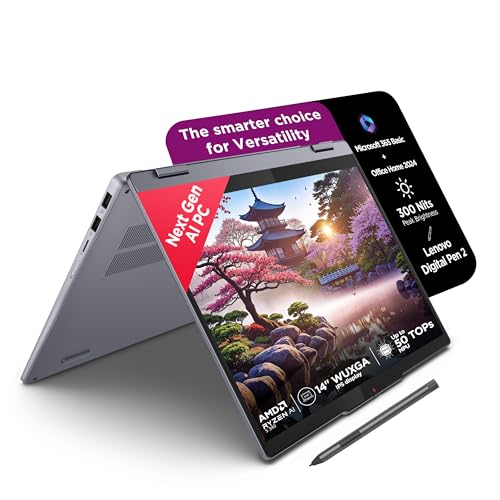
A next‑gen AMD Ryzen AI powered 2‑in‑1 with strong performance, 16 GB LPDDR5x RAM, and Copilot+ PC features, built for buyers who want a future‑leaning Windows 11 experience.
Pros
- Ryzen AI 5 340 brings strong CPU performance and on‑chip NPU
- Fast LPDDR5x‑7500 RAM with 16 GB capacity
- Solid 512 GB PCIe 4.0 SSD for quick boots and loads
- Aluminum top cover gives a more premium feel
Cons
- RAM is soldered and fixed at 16 GB
- IPS panel covers 45 percent NTSC, not ideal for color‑critical work
- Glossy touchscreen reflects overhead lights
- AI features depend on software support and updates
The IdeaPad 5 2‑in‑1 with Ryzen AI 5 340 targets users who want a modern Windows 11 experience with extra AI features baked in. The 6 core, 12 thread processor supports a Neural Processing Unit that offloads some AI‑related tasks from the CPU and GPU. This helps workloads like background blur in video calls, noise reduction, and other on‑device AI features. For regular office work, browsing, light coding, and content creation, the CPU has more than enough headroom.
With 16 GB of LPDDR5x‑7500 RAM and a 512 GB PCIe 4.0 SSD, the system feels responsive during multitasking. Several office apps, Chrome windows, and streaming apps can stay open without slowdowns. The 14‑inch WUXGA IPS display delivers 1920×1200 resolution and 300 nits brightness. The 45 percent NTSC color coverage is fine for productivity, study, and entertainment, but professionals who do color graded video or accurate design work should look at the OLED option instead.
Design is one of the strengths of this model. The aluminum top combined with PC‑ABS bottom keeps weight around 1.6 kg while giving a more premium hand feel compared to full plastic builds. The 4 side narrow bezels keep the footprint compact. The 1.75 cm thin profile fits well in slim office bags, which many Indian commuters prefer on metro or bike rides. A backlit keyboard helps when lights are dim during power cuts or late work hours.
You get a 360‑degree hinge and touch support, so the laptop can switch between traditional, tent, stand, and tablet modes. Lenovo includes its Digital Pen 2, which helps in daily use cases like whiteboard notes in meetings, school assignments, or signing PDFs. Windows 11 Home, Microsoft 365 Basic, and Office Home 2024 are bundled, which saves extra subscription cost for many users who need Word, Excel, and PowerPoint out of the box.
Lenovo extends its usual mix of Wi‑Fi 6, USB‑A and USB‑C ports, HDMI, audio jack, and more. These are important for Indian users who still plug into legacy projectors, USB drives, and wired headsets. The company has a widespread service network that stretches across big and small cities. Warranty on this model includes 1 year onsite support, with Premium Care commonly available to improve service turnarounds. For someone who wants a capable daily driver with newer AI support and flexible 2‑in‑1 form factor, this model stands out in Lenovo’s current range.
Buying Guide
Set your budget and usage first
Before you pick any 2‑in‑1 laptop or stylus, be clear about what you will do most of the time. If your main use is online classes, Office work, browsing, and OTT content, a mid‑range Core i5 or Ryzen 5 with 16 GB RAM works well. If you plan to run heavy tools like large codebases, virtual machines, or frequent video editing, a Core i7 H‑series or an AI‑focused Ryzen helps. Decide an upper budget limit in rupees and then see which configuration gives the best mix of CPU, RAM, SSD size, and display quality within that amount.
Processor and performance requirements
For Indian students and professionals, the processor decides how long the laptop feels fast. Intel 13th Gen Core i5 and Core i7 H‑series CPUs, like on the IdeaPad 5 models, handle multitasking and light creative work comfortably. AMD Ryzen 5 5625U on the Flex 5 is efficient for students and office tasks. The Ryzen AI 5 340 adds an NPU which supports AI features in Windows 11, such as better camera effects or on‑device processing. If you run code compilers, work with many browser tabs, or use heavy Excel sheets, these processors give more headroom than older U‑series chips from earlier generations.
RAM and storage choices
All the Lenovo models in this list ship with 16 GB RAM, which is a good baseline in 2025 for a 2‑in‑1 machine. Since the RAM is soldered on the motherboard and not upgradable, you should not go below 16 GB if you expect to keep the laptop for 4 to 5 years. For storage, 512 GB PCIe SSD offers enough room for Windows, Office, some games, and files for most people, though heavy media users can add external SSDs or use cloud storage. When you compare models, check that the SSD is PCIe 4.0 and in an M.2 slot, which improves speeds and serviceability if replacement is needed later by an authorized center.
Display, touchscreen, and pen experience
For 2‑in‑1 laptops, the display and pen behavior matter more than in regular clamshells. WUXGA 1920×1200 panels with 16:10 aspect ratio provide extra vertical space, which helps when reading PDFs or scrolling code. IPS panels offer balanced quality for normal use, while OLED, like on the i7 IdeaPad 5 2‑in‑1, gives deeper blacks and stronger colors for movies and media work. All these Lenovo models support 10‑point multi‑touch and include a Lenovo Digital Pen 2, which is useful for handwritten notes, diagrams, and signatures. If your device does not support an active pen, a universal capacitive stylus like the Elfora is a backup, though you lose features like pressure sensitivity and palm rejection.
Build quality, portability, and Indian conditions
Indian users often travel by bike, metro, or bus and face dust, heat, and crowded spaces. So build quality and weight matter. The IdeaPad 5 series and Flex 5 stay around 1.5 to 1.6 kg, which is manageable for daily commute or college. MIL‑STD 810H testing on some models adds peace of mind against shocks and temperature changes. Aluminum top covers and sturdy hinges help the machines handle frequent mode switching from laptop to tablet. Glossy touchscreens look good indoors but pick up fingerprints, so you might want a microfiber cloth and a sleeve for protection, especially during summer dust or monsoon humidity.
Battery life and charging habits
Battery life can vary a lot depending on brightness, workloads, and background apps. H‑series processors tend to draw more power under load, while Ryzen U‑series chips are a bit more efficient for simple tasks. Lenovo quotes around 8 to 10 hours for several of these models under standard benchmarks, which in real life often means a workday with mixed use at 60 to 70 percent brightness. Rapid Charge Boost support on IdeaPad 5 models is useful for Indian routines, because you can plug in during a short tea break at office or in the library and still add useful runtime. Try to use surge protection in homes with voltage fluctuations to protect the adapter and battery health.
Ports, connectivity, and accessories
Before buying, list the accessories you already own. Do you still use USB‑A drives, HDMI projectors, wired headphones, or SD cards. The Lenovo convertibles here offer a mix of USB‑A and USB‑C, HDMI 1.4b, audio jack, and microSD reader. USB‑C with power delivery and DisplayPort gives flexibility with modern monitors and docks. Wi‑Fi 6 and Bluetooth 5.x are standard, which helps in crowded Indian apartment complexes where many routers are active. For stylus users, decide if you need an active pen with pressure support or if a simple capacitive option, like the Elfora, is enough for your style of note taking and tapping.
Warranty, service, and long‑term support
For most Indian buyers, after‑sales support matters more than one or two minor spec differences. Lenovo has a widespread service network with onsite warranty, authorized service centers, and Premium Care options in many cities. Some IdeaPad models on this list include 1 year Accidental Damage Protection, which helps in case of drops or liquid spills. When you buy a 2‑in‑1, register your product on the brand website, save digital copies of invoices, and check if extended warranty fits your budget. For small accessories like stylus pens, service usually means replacement through the seller rather than walk‑in repair, so factor that into your expectations.
Feature Importance
| Feature | Importance |
|---|---|
| Processor (CPU type and generation) | High |
| RAM capacity and speed | High |
| Display type (IPS vs OLED) and brightness | High |
| Touch and pen support quality | High |
| Battery life and fast charging | High |
| Build quality and hinge durability | High |
| Storage capacity and SSD speed | Medium |
| Weight and portability | Medium |
| Port selection and wireless standards | Medium |
| Brand warranty and service network in India | High |