
A good flight simulator setup changes the whole feel of virtual flying. A keyboard and mouse work for basic control, but they never give the same sense of accuracy, comfort, and immersion as a proper joystick, sidestick, throttle, or cockpit frame. If you spend long hours in Microsoft Flight Simulator, X-Plane, DCS, or War Thunder, the right hardware makes take-offs smoother, landings less messy, and long sessions less tiring on your hands.
When you pick a flight sim controller in India, focus on sensor quality, button layout, throttle control, comfort, desk space, and software support. You should also think about the type of flying you do most. Civil aviation users often prefer smoother throttle control and Airbus-style layouts, while combat sim players usually want extra buttons and flexible mapping. Build quality matters a lot too, because these products often stay in use for years.
Indian buyers also need to think about import-driven pricing, stock gaps, and after-sales support. Flight sim gear is still a niche category here, so service network strength and spare part access matter more than many people expect. I have kept this list practical, with products that suit different types of sim users, from first-time buyers to people building a serious home cockpit.
Thrustmaster TCA Officer Pack Airbus Edition

This is the most complete Airbus-style starter bundle in this list. You get a sidestick and throttle quadrant together, which makes it a strong pick for civil flight sim fans who want a more realistic desk setup.
Pros
- Airbus-inspired sidestick and throttle bundle
- Magnetic sensors give better precision and longer life
- Lots of buttons and controls for sim mapping
- Good fit for Microsoft Flight Simulator and X-Plane
Cons
- Takes more desk space than a single-stick setup
- Best suited to Airbus-style flying, less universal in feel
- Plastic-heavy build at this level
- Service and replacement process in India may take time
The TCA Officer Pack Airbus Edition is built for users who want a proper airline-style control layout without jumping straight into a full metal cockpit setup. The sidestick follows the Airbus pattern, and the throttle quadrant adds a big jump in realism during take-off, climb, descent, and landing. If you mostly fly A320 family aircraft in Microsoft Flight Simulator, this setup feels far more natural than a generic joystick.
What makes this package stand out is the sensor system. Thrustmaster uses contactless magnetic sensors, so precision stays consistent over long use. That matters in flight sims where small corrections decide whether your final approach feels smooth or shaky. You also get a healthy number of programmable buttons, which helps when you want quick access to flaps, spoilers, gear, autopilot functions, or camera views without touching the keyboard too often.
For Indian users, this pack makes sense if you want one purchase that covers both stick and throttle duties in a clean way. The plastic body does not feel premium like high-end enthusiast gear, but the functional value is strong. Thrustmaster has better name recall in India than many niche flight sim brands, and service support is usually easier to track through major sellers and distributors. If your main aim is civil aviation immersion on a desk, this is one of the easiest recommendations here.
Thrustmaster T.Flight Stick X

The T.Flight Stick X is a simpler, more budget-friendly flight stick for beginners. It gives you integrated throttle control, stable handling, and enough buttons to start enjoying flight sims without a complicated setup.
Pros
- Easy for beginners to set up and learn
- Integrated throttle keeps the setup simple
- Weighted base helps stability on a desk
- Works with many PC flight simulation titles
Cons
- Older design compared to newer rivals
- Precision is lower than magnetic sensor models
- Fewer advanced controls for serious sim users
- Looks and build feel dated
If you are new to flight simulators and want something straightforward, the T.Flight Stick X still holds value. It combines the main joystick controls with an integrated throttle, so you do not need extra hardware right away. For casual flights, basic combat flying, or learning the feel of pitch, roll, yaw, and throttle management, this model keeps things simple.
The weighted base helps during fast inputs, which is useful on Indian desks where many users do not mount their peripherals permanently. The hand rest is comfortable enough for longer sessions, and the button layout is practical once you get used to it. You also get profile switching support, which helps if you move between different sims or aircraft types.
This is not the stick I would suggest for someone chasing maximum accuracy in modern sims, because newer Hall sensor models feel cleaner and more refined. Still, for first-time buyers, the T.Flight Stick X remains a sensible entry point. Thrustmaster’s brand familiarity helps in India, and if you buy from a reliable marketplace seller, ownership tends to be less stressful than buying from a small imported niche brand with weak support.
Thrustmaster TCA Sidestick Airbus Edition
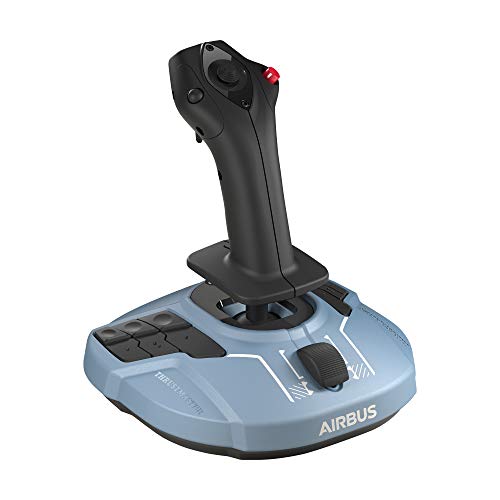
This Airbus-style sidestick is ideal for users who want better precision than entry-level sticks but do not want a full throttle bundle yet. It suits civil sim pilots who need accurate control in a compact form.
Pros
- Airbus-style design feels authentic for airliner sims
- Magnetic sensors improve long-term precision
- Built-in throttle and rudder functions add flexibility
- Compact size suits smaller desks
Cons
- Single-stick setup feels less complete than the Officer Pack
- Best for civil aviation fans, less immersive for military sims
- Plastic shell could feel basic to enthusiasts
- You may outgrow the built-in throttle later
The TCA Sidestick Airbus Edition hits a sweet spot for many Indian sim users. It gives you the Airbus-inspired feel, a strong set of buttons, and contactless magnetic sensor accuracy in a smaller and easier package than a full stick-and-throttle combo. If you mainly fly airliners and want smooth, repeatable input during climb, cruise corrections, and landing flare, this stick does the job well.
One smart part of the design is the built-in throttle and rudder control. That means you are not forced into buying extra gear on day one. For a compact setup in a bedroom or study table, this matters a lot. The remappable buttons also help when you want aircraft controls close to hand. In flight sims, less keyboard dependency usually means a more relaxed session.
For Indian buyers, this model works well as a long-term first serious joystick. Later, you can pair it with a separate throttle quadrant and build the setup step by step. Thrustmaster has a decent presence in the Indian sim and gaming market, so parts and seller support are easier to find than many specialty brands. For Airbus fans, this is one of the easiest products to like.
Next Level Racing Flight Simulator NLR-S018

This is a dedicated flight cockpit frame for users building a serious sim station. It is not a controller on its own, but it transforms comfort, mounting stability, and immersion for both civil and combat sim pilots.
Pros
- Dedicated cockpit layout improves immersion
- Supports gear from major flight control brands
- Good range of height and distance adjustments
- Includes keyboard and mouse support
Cons
- Needs significant space at home
- Much costlier and bulkier than desk use
- Assembly takes time and planning
- Not useful without separate flight controls
The Next Level Racing Flight Simulator NLR-S018 is for a different type of buyer. This is for the person who is done shifting a joystick around on a table and wants a stable, fixed flying position. Once you mount your joystick, throttle, or yoke properly, the entire sim experience changes. Inputs feel more consistent, hand placement improves, and long flights become far less tiring.
A big strength here is flexibility. The frame supports both civilian and combat-style setups, so you are not locked into one type of flying. You also get a useful adjustment range, which matters in Indian homes where one setup often gets shared by more than one person. The keyboard and mouse tray adds practical value because sim flying often involves menus, maps, ATC windows, and setup changes mid-session.
This cockpit needs space, patience, and a clear plan before purchase. If you live in a compact flat, measure your room first. But for users building a proper home simulator, this is a strong foundation. Next Level Racing has built a solid reputation among sim enthusiasts, and Indian buyers usually know the brand through racing cockpits and premium sim gear. Support depends heavily on seller channel, so buying from a trusted source matters a lot.
Thrustmaster T.16000M FCS

The T.16000M FCS is one of the strongest mid-range joystick picks for precision-focused sim users. It suits combat flying, space sims, and general aviation thanks to its accurate sensors and button-heavy layout.
Pros
- Hall effect sensors offer excellent precision
- Good button count for advanced control mapping
- Works well for combat, civilian, and space sims
- Ambidextrous design adds setup flexibility
Cons
- Throttle is not included in this version
- Base design is functional, not premium
- Button placement takes time to learn
- Plastic finish does not feel high-end
The T.16000M FCS has been a popular recommendation for years because it gets the basics right. Precision is the main reason. The Hall effect sensor system gives smoother and more reliable input than older entry-level sticks, and that matters a lot in air refueling, formation flying, helicopter correction, or fine control during landing. For DCS players and serious sim hobbyists, this extra control feel is easy to notice.
The stick also gives you a healthy number of buttons, an 8-way POV hat, and twist rudder support. That mix works well for users who want more functions on the stick itself. You can map trim, target controls, flaps, camera movement, or view changes without feeling cramped. The ambidextrous design is another bonus, especially for users who want a left-hand or right-hand setup for space sims or custom desk arrangements.
In India, this model often makes more sense than many random imported alternatives because the product has a long history and a strong user base. That means easier community support, profiles, and setup tips online. Thrustmaster’s service reputation here is not perfect, but it is still more reassuring than taking a risk on unknown brands with no local trail. If you want one stick for many types of flying, this is one of the safest picks in the list.
Buying Guide
Choose based on your type of flying
Start with the sim titles and aircraft you use most. If you mostly fly Airbus airliners in Microsoft Flight Simulator, an Airbus-style sidestick or throttle setup feels more natural. If you play DCS, War Thunder, or space sims, you will usually benefit more from a general-purpose joystick with extra buttons and strong precision.
Sensor quality matters more than flashy design
Look for Hall effect or magnetic sensors if possible. These sensors usually give smoother control and better long-term reliability than older potentiometer-based designs. In flight sims, small input errors are easy to feel, especially during landing, taxiing, and formation flying.
Think about throttle needs early
Some users are happy with a joystick that includes a small built-in throttle. Others outgrow that setup fast and want a separate throttle quadrant. If you know you will spend time in civil aviation or twin-engine aircraft, a proper external throttle often feels much better in daily use.
Check desk space and mounting options
Many Indian buyers use these controllers on a study table or work desk. Measure your space before buying, especially if you are adding a throttle quadrant or cockpit frame. A stable surface helps a lot. If the controller slips during use, precision drops and frustration rises.
Button layout affects daily comfort
Button count sounds good on paper, but placement matters more. Make sure the controls you use most are easy to reach without shifting your grip too much. For long sessions, awkward button placement gets tiring. This is more noticeable in combat sims where your hands stay busy all the time.
Build quality is important in Indian conditions
Flight sim gear often sits in rooms with dust, heat, and long summer use. A strong base, durable switches, and smoother axes help the controller age better. Plastic construction is common in this category, so pay attention to joint stability and stick wobble instead of only the outer finish.
Warranty and after-sales support deserve attention
This category is niche in India, so after-sales support can be uneven. Buy from a trusted seller with a clear return process. Brands like Thrustmaster have better recognition here than many flight-sim-only companies, but support timelines still depend on distributor stock and marketplace response. Keep invoices and packaging safe for longer than usual.
Feature Importance
| Feature | Importance |
|---|---|
| Sensor precision | High |
| Throttle control | High |
| Button count | High |
| Ergonomics | High |
| Desk stability | Medium |
| Software mapping support | High |
| Build quality | High |
| Warranty and service in India | High |
| Upgrade path | Medium |
| Cockpit or mount compatibility | Medium |