
A good gaming monitor changes how your games feel every single day. A fast panel gives smoother motion, cleaner aiming, and less blur during quick fights. For many Indian buyers, a monitor also doubles up for work, YouTube, OTT, and late-night streaming, so the right choice needs more than a high refresh rate. Screen size, panel type, resolution, eye comfort, and service support all matter.
When I shortlist gaming monitors for Indian users, I look at a few simple things first. Refresh rate and response time matter for esports and fast shooters. Resolution matters for image sharpness and how strong your PC needs to be. IPS panels usually give better colours and viewing angles, while features like FreeSync, G-SYNC compatibility, HDR support, tilt adjustment, and VESA mount support make daily use easier. Ports matter too, especially if you use a desktop, laptop, PS5, or Xbox.
The Indian market has options from value-focused Full HD models to premium 4K screens. Your choice should depend on your graphics card, room lighting, desk space, and after-sales support in your city. Below, I have picked five monitors from Acer, LG, and Samsung that cover different needs, from budget-friendly competitive gaming to high-end 4K play and mixed use.
Acer EK240Y P6

This is a simple 23.8-inch Full HD IPS gaming monitor for buyers who want 144Hz smoothness without making the setup expensive. It suits entry-level gaming, daily work, and casual media use.
Pros
- 144Hz refresh rate gives smoother gameplay
- IPS panel offers good viewing angles and decent colours
- Acer VisionCare features help during long sessions
- Frameless look and VESA support fit small desks well
Cons
- Only HDMI and VGA ports, no DisplayPort
- Full HD resolution feels basic for content work
- Stand only supports tilt adjustment
- Brightness is modest for bright rooms
Acer has kept this model focused on the basics that matter. You get a 23.8-inch IPS panel with Full HD resolution, 144Hz refresh rate, and 1ms VRB support. For gamers moving from a 60Hz office monitor, the jump in motion clarity feels easy to notice in racing games, Valorant, CS2, and similar fast titles. The zero-frame design also makes the screen look cleaner on a compact study table or hostel desk.
This monitor makes sense for Indian buyers who want one screen for college, office work, and gaming after hours. IPS viewing angles help if you watch content from the side, and eye care features like Flicker-less, BlueLightShield, and ComfyView are useful when you sit in front of the screen for long stretches. The included HDMI cable is a small but useful touch, since many budget setups need every accessory in the box.
The weak point is connectivity and adjustability. You only get HDMI and VGA, so users with newer GPUs may miss DisplayPort. Still, for a first gaming monitor, this Acer feels practical and straightforward. Acer’s service reach in India is fairly well known in major cities, and spare availability for popular models is usually easier than many lesser-known brands.
LG UltraGear 24G411A-B

LG’s 23.8-inch UltraGear model is a balanced Full HD gaming monitor with 144Hz, IPS quality, and stronger gaming features than many entry models. It works well for players who want a dependable screen for both competitive gaming and daily use.
Pros
- 144Hz IPS panel with good motion handling
- Supports both AMD FreeSync and NVIDIA G-SYNC Compatible
- DisplayPort and HDMI give better connectivity options
- Useful gaming tools like Black Stabilizer and Dynamic Action Sync
Cons
- Full HD on 23.8-inch is good, but not a step up for users seeking sharper visuals
- Stand offers tilt only, no height adjustment
- HDR10 support is limited by panel brightness
- Built-in speakers are not listed
This LG model feels more complete than many basic 144Hz monitors. The 23.8-inch IPS panel runs at 144Hz and adds features like 1ms MBR, G-SYNC compatibility, FreeSync, and anti-glare coating. In day-to-day use, this means smooth motion, lower tearing, and less distraction from room lights. If you play story games one day and competitive shooters the next, this kind of balance helps.
LG also adds many software and gaming-side tweaks. Black Stabilizer helps in dark scenes, Dynamic Action Sync lowers delay perception, and multiple picture presets make the screen easier to tune for work or games. The colour coverage of sRGB 99 percent also gives the panel a more pleasant look for videos, classes, and light photo work. For a lot of Indian homes where one monitor does everything, this matters more than flashy marketing.
Another reason many buyers trust LG is service support. LG has one of the better brand networks in India, and that matters when you are buying a display you expect to use for years. The stand is basic, and brightness is not made for strong daylight next to a sunny window, but the overall package feels sorted and dependable.
Acer Nitro VG270U X1

If you want a bigger and sharper screen for PC gaming, this 27-inch WQHD IPS monitor stands out with a 200Hz refresh rate and 0.5ms response time. It is a strong pick for buyers who want speed and better detail together.
Pros
- 27-inch WQHD panel looks sharper than Full HD options
- Up to 200Hz refresh rate suits fast competitive gaming
- Wide colour coverage with DCI-P3 90 percent
- Includes built-in speakers and multiple input ports
Cons
- You need a stronger PC to use WQHD at high refresh rates
- Stand adjustments are limited to tilt
- HDR10 support is basic, not true high-end HDR
- Built-in speakers are serviceable, not rich sounding
This Acer Nitro moves into a more serious gaming zone. The 27-inch IPS panel with 2560 x 1440 resolution gives you a big upgrade in clarity over Full HD, especially in open-world games, editing timelines, and everyday text sharpness. Then Acer adds the speed part with up to 200Hz refresh rate over DisplayPort and a rated 0.5ms response time. For PC gamers with decent hardware, this mix feels far more premium than entry-level 144Hz screens.
I also like the practical extras here. You get AMD FreeSync Premium, HDR10 support, two HDMI 2.0 ports, one DisplayPort 1.4, audio out, and built-in speakers. That gives the monitor better flexibility for a desktop and a console on the same table. The zero-frame style keeps the front neat, and VESA mount support helps if you want an arm mount for a cleaner setup, which many Indian buyers now prefer for compact work-and-play desks.
This monitor suits users who are ready to move beyond starter gaming screens. The main catch is hardware demand. WQHD at high refresh rates asks more from your GPU, so this is best paired with a mid-range or better graphics card. Acer’s service presence in India is decent in major regions, and the Nitro line is widely known, which makes the purchase feel safer than niche imports.
Samsung Odyssey G7 LS27DG700EWXXL

Samsung’s 27-inch Odyssey G7 is a premium 4K smart gaming monitor for buyers who want high detail, 144Hz speed, and TV-like smart features in one screen. It fits high-end PC gaming, console gaming, and media use in the same room.
Pros
- 4K Fast IPS panel looks crisp and detailed
- 144Hz with 1ms response suits premium gaming setups
- Smart TV apps, Wi-Fi, Bluetooth, and speakers add extra utility
- Ergonomic stand offers height, swivel, tilt, and pivot
Cons
- Needs a strong PC for 4K gaming at high refresh rates
- Premium feature set may feel excessive for pure esports users
- HDR400 is decent but far from OLED-level contrast
- Smart interface may feel busy for users who want a simple monitor
Samsung has packed a lot into this Odyssey G7. You get a 27-inch 4K Fast IPS panel with 144Hz refresh rate, 1ms response time, FreeSync Premium, G-SYNC compatibility, and DisplayHDR 400. Image sharpness is the first thing most users will notice. Text looks cleaner, game worlds look richer, and PS5 or Xbox Series X owners get a screen that makes sense for modern console output. For anyone who uses one premium monitor for games, movies, and work, 4K on 27 inches still feels superb.
What makes this model different from a normal gaming monitor is the smart side. Samsung includes OTT apps, Wi-Fi, Bluetooth, LAN, built-in speakers, and extra smart functions like TV Plus and SmartThings Hub. If your room has limited space, this screen reduces the need for a separate TV. That suits many Indian apartments, PG rooms, and bedrooms where one display handles everything from office calls to weekend gaming to cricket streaming.
Samsung also scores well on ergonomics. Height adjustment, pivot, swivel, and tilt give you much more freedom than basic stands. The service network in India is another plus, especially in bigger cities where Samsung support is easier to find. This is a premium buy meant for users who want a monitor to do more than show frames.
LG UltraGear 27GR93U
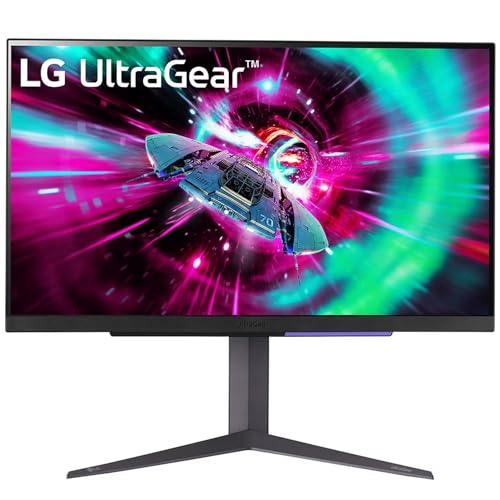
The LG 27GR93U is a 27-inch 4K IPS gaming monitor built for users who want serious image quality with fast refresh support. It is one of the better picks for PC gamers and current-gen console users who want a clean, focused gaming monitor without smart TV extras.
Pros
- 4K IPS panel with 144Hz gives sharp and fluid visuals
- HDMI 2.1 support is great for PS5 and Xbox Series X
- DCI-P3 95 percent colour coverage improves visual richness
- Strong ergonomic stand with height, tilt, and pivot adjustment
Cons
- 4K 144Hz needs a capable GPU on PC
- HDR400 support is useful but still entry-level HDR
- No smart TV app ecosystem like Samsung’s model
- 27-inch size may feel small for users expecting TV-like immersion
The 27GR93U is the sort of monitor I would suggest to buyers who want a clean, performance-first 4K display. LG uses a 27-inch IPS panel with 3840 x 2160 resolution, 144Hz refresh rate, 1ms GtG response time, and HDMI 2.1 support. That combination is excellent for both high-end PC rigs and current-gen consoles. Fast shooters feel smoother, story games look sharper, and text work on desktop apps stays crisp throughout the day.
LG has also added the right display features instead of stuffing in too much extra software. You get VESA DisplayHDR 400, DCI-P3 95 percent colour coverage, NVIDIA G-SYNC compatibility, and AMD FreeSync Premium. The panel is meant for users who care about image quality as much as speed. If you edit photos casually, watch 4K content, and play games on the same monitor, this model feels easier to justify than a pure esports screen.
For Indian buyers, the bigger comfort is brand trust. LG’s after-sales support is widely available, and UltraGear monitors have built a solid name in the market. The stand supports tilt, height, and pivot, which helps a lot during long work sessions or when you want a cleaner eye-level setup. If you want a premium 4K gaming monitor without smart TV functions getting in the way, this LG is a strong fit.
Buying Guide
Choose the right resolution for your GPU
This is the first filter. Full HD suits entry-level and mid-range gaming PCs and keeps frame rates easier to achieve. WQHD is a sweet spot for many PC gamers because image sharpness improves a lot on a 27-inch screen. 4K looks best, but your graphics card needs to be strong enough. If your GPU struggles, a 4K monitor will not feel worth the spend in fast games.
Refresh rate matters more for gaming than flashy HDR labels
If you play shooters, racing games, or battle royale titles, 144Hz already feels much better than 60Hz. Going higher to 200Hz helps more for users who play competitively and have the hardware to feed those frames. Do not get distracted by basic HDR support alone. In many monitors, refresh rate and motion handling improve the experience more than entry-level HDR.
IPS panels are a safe choice for mixed use
All five monitors here use IPS panels, and that suits most Indian buyers. IPS gives better viewing angles and more pleasant colours than many basic VA or TN alternatives. If you work in the daytime, watch content with family, and game at night, IPS tends to feel more balanced. Anti-glare coating also helps if your room gets strong tube light or window light.
Check ports before you buy
This step gets ignored too often. Some monitors only give HDMI and VGA, while others add DisplayPort, headphone out, or HDMI 2.1. PC gamers should check whether the monitor needs DisplayPort for the highest refresh rate. Console gamers should look for HDMI 2.1 if they want the best match for newer consoles. If you use speakers or headphones often, audio out also helps.
Stand quality affects daily comfort
A lot of buyers focus only on panel specs and forget ergonomics. Tilt-only stands are common in lower segments, but height adjustment, swivel, and pivot make a real difference if you sit for long hours. In Indian homes, desk height is often not ideal, so a better stand or VESA mount support helps you avoid neck strain.
Eye comfort matters in long Indian work and study hours
Many people buy a gaming monitor and then use it for office work, classes, editing, and streaming. Look for flicker reduction, blue light reduction, reader modes, and anti-glare screens. These features help if you spend long evenings in front of the display, especially in smaller rooms where the monitor sits close to your face.
Brand service network is not a small detail
A monitor is not a gadget you replace every year. Dead pixels, adapter issues, and panel faults are frustrating if service is weak in your area. LG and Samsung usually have stronger service confidence in India, especially in larger cities. Acer also has good presence across many regions. Before buying, check whether your city has an authorised service centre nearby.
Feature Importance
| Feature | Importance |
|---|---|
| Resolution | High |
| Refresh Rate | High |
| Response Time | High |
| Panel Type | High |
| Adaptive Sync Support | High |
| Port Selection | High |
| Stand Adjustability | Medium |
| HDR Performance | Medium |
| Built-in Speakers | Low |
| Brand Service Support in India | High |