High end graphics cards have become heavy, hot, and expensive, so a small thing like a GPU support bracket starts to matter a lot. A sagging card not only looks odd inside your glass side panel, it can strain the PCIe slot and cause loose connections, especially in Indian homes where the PC often gets moved or bumped.
When you pick a GPU holder or vertical mount, you need to think about build quality, riser cable standard, case compatibility, ease of installation, and looks. For Indian buyers, availability, after sales support, and long term value matter more than small premium features. In this guide I have focused on products that are easily available online in India and suit different budgets, from simple metal stands to a premium PCIe 4.0 vertical mount.
If you game late nights in the summer, run productivity workloads all day, or keep your PC on an office desk in AC, there is a bracket here that can keep your GPU safe. I will walk you through each option with clear pros and cons, and then a buying guide that keeps Indian usage, power cuts, dust, and tight budgets in mind.
NZXT Vertical GPU Mount AB-RH175-B1

Premium steel vertical mount kit with PCIe 4.0 x16 riser cable designed mainly for NZXT H7 series cases. Best suited for high end builds where looks and top performance matter.
Pros
- Thick steel bracket holds heavy GPUs without sag
- PCIe 4.0 x16 riser for modern high bandwidth cards
- Clean vertical presentation ideal for tempered glass cases
- Tuned fit for NZXT H7 series with room for air and AIO cooling
Cons
- Best fit only in NZXT H7 series, limited compatibility elsewhere
- Installation needs case disassembly and planning
- More expensive than basic GPU sag brackets
- Relies on case airflow, so cramped builds might run hotter
NZXT’s AB-RH175-B1 vertical GPU mount targets users who want a neat showcase build with a powerful graphics card front and center. The bracket uses thick steel so it feels solid in hand and handles today’s triple fan cards without bending. For Indian users where cabinets sometimes sit on uneven tables or get nudged when cleaning, this extra rigidity helps keep the GPU fixed firmly in place.
The star here is the PCIe 4.0 x16 riser cable. Newer Radeon and GeForce cards benefit from higher bandwidth and lower signal loss through a good quality riser. In many cheaper vertical mounts the cable is the weak link, which can cause instability. With this kit you get a properly shielded cable sized at 175 mm, enough for a standard mid tower layout. For users who upgrade to future GPUs, PCIe 4.0 support adds peace of mind.
NZXT has tuned the mount for its H7 series cases, which are popular in India among premium builders. The spacing keeps enough clearance for front intake fans and AIO radiators so the GPU gets fresh air. NZXT’s service presence in India is smaller than brands like Ant Esports, though their premium products generally see fewer issues. If you are okay with a higher up front cost and you already use or plan to use an NZXT H7 case, this mount suits a clean, showpiece build that still respects performance and stability in Indian conditions.
Generic Vertical GPU Mount Adjustable 72.5–111.5 mm

Budget friendly adjustable GPU holder that supports vertical style bracing for a wide range of cases. Focuses on simple setup and basic protection against sag.
Pros
- Very affordable option for first time builders
- Adjustable 72.5 to 111.5 mm range for different cards
- Works with many case sizes including mini ITX and full tower
- Simple installation with included hardware
Cons
- Brand support and warranty in India are limited
- Materials feel basic compared to premium brackets
- No riser cable, this is only a support bracket
- No RGB or aesthetic features for show builds
This generic vertical GPU mount targets users who want practical support without spending a lot. The body uses standard metal and plastic parts that are not fancy, but strong enough for mid range and some high end cards. If you are running your PC in a non AC room, where heat and small vibrations from ceiling fans or nearby traffic can affect components, even this simple support helps keep the GPU straight in the PCIe slot.
The adjustable height from 72.5 mm to 111.5 mm gives you enough freedom for different card designs and cooler shrouds. Whether you have a compact mini ITX case tucked under a hostel table or a full tower standing on the floor, you can tune the bracket to meet the bottom edge of your card. Setup is simple, you follow the basic instructions, align under the free end of the GPU, and tighten. No special tools are needed beyond what you use to mount other PC parts.
Since this is a generic product with no big brand backing, after sales in India is mostly through the marketplace where you buy it. You should treat it as a low risk buy and check it well during the return window. There is no riser cable in the box, so this is not for vertical display in a new location, it only stops sag of a horizontally mounted card. For budget focused Indian gamers or office users who have heavy cards and a tight wallet, this small stand gives you cheap protection without complex installation.
Lian Li Lancool II-1X PCIe 3.0 Riser Kit
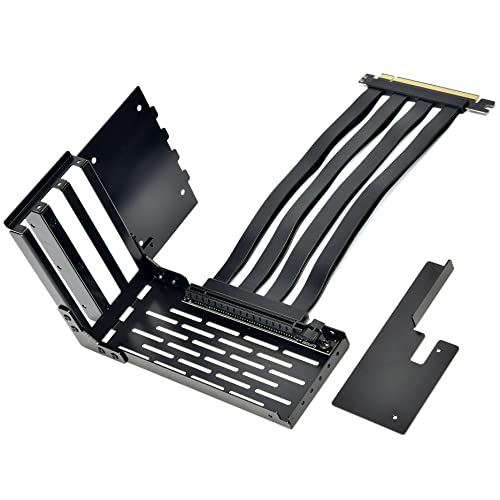
Official Lian Li riser cable and vertical GPU cover bracket for Lancool II series cases, ideal for neat vertical mounting in Lian Li mid towers.
Pros
- Made specifically for Lian Li Lancool II series cases
- PCIe x16 3.0 riser cable with 200 mm length included
- Leaves space for two 120 mm fans for better airflow
- Clean bracket cover for a tidy look inside the case
Cons
- Works only in compatible Lian Li cases
- PCIe 3.0 riser, not 4.0, which limits latest GPUs slightly
- Higher price compared to plain GPU braces
- Availability in India depends on imports and stock
Lian Li’s Lancool II-1X kit is meant for owners of the Lancool II and related models who want official support for vertical GPU mounting. The kit includes a metal cover bracket and a 200 mm PCIe 3.0 x16 riser cable, so you do not need to hunt for separate parts. For Indian users who prefer Lian Li’s clean build style and build once for long term, an official accessory like this usually gives a better fit and fewer small alignment issues.
One strong point here is airflow planning. Lian Li designed the cover so there is still room for two 120 mm fans near the GPU. In hot Indian cities where room temperature often stays high, extra fans directly pushing air to the graphics card help keep VRM and memory temperatures under control. You can keep the PC in a closed cabinet or under a desk and still get decent cooling as long as intake and exhaust are thought through.
The riser cable runs on PCIe 3.0 x16, which is fine for many current cards, especially if you game at 1440p or 4K where GPU load dominates. For some high end PCIe 4.0 cards there can be a small performance hit in bandwidth heavy scenarios. Gamers who want absolute top performance from the latest flagship GPUs should be aware of this trade off. Lian Li’s brand reputation and presence among Indian boutique builders is strong, and service for accessories is usually routed through resellers. If you already own a Lancool II case, this kit is the cleanest way to mount your card vertically without DIY adjustments.
Generic Metal GPU Stand Sag Bracket

Simple metal GPU stand with adjustable height that props up heavy cards from below. A no nonsense solution for sag in standard ATX and mATX cases.
Pros
- High quality metal construction for solid support
- Adjustable height suits many card and case layouts
- Designed to sit near fans for better heat dissipation
- Low maintenance, no cables or software involved
Cons
- Unnamed brand with limited structured support in India
- Plain looks, no RGB or styling elements
- Setup needs manual trial and error for ideal height
- Some users might find the design bulky in small cases
This generic metal GPU stand focuses on one job, hold your graphics card up. The body uses thick metal so it does not bend or shake easily, important in Indian homes where floors can vibrate slightly when people walk or when the PC rests on a thin wooden table. Once you adjust the stand to the correct height, it supports even large triple fan GPUs and keeps the rear of the card level with the PCIe slot.
The manufacturer mentions that the bracket is meant to be fixed near a fan for faster heat dissipation. In practice, you place the stand near the end of the card, often near the front intake fans or the PSU shroud vent. Air moves around the support without much obstruction, which is important in hot months when case temperatures climb. Since there are no cables, lights, or moving parts, there is almost nothing to fail in daily use.
Installation is straightforward though you need a bit of patience. You place the stand roughly under the heavy end of the GPU, adjust the telescopic section until the card sits level, then tighten. This is a one time job for most users. Because the product is generic, warranty or RMA in India depends on the online seller. Thankfully, the simple construction means there is little that can go wrong. For office machines running 3D workloads, cyber cafe PCs, or home gaming rigs on a budget, this bracket adds safety with minimal extra complexity.
Ant Esports GCB90 ARGB GPU Brace

Adjustable aluminum alloy GPU anti sag bracket with addressable RGB lighting and rubber grommets. A feature rich option from a popular Indian focused brand.
Pros
- Aluminum alloy body is durable yet light
- Built in ARGB strip supports 5V 3 pin motherboard headers
- Length and height are adjustable for broad GPU support
- Rubber grommets prevent scratches on the GPU shroud
Cons
- Requires ARGB header for full lighting control
- ARGB cable adds to cable management work
- Not a full vertical mount, only anti sag support
- RGB look might not suit minimal or office builds
Ant Esports targets Indian PC builders directly, and the GCB90 GPU brace fits well into that space. The body uses aluminum alloy, which keeps weight low compared to thick steel while still holding heavy triple slot GPUs. This matters if your case is thin or if you transport your PC for LAN events or between hostel and home, because a heavy support can itself stress the case floor.
One major draw of the GCB90 is its ARGB lighting. The bracket includes an addressable strip that plugs into a 5V 3 pin ARGB header on your motherboard. You can sync it with MSI Mystic Light, Asus Aura Sync, and similar software so the brace follows your case lighting theme. For many Indian gamers who like to show off their setup with a glass side panel, this turns a simple support part into a visible element of the build.
Functionally, the adjustable length and height let the GCB90 work with a wide variety of cards, from mid range dual fan models to long high end GPUs. Rubber grommets at the contact points protect the card shroud from scratches, which matters if you plan to resell the GPU later. Ant Esports has stronger presence in India compared to most generic brands, with wider availability and better basic support via local distributors. For someone who cares about both looks and protection, and who wants parts that match the Indian retail ecosystem, the GCB90 is a sensible and still affordable choice.
Buying Guide
Set a sensible budget for your GPU support
For Indian buyers, the GPU often eats the largest share of the PC budget. A support bracket or vertical mount is a small part of the spend, but you still need to think clearly about cost. Simple metal stands are inexpensive and solve sag for most mid range builds. Branded vertical mounts with riser cables cost a lot more, often close to the price of a low end motherboard. Spend more only if you want a show build with full vertical display or if you run a high end card and plan to keep the system for many years. Always keep some margin for extra fans or better PSU, since those improve stability in Indian conditions more than cosmetic parts.
Check PCIe generation and riser cable quality
If you are looking at vertical mounts with riser cables, pay close attention to PCIe generation. Many affordable mounts still use PCIe 3.0. These work fine with many GPUs, but the latest PCIe 4.0 cards perform best with PCIe 4.0 risers. A low quality riser can cause random crashes, artifacts, or failure to boot. For Indian users who face frequent power cuts and voltage swings, a flaky riser only adds to troubleshooting pain. Pick a known brand for risers or use a kit that includes a tested cable, and keep cable length as short as your layout allows.
Match the bracket to your PC case and GPU size
Compatibility is the biggest practical point before ordering. Vertical mounts like the NZXT and Lian Li kits are tuned for specific cases. Measure clearance from the PCIe slot to the side panel, and check how many vertical slots your case has. For simple stands, measure the distance from the graphics card edge to the case floor or PSU shroud. Large triple fan cards need longer and stronger supports. In smaller Indian homes where the PC sometimes sits inside closed wooden cabinets, access space can be tight, so plan for installation room too.
Think about airflow and thermals in Indian climate
Indian summers push room temperatures high, sometimes above 35 degrees even indoors. Any GPU mount must work with proper airflow. When you mount a card vertically, the fans on the GPU often sit closer to the glass panel, which can restrict intake if the gap is small. Check reviews and user photos for how much distance stays between the fan and glass. For sag brackets under horizontal cards, confirm that the stand does not block bottom intake fans. Add at least one front intake and one rear exhaust fan, and clean dust filters often, especially if you keep windows open.
Build quality, materials, and long term durability
Good GPU supports use steel or aluminum alloy that stays straight over time. Thin plastic parts can warp in heat or crack if you shift the PC. Look at how the joints lock, threaded sections, and base contact points. A heavier support feels safer in hand, but if your case uses thin sheet metal, a lighter aluminum brace like the Ant Esports GCB90 may be smarter. In many Indian homes the PC moves during cleaning or shifting houses, so favor sturdy construction and simple mechanical design over complex folding arms or multiple hinges.
Warranty, brand presence, and service in India
Branded parts such as NZXT, Lian Li, and Ant Esports come with formal warranty, but coverage and turnaround differ. Ant Esports is widely available with better local distributor support, which suits budget Indian builds. International brands often route service through the retailer. For low cost generic mounts, you mostly rely on return windows rather than long warranties. Always check seller ratings and how easy returns are on the platform you use, especially if you order riser cables where defects show up early.
Ease of installation and maintenance
If you build your PC for the first time, avoid overly complex mounts that need case cutting or many steps. Simple stands that sit on the case floor install in minutes. Vertical mounts need more planning, because you must remove slot covers, route the riser cable, and sometimes shift other cards. In Indian setups where space around the PC is limited, easy installation saves a lot of frustration. Maintenance is simple for most brackets, you only check screws once in a while and wipe off dust when you open the case for cleaning.
Aesthetics, RGB, and desk presence
For many Indian gamers, the PC is also a showpiece on the desk. If you care about looks, ARGB options like the Ant Esports GCB90 let you sync lighting with the rest of the build. Vertical mounts place the fan side of the card toward the glass, which shows off custom coolers. On the other hand, office users or minimalists may prefer plain black supports with no lighting that blend into the background. Decide early how important looks are for you so you do not end up paying for RGB that you never connect.
Feature Importance
| Feature | Importance |
|---|---|
| Build material and structural strength | High |
| Riser cable PCIe generation and quality | High |
| Compatibility with case and GPU length | High |
| Airflow clearance near side panel and fans | High |
| Ease of installation in tight spaces | Medium |
| Brand warranty and service in India | Medium |
| Adjustable height and length range | Medium |
| Aesthetics and RGB lighting options | Medium |
| Price relative to overall PC budget | High |
| Extra features such as rubber grommets | Low |