
For many of us who spend long hours on a laptop or desktop, a good mouse feels as important as a good chair. Logitech’s MX Master series has become a favourite in India for office work, coding, content creation, trading, and even casual gaming. These mice focus on comfort, smart shortcuts, and precise tracking that suits long workdays in Indian homes and offices.
When you pick an MX mouse, you need to think about your operating system, how many devices you work on, battery life, noise levels, and whether you want the newest features like haptic feedback or an 8K DPI sensor. Price and availability in India also matter a lot because stocks fluctuate on Amazon and local stores, and older models often give better value for money while still being fast and reliable.
This guide focuses on the 5 best Logitech MX Master options and one travel case available in India right now. I will walk you through which one works better for Windows, which one is ideal for Mac users, who should pick the older MX Master 2S to save money, and why a hard case is a smart add-on if you travel between office, college, and home.
Logitech MX Master 4

Flagship ergonomic wireless mouse with haptic feedback, MagSpeed scroll wheel, and dual connectivity for serious productivity users.
Pros
- Advanced haptic feedback for shortcuts and alerts
- MagSpeed wheel scrolls long documents extremely fast
- Dual connection with stronger radio and USB-C dongle
- Comfortable ergonomic design with thumb scroll wheel
Cons
- High price compared to older MX models
- Right-handed design only, no option for left-handed users
- Needs Logi Options+ software for full customisation
- Haptic features may feel overwhelming at first
Logitech MX Master 4 targets power users who live on spreadsheets, timelines, and long documents. The standout feature is the Haptic Sense Panel, which lets you feel subtle feedback for specific actions, shortcuts, and notifications. For example, you can set a gentle vibration when you switch between desktops or trigger a macro. This feels helpful for creators, editors, and coders who juggle multiple apps and need clear, physical cues without looking away from the screen.
The MagSpeed scroll wheel handles long PDFs and Excel sheets in a way traditional wheels cannot match. You can scroll thousands of lines in a second, then stop on a single cell or word. For Indian office users who work with GST sheets, large code files, or research papers, this saves time and reduces finger strain. There is also a thumb scroll wheel, which is handy for horizontal movement in video timelines, big sheets, or wide dashboards, something you often see in finance and design work.
Connectivity is one of the big upgrades. With a stronger radio chip, a USB-C receiver, and Bluetooth, you get more stable performance even in crowded office environments with a lot of wireless devices. This is useful in Indian co-working spaces or busy home setups with multiple phones, routers, and smart devices. Logitech’s service network in India is among the better ones for computer accessories, with decent support in metros and easy replacement through Amazon and authorised service centres. For someone who wants the latest features and does not mind paying extra for them, MX Master 4 feels like a complete workhorse for both Windows and Mac users.
Logitech MX Master 4 for Mac

Mac-focused version of the MX Master 4, tuned for macOS and iPadOS with colour and software integration that fits the Apple ecosystem.
Pros
- Optimised for macOS with Logi Options+ profiles
- USB-C charging matches modern Mac and iPad chargers
- Quiet and precise MagSpeed scrolling
- Colour and finish suit Apple devices
Cons
- Limited value for users who only use Windows PCs
- Same high pricing as the standard MX Master 4
- Haptic features need some time to customise
- No USB-A receiver included for older devices
Logitech MX Master 4 for Mac aims at users locked into the Apple ecosystem. The mouse is tuned for macOS and iPadOS, with Logi Options+ giving you ready-made profiles for Finder, Safari, Final Cut Pro, Lightroom, and other popular Mac apps. You plug it in, map a few shortcuts, and your most common tasks feel quicker. The finish in pale grey pairs cleanly with MacBooks, iMacs, and iPads, which matters to many Apple users who like a uniform desk look.
Charging is through USB-C, which means you can use the same charger as your MacBook or iPad. For Indian users who travel between home and office, one less cable helps keep the bag lighter. The MagSpeed scroll wheel feels smooth and fast when you move across long Xcode logs or FCP timelines, and the thumb wheel gives fine control in editing layouts. Ergonomically, the design puts your wrist in a relaxed angle, which helps if you work long hours and deal with wrist pain or mild carpal tunnel discomfort.
The MX Master 4 for Mac relies on Bluetooth, and Logitech tunes it for reliable pairing with Macs. This avoids clutter from dongles, which is essential for MacBooks with limited ports. The brand’s service support in India usually handles MX series warranty claims without much drama, especially if you purchased from authorised channels. For designers, editors, and developers on Mac who want an ergonomic upgrade and deep app-specific custom control, this Mac version makes more sense than the regular MX Master 4.
Logitech MX Master 3S for Mac
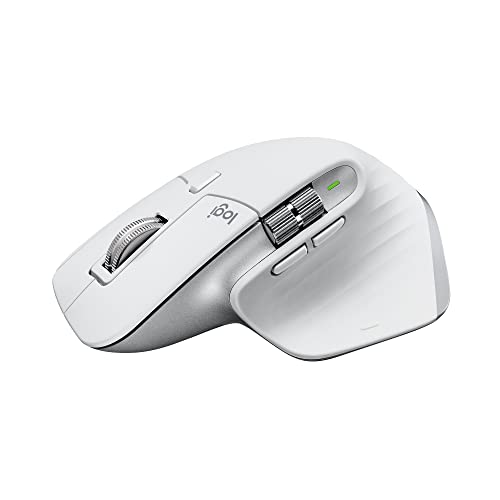
Previous generation Mac-focused mouse with 8K DPI sensor, silent clicks, and strong value for Mac users who do not need haptics.
Pros
- 8K DPI sensor tracks even on glass surfaces
- Quiet clicks reduce noise in shared spaces
- MagSpeed scrolling still fast and accurate
- Often better value than MX Master 4 for Mac
Cons
- No haptic feedback system
- Older generation compared to MX Master 4 line
- Only Bluetooth, no dedicated USB receiver in the box
- Some users find software setup confusing
Logitech MX Master 3S for Mac offers a sweet spot for many Indian Mac users who want performance without chasing the newest model. The 8K DPI sensor tracks smoothly on almost any desk, including glossy glass tops that you see in many Indian offices and cafes. You do not always get the luxury of a mouse pad, so this feature matters. Quiet Clicks reduce sound by around 90 percent compared to older loud buttons. This is perfect for late-night work at home when family members sleep nearby or when you work from a quiet library or co-working cabin.
MagSpeed scrolling here stays fast and controlled. You move quickly through long PDFs, code files, or timelines, while the wheel automatically shifts between ratchet and free scroll modes. Ergonomics follow the well-known MX shape with a comfortable hand rest and thumb controls placed in easy reach. For Indian users with long shifts in front of the screen, this shape helps reduce fatigue compared to flat travel mice.
Battery life stretches up to around two months on a full charge, and a one-minute quick top-up through USB-C gives hours of use when you forget to charge. The mouse connects over Bluetooth and supports multi-device pairing across up to three Macs or iPads, which suits creators who use a MacBook along with a Mac mini or iPad. Logitech India service handles MX Master 3S well, since it has been in the market for some time, so spare units and replacements are usually not an issue. If you want a silent, high-resolution Mac mouse and do not care much about new haptic tricks, the MX Master 3S for Mac feels like strong value.
M.G.R.J MX Master Carry Case

Hard protective travel case for Logitech MX Master 4, 3, 3S, and 2S mice, designed for safe carrying in bags and backpacks.
Pros
- Perfect fit for MX Master series mice
- Shockproof shell protects from drops and bumps
- Dust and water resistant outer material
- Includes lanyard for easy carrying
Cons
- Only a case, mouse sold separately
- Takes extra space in compact laptop bags
- No internal pocket for dongles or cables
- Unknown brand compared to Logitech
The M.G.R.J MX Master Carry Case is a simple but practical accessory if you often carry your MX Master mouse on the go. MX mice are not cheap, and tossing them loose in a backpack with keys and chargers is a risk. This hard shell case wraps around the mouse with a snug fit which reduces movement inside. The interior padding helps handle light drops or bumps in crowded buses, metro rides, or during flights where luggage is handled roughly.
The case uses a strong 360 degree zipper that opens without snagging, and a small hand strap that lets you hold or hang it easily. For Indian users who travel between hostel and office, or students taking their own mouse to college labs, this adds peace of mind. The outer material is dust resistant and offers some water resistance, helpful during monsoon months when bags see light rain or moisture on bike rides.
Since M.G.R.J is not a premium international brand, expectations should be realistic. Still, for the price, the case does its job of protecting the mouse from scratches and dents. There is a basic lanyard included, which can be handy if you want to hang it on a hook near your desk. Warranty and service will not match Logitech level, but the product is simple enough that most users do not face serious issues. For anyone who spent good money on an MX Master mouse and travels often, this kind of case feels like cheap insurance.
Logitech MX Master 2S Bluetooth

Older generation MX Master with cross-computer Flow control, strong sensor, and great ergonomics at a lower price point.
Pros
- Supports Logitech Flow for multi-computer control
- Tracks on most surfaces, including glass
- Connects to up to three devices
- Good battery life with fast recharge
Cons
- Older design compared to MX Master 3S and 4
- Micro USB charging instead of USB-C
- Clicks louder than newer quiet models
- Scroll wheel and sensor not as advanced as newer models
Logitech MX Master 2S Bluetooth Edition still holds up well for many office and productivity users in India. The standout feature is Logitech Flow, which lets you move the cursor across multiple computers and copy paste text, images, and files between them. For example, if you use a work laptop and a personal desktop on the same desk, you can drag content across displays as if they were one system. This helps a lot for IT professionals, traders, and creators who juggle multiple machines.
The sensor tracks on almost any surface, including polished wood and glass, which suits the mix of furniture you find in Indian homes and offices. The shape of the mouse is ergonomic with a raised palm rest and thumb support that helps reduce wrist strain. Although this is an older model, the comfort level is still strong compared to many new budget mice on the market.
Battery life reaches around two months on a single charge, depending on usage. The main drawback here is the micro USB charging port, which feels dated in 2025 when most phones and laptops use USB-C. Still, since you charge infrequently, this may not be a daily annoyance. Logitech’s service and parts availability for MX Master 2S in India are decent because the product sold in large numbers. For buyers who want the MX experience and are watching their budget, the 2S version tends to give the best value if you find genuine stock from trusted sellers.
Buying Guide
1. Budget planning for MX Master mice in India
MX Master mice sit in the premium segment of the Indian market. Newer models like MX Master 4 and MX Master 4 for Mac ask for a noticeable premium compared to older MX Master 2S or 3S. Before you choose, decide if you need the latest features like haptic feedback and stronger wireless, or if you are okay with a slightly older design for better value. For office users, students, and freelancers, older models often give most of the same comfort and performance at a lower spend. Keep an eye on Amazon sales, bank offers, and festival deals, since MX series prices fluctuate through the year.
2. Choosing between Windows and Mac focused models
One of the first decisions is your primary operating system. If you use mostly Windows or a mix of Windows and Android, the regular MX Master 4 and MX Master 2S make more sense. They come with receivers or broader compatibility across platforms. If your main machine is a MacBook, iMac, or iPad, the MX Master 4 for Mac or MX Master 3S for Mac give better software tuning and ready app profiles for macOS and iPadOS. These profiles save time because you get common shortcuts mapped from day one. Cross-platform users who switch between Windows laptop and MacBook should focus on models with Bluetooth multi-device support.
3. Technical specifications that matter day to day
Spec sheets mention DPI numbers, sensor type, scroll wheel design, and custom buttons. For office and creative work in India, smooth tracking on different surfaces is more important than the highest DPI. MX Master 3S for Mac, for example, offers an 8K sensor that tracks well on glass. Scroll wheels also differ. MagSpeed wheels let you scroll through long PDFs and Excel files quickly while still stopping accurately on a single line. Extra buttons and thumb wheels save time if you map them to copy, paste, forward, backward, desktop switching, or timeline scrubbing.
4. Ergonomics and long term comfort in Indian conditions
Heat and humidity in many Indian cities make long work sessions uncomfortable. A flat mouse with poor shape can increase sweat and wrist pain. MX series mice have taller bodies with proper palm and thumb support. This helps maintain a more natural wrist angle, especially during 8 to 10 hour workdays. If you already have mild wrist pain or use a laptop trackpad full time, shifting to an ergonomic mouse such as MX Master 2S or MX Master 4 can make a visible difference in comfort. Pair the mouse with a decent mouse pad and a proper chair height for best results.
5. Connectivity, multi device workflow, and travel use
Many Indian professionals use one laptop for office, another for personal work, and sometimes a tablet. MX Master mice handle this with Bluetooth multi-device pairing. You press a button to switch between up to three systems. This is helpful in small home offices where you do not have space for separate peripherals. If you travel often between home, office, or college, look for strong wireless stability and consider a travel case like the M.G.R.J MX Master Carry Case. A case protects the mouse in crowded bags, auto rides, metro rush, and during monsoon.
6. Build quality, durability, and cleaning
MX series mice use sturdy plastics and solid internal components, designed for long daily use. For Indian conditions, dust and sweat are the main enemies. Wipe your mouse regularly with a soft cloth slightly dampened with water, especially the thumb rest area. Avoid harsh cleaning sprays. If your desk is dusty, a mouse pad helps protect the feet and sensor. A hard shell carrying case reduces chances of cracked buttons or scroll wheels when the mouse sits in a bag next to chargers and adapters.
7. Software, customisation, and learning curve
To get full value from MX Master mice, you need to install Logi Options+ software on Windows or macOS. The software lets you remap buttons, adjust scroll behaviour, and set app-specific actions. There is a small learning curve, especially for new users, but once you spend some time, your daily tasks feel quicker. For example, you can set the thumb button to show all windows, or map horizontal scroll to timeline zoom in editing software. Indian users who handle repetitive tasks like data entry, design, or coding benefit a lot from thoughtful custom setups.
8. Warranty, service, and buying from trusted sellers
Logitech offers limited hardware warranty on MX series mice in India, usually one or two years depending on the model and batch. Service centres in big cities like Delhi, Mumbai, Bengaluru, Chennai, and Kolkata handle most claims. Support is easier if you buy from authorised sellers on Amazon or offline retailers, since fake or parallel imports cause warranty rejection. Accessories from third party brands, such as carrying cases, typically have basic replacement policies at best. Before you purchase, check seller ratings, return policy, and warranty terms to avoid hassles later.
Feature Importance
| Feature | Importance |
|---|---|
| Ergonomic design and comfort | High |
| Operating system compatibility (Windows/macOS/iPadOS) | High |
| Sensor performance and surface tracking | High |
| Scroll wheel type and speed (MagSpeed, hyper-fast) | High |
| Multi device pairing and Logitech Flow support | Medium |
| Noise level of clicks and scrolling | Medium |
| Charging port type (USB-C vs micro USB) | Medium |
| Battery life per charge | High |
| Build quality and durability of buttons and wheel | High |
| Accessories like protective carrying case | Low |