
A good mechanical keyboard changes how your desk feels every day. You notice it while gaming, while typing long assignments, and even during simple office work. Better switches, cleaner feedback, and stronger key rollover make a big difference once you move past a basic membrane board. In India, this category has grown fast because more buyers want compact setups, better typing feel, and longer life from their accessories.
When you pick a mechanical keyboard, look at the switch type, layout, build quality, backlighting, hot-swap support, and connection mode. Wired models still make sense for low-latency gaming, while wireless models suit users who shift between laptop, tablet, and desktop. You should also check service support in India, because switch issues, cable wear, or RGB faults are easier to handle when the brand has a visible local presence.
For Indian buyers, value for money matters a lot. Dust, heat, heavy daily use, and crowded desks all affect what works best. Compact 68-key and TKL boards save space, but you need to think about missing keys and function layers. The five keyboards below cover different needs, from budget gaming to quieter typing and cleaner compact setups.
EvoFox Katana S Mini Wireless

This compact 68-key keyboard suits gamers and multitaskers who want wireless freedom, hot-swap support, and a smaller desk footprint. Tri-mode connectivity gives it more flexibility than most entry-level mechanical keyboards.
Pros
- Tri-mode connection with Bluetooth, 2.4GHz, and wired use
- Hot-swappable red switches for easier customization
- 1000Hz polling rate in wired and 2.4GHz mode
- Compact 68-key layout saves desk space
Cons
- 60% style layout needs Fn shortcuts for many functions
- Rainbow backlight is less customizable than full per-key RGB
- ABS body feels lighter than premium metal boards
- Wireless performance is best in 2.4GHz, not Bluetooth for gaming
The EvoFox Katana S Mini Wireless is built for users who want one keyboard for many devices. You get support for three Bluetooth pairings, a 2.4GHz dongle mode, and wired mode, which makes daily switching easy if your setup includes a gaming PC, work laptop, and tablet. For Indian homes where one desk often handles study, work, and gaming together, this kind of flexibility feels useful from day one.
Its pre-installed Jixian red switches aim for a smoother and quieter feel than clicky switch options. That makes this keyboard a safer pick for shared rooms, hostel setups, or late-night gaming sessions. The hot-swap support adds another layer of value because you are not locked into one switch feel forever. If a switch starts acting up after long use, replacing a few switches is simpler than replacing the whole keyboard.
The compact 68-key layout gives you arrow keys while keeping the board short and easy to carry. EvoFox also claims 1000Hz polling rate with anti-ghosting in wired and 2.4GHz mode, which matters more for competitive play than Bluetooth mode. In India, EvoFox has built decent visibility in the budget gaming segment, and service access is usually better than what you get from obscure import-only brands sold online.
EvoFox Katana S Mini Wired Black
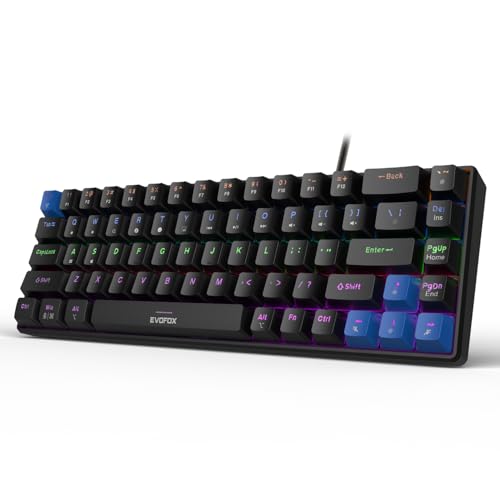
This wired version of the Katana S Mini is a straightforward pick for budget gaming and daily typing. It keeps the compact layout, hot-swap support, and fast polling rate without the battery and wireless layer.
Pros
- Stable wired connection for gaming
- Hot-swappable silent red switches
- 1000Hz polling rate with all-key anti-ghosting
- Lightweight and easy to fit on small desks
Cons
- No wireless mode
- 68-key layout has a learning curve
- Rainbow lighting looks basic beside per-key RGB boards
- Plastic build does not feel as dense as gasket-style keyboards
If you want the Katana experience without paying for wireless features, the wired black version makes more sense. It keeps the same 68-key compact body, silent red switch setup, and 1000Hz polling rate. For players who stay on a desktop and do not move the keyboard between devices, a wired-only board often ends up being the smarter buy because there is less to charge and fewer connection variables to manage.
The silent red switches make this keyboard friendlier for mixed use. You can play FPS titles at night, then switch to office typing in the morning without dealing with loud click noise. Hot-swap support is a strong addition in this segment because many buyers enter the mechanical keyboard market with one switch type and later want a different sound or feel. This model leaves that door open.
Its black finish suits darker desk setups and tends to hide dust and wear better, which matters in many Indian cities where fine dust builds up quickly on peripherals. The feature set is simple, but simple works when you want reliable input, anti-ghosting, and a compact frame. EvoFox also has decent recall among Indian gaming accessory buyers, which gives more confidence than a random low-cost board with no support trail.
Cosmic Byte CB-GK-26 Pandora TKL

The CB-GK-26 Pandora is a TKL-style option for users who want more keys than a 68-key board but still want a smaller footprint than a full-size keyboard. It is a practical choice for gaming, study, and office work on a budget.
Pros
- TKL format gives more usable keys than 60% layouts
- Outemu red switches suit quieter gaming and typing
- Double-shot keycaps help with long-term legend durability
- 20 lighting effects and 8 game modes
Cons
- Larger footprint than ultra-compact boards
- Wireless connectivity is absent
- Outemu ecosystem limits switch choices compared to universal hot-swap sockets
- Rainbow LED setup is less refined than full RGB implementations
The Cosmic Byte CB-GK-26 Pandora sits in a sweet spot for many Indian buyers. A lot of people like compact keyboards until they start missing dedicated navigation and function access. This keyboard solves part of that problem by using a TKL-style layout, so you save desk space compared to a full-size board but still keep a more familiar typing experience than a 68-key compact model.
Outemu red switches make the board easier to live with in classrooms, shared flats, and work-from-home setups. Cosmic Byte claims long switch life and all-key anti-ghosting, which is useful for games that need multiple simultaneous inputs. The double-shot keycaps are also a meaningful plus because printed legends tend to wear faster under sweaty fingers and heavy use, especially in hot Indian summers.
Cosmic Byte has stayed visible in the Indian gaming accessory segment for years, so this board feels familiar to many first-time buyers. The Pandora is not trying to be flashy in every area. Instead, it gives you a safer layout, reliable wired use, decent lighting control, and a mechanical feel that is easier to recommend to students and entry-level gamers who want fewer compromises in daily use.
EvoFox Katana S Mini Wired White

This white version of the Katana S Mini offers the same core performance as the black model but fits brighter setups better. It is a good pick if you want a clean desk look without giving up gaming-friendly basics.
Pros
- Compact 68-key body for smaller desks
- Hot-swappable silent red switches
- 1000Hz polling rate and anti-ghosting
- White finish looks clean in modern setups
Cons
- White body needs more frequent cleaning
- No wireless support
- Function-layer dependence for secondary controls
- Lighting is rainbow based, not full per-key RGB
The white EvoFox Katana S Mini Wired is almost the same keyboard as the black version in core hardware, but the color changes the audience a bit. If your setup has a white cabinet, pastel accessories, or a brighter work desk theme, this one blends in better. In India, many buyers now care about desk aesthetics along with raw specs, especially students and creators building a cleaner compact setup.
Performance stays focused on the basics that matter. You get hot-swappable silent red switches, a 68-key layout, anti-ghosting, and 1000Hz polling rate. That makes it suitable for casual and competitive gaming, while the smoother switch feel also works for everyday typing. Because the board is light, moving it between a home desk and office bag is easy, though the compact layout will need a few days of habit building if you are shifting from a full-size keyboard.
White peripherals look great, but they show dust sooner, and Indian conditions are not gentle on light-colored accessories. You will need to clean the keycaps and edges more often. Still, for buyers who want an affordable compact mechanical keyboard that does not look generic, this version has clear appeal. EvoFox service perception in India is fairly decent in the budget segment, which adds a bit of comfort if something goes wrong later.
EvoFox Ronin Wired
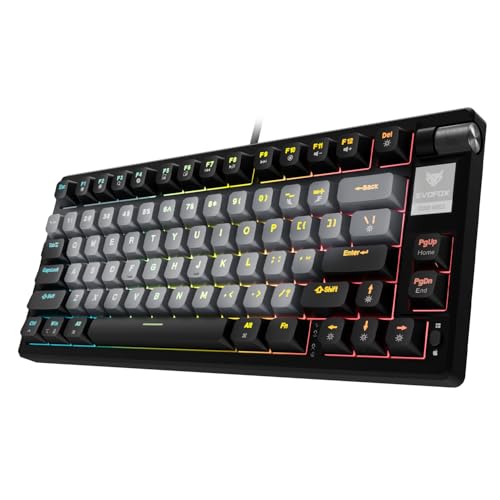
The EvoFox Ronin Wired is the most feature-rich keyboard in this list, aimed at users who care about sound dampening, customization, and a more premium typing feel. It is better suited to enthusiasts who want more than a basic entry-level board.
Pros
- 9-layer gasket sound dampening design
- Hot-swappable Outemu red silent switches
- Per-key RGB with multiple effects
- Volume knob and Windows software support
Cons
- Wired-only design limits portability
- Software benefits are strongest on Windows
- Likely bulkier than ultra-compact models
- Advanced features may feel excessive for first-time buyers
The EvoFox Ronin Wired targets a different buyer from the Katana series. This keyboard focuses more on typing feel, acoustic control, and customization. The 9-layer gasket sound dampening design is the headline feature here, and for many users that translates into a softer, less harsh typing sound. If you dislike the hollow noise common on cheaper boards, this model makes a stronger first impression.
Hot-swap support, silent Outemu red switches, per-key RGB, onboard memory, and Windows software push the Ronin closer to enthusiast territory. The volume knob is another practical addition. Once you use a knob for quick volume changes during gaming, calls, or music playback, going back to Fn shortcuts feels less convenient. These touches make the Ronin better for people who spend long hours at the desk and care about comfort as much as input speed.
For Indian buyers, this keyboard stands out because premium feel in the budget-to-mid segment is still hard to find. The detachable Type-C braided cable also helps with transport and replacement ease. EvoFox has a growing name in gaming accessories here, and while service standards vary by case, local availability and recognition are better than niche imports. If you want the most serious mechanical keyboard in this group, the Ronin is the one I would look at first.
Buying Guide
Pick the right layout first
Layout changes your daily experience more than RGB or switch branding. A 68-key keyboard saves the most desk space and still keeps arrow keys, but you will rely on Fn shortcuts for many commands. A TKL board gives a more familiar structure and is easier for office work, coding, and spreadsheet use. If you are moving from a full-size keyboard, TKL often feels easier on day one.
Switch type affects noise and feel
Most keyboards in this list use red switches. Red switches suit gaming because the keystroke feels smooth and the sound stays lower than blue switches. For Indian homes where one room often serves many people, quieter switches make more sense. If you like a stronger tactile bump for typing, check whether the keyboard supports hot-swap sockets so you can change switches later.
Wired or wireless depends on your routine
If you play competitive games, wired or 2.4GHz wireless mode is the safer choice because input delay stays lower and more stable. Bluetooth is better for typing, casual use, and multi-device setups. If your desk is fixed and you mostly use one PC, a wired keyboard keeps things simple. If you switch between laptop, tablet, and desktop, tri-mode models save time and cable mess.
Hot-swap support adds long-term value
Hot-swappable keyboards are easier to maintain and upgrade. You can replace a faulty switch without soldering, and you can change the feel of the keyboard later. In India, where many buyers keep accessories for years, this feature matters more than people think. Dust, heavy use, and accidental spills sometimes damage individual switches first, not the entire board.
Build quality matters in Indian conditions
Dust, humidity, and heat affect peripherals over time. Look for strong keycaps, stable feet, decent cable quality, and a body that does not flex too much. White keyboards need more cleaning. ABS plastic is common in this segment and works fine, but denser construction and better internal damping improve both sound and feel during long use.
Backlighting should match your real use
Many buyers chase RGB first, then ignore how they use the keyboard. If you play or work at night, adjustable brightness is more useful than fancy effects. Rainbow backlighting looks good from a distance but gives less control than per-key RGB. If your room lighting is low, check whether legends stay readable and whether the effects distract during daily work.
Software and shortcuts are worth checking
Some keyboards rely only on onboard shortcuts, while others offer software for macros, remapping, and lighting control. If you need custom profiles for games or work apps, software support helps a lot. Mac users should also check whether the keyboard has a proper Mac mode or key mapping support, because many budget boards still focus mainly on Windows.
Feature Importance
| Feature | Importance |
|---|---|
| Switch type | High |
| Layout size | High |
| Hot-swap support | High |
| Connection mode | High |
| Polling rate | Medium |
| Anti-ghosting / N-key rollover | High |
| Backlighting quality | Medium |
| Build quality | High |
| Software customization | Medium |
| Warranty and service in India | High |