

If you spend long hours in front of a computer, a good monitor light bar helps more than any fancy wallpaper or desk plant. It reduces eye strain, improves focus, and keeps your workspace neat because you do not need a bulky table lamp. For Indian users who work late, binge OTT at night, or code in small hostel rooms, a light bar on top of the monitor is a simple upgrade that feels instantly more comfortable.
When you choose a monitor light bar, you need to think about a few basics. How evenly it lights your desk, whether there is screen glare, how easy the controls are in the dark, and if you get warm and cool color temperatures for both work and relaxation. For gamers, RGB backlighting and wide coverage matter. For office and study use, eye comfort and dimming control matter more. In India, you also need to think about power via USB, compatibility with thin laptops or curved monitors, and after-sales support because replacement through local service or Amazon sellers should not become a headache.
This guide picks 5 strong options available in the Indian market that suit different users, from budget buyers who want a simple USB bar for a laptop, to gamers with curved 27 inch monitors. I will walk you through where each product shines, where it falls short, and what kind of Indian user and setup it suits best.
Techzere 13-Inch Monitor Screen Light Bar

Compact USB-powered light bar for laptops and thin monitors with simple touch controls and stepless dimming for late-night reading or work.
Pros
- Works with both laptops and thin desktop monitors
- Three color temperatures for study, work, and relaxed use
- Stepless dimming with 60 minute timer for eye comfort
- USB powered from laptop, charger, or power bank
Cons
- Short 13 inch length, not ideal for large monitors
- No backlight or RGB effects for ambience
- No remote control, all controls on the bar
- Brand support and warranty visibility in India is limited
Techzere’s 13 inch light bar targets students, freelancers, and work from home users who sit close to a laptop or a small monitor. The design clips on top of thin screens and throws light down on the keyboard and desk without hitting the display. That matters in Indian homes where you often work in a dim bedroom or shared living room and do not want reflections on glossy laptop panels.
You get three color modes, cool white for tight work like spreadsheets, warm white for night browsing, and a middle tone for general use. Stepless dimming lets you fine tune brightness instead of fixed steps, helpful when your eyes already feel tired after a day of meetings. The 60 minute auto timer is a small but thoughtful touch, you switch it on for a study session and when it goes off you know it is time for a break. Power comes from any USB port, so if you sit far from a wall socket in a hostel, a power bank in your drawer is enough.
Build quality is basic plastic but decent for a budget tool. Since Techzere is not a major national lighting brand, you should treat this more like a functional accessory than a long term investment. On Amazon, replacement tends to depend on the seller rather than a large service network. For students, part time creators, or office workers who need an affordable way to cut eye strain without crowding a small desk, this light bar gives good value if you accept that service support is modest.
Quntis ScreenLinear ML214 Monitor Light Bar
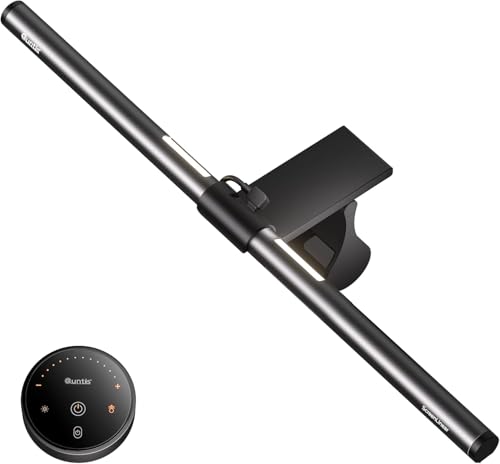
Premium monitor light bar with front and back lighting, remote control, and high CRI LEDs suited for serious office work and content creation.
Pros
- Remote control with lit buttons for dark rooms
- Front, back, and combined lighting modes
- High CRI LEDs give natural color for photo or design work
- Weighted clip with hood design reduces glare into the eyes
Cons
- Not compatible with laptops or curved monitors
- Higher price than basic USB light bars
- Requires some setup and adjustment for best effect
- Brand service in India mostly through online channel
The Quntis ScreenLinear ML214 is for users who treat their desk as a proper workstation, not a temporary jugaad setup. It combines a front light that focuses on the desk and keyboard with a backlight that washes the wall behind the monitor. That backlight reduces contrast between bright screen and dark surroundings, which helps a lot during long coding or trading sessions in a dim room.
A big advantage here is the dedicated remote. The buttons have a soft orange glow so you find them easily even in a dark bedroom. You get stepless control of both brightness and color temperature, so you can shift from cooler tones during a hectic office day to warmer tones when you switch to OTT or light reading. The asymmetrical optics and hood design keep light off the screen itself and away from your direct line of sight, which reduces eye fatigue.
Quntis uses 84 LED beads with a high CRI rating, which means colors on documents, images, and physical samples on your desk look closer to daylight. This matters for design students, photographers reviewing prints, and anyone working with color-critical content. The weighted clip with anti-slip rubber makes mounting simple on most flat monitors, though it does not suit laptops or curved panels. In India, Quntis largely sells through marketplaces, so warranty support depends on the seller and replacement policy, but user feedback suggests acceptable reliability for home and office use.
KACA 13-Inch Monitor Screen Light Bar

USB-powered 13 inch light bar with smart touch controls, memory function, and strong eye-care features for study and office work.
Pros
- Asymmetrical design avoids screen glare and flicker
- Touch controls with 60 minute timer and memory
- Three color temperatures and wide dimming range
- Space-saving C-clamp mount keeps desk clear
Cons
- Short length suited more to laptops and small monitors
- No backlight or RGB effects
- Plastic build feels basic compared to premium bars
- Service depends on online replacement, no big brand presence
The KACA 13 inch monitor light bar targets users who want better control over their lighting without paying premium gaming prices. The light uses an asymmetrical optical setup that directs the beam only on your desk and keyboard, not onto the screen. Combined with a flicker free design, this helps reduce eye strain for long typing or reading sessions, something many Indian office workers and UPSC aspirants struggle with in low light rooms.
Control is through touch sensors that respond with a single tap. You get a 60 minute auto off timer for focused study blocks, and a memory function that remembers your last used brightness and color temperature. This suits people who follow a fixed night routine, for example warm 3000K light at low brightness for late night coding or writing. Brightness adjusts through stepless dimming, and you have three color temperatures covering warm, neutral, and cool white.
The C-clamp attaches to the top of the screen within a few seconds and does not eat into precious desk space, which helps in smaller Indian flats and PG rooms. The bar is powered from any 5V USB source, so it pairs well with laptops, desktops, and standard phone chargers. KACA is not yet a household name in India, though the lamp itself uses ABS material tested for durability. For most users, support will run through Amazon seller warranty rather than a physical service center. If you want a focused study or work light with smart touches like timers and memory, this model offers a balanced mix of comfort features at a practical budget.
KACA Curved Monitor Light Bar 24–27 Inch
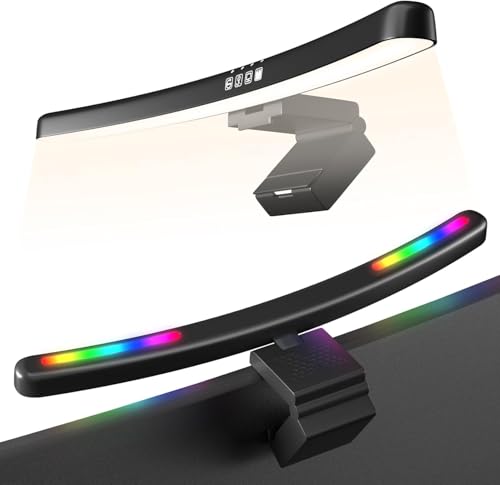
Curved monitor light bar with RGB backlight, stepless dimming, and three color temperatures built for gaming setups and wide curved screens.
Pros
- Designed for 24 to 27 inch curved monitors
- Asymmetrical beam avoids screen glare
- Seven RGB backlight colors for gaming ambience
- USB powered with 1 hour auto shut off for eye rest
Cons
- Not suitable for laptops or small flat monitors
- RGB backlight mainly for looks, not productivity
- Touch controls placed on bar, no remote
- Limited visibility of long term service support in India
For gamers and multitaskers using curved monitors, standard straight light bars often feel awkward. KACA’s curved monitor light bar is shaped and sized for 24 to 27 inch curved screens, which are common among Indian PC gamers and stock traders. At around 15.7 inches, it covers most of the width while its 45 degree asymmetric light focuses on the desk and keyboard without reflecting on your expensive curved display.
The standout here is the RGB backlight. You get seven color options and a flowing mode that cycles through them, which adds personality to your battlestation, especially if you already run RGB keyboards or strips. You can keep a calm static color for late night browsing or go for changing colors during gaming sessions. The front light still provides proper white light with stepless dimming and three color temperatures, so you are not stuck with flashy colors when you need to finish a report.
A 1 hour auto shut off helps remind you to rest your eyes after long sessions, which many gamers in India ignore until headaches start. Power comes from any USB socket, so you avoid extra adapters. The clip-on design avoids using desk space, important if your table already holds a large mousepad and speakers. As with other KACA products, formal service centers are limited, but the products are targeted towards online buyers comfortable with warranty through e-commerce returns. If you run a 24 or 27 inch curved monitor in a tight Indian room and want a single bar for both gaming mood and functional desk light, this option fits that niche nicely.
Quntis ScreenLinear HY214 Pro Light Bar

Longer and wider monitor light bar with extended backlight, sliding weighted clip, and remote control suited for large flat and curved screens.
Pros
- 20.1 inch bar covers large wide monitors
- Adjustable sliding weighted clip fits many flat and curved screens
- Front, back, and combined lighting modes for flexible setups
- Remote with stepless dimming and color temperature control
Cons
- Higher cost than basic models
- More features than needed for simple laptop users
- Requires space behind monitor for extended backlight wash
- Support network in India is mostly online based
The Quntis ScreenLinear HY214 Pro targets users with larger desks and larger screens, such as 27 inch or ultra wide monitors used by content creators, analysts, and serious gamers. The bar length stretches to 20.1 inches, which gives you wider and more even illumination across the full width of the desk. Backlighting on both sides extends to around 6.29 inches, so the wall behind the monitor gets a broad, soft wash of light that eases contrast with the screen.
Installation is flexible. The patented sliding weighted clip includes two adjustable sliding points so you adjust both the front section and the rear clamping distance. This design helps it sit securely on a wide range of monitors, including many curved models that trouble simpler clips. That is useful in Indian homes where desk and monitor combinations are often mixed and matched instead of following one brand ecosystem.
The remote control, like the ML214, uses a non mechanical design with gently lit buttons for dark rooms. You control stepless brightness and color temperature, and you can pick between front light, backlight, or both together. Quntis uses a high number of LED beads, 88 in front and 55 at the back, with a high CRI rating. This gives a comfortable light for reading, gaming, or editing photos and videos where color accuracy matters. For Indian buyers who have invested in a premium monitor and want a matching light bar that keeps up, the HY214 Pro sits in the premium tier. Support and warranty are mostly handled through Amazon and Quntis online channels, so choose a seller with clear return policies for peace of mind.
Buying Guide
Set your budget and use case first
Before you start shortlisting monitor light bars, decide whether you need a simple reading light or a full ambience setup. Students and basic work from home users usually do well with compact USB bars like Techzere or the smaller KACA models. Gamers and professionals with big curved or flat monitors should look at premium options from Quntis or the curved KACA bar. Since prices change often in India due to sales and offers, keep a rough budget in mind and compare features like remote control, RGB, and backlighting instead of chasing the lowest number alone.
Check monitor size and shape compatibility
Compatibility is the most important factor, especially in India where many users upgrade parts one by one. Laptop users need lighter bars designed for thin screens. Some models, like the Quntis ML214 and HY214 Pro, are meant for desktop monitors and do not suit laptops. Curved monitor users should pick dedicated curved bars such as the KACA curved model or a Quntis with a flexible clip. Always match the recommended inch size and check user photos or Q&A before ordering, so you do not end up with a clip that slips or blocks your webcam.
Understand optical design and eye comfort
Look for asymmetrical light designs that direct light downwards onto the desk while keeping the screen dark. This reduces screen glare and reflections, which helps during long PowerPoint, coding, or trading sessions. Features like high CRI LEDs, no visible flicker, and soft light transitions matter more than flashy specs. Auto timers, like the 60 minute or 1 hour shut off modes on KACA bars, help Indian users who sit for hours without a break, especially during exam preparation or peak work months.
Decide on color temperature and dimming needs
Most current light bars offer at least three color temperature modes. Warm light around 3000K suits night use, makes your room feel calmer, and disturbs sleep less. Neutral whites around 4000K are good all-purpose options for mixed use. Cooler whites around 6000K are useful for detailed work where you want to feel more alert. Stepless dimming is preferable to fixed steps because it lets you tune brightness according to your room lighting and time of day. If you share a room with family or flatmates, flexible dimming helps keep light comfortable for everyone.
Look at build quality and mounting style
Pay attention to the clip and hinge more than the plastic housing. A strong weighted clip with anti-slip rubber protects your monitor and keeps the bar stable when you adjust the angle. C-clamp or clip-on designs save space, which is important on small Indian study tables. Longer metal bars tend to feel more solid, but good ABS plastic can also last for years if handled well. Before buying, check if the bar blocks your webcam or thick monitor bezel, especially for office meetings and online classes.
Power source and cable management in Indian homes
All five products here run from USB power. This suits Indian conditions where you already have multiple USB adapters, power banks, and hubs. Think about where your CPU or laptop sits, and how you will route the cable so it does not hang in front of the screen. For desktop towers on the floor, a rear USB port with a slightly longer cable is useful. For laptops, side USB ports make routing easier. In crowded plug boards, a USB powered light bar avoids one extra bulky adapter.
Warranty, returns, and service support
Brands like Quntis and KACA do not have large offline service networks in India. Most support runs through Amazon or online channels. Before placing an order, check the seller ratings, return period, and warranty description. Keep original packaging for at least the return window, in case your unit has flicker, dead LEDs, or a loose clip. For heavy users such as designers or full-time gamers, consider saving your invoice PDFs and screenshots of the listing, so warranty claims are smoother later.
Extra features for gamers and creators
If you game, stream, or create content, features like RGB backlighting, extended backlight, and high CRI LEDs start to matter more. The KACA curved bar with 7 RGB colors suits gaming rooms where looks and mood lighting matter. The Quntis HY214 Pro with wide backlight and high CRI suits creative workstations, YouTube setups, and dual monitor desks. For basic reading and office use, do not pay extra for RGB, but do pay attention to CRI and color temperature range.
Feature Importance
| Feature | Importance |
|---|---|
| Monitor size and shape compatibility | High |
| Asymmetrical optical design (no screen glare) | High |
| Stepless brightness dimming | High |
| Multiple color temperature modes | High |
| Remote control or easy touch controls | Medium |
| Backlighting or RGB ambience | Medium |
| Build quality of clip and hinge | High |
| USB power and cable length | Medium |
| Brand warranty and online support in India | High |
| Length of light bar for wide coverage | Medium |












Interesting take on the Quntis HY214 Pro. How does its color rendering index (CRI) compare to the BenQ ScreenBar? That’s a crucial factor for designers and content creators.
Yaar, Quntis ML214 ka price thoda zyada nahi hai? I mean for that money, I expect it to make my coffee also. Is it really worth the hype or just another overpriced gadget?
omg a curved monitor light bar! finally, someone thought about us curved monitor users. the kaca 24-27 inch one sounds like a dream come true, no more awkward lighting angles!
The KACA 13-inch one seems promising for smaller screens. It would be really helpful if you could include some real-life photos of it on different monitor sizes in the review. Visuals make a huge difference!
this review is super useful, especially the comparison bit. i was really confused about which one to pick for my setup. thanks for breaking it down, ab samajh aa gaya.
Yo this Techzere light bar sounds pretty lit for a 13inch monitor My desk setup is crying for some good lighting without the glare Definitely adding this to my cart
Great article overall, very informative. For future posts, maybe a section on the energy consumption and eco-friendliness of these light bars could be a valuable addition. Sustainability is key these days.