A good NVMe SSD enclosure turns an internal M.2 drive into a fast external storage device for backups, video files, work projects, and game libraries. For many Indian users, this is one of the smartest ways to reuse an old laptop SSD or build a compact high-speed drive without spending on a prebuilt external SSD. If you move large files often, work with 4K footage, or keep a second drive for Windows and Mac systems, the right enclosure saves time every day.
When you choose one, focus on the SSD type first. This matters more than people think. Most enclosures in this list support PCIe NVMe SSDs only, not SATA M.2 drives. After that, look at the USB interface, chipset, thermal design, supported SSD lengths, and whether the case is tool-free. In Indian conditions, heat handling also matters because long file transfers in a warm room can slow down a badly designed enclosure.
I also suggest paying attention to service support and day to day convenience. A compact body, bundled cables, stable connection, and decent build make a big difference when you carry the enclosure between office, home, and travel. The Indian market now has many options, but not all of them offer the same mix of speed, cooling, compatibility, and after-sales peace of mind.
PiBOX India NVMe M.2 Enclosure RTL9210

This PiBOX enclosure is a simple and practical pick for users who want a tool-free 10Gbps NVMe case with a trusted Realtek RTL9210 controller and dual cable support.
Pros
- Realtek RTL9210 chipset for stable 10Gbps operation
- Tool-free design with thermal pad and aluminium body
- Includes both USB-C to C and USB-C to A cables
- Supports 2230, 2242, 2260, and 2280 NVMe SSDs
Cons
- Does not support SATA M.2 SSDs
- Brand service presence is not as wide as larger accessory brands
- Rubber fastener system may feel basic to some users
- Marketing text around key support is a bit confusing for first-time buyers
This enclosure gets the basics right, and for most buyers that matters more than flashy design. You get a 10Gbps USB interface, a known Realtek RTL9210 controller, and support for common NVMe SSD sizes from 2230 to 2280. The included USB-C to C and USB-C to A cables make life easier because you do not need to hunt for adapters when switching between a modern laptop and an older desktop or TV box.
I like the fact that PiBOX has kept the body in aluminium and included a thermal pad. In Indian summers, sustained transfers often push compact storage accessories into warm territory. A metal body does a better job of spreading heat than cheap plastic shells. For office backups, media transfer, and bootable drive use, this design feels better suited to long sessions.
The tool-free installation is another strong point for casual users. If you are reusing an old laptop SSD after an upgrade, setup stays easy. PiBOX is not a giant service brand in India, so support experience may vary by seller, but the product itself looks well specced for buyers who want speed, portability, and broad OS support without making the process complicated.
PiBOX India NVMe M.2 Enclosure Fan Edition

This second PiBOX option targets buyers who want the same 10Gbps NVMe performance in a compact tool-free body, with a design pitched toward better cooling focus.
Pros
- 10Gbps USB 3.2 interface with UASP support
- Compact tool-free design for quick SSD swaps
- Aluminium shell and thermal pad help with heat control
- Works with multiple operating systems and common NVMe sizes
Cons
- No SATA M.2 support
- Product naming is confusing because the listing mentions fan but details point to fanless cooling
- After-sales network is limited compared with bigger Indian electronics brands
- Best results depend on a quality host port and SSD
This model feels aimed at users who move files often and want a travel-friendly enclosure that stays simple. It supports NVMe SSDs up to 4TB, covers standard 2230 to 2280 sizes, and offers the same headline 10Gbps transfer ceiling seen in many good mid-range enclosures. For students, editors, and developers who carry project files between systems, that is a useful starting point.
Its appeal is in convenience. Slide open the shell, mount the SSD, secure it, and start using it. No external power brick, no software setup, no fiddly screws. That is the kind of product many Indian users want for quick upgrades and old SSD reuse. You also get both cable types in the box, which helps when you deal with mixed devices at home or in the office.
I would still say buyers should read the compatibility line carefully because PiBOX clearly states NVMe only. If your old M.2 drive is SATA, this is the wrong pick. Service support in India is more seller dependent than brand backed, so I would buy this where return handling is clear. If your focus is easy use, portable size, and decent thermal handling, this one makes sense.
Lemorele M.2 NVMe SSD Enclosure
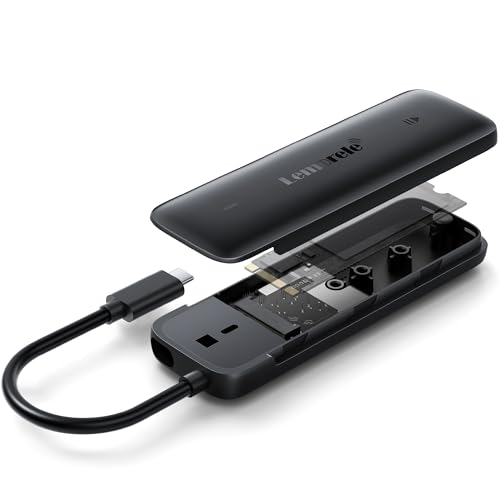
Lemorele stands out with its integrated USB-C design, broad device support, and clearly stated India after-sales contact details, which adds confidence for first-time buyers.
Pros
- Integrated USB-C connection reduces cable clutter
- Realtek RTL9210 based 10Gbps performance
- Supports Windows, macOS, Linux, Android, and some iOS use cases
- India support details and 1-year warranty are clearly mentioned
Cons
- Integrated connector design may not suit every device layout
- ABS hybrid body may feel less premium than full metal options
- No SATA M.2 support
- Phone compatibility depends on OTG or USB port support
Lemorele takes a different route from the usual enclosure design. The built-in USB-C connection is the first thing you notice. For some users, this is a smart move because loose cables are often the first point of failure in cheap storage accessories. If you use an enclosure with tablets, phones, ultrabooks, or a packed travel bag, a single-piece design feels cleaner and easier to carry.
Performance claims remain in the familiar 10Gbps class, and the enclosure uses the RTL9210 controller, which many buyers look for in this segment. The body uses an ABS hybrid material instead of full aluminium. Some people prefer metal for heat spreading, but this design has one clear upside. It is lighter and less likely to scratch other devices in your bag. For commuting users or students carrying tech in one backpack every day, that is a practical gain.
What gives Lemorele an edge for Indian buyers is the stated support line, service email, and 1-year warranty mention. That level of clarity is useful when you are buying a niche accessory online. I would place this model high on the list for users who want wide device compatibility, tidy design, and better confidence around support after purchase.
Zebronics CN101 M.2 NVMe Enclosure

The Zebronics CN101 is the most reassuring pick for buyers who prefer a known Indian accessories brand, and it also offers support for up to 8TB NVMe storage.
Pros
- Zebronics has a familiar service presence in India
- Supports NVMe SSD capacities up to 8TB
- Aluminium body with tool-free plug and play setup
- Type-C 3.2 Gen2 interface with 2230 to 2280 SSD support
Cons
- Feature sheet does not mention bundled cable details clearly
- No SATA M.2 support
- Uses PCIe 3.0 wording, which may confuse buyers expecting PCIe 4.0 SSD benefits
- Newer product so long-term user feedback may take time to build
Zebronics has one big advantage in this list. Brand familiarity. A lot of Indian buyers feel more comfortable picking an accessory from a company with an established presence in local retail and service channels. That peace of mind matters when you are buying a storage case that will hold important data. The CN101 also supports up to 8TB, which is higher than several rivals and useful for professionals with large media libraries.
The enclosure supports the usual 2230, 2242, 2260, and 2280 form factors and uses a Type-C 3.2 Gen2 connection for up to 10Gbps transfer. For normal NVMe enclosure usage, that is enough for fast backups, editing proxy files, photo libraries, and moving games between systems. The aluminium case should help with cooling during long sessions, which is a welcome point in warmer Indian environments.
If I had to recommend one model for a buyer who values easier brand recognition over chipset obsession, this would be near the top. Zebronics service and availability are generally easier to understand than smaller niche accessory names. You still need to remember that this is for NVMe drives, not SATA M.2, but for many users the mix of trust, capacity support, and simple design will feel safer.
Sounce NVMe SSD Enclosure RTL9210

Sounce offers a familiar formula with a Realtek RTL9210 controller, metal body, thermal pad, and dual cable support, making it a good fit for everyday high-speed external storage use.
Pros
- Realtek RTL9210 chipset with up to 10Gbps transfer support
- Thermal pad and aluminium shell help reduce heat build-up
- Tool-free installation with hot-swap support
- Supports Windows, Mac, Linux, and Chrome OS
Cons
- Does not work with SATA M.2 SSDs
- Service experience may depend on seller and platform support
- Design is functional more than refined
- Long sustained speed still depends on your SSD and host device
Sounce has packed in the features most buyers look for first. You get a 10Gbps USB 3.2 interface, support for common NVMe SSD lengths, a metal shell, and the popular RTL9210 controller. On paper, that checks many of the right boxes for anyone building a compact external drive for office data, media backups, or software libraries.
The thermal side is handled with a pad and aluminium housing, which is important if you often transfer large folders in one go. A badly cooled enclosure feels fine for five minutes, then slows down when the SSD gets hot. In Indian homes and workspaces where air conditioning is not always running, this part matters more than many listings admit. Sounce seems to understand the basic need here.
This model fits users who want a no-nonsense enclosure with broad OS support and a setup process that takes only a minute. Brand support is not as well known as Zebronics, so I would keep warranty expectations realistic and buy from a seller with solid replacement terms. If your goal is to turn an NVMe drive into a fast portable storage unit without overthinking the purchase, this enclosure does the job well.
Buying Guide
Check SSD type before anything else
This is the first filter. These enclosures are meant for M.2 NVMe SSDs. They do not support M.2 SATA drives. Many buyers in India reuse old laptop SSDs and assume every M.2 drive will fit and work. Physical fit is not enough. You need protocol support too. Check whether your SSD is NVMe PCIe and then match the key type and length.
10Gbps speed sounds great, but your full setup decides real speed
A 10Gbps enclosure needs the right host port, cable, and SSD to perform well. If your laptop has an older USB port, transfer speeds will drop. If your SSD is entry level, speeds will also sit lower. For daily use, stable transfer matters more than marketing numbers. Look for UASP support and a known controller such as Realtek RTL9210 if you want a better chance of smooth performance.
Heat control matters more in Indian conditions
NVMe drives run warm, especially during long file transfers, video editing, or cloning work. In a hot room, a poor enclosure will heat up fast and speed may drop after a few minutes. Aluminium bodies, thermal pads, and a tight fit around the SSD help a lot. If you plan to copy large folders often, do not ignore the cooling design.
Tool-free design is worth paying attention to
If you swap SSDs often, a tool-free enclosure saves time and frustration. You slide open the cover, insert the drive, lock it in place, and start working. This is useful for technicians, content creators, and anyone who repurposes old SSDs from upgrades. If you install one SSD and never touch it again, even a basic locking system is fine, but tool-free design still feels easier in day to day use.
Cable bundle and device compatibility affect daily convenience
Many Indian users work across laptops, desktops, phones, tablets, and smart TVs. An enclosure with both USB-C to C and USB-C to A cables is more flexible. If you want to use the drive with a phone, check OTG support on Android and port compatibility on iPhone or iPad models. Broad OS support is useful, but your port type still decides whether the setup feels smooth or annoying.
Build quality is not only about looks
A metal shell feels more solid and helps with heat, but plastic or hybrid designs have their own value. They are lighter and less likely to scratch other devices. Look at the closure mechanism, internal SSD locking method, and whether the connector feels firm. A small enclosure gets plugged in and unplugged often, so a weak fit becomes a headache over time.
Warranty and support are extra important for storage accessories
An enclosure is a simple product, but if the bridge board fails or the port gets loose, your data access stops. For Indian buyers, clear warranty terms and reachable support matter more than big feature lines. Brands with a known service footprint or clear India contact details usually feel safer. If the brand is lesser known, buy from a platform or seller with easy replacement handling.
Feature Importance
| Feature | Importance |
|---|---|
| NVMe only or NVMe plus SATA compatibility | High |
| USB 3.2 Gen2 10Gbps interface | High |
| Controller quality, such as RTL9210 | High |
| Thermal pad and heat dissipation design | High |
| Supported SSD sizes, 2230 to 2280 | High |
| Tool-free installation | Medium |
| Bundled cable options, USB-C and USB-A | Medium |
| Maximum supported capacity | Medium |
| OS and phone compatibility | Medium |
| Brand warranty and India service support | High |