Portable monitors have become a useful tool for students, office workers, freelancers, and gamers in India. You get extra screen space without carrying a bulky full‑size monitor, which helps a lot when you are working from cafes, client sites, or while travelling between cities. For small flats and hostel rooms, a slim USB‑powered screen feels far more practical than setting up a full desktop.
When you pick a portable monitor, you need to think about screen size, panel type, resolution, refresh rate, ports, brightness, and how stable the stand feels. For India, you also need to think about power backup, compatibility with budget laptops and Android phones, and after‑sales support. The models below cover office work, Netflix, console gaming, and even fast PC gaming, so you can pick what makes sense for your budget and use case without wasting money on extra features you will never touch.
MSI PRO MP161 E2

A slim 15.6 inch Full HD IPS portable monitor aimed at productivity and business use, with strong focus on eye comfort and flexible mounting.
Pros
- 15.6 inch IPS Full HD panel with wide viewing angles
- Slim and light at around 0.75 kg, easy to carry in a laptop bag
- Good eye comfort features with low blue light and anti‑flicker tech
- Flexible stand with 0° to 180° adjustment and tripod support
- Dual USB Type‑C and mini HDMI inputs with included cables
Cons
- Standard 60 Hz refresh rate, not ideal for competitive gaming
- Built‑in speakers are basic and weak for media use
- Brightness is decent but not ideal for bright outdoor use
- Needs compatible USB‑C power or separate power source in some setups
MSI PRO MP161 E2 targets office users and professionals who need a second screen on the go. The 15.6 inch IPS panel runs at Full HD resolution with a 16:9 aspect ratio, so your Windows or macOS desktop feels natural. The wide 170 degree viewing angle keeps colors stable whether the monitor is on a desk in landscape mode or on a tripod in portrait mode, useful when you show slides or Excel sheets to colleagues during meetings.
For Indian conditions where many of us stare at screens for long hours, MSI adds TÜV Rheinland certified eye comfort features, including low blue light filters and flicker‑free backlight. The matte anti‑glare coating helps in bright rooms, which is handy if you work near a window or under tube lights. MSI’s Display Kit software gives simple display profiles, split‑window layouts, and HDCR style contrast tweaks, which helps if you shift from coding to video watching often.
Portability is a strong point. With a thickness of about 1.08 cm and weight near 0.75 kg, the MP161 E2 slides into the laptop sleeve of a backpack without much fuss. The fold‑out kickstand opens up to 180 degrees and feels more stable than soft magnetic covers that many cheaper panels use. You can tilt it low for pen‑tablet style use or stand it tall in vertical mode for reading long documents. Connectivity is also practical for Indian users because you get mini HDMI plus two USB Type‑C ports that support DisplayPort Alt mode and 15 W power input. So, newer laptops and some Android phones with USB‑C video output connect with a single cable.
MSI as a brand has a fair presence in major Indian cities for gaming laptops and monitors. Service networks in metros and tier‑1 cities are decent, although smaller towns might depend on courier‑based service. If your priority is a reliable, eye‑friendly second screen for work, classes, coding, or stock trading, the PRO MP161 E2 gives balanced features without wasting money on high refresh gaming extras.
Zebronics Pixigo A16

A 15.6 inch Full HD portable monitor from Zebronics with a bright panel, anti‑glare screen, and simple 180 degree adjustable stand suited for mixed work and entertainment.
Pros
- Full HD 1920 x 1080 resolution with 16:9 aspect ratio
- Bright 300 nits panel works better in well lit Indian homes and offices
- Anti‑glare coating reduces reflections and eye strain
- Multiple ports including Type‑C DP, mini HDMI, and headphone jack
- Wall mount support for a cleaner desk setup
Cons
- Speakers are serviceable but lack bass and volume
- Plastic build feels basic compared to metal rivals
- Refresh rate limited to 60 Hz, not tuned for e‑sports gamers
- Color accuracy is fine for casual use but not ideal for pro editing
Zebronics Pixigo A16 targets budget‑focused users in India who want a simple external display for laptops, mobiles, and consoles. The 39.6 cm panel uses a Full HD resolution with a 16:9 aspect ratio, which suits movies, OTT content, and side‑by‑side documents. The 300 nits peak brightness is a key plus in Indian conditions where rooms are often bright during the day. Text stays readable and colors stay visible even when tube lights or ceiling fans cast reflections around the room.
The anti‑glare coating on the Pixigo A16 helps reduce harsh reflections from windows and tube lights, which matters a lot in small Indian flats with white tiles and bright walls. With support for 16.7 million colors, the display gives decent color reproduction for YouTube, Netflix, and casual Canva or photo edits. It will not replace a pro color‑calibrated monitor, but for students, WFH employees, and office presentations, it does the job well.
Zebronics has kept connectivity simple and flexible. You get a Type‑C DP port for laptops and phones that output video over USB‑C, mini HDMI for consoles or older laptops, another Type‑C port for power or data, and a 3.5 mm headphone jack. The built‑in stereo speakers handle calls and casual videos, though for serious movies or gaming you will prefer headphones or external speakers. The 180 degree adjustable stand acts as both cover and support, letting you pick an angle that works on low desks or higher work tables. Wall mount support with standard VESA holes is a nice touch for users who want a semi permanent setup above a compact study desk.
Zebronics has long experience in the Indian peripherals market, so spares and basic service centers are quite widely available, especially in tier‑2 and tier‑3 cities. For buyers who want a practical portable display that handles everyday tasks, multi‑device connectivity, and occasional gaming without spending too much, the Pixigo A16 sits in a sweet spot. It suits students in hostels, freelancers who move between co‑working spaces, and anyone who wants an extra screen for productivity at home.
Frontech MON-0023 15.6″
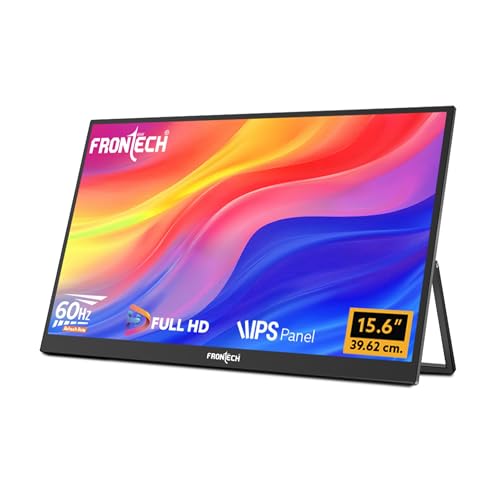
A budget friendly 15.6 inch Full HD portable LED monitor with dual Type‑C, mini HDMI, and an included 180 degree stand, aimed at entry level buyers and students.
Pros
- Full HD IPS panel with 16:9 aspect ratio
- Dual Type‑C and mini HDMI cover most laptops, phones, and consoles
- Includes all key cables in the box, useful for first time buyers
- 180 degree stand and lightweight design suit travel
- Budget pricing in the Indian market with 1 year warranty
Cons
- Brightness at 220 cd/m² is modest, not ideal for use near strong sunlight
- 20 ms response time is slow for fast paced competitive gaming
- Speakers are basic, better to use headphones for content
- Brand visibility and service network smaller than global names
Frontech MON‑0023 targets Indian buyers who want a low cost way to add a second screen for study or work. The 15.6 inch IPS panel runs at Full HD resolution, which is enough for clear text and sharp videos on a portable display. The 16:9 format feels familiar and works well for spreadsheets, coding windows, and lecture recordings side by side. For students doing online classes and notes together, the extra space makes a big difference in comfort.
The monitor includes two USB Type‑C ports and a mini HDMI port, so it works with modern USB‑C laptops, older HDMI only laptops, gaming consoles like PS5, and handhelds such as Nintendo Switch. You also get a 3.5 mm audio jack and built‑in speakers, useful if hostel quiet hours force you to keep volumes low. Frontech packs a mini HDMI cable, Type‑C cable, and USB power cable in the box, which helps first‑time users who do not want to hunt for compatible cables in local markets.
At 220 cd/m² brightness, the display suits indoor use in normal rooms, but if you sit near a bright window during the afternoon you might need to pull curtains. Response time of around 20 ms and 60 Hz refresh rate means high speed shooters will show some blurring. Casual gaming, story based titles, and console use still feel fine. The 180 degree adjustable stand adds flexibility for users who work from coffee tables, folding study desks, or even beds.
Frontech is an Indian brand with presence in many computer shops, especially in smaller cities. Warranty support usually runs through regional distributors and retailers. That approach suits users who prefer walking into a nearby shop over shipping products to big service centers. If your priority is low cost, basic productivity, OTT viewing, and plugging into multiple devices, MON‑0023 offers strong value without unnecessary frills.
Arzopa 15.6″ FHD Portable

A 15.6 inch Full HD IPS portable monitor with a solid metal body and built‑in kickstand, aimed at users who travel often and want a sturdier screen for work and console gaming.
Pros
- Full HD 1080p IPS panel with 178 degree viewing angle
- Metal construction with integrated kickstand feels sturdy
- Multiple display modes like duplicate, extend, and second screen
- Works with wide range of devices including phones and consoles
- Slim and light at about 0.35 inch thick and 1.6 lb weight
Cons
- Standard 60 Hz refresh rate, not tuned for high FPS gaming
- Speakers are adequate but not strong for large rooms
- Metal body can feel slightly warm in non‑AC Indian rooms
- Arzopa service network is still developing in India
The Arzopa 15.6 inch FHD portable monitor is designed as a premium yet compact option for laptop users, console owners, and frequent travellers. The IPS screen with 1920 x 1080 resolution and wide 178 degree viewing angles gives consistent colors across the panel, useful when two or three people watch a video together. Whether you connect to a MacBook, Windows laptop, or a PS5, the display keeps menus sharp and text crisp for long work sessions.
Build quality stands out here. The monitor uses a metal chassis with a built‑in kickstand, not a flimsy foldable cover. This helps a lot in Indian travel conditions where bags get tossed in buses, cabs, and on trains. The kickstand opens to different angles, so you can adjust for low coffee tables, high office desks, or even use it in vertical mode for coding and document review. Despite the sturdy frame, the screen stays slim and light, so it fits neatly in a backpack with a 14 or 15 inch laptop.
Arzopa keeps setup simple with plug and play behavior. You connect via USB‑C or HDMI to laptops, PCs, Macs, phones, and consoles like Xbox, PS3, PS4, and PS5, and the display comes up without drivers. This makes life easier during client presentations or hotel work sessions where you do not want to troubleshoot drivers on slow hotel Wi‑Fi. Multiple display modes such as duplicate, extend, or second screen allow flexible workflows, whether you edit on one screen and run video calls on the other or keep reference PDFs open on the side.
In the Indian context, Arzopa is still a newer brand. Online warranty support and replacements usually work through marketplace channels. Service reach will not match legacy brands in every city, so buyers in remote areas should consider this point. For users who focus on design, sturdiness, and straightforward connectivity for work plus casual gaming, this 15.6 inch Arzopa panel feels like a strong all‑rounder.
Arzopa 16.1″ 144 Hz Gaming

A 16.1 inch Full HD 144 Hz portable gaming monitor with 106% sRGB coverage, designed for smoother motion and richer color for gamers and creators on the move.
Pros
- 16.1 inch 1080p panel with 144 Hz refresh rate for smooth motion
- High 106% sRGB color coverage, good for content creation
- Built‑in kickstand with adjustable tilt, lighter than many 16 inch rivals
- Works as a second monitor for laptops with both horizontal and vertical modes
- USB‑C and mini HDMI inputs support laptops, consoles, and handhelds
Cons
- Higher refresh rate demands more GPU power from your laptop or PC
- Brightness and HDR are suited to indoor use, not strong sunlight
- Speakers are fine for casual use but weak for immersive gaming
- Arzopa brand awareness and offline service still limited in India
Arzopa 16.1 inch 144 Hz portable monitor focuses on Indian gamers and power users who want smoother motion and better colors without lugging a large desktop display. The Full HD panel supports a 144 Hz refresh rate, which cuts motion blur and reduces perceived input lag in shooters, racing titles, and fast action games. When paired with a capable gaming laptop or desktop, animations feel more fluid than standard 60 Hz portable screens. Web scrolling and desktop animations also feel smoother, which helps during long productivity sessions.
Color performance is another strong point. With about 106% sRGB coverage, this monitor offers richer color than many budget portable panels. This matters for creators working on Instagram content, YouTube thumbnails, and light video edits. You get clearer separation between shades, which helps with skin tones and product shots. The IPS technology supports wide viewing angles, so when you share the screen with friends during co‑op sessions or movie nights, colors do not shift badly.
The integrated kickstand makes the Arzopa gaming monitor easy to use in cramped Indian rooms, PGs, or hotel desks. You adjust the tilt angle to match your seating height, and you can also rotate the screen for vertical use if you do coding or long article reading. With two fully functional USB Type‑C ports and a mini HDMI port, you hook it up to laptops, Mac, Xbox, PS5, Steam Deck, and similar devices. Plug and play behavior keeps set up quick for LAN parties or temporary work setups.
As with the smaller Arzopa model, the main caveat for Indian users is service access. Most support works through e‑commerce platforms and central service points, which might involve shipping the monitor rather than walking into a neighborhood service center. Still, for gamers who want high refresh gaming in a hostel, rented flat, or on family trips, and for creators who want better color on the go, this Arzopa 16.1 inch 144 Hz panel offers a serious step up over typical 60 Hz portable screens.
Buying Guide
1. Budget planning for portable monitors in India
Before you pick a portable monitor, think about your real use case. If you need a second screen for MS Office, coding, and Zoom calls, a basic 60 Hz Full HD model from brands like Zebronics or Frontech will handle your needs without stretching your budget. If you plan to game seriously or do color sensitive work, you should plan extra money for options like the 144 Hz Arzopa or a monitor with better color coverage. Also factor in accessories like a good USB‑C cable, a sleeve for travel, and maybe a compact stand if you do not like built‑in kickstands. For many Indian users, prices fluctuate during festive sales, so tracking deals during Diwali, Independence Day, or Big Billion style events can save a lot.
2. Screen size, resolution, and panel type
Most portable monitors in India sit around 15.6 to 16.1 inches with Full HD resolution. For text clarity and daily work, 1080p on this size is comfortable at laptop viewing distances. A 16.1 inch model gives slightly more vertical space, useful for timelines, Excel, and gaming HUDs. IPS panels are widely used in these models because they offer better viewing angles and more consistent color than basic TN panels. If you often share your screen in meetings or watch content with friends, IPS is a safer choice. Do not chase 4K in this size unless you have a strong reason and a much higher budget, because scaling issues and higher GPU load reduce the benefit for most users.
3. Refresh rate and response time for work and gaming
Refresh rate affects how smooth motion looks on screen. A 60 Hz monitor like MSI PRO MP161 E2, Zebronics Pixigo A16, Frontech MON‑0023, or Arzopa 15.6 inch FHD will satisfy office work, OTT streaming, and casual gaming. If you care about fast shooters or racing games and you own a capable gaming laptop, a 144 Hz monitor such as Arzopa 16.1 inch 144 Hz model gives visible gains in motion clarity. Response time numbers on portable monitors are often higher than desktop gaming panels, so even high refresh portable screens will not match premium e‑sports displays, but they still feel significantly smoother for general gaming compared to 60 Hz.
4. Connectivity and compatibility with Indian devices
Before buying, check the ports on your laptop, phone, and console. Many modern thin laptops and some Android phones output video over USB Type‑C with DisplayPort Alt mode. Monitors like MSI PRO MP161 E2, Zebronics Pixigo A16, Frontech MON‑0023, and both Arzopa models support USB‑C input. If your device only has HDMI, then mini HDMI on the monitor plus a correct cable or adapter becomes essential. For phones that do not support video over USB‑C, you will not get a desktop experience on these monitors even if the cable fits. If you plan to use the monitor with multiple sources, such as office laptop plus PS5 at home, pick a model with both USB‑C and mini HDMI and keep spare cables ready.
5. Brightness, anti‑glare coating, and eye comfort
Indian homes often have bright lighting and windows without blackout curtains. A portable monitor with at least 250 to 300 nits brightness and a matte anti‑glare coating helps manage reflections. Zebronics Pixigo A16 scores well here with about 300 nits and an anti‑glare screen. Models around 220 nits like some budget options suit indoor rooms but feel washed out near strong sunlight or under direct light. Eye comfort features such as low blue light modes and flicker‑free backlights reduce strain during long coding or trading sessions. MSI PRO MP161 E2 puts clear focus on eye care, which suits users who stare at charts and documents through the day.
6. Build quality, kickstands, and portability
Portable monitors trade strong stands for slim designs, so you should pay attention to how the monitor stands on your desk. Integrated metal kickstands like on the Arzopa models provide better stability than thin foldable covers, especially on slightly uneven tables often found in cafes or PGs. Lightweight panels around 0.7 to 1 kg are easier to carry in a backpack alongside a laptop. If you travel by bus or train, a rigid sleeve or hard case protects the panel from pressure in crowded luggage racks. For fixed home setups in small rooms, wall mountable models like Zebronics Pixigo A16 let you free desk space and keep the cable mess away from kids.
7. Audio, headphones, and Indian home conditions
All the monitors listed here include basic stereo speakers. These are fine for YouTube, meet calls, and low volume viewing but they do not deliver strong bass or loudness for movies, especially in noisy Indian homes with fans and traffic sounds. For serious media use or gaming, plan to use wired headphones via the 3.5 mm jack or connect Bluetooth speakers to your laptop or console. Built‑in speakers still matter for travel because they avoid carrying separate speakers for quick presentations or hotel room binge sessions.
8. Warranty, service network, and brand support
Service support in India varies lot between brands. MSI has service points in most metros and tier‑1 cities due to its gaming laptop and monitor business. Zebronics and Frontech have local distributor driven networks with presence in many smaller towns, although support quality depends on the local partner. Arzopa is a newer brand with stronger online presence and limited offline reach. Before purchase, check warranty duration, type of support, and how returns or repairs work in your city. Save the box and protective foam for the first year, because shipping a portable monitor safely to a service center without good packing is risky.
Feature Importance
| Feature | Importance |
|---|---|
| Screen size and resolution | High |
| Panel type (IPS vs TN) | High |
| Refresh rate (60 Hz vs 144 Hz) | Medium |
| Brightness and anti‑glare coating | High |
| Ports and connectivity (USB‑C, HDMI) | High |
| Build quality and kickstand stability | Medium |
| Weight and thickness for travel | Medium |
| Color coverage (sRGB percentage) | Medium |
| Built‑in speakers and audio options | Low |
| Warranty length and service network in India | High |