


Mini PCs have picked up in India because many of us want a clean desk, low power use, and a machine that still feels fast for work, studies, and light gaming. Instead of a big tower under the table, a mini PC hides behind your monitor or sits quietly near the TV, which suits small flats and shared family spaces very well.
When you pick a mini PC, you need to think about the processor, RAM, storage, upgradability, ports, and wireless connectivity. For Indian buyers, power efficiency, heat management in hot weather, and after-sales support matter a lot. In this guide I focus on Skullsaints mini PCs that are available in India, which give solid performance for the price without wasting electricity or space.
Skullsaints CoreX Ryzen 9 5900HX (32GB/1TB)

A high performance mini PC for users who need serious multitasking, content creation, and smooth 4K output in a compact metal body.
Pros
- Ryzen 9 5900HX processor suitable for heavy multitasking and editing
- 32 GB DDR4 RAM and 1 TB NVMe SSD out of the box
- Triple display support with 4K capability
- Wi‑Fi 6E and Bluetooth 5.3 for modern connectivity
Cons
- Overkill for basic office and web use
- Metal body can feel warm in non AC rooms
- Relies on brand based online support, limited offline presence
- Higher total cost of ownership compared to entry models
The Skullsaints CoreX Ryzen 9 5900HX with 32 GB RAM and 1 TB NVMe storage targets power users who still want a small footprint. The Ryzen 9 chip handles parallel workloads far better than low power CPUs, so if you juggle dozens of Chrome tabs, VMs, code compilation, or 4K video timelines, this configuration stays responsive. The 32 GB RAM gives enough headroom for creators and professionals who dislike slowdowns when they open heavy apps together.
Triple display support lets you connect up to three monitors using HDMI and other ports, which suits trading setups, programmers, or office users who like separate screens for mail, Excel, and conferencing. The PC supports 4K output so you get sharp text and clean visuals on modern TVs and monitors, which is helpful for both OTT streaming and color work. Wi‑Fi 6E and Bluetooth 5.3 keep wireless performance strong, which is handy in Indian flats with many competing routers and multiple Bluetooth devices like keyboards, mice, and TWS earbuds.
The compact metal body feels solid, travels easily in a bag, and fits cleanly behind a monitor using a VESA mount. Power consumption stays lower than a typical full tower, so long sessions during long Indian summers will not hit your electricity bill as hard. Skullsaints offers a 12 month warranty, and while the brand is still growing in India, service is handled through online support and pickup based processes that suit metro and tier 2 buyers who are comfortable with courier based RMA. For users who want one small system that handles work, content creation, and entertainment, this configuration offers strong long term value.
Skullsaints Mist Ryzen 3 4300U (8GB/128GB)
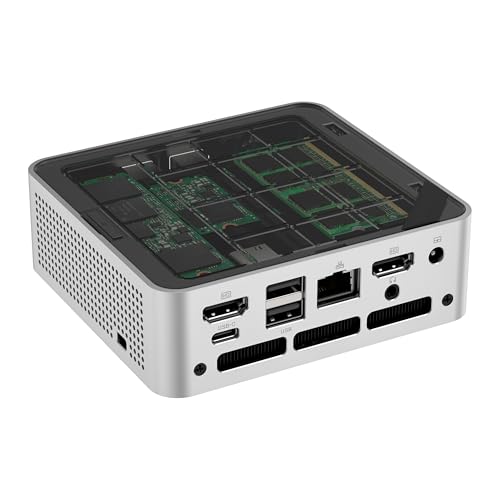
An affordable mini PC for students, home office use, and light productivity, with triple display and Wi‑Fi 6 in a compact shell.
Pros
- Ryzen 3 4300U quad core CPU handles daily tasks well
- Triple display support for productivity setups
- Wi‑Fi 6 and 2.5 Gbps LAN for fast networking
- VESA mount support for clean desk setups
Cons
- 128 GB SSD is small for long term use
- 8 GB RAM limits heavy multitasking
- Not ideal for heavy gaming or serious video editing
- Brand service network is still limited offline
Skullsaints Mist with Ryzen 3 4300U, 8 GB RAM, and 128 GB storage targets budget focused users who need a reliable daily driver for office work, classes, and media. The 4300U is a laptop grade quad core chip that handles browsing, Office, Zoom, and light coding nicely. For a student or a work from home user, this gives the experience of a decent modern laptop connected to a larger screen, without the bulk of a full desktop tower.
The system supports triple display output, which is rare in this budget oriented space. So you can plug in multiple monitors and keep spreadsheets, research, and communication apps open side by side. The 2.5 Gbps LAN port and Wi‑Fi 6 help if your broadband plan in India goes above 200 Mbps, especially for high resolution streaming or big file transfers from office VPNs. Bluetooth 5.3 handles wireless peripherals reliably so your desk stays neat.
Storage at 128 GB feels tight once you install Windows updates, Office, and a few heavy apps, so I suggest planning an NVMe SSD upgrade early. The 8 GB RAM suits light workflows, but power users should either upgrade or pick higher models from this list. Noise and power draw stay low which suits Indian homes where the PC might run near family spaces or in a bedroom. Service support is through Skullsaints warranty and online channels, which works best for users comfortable with basic troubleshooting and shipping a unit for repair if required.
Skullsaints Ash N150 (16GB/512GB)

An ultra compact mini PC built around Intel 13th Gen N150, ideal for everyday computing, office use, and triple display productivity.
Pros
- 13th Gen Intel N150 gives efficient performance for daily tasks
- 16 GB LPDDR5 RAM for smooth multitasking
- 512 GB NVMe SSD for quick load times
- Energy efficient and quiet for small rooms
Cons
- Integrated graphics suited only for light gaming
- LPDDR5 memory is not user upgradable
- Wi‑Fi 5 instead of Wi‑Fi 6/6E
- Brand recognition is still growing in India
The Skullsaints Ash with Intel 13th Gen N150 focuses on efficient performance in an ultra compact shell. Intel’s N series chip targets daily workloads such as document work, web apps, cloud tools, and casual entertainment. Paired with 16 GB LPDDR5 memory, the system feels quick as you switch between multiple lightweight apps. This combination suits professionals who live inside browsers and SaaS tools, as well as households that want a general purpose PC near the TV.
A 512 GB NVMe SSD gives enough space for Windows, productivity apps, and a decent media library. Triple display support through HDMI, DisplayPort, and USB C output lets you create a modern workstation with multiple screens, which improves comfort if you work from home for long hours. The ultra compact design fits easily on a small study table or behind a monitor, a good match for Indian apartments where every inch on the desk matters.
Wireless connectivity uses Wi‑Fi 5 and Bluetooth 5.2, which still handle normal broadband plans found across most Indian cities. For more stable connections, a wired Ethernet port is available. The Ash runs cool and quiet, so it does not disturb late night work or study sessions. Skullsaints bundles Windows 11 Pro, so you get features like BitLocker and domain join for office use if required. Warranty support is 12 months via the brand, and early adopters in India often rely on email and chat support instead of walk in centres, so keep that in mind before purchase.
Skullsaints CoreX Ryzen 7 4800H (16GB/512GB)
A balanced performance mini PC with Ryzen 7 muscle, triple display, and a compact metal chassis for power users and small offices.
Pros
- Ryzen 7 4800H handles demanding multitasking and light editing
- 16 GB RAM and 512 GB NVMe suitable for most users
- Triple 4K display support for productivity or multi monitor trading
- Wi‑Fi 6E and Bluetooth 5.3 included
Cons
- May need RAM or storage upgrade for heavy creators
- Metal chassis can run warm in hot Indian summers
- Not the cheapest option for pure basic use
- Service handled mostly through online channels
The Skullsaints CoreX Ryzen 7 4800H sits between budget and high end builds. The Ryzen 7 4800H is an 8 core laptop class processor that deals with heavy browsing, multiple Office files, FHD video editing, and light 3D tasks better than entry level chips. For a CA office, software dev, or business owner who uses many tools at once, this processor level feels like a nice sweet spot.
You get 16 GB DDR4 RAM and a 512 GB NVMe drive in the default package, which handles Windows, main apps, and a fair number of projects or games. If your workloads grow, the CoreX platform allows RAM and storage expansion, so you are not locked in. Triple display output and 4K support make it ideal for multi monitor workstations, especially for stock trading, analytics dashboards, and complex Excel work that many Indian professionals depend on.
Wi‑Fi 6E and Bluetooth 5.3 keep wireless connections strong in flats with many devices. The compact metal body looks neat in a modern office and hides away behind screens if you use a VESA mount. Since Indian weather can stay hot for long months, the focused cooling system and energy efficient performance help avoid high temperatures and lower electricity use compared to tower builds. Skullsaints provides a 12 month warranty and remote support. For buyers who need a serious workhorse but do not want the absolute top tier Ryzen 9 spend, this model offers strong value.
Skullsaints CoreX Ryzen 9 5900HX (16GB/512GB) Silver

A premium looking silver mini PC with Ryzen 9 power, ideal for creators, developers, and multi monitor setups in compact spaces.
Pros
- Ryzen 9 5900HX suitable for heavy professional workloads
- Triple display with 4K output for serious productivity
- Wi‑Fi 6E, Bluetooth 5.3, and multiple USB ports
- Compact metal chassis in a distinct silver finish
Cons
- 16 GB RAM might feel tight for heavy creative use
- Needs storage upgrade for large project libraries
- Higher price point than mid range models
- Service is online first, not widespread walk in
This Skullsaints CoreX Ryzen 9 5900HX configuration offers similar raw power to the 32 GB version, but with 16 GB RAM and 512 GB storage in a silver finish. The Ryzen 9 processor suits developers who run Android Studio, Docker containers, or local databases, as well as content creators working with FHD or light 4K projects. Many Indian freelancers who work from compact home offices will find the performance level helpful if they bill by the hour and dislike slow exports.
The 16 GB memory handles most workloads, though heavy After Effects or 4K timelines can push it, so planning a RAM upgrade later is a smart move. Storage at 512 GB is enough for OS and core apps, with extra NVMe capacity available if you want to keep scratch disks or large game libraries on the same box. Triple monitor support with 4K output suits complex workflows such as timelines, preview monitors, and tools all visible together, which reduces window shuffling.
The silver metal body gives a different aesthetic compared to standard black boxes, which some users like on a visible desk setup. Wireless performance benefits from Wi‑Fi 6E and Bluetooth 5.3, good for crowded apartment complexes with many overlapping networks. Power draw is lower than a typical performance tower, so long editing or coding sessions do not punish your electricity bill as much. With a 12 month warranty and online first service, this model suits users comfortable with self installation and some basic maintenance, who want strong performance in a premium compact form.
Buying Guide
Set your budget and use case first
Before you pick any Skullsaints mini PC, write down what you plan to do. If your work is browsing, Office, GST filing, and online classes, a Ryzen 3 or Intel N series model like Mist or Ash makes more sense. If you handle heavy code, virtual machines, or video editing, look at Ryzen 7 or Ryzen 9 CoreX models. Decide whether you will upgrade RAM or storage in the future. Higher upfront spend on a stronger CPU gives longer usable life, while cheaper models suit second PCs at home or staff systems in small offices.
Choose the right processor tier
Processor choice decides how long the PC will feel fast. Ryzen 3 4300U in the Mist suits basic workloads and student use. Intel 13th Gen N150 in the Ash targets efficient daily tasks with low power draw. Ryzen 7 4800H and Ryzen 9 5900HX in the CoreX series handle tougher tasks like compiling code, bulk Excel processing, and editing. For Indian buyers who keep PCs for 5 years or more, going at least to Ryzen 7 makes sense if budget allows.
RAM and storage planning
For Windows 11 Pro, I suggest 16 GB RAM as a comfortable baseline. The Mist with 8 GB RAM works for lighter tasks but you may face slowdowns with many apps open, so consider an upgrade later. For storage, 512 GB NVMe suits most office users, while creators and gamers should look at 1 TB or plan an upgrade. Indian broadband speeds are high in cities but data caps still exist, so keeping local copies of work projects and media on a fast SSD saves time and bandwidth.
Display setup and graphics needs
All the Skullsaints mini PCs listed support triple display output, which is useful for productivity. If you plan multi monitor trading or editing, focus on the models that handle 4K displays comfortably, mainly the Ryzen 7 and Ryzen 9 CoreX units. Integrated graphics in these PCs handle office tasks and streaming well, but serious AAA gaming at high settings is not their strength. Casual esports and older titles will run, but for heavy gaming you would look at a different category with discrete GPUs.
Connectivity, ports, and networking
Indian homes and offices often mix wired and wireless setups. Skullsaints models give a mix of USB 3.2 ports, USB C, HDMI, DisplayPort, and Ethernet. Check your monitor inputs and peripherals before choosing. If your router supports high speed plans, Wi‑Fi 6 or Wi‑Fi 6E in the CoreX and Mist models helps, especially in crowded apartments with many networks. The 2.5 Gbps LAN in the Mist is useful if you connect to a fast office NAS or local server.
Power, heat, and noise for Indian climate
With long summers and frequent power cuts, Indian buyers should think about heat and electricity use. Mini PCs draw less power compared to full towers, which helps when running on inverter or small UPS units. Skullsaints designs focus on energy efficiency, and the compact bodies with tuned cooling keep noise low. In non AC rooms, leave some space around the mini PC for airflow and avoid closing it inside a fully sealed cupboard. Metal chassis models like CoreX can feel warm to touch but are built to handle those temperatures.
Warranty, service, and upgradability
Skullsaints offers a 12 month warranty on these mini PCs, with support handled mostly online. Before you buy, read how returns and RMA collection works in your city or town. Since this is a growing brand in India, physical service centres are not present in every area, so factor in shipping time for repairs. On the positive side, most CoreX and Mist configurations allow RAM and storage upgrades, which lets you extend the life of the system without replacing the whole box.
Where mini PCs fit in Indian homes and offices
Mini PCs work well as TV companions for OTT apps and browsing in the living room, as study PCs for teens, and as compact workstations on narrow office tables. The VESA mount support on many Skullsaints models lets you hide the PC behind a monitor, leaving the desk free for notebooks and paperwork. For small businesses, they help keep cable clutter low and simplify shifting desks when you change office layouts.
Feature Importance
| Feature | Importance |
|---|---|
| Processor (CPU) | High |
| RAM capacity | High |
| NVMe SSD storage size | High |
| Triple display and 4K support | Medium |
| Wi‑Fi standard (Wi‑Fi 5 vs Wi‑Fi 6/6E) | Medium |
| Number and type of USB ports | Medium |
| Build quality and cooling design | High |
| Power consumption | High |
| Upgradability of RAM and storage | High |
| Warranty and service access in India | High |











nice overview of the skullsaints lineup. for the budget-friendly skullsaints ash n150 (16gb/512gb), it would be great to see some performance benchmarks especially related to daily productivity tasks. good article overall!
The Skullsaints Mist Ryzen 3 4300U sounds good for basic use but 8GB RAM and 128GB storage seems a bit low for current standards Is it upgradable later or is this mainly for very light work
Wah bhai Skullsaints CoreX Ryzen 9 with 32GB RAM and 1TB SSD is a beast mode machine! For gaming and heavy tasks this is simply next level stuff. Killer specs!
That Skullsaints CoreX Ryzen 9 5900HX (16GB/512GB) in Silver looks absolutely stunning. The performance combined with that premium design wow I am seriously considering this one. Looks amazing!
this was a helpful post covering different models. could you perhaps add a comparison table for quick reference in your next update it would make it easier to compare the specs at a glance. thanks!
Just got the Skullsaints CoreX Ryzen 7 4800H version last month and it’s running super smooth. 16GB RAM and 512GB SSD is perfect for me. Ekdum solid deal, no complaints!