
A good sound card still matters more than many people think. If your motherboard audio sounds flat, your laptop has a noisy headphone jack, or your headset mic picks up hiss, a dedicated sound card gives a cleaner signal and better control. For gamers, streamers, movie lovers, and people who join daily calls, better audio changes the full experience.
When you pick a sound card, look at the type first. USB models are easy and work well with laptops, PS4, and office setups. Internal PCIe cards suit desktop users who want stronger audio processing, higher signal-to-noise ratio, and better headphone amplification. You should also check OS support, mic input quality, surround processing, and whether your headphones need extra driving power.
In India, value for money matters a lot because this category ranges from basic plug-and-play adapters to enthusiast-grade PCIe cards. I would also pay attention to after-sales support, software stability, and ease of buying replacement units or warranty help. Heat, dust, and long daily usage are common here, so reliability and brand service matter as much as sound quality.
Ant Esports 7.1 USB Gaming Sound Card

This is a simple external USB sound card for gamers and casual users who need a quick audio fix. It suits headsets, earphones, and microphones without asking you to open your PC cabinet or install complex hardware.
Pros
- Plug-and-play setup on major operating systems
- Supports headphone and microphone connections
- Compact size works well for laptops and front USB ports
- One-year warranty adds some peace of mind
Cons
- Virtual surround effect is basic compared to premium cards
- Sound quality improvement depends on your headset
- Limited controls and tuning features
- Build feels more utility-focused than premium
The Ant Esports 7.1 USB Gaming Sound Card is made for people who want an easy solution. If your laptop audio port has stopped working, your desktop jack has static noise, or you want a separate audio path for gaming headset use, this adapter solves the problem fast. Setup is simple, and for many users that will be the main reason to buy it.
For gaming and voice chat, the card does a decent job with basic virtual surround processing and separate support for audio out and mic input. Footstep positioning in competitive games will not match a higher-end internal card, but for casual Valorant, CS2, GTA Online, Discord, and office use, the difference from weak onboard audio still feels useful. The sound is cleaner than many failing or noisy built-in ports, which is often what buyers in this segment need.
Ant Esports has strong visibility in the Indian gaming accessories market, and service reach is better known than many no-name adapters sold online. That matters when you want a replacement or basic warranty support without too much running around. For students, budget gamers, and work-from-home users, this one stays practical and easy to recommend.
Storin 7.1 Channel USB External Sound Card
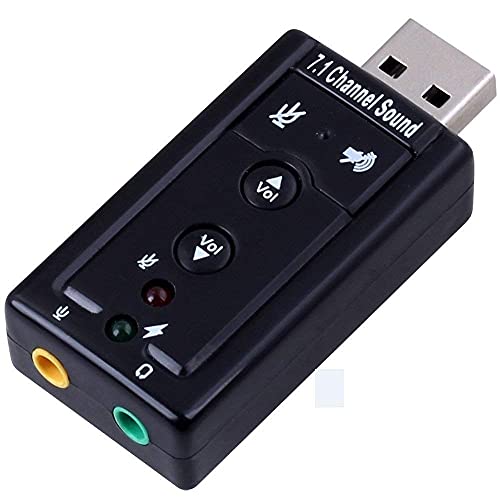
The Storin adapter is aimed at Windows users who want virtual 7.1 sound and a front-access headphone and mic solution. It is a low-cost pick for desktops and notebooks where convenience matters more than audiophile-grade output.
Pros
- Easy USB setup for Windows systems
- Bundled Xear 3D sound simulation software
- Useful for adding headphone and mic jacks quickly
- Handy option for older PCs with weak audio ports
Cons
- Windows-only support limits flexibility
- Software-based surround is modest in real use
- Brand presence and support are limited in India
- Not ideal for users who switch across multiple operating systems
The Storin 7.1 Channel USB External Sound Card focuses on one thing, simple desktop convenience. If your CPU sits under the table and you are tired of reaching the rear audio ports, plugging this into a front USB port feels easier. You get quick access for your headset and microphone, which helps in gaming, online classes, or office calls.
Its bundled Xear 3D software tries to create a wider surround effect from regular stereo earphones or headphones. In day-to-day use, this works best for casual media and entry-level gaming. You should keep expectations realistic. This is still an affordable USB adapter, so the surround effect is more software flavour than true high-grade positional audio. For YouTube, meetings, and basic multiplayer use, though, many buyers will find the result good enough.
The weak point is platform support. Storin clearly suits Windows users and does not fit mixed-device households using Mac or Linux. In India, brand familiarity is also lower than better-known names, so long-term confidence is not as strong. If your setup is Windows-only and you want a simple jack expansion device, this model stays relevant.
Creative Sound BlasterX AE-5 Plus

This is the enthusiast pick here. The AE-5 Plus is a high-end internal PCIe sound card with strong DAC performance, a serious headphone amp, and surround features suited for gaming, music, and movie use on a desktop.
Pros
- Excellent DAC specs with up to 32-bit/384 kHz playback
- Drives demanding headphones up to 600 ohms
- Supports Dolby Digital Live and DTS encoding
- Creative software offers deep audio tuning options
Cons
- Works only with desktop PCs that have a PCIe slot
- Overkill for entry-level headsets or casual users
- Software setup takes time for best results
- Costs more than basic USB solutions
The Sound BlasterX AE-5 Plus is for users who care about audio quality in a serious way. On paper, the SABRE32-class DAC, 122 dB range, and discrete Xamp design put it in a different league from simple USB adapters. In real use, you hear cleaner separation, tighter bass, and more precise details in game audio, FLAC tracks, and movie soundtracks. If you own premium headphones, this card gives them room to perform.
Gamers will like the positional cues, surround virtualization, and Dolby Digital Live or DTS support for external devices. Music listeners will appreciate the cleaner output and better handling of high-resolution audio. The headphone amplification is a major advantage because many desktop motherboards struggle with higher-impedance headphones. If you use studio-grade or planar-style headphones, this card makes more sense than a cheap USB dongle.
Creative has a long history in PC audio, and in India the brand still carries trust among desktop enthusiasts. Support is not as widespread as mass-market phone brands, but availability, documentation, and user community discussion are much better than random imports. This matters when you tweak drivers, EQ, surround profiles, or recording settings. For a fixed desktop setup where sound quality is part of the build plan, the AE-5 Plus stands out.
Creative Sound Blaster Z SE

The Z SE is a strong mid-to-upper-tier PCIe sound card for desktop gamers who want better surround processing, cleaner mic handling, and solid headphone support without stepping all the way up to the AE-5 Plus.
Pros
- Good audio quality with 24-bit/192 kHz support
- Strong gaming-focused software and EQ profiles
- Useful mic tuning and noise reduction features
- Supports discrete 5.1 and virtual 7.1 output
Cons
- Desktop-only PCIe design limits usage
- Not as refined as the AE-5 Plus for demanding headphones
- Best features depend on software setup
- Needs cabinet space and a proper install
The Sound Blaster Z SE sits in a sweet spot for many desktop gamers. It gives a clear step up from onboard audio without moving into full enthusiast territory. Audio quality is strong, and the 116 dB specification, ASIO support, and headphone amp make this card useful for both play and recording. If you spend long hours in multiplayer games, the surround processing and gaming EQ presets bring more control than generic motherboard sound.
A big plus here is microphone handling. The Mic EQ presets and CrystalVoice processing help a lot if your headset mic sounds harsh, hollow, or full of room noise. For Indian homes where background fan noise, traffic noise, or family movement often enters the mic, these tools are more useful than fancy RGB or spec-sheet bragging. This makes the Z SE a sensible buy for streamers, gamers, and work-from-home users using one desktop for everything.
Creative’s service reputation in India is still more reassuring than many unknown audio brands in this segment. Driver support and software updates also carry more weight in a category where poor software ruins good hardware. If your goal is better gaming audio, clearer team chat, and a more polished desktop sound setup, the Z SE makes a lot of sense.
Verilux USB Sound Card
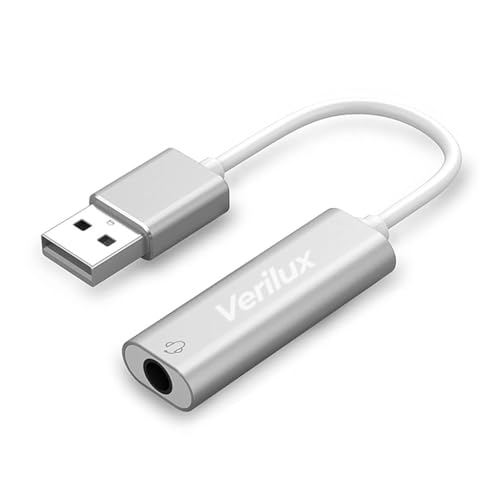
The Verilux USB Sound Card is a compact external adapter for users who need a simple replacement for a damaged audio jack or a clean extra 3.5 mm port. Its broad OS support makes it flexible for homes with different devices.
Pros
- Works with Windows, Mac, and Linux
- Supports both audio input and output
- Lightweight and easy to carry
- Good use case for meetings, streaming, and backup audio
Cons
- Volume control depends on the connected device
- Virtual 7.1 effect is limited
- Brand support is less established
- Not meant for high-end headphone loads
The Verilux USB Sound Card is easy to understand. You plug it in, set it as the default device if needed, and start using your headset or microphone. This simplicity makes it a handy fix for laptops with worn-out headphone jacks, mini PCs with limited ports, or office systems where onboard audio gives trouble. The compact body also suits people who move between home and office.
Its broad compatibility is the main selling point. Windows, Mac, Linux, and even PS4 support make this more flexible than some budget rivals. That helps in Indian households where one accessory often gets shared between a work laptop, a family desktop, and a console. For calls, classes, light streaming, and normal media playback, the sound card does the job without fuss.
The sound processing includes noise reduction and virtual 7.1 claims, but the main value comes from stable plug-and-play use rather than dramatic audio upgrades. Buyers should treat this as a practical replacement or expansion tool. Verilux is not a major audio brand with a deep service network in India, so I would look at seller reliability before buying. If you want broad compatibility in a small adapter, this one is easy to shortlist.
Buying Guide
Choose USB or PCIe first
This is the first decision. USB sound cards suit laptops, consoles, office systems, and users who want plug-and-play use. PCIe sound cards fit desktop PCs and give better hardware-level audio processing, stronger headphone amplification, and more software options. If you move between devices, pick USB. If your desktop is fixed and audio matters a lot, PCIe is the better route.
Check operating system support carefully
Do not skip this step. Some sound cards work across Windows, Mac, and Linux, while others target Windows only. If your home uses a MacBook for work and a Windows desktop for gaming, poor OS support becomes a headache fast. Check whether all features work on your system, not only basic playback.
Understand virtual surround versus true output
Many affordable sound cards mention 7.1 sound, but most USB adapters in this segment use virtual surround for headphones. That is fine for gaming and movies, but it is different from discrete multi-channel output used in larger speaker setups. If you want better footstep cues in games, virtual surround may be enough. If you want a true speaker-based home setup, look deeper into output standards and ports.
Match the sound card to your headphones and mic
A basic headset does not need a heavy-duty amp. High-impedance or studio headphones do. If your headphones are hard to drive, a stronger internal card like a Creative PCIe model makes more sense. Also think about microphone quality. If you stream, join meetings, or play ranked games, mic noise reduction and voice tuning are worth paying for.
Look at software quality, not only specs
Many buyers focus on bit rate, sample rate, and signal numbers. Those matter, but software matters too. Good software lets you switch between speakers and headphones, tune EQ, improve mic clarity, and manage surround effects without frustration. Bad software ruins daily use even if the hardware looks good on paper.
Think about Indian usage conditions
In India, long work hours, hot rooms, dust, and unstable power setups are common. A compact USB adapter should have a firm connector and stable detection across repeated plug cycles. A PCIe card should sit in a cabinet with decent airflow and dust control. If your area has voltage issues, a decent UPS for your desktop setup also helps protect audio gear.
Warranty and service matter more than you think
A sound card is often bought when your existing audio setup fails, so downtime is irritating. Brands with known support channels save time if the unit develops channel imbalance, mic port issues, or driver trouble. Creative and Ant Esports have better recognition in India than small imported labels. For lesser-known brands, seller reputation becomes more important.
Feature Importance
| Feature | Importance |
|---|---|
| Audio type, USB or PCIe | High |
| Operating system support | High |
| Headphone amp strength | High |
| Microphone input quality | High |
| Virtual surround or multi-channel support | Medium |
| Software stability and tuning options | High |
| Build quality | Medium |
| Portability | Medium |
| Warranty and service network | High |
| RGB or cosmetic extras | Low |