A good storage enclosure solves a common problem for many Indian users. Your internal drive has data, speed, and life left, but your laptop or desktop has no spare slot. With the right enclosure, you turn an HDD or SSD into usable external storage for backup, editing work, family photos, CCTV archives, or office files. For creators, IT users, and even home users with old drives lying around, this product category makes a lot of sense.
When you pick one, the details matter more than many people expect. You need to check drive type support first, 2.5-inch, 3.5-inch, or M.2 NVMe. After that, look at interface speed, RAID support if needed, heat control, build quality, and ease of installation. In India, heat and dust are real issues, so cooling design is not a small point. Service support also matters because imported accessories often look good on paper but become a headache if anything goes wrong.
Budget matters too. Some buyers need a simple single-drive NVMe case for fast file transfer. Others need a heavy desktop enclosure with two or five bays for backup and long-hour use. I always suggest matching the enclosure to your work style first, instead of chasing the biggest numbers. A compact model suits travel and daily carry, while a multi-bay model suits home office, media work, and long-term storage planning.
ORICO 5 Bay USB 3.0 HDD Enclosure

This is a large-capacity desktop enclosure for users who need to run multiple 3.5-inch drives from one unit. It suits backup-heavy setups, media libraries, and office storage where easy drive swapping matters.
Pros
- Supports up to five 3.5-inch SATA HDDs or SSDs
- High total storage ceiling of up to 80TB
- Tool-free drive installation with hot swap support
- Aluminum body and built-in fan help with cooling
Cons
- No RAID support, so advanced storage modes are missing
- Large desktop size is not suitable for travel
- Best suited for users who already own multiple drives
- USB 3.0 interface is slower than newer 10Gbps options
The ORICO 5 Bay enclosure is built for a specific type of buyer, and if you are that buyer, this product makes immediate sense. It is not trying to be tiny or stylish for coffee-shop carry. This is a serious desktop box meant to hold five drives in one place and keep your storage setup clean. If you work with old project files, camera backups, movie collections, or office records, having one enclosure instead of multiple loose adapters feels far better in daily use.
Its biggest strength is convenience. Tool-free bays and hot swap support save time when you need to insert or replace drives. The 150W power supply is also a good sign because multi-drive enclosures need stable power, especially during long transfers. The aluminum alloy shell and active fan matter in Indian weather, where summer room temperatures alone put stress on hard drives. For users in warmer cities, this cooling setup is more useful than flashy design.
The missing RAID support will matter for some users. If you want mirrored backup or striped speed inside one box, this is not the right pick. But if your goal is simple bulk storage with separate drives, the ORICO works well. ORICO has decent visibility in the accessories market in India, though service reach is not as wide as major PC brands. For buyers who want a practical multi-bay enclosure and understand its non-RAID nature, this one stays a strong option.
Lemorele M.2 NVMe SSD Enclosure RTL9210
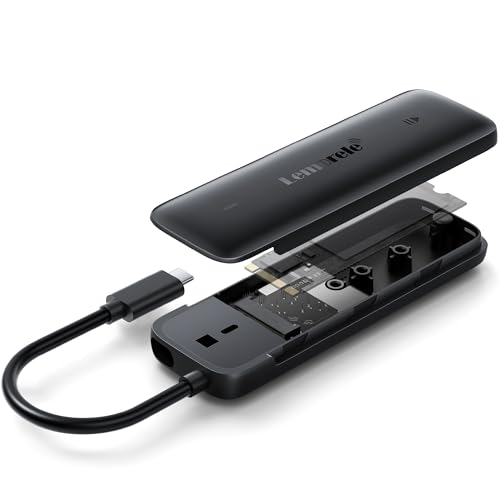
This compact NVMe enclosure is made for users who want fast portable storage from an M.2 SSD. It is a smart fit for students, editors, and professionals who move large files between devices.
Pros
- 10Gbps USB 3.2 Gen 2 interface for fast transfers
- Tool-free design keeps setup easy
- Integrated cable design reduces connection fuss
- Works with Windows, macOS, Linux, Android, and supported iOS devices
Cons
- Supports only NVMe SSDs, not SATA M.2 drives
- Maximum supported capacity is 4TB
- Plastic-based body feels less premium than full metal designs
- Phone use depends on OTG or USB support on the device
The Lemorele enclosure takes a simple idea and does it neatly. You insert a compatible NVMe SSD, close the case, and your spare internal drive becomes a compact external drive. For people who edit photos, transfer 4K clips, move game libraries, or keep project backups in a bag, this is a much cleaner route than carrying a bulky hard drive. The 10Gbps interface and Realtek RTL9210 controller give this enclosure a good base for stable high-speed use.
One of the better touches here is the integrated cable setup. Small enclosures often get annoying because the loose cable goes missing or the fit becomes unreliable after a while. This design tries to reduce that pain point. The ABS hybrid body also makes sense for daily carry. It is lighter and less likely to scratch a laptop or tablet kept in the same bag. For commuting users and students, those small quality-of-life details matter more than people admit.
For Indian buyers, after-sales access adds trust. Lemorele mentions a 1-year warranty and India support contact details, which is a useful point in a product category where many listings feel anonymous. You do need to be careful about compatibility because this enclosure does not support SATA-based M.2 SSDs. If your SSD is NVMe and you want a pocket-size external drive with low setup effort, this is one of the safer picks in this list.
PiBOX India Dual Bay RAID Enclosure

This dual-bay enclosure suits users who want RAID flexibility, large storage capacity, and support for both 2.5-inch and 3.5-inch SATA drives. It is a good match for creators, small offices, and backup-focused home setups.
Pros
- Supports RAID 0, RAID 1, JBOD, and clone modes
- Works with both 2.5-inch and 3.5-inch SATA drives
- Aluminum body and fan-based cooling suit long use
- USB Type-C connectivity with UASP support
Cons
- Desktop-style unit needs external power and fixed placement
- RAID setup needs careful handling before use
- Bigger and heavier than simple single-drive enclosures
- Brand support is not as established as bigger global names
The PiBOX India Dual Bay model is for buyers who want more than a plain enclosure. RAID support changes the use case completely. RAID 1 suits users who care about mirrored backup for family photos, office records, or work documents. RAID 0 suits speed-focused users handling larger transfer loads. JBOD keeps both drives independent, while clone mode adds practical value for quick duplication jobs. That kind of flexibility is rare at this level and gives the product a wider audience.
The build also feels aimed at serious desktop use. The aluminum housing, cooling fan, and anti-vibration base are all useful features, especially if the enclosure will stay powered for long sessions. In Indian conditions, where ambient heat and dust are often part of daily life, thermal control is not a spec-sheet extra. It directly affects drive health. USB 3.1 Type-C with UASP support also keeps performance respectable for large backups and media transfers.
PiBOX India as a seller name gives some local familiarity, which some buyers will prefer over random imported labels. Service network depth is still not on the level of large mainstream PC brands, so you should buy from a trusted seller and keep warranty details safe. If you want a dual-bay enclosure with RAID, clone support, and better thermal design than many budget options, this one deserves serious attention.
ACASIS 2 Bay RAID Enclosure

This ACASIS enclosure is a solid dual-bay choice for users who want RAID modes, broad OS support, and a sturdy metal body. It fits backup setups, small business use, and users upgrading old SATA drives into one external unit.
Pros
- Supports RAID 0, RAID 1, JBOD, and SPAN
- Compatible with 2.5-inch and 3.5-inch SATA HDDs and SSDs
- Aluminum construction with fan and vents for cooling
- Wide support across Windows, Mac, and Linux
Cons
- USB 3.0 interface is older than newer 10Gbps options
- RAID configuration requires care and formatting awareness
- Capacity claims in listing appear inconsistent
- Needs external power, so portability is limited
The ACASIS 2 Bay enclosure focuses on practical storage needs. It gives you dual-drive support, multiple RAID choices, and a design built for desk use rather than travel. For users who are upgrading old internal drives, this is a tidy way to turn them into one backup station. RAID 1 is useful if your main concern is data safety. SPAN helps when you want one larger combined volume. JBOD is there for those who prefer separate drives without extra complexity.
I also like that ACASIS pays attention to cooling. A whisper-quiet fan, ventilation openings, and an aluminum shell are all good signs for sustained operation. That matters if you are moving big folders, backing up office systems, or keeping the unit connected for long periods. In many Indian homes and workspaces, room cooling is not consistent through the year, so enclosure thermals deserve more attention than buyers usually give them.
The one thing to watch here is setup discipline. The listing itself tells users to back up data before firmware work and to format before setting RAID mode. That tells you this is not a plug-in-and-forget product for absolute beginners. ACASIS has a decent name in the storage accessory space, though service in India is usually more seller-driven than brand-network driven. If you are comfortable with RAID basics and want a sturdy two-bay enclosure, this is a sensible pick.
PiBOX India NVMe M.2 SSD Enclosure

This portable NVMe enclosure is a good fit for users who want fast external SSD performance with a metal body and bundled cables for both USB-C and USB-A devices. It works well for portable editing, backups, and daily file movement.
Pros
- 10Gbps USB 3.2 support with RTL9210 chipset
- Aluminum shell and thermal pad help manage heat
- Includes both USB-C to C and USB-C to A cables
- Tool-free setup with support for common M.2 sizes
Cons
- Works only with NVMe SSDs, not SATA M.2
- No support for certain older AHCI or Mac-specific SSD cases
- Small enclosures can still throttle with hot SSDs in long transfers
- Support experience depends heavily on the seller channel
The PiBOX India NVMe enclosure is aimed at buyers who want speed without making the setup complicated. It supports common NVMe sizes from 2230 to 2280, uses the trusted RTL9210 chipset, and keeps installation simple with a tool-free approach. If you have upgraded your laptop SSD and kept the old NVMe stick, this enclosure is a clean way to turn it into a fast external drive for media files, software backups, and large document folders.
Its metal body is a good move. High-speed NVMe drives run warm, and cheap plastic cases often struggle during long writes. PiBOX adds an aluminum shell and thermal pad, which gives the enclosure a better chance of holding stable performance in Indian summer conditions. The included USB-C and USB-A cables are useful too, because many buyers switch between newer laptops and older desktops. You do not need to buy an extra cable on day one.
This product also adds protection features such as over-current and over-heat protection, plus S.M.A.R.T support for drive status monitoring. Those are useful details for users who care about data health. PiBOX India has growing visibility in this category, though service confidence still depends on where you buy from. If your SSD is compatible and your goal is a compact high-speed enclosure with strong everyday practicality, this one offers good value.
Buying Guide
1. Choose the right enclosure type first
Start with your drive type. A 3.5-inch SATA hard drive needs a desktop enclosure with external power. A 2.5-inch SATA SSD or HDD is easier to handle and is often more portable. An M.2 NVMe SSD needs a dedicated NVMe enclosure. This point is where many buyers make mistakes. If your SSD is M.2 SATA, an NVMe-only case will not work. Check the drive label before ordering.
2. Decide if you need RAID or simple storage
RAID matters only for some buyers. If you want one mirrored copy for better data safety, look for RAID 1. If you want faster combined performance and accept higher risk, RAID 0 is the mode people pick. JBOD keeps drives separate, which many home users prefer because setup is easy. If your goal is plain storage expansion, a non-RAID enclosure is often enough and keeps things simple.
3. Pay attention to speed, but match it to your use
USB 3.0 and USB 3.1 Gen 1 are fine for large hard drives and normal backups. For NVMe SSD enclosures, 10Gbps USB 3.2 Gen 2 makes more sense because the drive itself is fast. Still, your laptop port also needs to support those speeds. If your system has only older USB ports, buying a high-speed enclosure will not give full benefit. Match the enclosure to your host device.
4. Cooling matters a lot in Indian conditions
Heat shortens drive comfort and affects stable transfer speed. For 3.5-inch HDD enclosures, I prefer aluminum bodies, vents, and active fans. For NVMe cases, thermal pads and metal shells help. If you live in a hot city or keep the enclosure running for long backup sessions, skip models with poor cooling design. A cooler enclosure usually gives fewer transfer drops and better long-run reliability.
5. Build quality affects daily use more than specs do
Thin plastic bodies often feel fine on day one and annoying after a few months. Loose ports, weak trays, poor cable fit, and vibration issues show up later. A good enclosure should have solid drive mounting, stable connectors, proper feet or grip on desktop models, and a case that does not flex too much. For travel use, lighter material helps. For desk use, heavier construction feels more stable.
6. Check power setup and portability needs
Desktop enclosures with multiple bays need external power adapters. This is normal and not a flaw. They are built for stable use in one place. Single NVMe enclosures usually draw power directly from USB and are better for travel. So think about how you will use the device. If you want to carry it daily with a laptop, a pocket-size NVMe case is a better buy than a big RAID box.
7. Warranty and service support should not be ignored
Storage accessories hold your data, so support quality matters. Before buying, check whether the seller mentions India warranty, service contact details, or technical support. Keep expectations realistic. Smaller accessory brands often depend on seller support more than a large service network. Buy from a trusted listing, keep the invoice, and test the enclosure early with your own drive.
Feature Importance
| Feature | Importance |
|---|---|
| Drive compatibility | High |
| RAID support | High |
| Transfer speed | High |
| Cooling system | High |
| Build quality | High |
| Capacity support | Medium |
| Port type and cable bundle | Medium |
| Tool-free installation | Medium |
| Portability | Medium |
| Warranty and India support | High |