If you stream, edit videos, produce music, or juggle office work on your PC, a good stream deck or macro pad feels like a relief. One press and your scene changes, your mic mutes, or your favorite shortcut runs. For Indian creators and professionals who handle multiple apps every day, these small controllers save time and reduce stress during live streams, meetings, and editing sessions.
When you pick a stream deck in India, you need to balance key count, software support, build quality, and brand reliability. You also have to think about your desk space, laptop friendliness, and how simple the setup feels. Since prices in India keep changing during sales, focus less on the exact offer and more on long term value, features, and local support.
This guide walks through five of the best stream decks and macro pads available in the Indian market. I will focus on how they fit Indian internet conditions, multi‑job workflows, and the usual mix of streaming, content creation, office work, and gaming. All products here work over USB and suit both beginners and serious creators.
Elgato Stream Deck Neo

Compact 8 key controller for productivity, streaming, and everyday shortcuts with simple drag and drop setup on Windows and Mac.
Pros
- Compact and laptop friendly for small Indian desks
- Simple drag and drop software with profiles and folders
- Good for both office work and streaming
- Strong Elgato plugin ecosystem and community assets
Cons
- Only 8 keys, heavy users might feel limited
- No dial controls for fine audio or timeline tweaks
- Needs Elgato software running in the background
- White color can look dirty faster in dusty rooms
Elgato Stream Deck Neo targets users who want something simple yet useful. You get eight customizable keys that show clear icons, so you always know what each one does. For a lot of Indian users who work on a laptop in a bedroom or small home office, this size hits a sweet spot. It fits next to your trackpad or keyboard without crowding the table.
The free Stream Deck app lets you drag and drop actions onto the keys. You can automate repetitive tasks such as opening Zoom and joining a meeting, controlling OBS while streaming to YouTube, or switching scenes and muting the mic in one tap. For office users, map keys to Outlook, Excel macros, Google Meet controls, or music playback while you work. Each key supports folders, so eight keys quickly turn into dozens of actions when you organize them well.
Elgato has one of the strongest ecosystems in this space. You get a lot of community made icons, profiles, and plugins for OBS, Twitch, Spotify, Philips Hue, and more. In India, Elgato products have a decent reputation among streamers, and service support usually comes through authorized distributors for capture cards and accessories. That gives some comfort for long term use, especially if you stream or edit often in hot and dusty conditions where hardware tends to age faster.
Elgato Stream Deck XL

Large 32 key LCD controller for serious streamers and power users who want direct access to many actions at once.
Pros
- Huge 32 key layout for complex setups
- Bright LCD keys with custom icons and pages
- Comes with a non slip magnetic stand for better viewing angle
- Strong integration with OBS, Twitch, YouTube, and creative apps
Cons
- Takes more desk space, not ideal for tight setups
- Higher price compared to compact models
- Requires USB 3.0 and a reliable port
- Large number of keys feels overwhelming for beginners
Elgato Stream Deck XL suits streamers, video editors, and multitaskers who juggle many actions in real time. You get 32 full color LCD keys, each programmable for single actions, multi actions, folders, and smart profiles that change based on the active app. If you run a busy YouTube or Twitch channel from India, this helps you manage scenes, overlays, chatbot controls, music, and camera angles in one area.
The magnetic stand keeps the deck at a comfortable viewing angle on most Indian desks, even if your table surface is not perfect. Each key shows a distinct icon or animated GIF, which makes it easy during fast streams when you cannot think twice before pressing. With USB 3.0 connectivity, response feels snappy, which matters when your connection is already under load from live streaming over Indian broadband or 4G backup.
Elgato’s software supports deep integration with OBS Studio, Streamlabs, YouTube Studio, Twitch, and many productivity tools. For editors, map keys to common shortcuts in Premiere Pro, DaVinci Resolve, or Final Cut on Mac. The large layout reduces the need for layers and folders, which makes sense if you handle multiple shows, clients, or languages. Brand service in India, while not as widespread as mainstream PC brands, is better known in the creator community compared to lesser known import only devices, so long term support looks reasonable for serious users.
Elgato Stream Deck Mini

Entry level 6 key LCD controller for new streamers and home office users who want basic control without a large footprint.
Pros
- Very small footprint, suits cramped Indian desks
- Affordable entry into the Elgato ecosystem
- 6 keys work with folders to give more actions
- Simple setup for OBS, Zoom, and common apps
Cons
- Only 6 keys, heavy workflows need more layers
- No detachable stand, angle control is limited
- Smaller keys feel tight for large hands
- Less future proof if your channel grows fast
Elgato Stream Deck Mini is ideal if you are starting streaming or remote work and want to test this type of controller. It has 6 customizable LCD keys, which still handle a lot when you use folders and multi actions. For example, set one key to start your YouTube stream, switch scene, post a chat message, and start recording. Another key can control your lights or music. Once you learn the layout, you stop fumbling with keyboard shortcuts.
For Indian students or professionals who work from a small room, the compact size is a big plus. It sits easily beside a laptop, and USB power means no extra adapter. The same Stream Deck software used on larger models works here, so you get full plugin support, profiles, and cloud shared icon packs. This helps you upgrade later to a Neo or XL without learning a new system.
Service and reliability follow Elgato’s general track record. Many Indian streamers use Elgato capture cards and decks, so there is good community knowledge on troubleshooting. If you face issues with keys or software updates, you will find guides and local support groups. For someone on a tight budget who wants a taste of automation, the Mini is a practical pick even with the limited key count.
Elgato Stream Deck Plus (White)
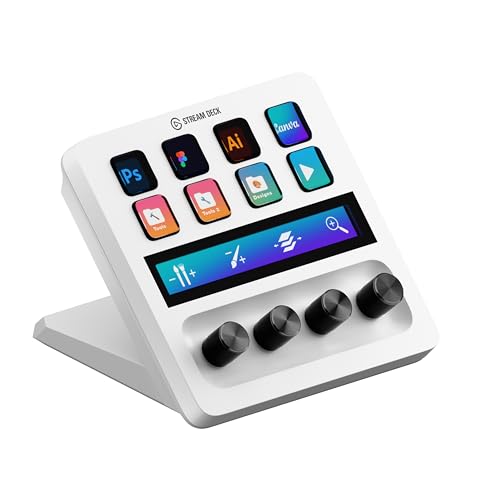
Hybrid studio controller with 8 LCD keys, 4 dials, and a touch strip, tuned for editing, color grading, and studio style workflows.
Pros
- Combination of keys, dials, and touch strip for flexible control
- Great for video editors, designers, and music producers
- Integrates with Adobe apps and DaVinci Resolve
- Customizable profiles for different software and projects
Cons
- Takes some learning due to extra controls
- Higher cost than basic stream decks
- White body is more prone to visible stains
- Best value only if you use creative apps often
Elgato Stream Deck Plus targets creators who go beyond simple scene switching. You get 8 LCD keys for shortcuts along with 4 physical dials and a touch strip for smooth control. This mix suits post production work in Adobe Premiere Pro, After Effects, Photoshop, Lightroom, and DaVinci Resolve. You can scrub timelines, tweak brush sizes, adjust volume levels, or control color grading parameters more naturally than with keyboard shortcuts alone.
For Indian editors who handle weddings, regional content, or freelance projects alongside a day job, this controller helps speed up routine actions. You can set one profile for editing, another for color correction, and one more for audio mixing. The touch strip lets you swipe through pages or adjust values while keeping your eyes on the footage. That kind of muscle memory saves a lot of time when deadlines are tight and clients expect quick delivery.
Elgato’s service ecosystem and software updates support this device as part of their pro lineup. In India, post production teams in metros like Mumbai, Chennai, and Hyderabad already use Elgato gear in studios. That gives some confidence if you plan to build a serious editing or streaming rig at home. If you often work long hours in non AC rooms, consider regular cleaning, since the white finish picks up dust and fingerprints faster.
AmpliGame D6 Stream Controller
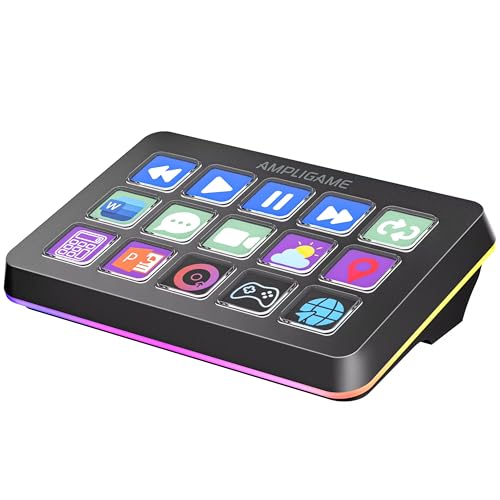
15 key macro and touchscreen controller aimed at gamers, streamers, and editors who want a flexible and colorful setup.
Pros
- 15 customizable macro keys provide good balance of size and control
- Touchscreen style visual keypad makes profiles easier to see
- RGB lighting adds style in gaming setups
- Broader software support beyond streaming only use cases
Cons
- Brand recognition and service footprint in India are limited
- Software maturity and plugin ecosystem trail Elgato
- RGB lighting might distract in professional office use
- Build quality is decent but not at top tier level
AmpliGame D6 Stream Controller brings a different approach compared to traditional Elgato decks. You get 15 macro keys integrated into a visual touchscreen style layout, so you see functions grouped clearly. This suits gamers who want quick access to Discord, OBS, clips, and in game actions. It also helps editors who handle hotkeys for trimming, zooming, and exporting without touching the keyboard every few seconds.
The controller advertises broad compatibility with OBS, Twitch, YouTube, and other applications. You can create multiple profiles for gaming, productivity, and editing. Dynamic RGB lighting around the keys gives your desk a colorful look, which appeals to many Indian gamers who like a themed setup with RGB keyboards and mousepads. For multi tasking scenarios like streaming while working from home, you can map keys to meeting controls and system functions too.
The main trade off is brand support. AmpliGame is less established in India compared to Elgato, so service centers and spare unit availability are unclear. If you live in a metro, warranty handling through the seller is more likely to be smooth than in smaller towns. On the other hand, you get a useful number of keys at a price usually lower than large Elgato decks, so for budget conscious creators this looks attractive if you are comfortable with a newer brand.
Buying Guide
1. Decide your use case before you buy
First decide how you will use the controller most of the time. If you stream on YouTube or Twitch, focus on keys for scene switching, mic control, chat, and overlays. If you edit videos or photos, dials and touch strips help with timeline navigation and brush size. For office work and productivity, even 6 or 8 keys feel useful for app launchers, Zoom controls, and macros. Once you fix your primary use, the right key count and feature set become clearer.
2. Budget planning for Indian buyers
Prices for stream decks in India swing a lot during sales, festive offers, and import cycles. Before you add to cart, fix an upper budget and check street prices over a few days or during major sales. For entry level use, smaller decks like Mini or mid range macro pads often provide enough control without overspending. Higher models, especially those with many keys or dials, suit full time creators or professionals who bill clients. Also factor in GST credits if you buy under a business or freelance GST number, since that changes the effective cost.
3. Key count and layout
Key count is one of the most important decisions. Six keys suit minimal workflows and tight desks. Eight to fifteen keys feel balanced for most Indian users who stream and work from the same PC. Large 32 key decks are best for heavy streamers, production houses, or users who hate switching pages. Also look at physical layout. Check if the keys are easy to reach, if you get a stand, and whether icons are visible under your usual room lighting, especially in bright Indian afternoons or dim late night sessions.
4. Software ecosystem and plugins
Your experience depends heavily on the companion software. Elgato’s Stream Deck app has a rich plugin store, profiles, and community made icons. This helps a lot when you want deep integration with OBS, Adobe apps, Spotify, Philips Hue, and more. Third party macro pads might need more manual setup or offer fewer ready made actions. Before buying, search for YouTube videos and community profiles for your favorite tools so you know how much work is needed to set things up.
5. Compatibility with your PC or laptop
Check the operating system and USB requirements carefully. The products here work with Windows and macOS, but you still need a free USB port, stable power, and up to date OS versions. Laptops with limited USB ports might need a quality powered hub. Also think about where the cable will run on your desk. Many Indian users work on compact study tables, so measure the space near your keyboard to avoid a crowded layout.
6. Build quality and durability in Indian conditions
India has dust, heat, and in many places voltage fluctuations. Look for controllers with solid key feel, good quality plastic, and reliable cables. Keep the deck away from direct sunlight and from windows where dust enters. If you live in a humid city like Mumbai or Chennai, try to keep the device in a well ventilated area and clean the keys often. A slightly higher spend on proven brands pays off over years of heavy use.
7. Warranty, service, and brand presence
For imported niche devices, warranty support is a big concern. Elgato has better recognition in India via official distributors and large online sellers, which helps if you face defects. Newer brands might offer attractive pricing but uncertain service networks. Before ordering, check warranty terms on the product page, see if there is pick up and drop support, and read recent user reviews from Indian buyers. This reduces headache if anything fails.
8. Future proofing your setup
Think about how your workflow will look one or two years from now. If you are serious about streaming or editing, you might grow out of a very small deck quickly. On the other hand, buying the largest and most complex model on day one can feel confusing and waste money. A sensible approach is to choose a device that leaves some headroom for new actions, while still fitting your current budget and desk. If you pick an ecosystem like Elgato, you can add a second deck later and run both together.
Feature Importance
| Feature | Importance |
|---|---|
| Key count and layout | High |
| Software ecosystem and plugin support | High |
| Compatibility with Windows/macOS and OBS | High |
| Build quality and key feel | High |
| Desk footprint and ergonomics | Medium |
| Brand warranty and service in India | High |
| Extra controls like dials and touch strip | Medium |
| RGB lighting and aesthetics | Low |
| Cable quality and port placement | Medium |
| Community profiles and tutorials | Medium |