
A thin and light laptop makes a big difference in daily use, whether you are a student, working professional, coder, creator, or someone who travels between home and office on the metro. You want something that slips into a backpack, runs cool in Indian summers, and handles heavy multitasking without lag. At the same time, you do not want to burn a hole in your pocket.
When you pick a laptop in this mid to upper mid-range budget, you should think about processor performance, RAM, SSD speed, screen quality, battery life, keyboard comfort, and brand service support in your city. The Indian market is full of options on Amazon and offline stores, so it becomes confusing fast. I have picked five thin and light laptops that offer solid value for money for Indian users who need work, study, and light content creation machines without going into premium flagships.
ASUS Vivobook S16 OLED S3607CA
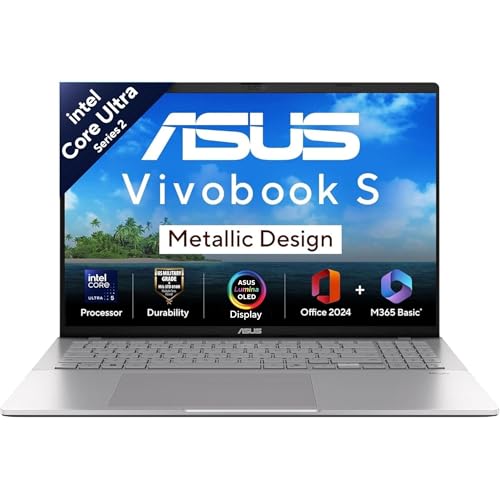
A 16 inch OLED ultrabook with Intel Core Ultra 5, ideal for users who want a big, color accurate display in a slim metallic body.
Pros
- 16 inch OLED 16:10 panel with deep blacks and rich colors
- Intel Core Ultra 5 with built in NPU for AI tasks
- 16 GB DDR5 RAM and fast PCIe 4.0 SSD
- Large 70 Whr battery in a 1.7 kg metallic chassis
Cons
- Refresh rate limited to 60 Hz
- No dedicated GPU for heavy gaming
- OLED needs some care to avoid image retention
- Cooling can feel warm under sustained H loads
ASUS Vivobook S16 OLED S3607CA targets users who want a big laptop that still feels slim and premium. The 16 inch Full HD OLED display with a 16:10 aspect ratio is the star here. Colors look punchy and deep, thanks to 95 percent DCI P3 coverage and high HDR peak brightness. If you watch Netflix, work with photos, or spend long hours reading, the panel will feel comfortable, especially with the taller 16:10 layout that shows more lines of text. In Indian homes where lighting is mixed, OLED contrast helps keep content sharp even at lower brightness levels.
Inside, the laptop runs on the Intel Core Ultra 5 225H with 14 cores and 14 threads, paired with an integrated Intel Arc GPU. This setup handles everyday productivity, browser tabs, light coding work, and some basic editing without drama. The new Intel AI Boost NPU supports on device AI workloads, so future AI based apps in Windows 11 can offload to this chip instead of hammering the CPU and GPU. With 16 GB DDR5 RAM and a 512 GB PCIe 4.0 SSD, the system feels quick while opening large Excel sheets or switching between Office 2024, browsers, and video calls.
For Indian users, build and service matter. The Vivobook S16 uses a metallic design that feels sturdier than basic plastic models, yet keeps the weight at roughly 1.7 kg, decent for a 16 inch system. Ports are practical for both office and college users, with two USB A, two USB C with power delivery and display support, HDMI, and a combo audio jack. Wi Fi 6 and Bluetooth 5.3 support modern accessories and home routers. ASUS has a growing service network in major Indian cities and tier 2 hubs, though smaller towns sometimes face longer turnaround times. Battery capacity at 70 Whr helps during long classes or flights, and the backlit keyboard with number pad suits account and finance users who deal with numbers all day.
Lenovo Yoga Slim 6 83E00012IN

Premium 14 inch OLED ultrabook with Intel Core i5 13500H, built for users who want portability, long battery life, and a sharp display.
Pros
- Lightweight at about 1.35 kg with aluminium body
- 14 inch WUXGA OLED with Dolby Vision and 100 percent DCI P3
- 16 GB LPDDR5x RAM and 1 TB SSD for storage heavy use
- Two Thunderbolt 4 USB C ports with power delivery and DisplayPort
Cons
- RAM is soldered and non upgradable
- Glossy OLED can show reflections under harsh tube lights
- No dedicated GPU for AAA gaming
- Thin body can feel warm under load
Lenovo Yoga Slim 6 is a good choice if you want a premium thin and light machine that still carries strong H series performance. The Intel Core i5 13500H brings 12 cores and 16 threads, which is more than enough for coding, multi tab browsing, MS Office, and occasional content creation on the go. Paired with 16 GB LPDDR5x 5200 RAM and a 1 TB SSD, the laptop handles heavy multitasking and large local projects like photo libraries or local datasets without choking.
The 14 inch WUXGA OLED panel offers 1920 x 1200 resolution with a 16:10 ratio. It supports Dolby Vision and True Black 500, along with 100 percent DCI P3 coverage. Colors look accurate for creators who edit photos or short reels for Instagram and YouTube. Brightness at around 400 nits suits indoor and office use, though reflective glass can show some glare under sharp ceiling lights. For students and professionals in India who work from cafes or coworking spaces, this balance of size, weight, and display quality feels practical.
Lenovo has put the Yoga Slim 6 through MIL STD 810H tests for temperature and shock, which gives extra peace of mind during travel across Indian cities, from hot buses to air conditioned offices. At about 1.35 kg and 1.49 cm thickness, it slips easily into a backpack. Ports include one USB A and two Thunderbolt 4 USB C ports that support charging, high speed data, and external monitors up to 4K 60 Hz, plus HDMI and a 3.5 mm combo jack. The FHD IR camera supports presence detection and Windows Hello, so login is quick. Battery life from the 65 Wh unit is rated up to around a full workday with mixed use at moderate brightness, which suits metro commutes and campus use. Lenovo has a strong service network in India, and Premium Care adds priority support and on site service in many locations, which helps non tech savvy family members who need clear guidance when something goes wrong.
Lenovo Ideapad Slim 3 83K100CJIN
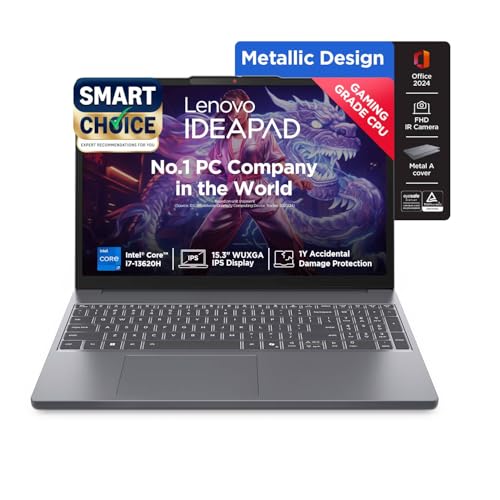
A 15.3 inch WUXGA workhorse with Intel Core i7 13620H, ideal for users who need more cores and a bigger screen on a tighter budget.
Pros
- Powerful 13th Gen Core i7 H series with 10 cores and 16 threads
- Upgradable RAM slot and SSD expansion up to 1 TB
- Large 15.3 inch 16:10 display with anti glare coating
- MIL STD 810H qualified design for rougher use
Cons
- Plastic bottom feels less premium
- 50 Wh battery is smaller than some rivals
- No high refresh rate for gamers
- Speakers are basic for media lovers
Lenovo Ideapad Slim 3 83K100CJIN is a smart choice if you want strong performance in a more affordable thin and light body. The Intel Core i7 13620H provides 10 cores and 16 threads with high turbo speeds, so compiling code, running VMs, crunching big Excel sheets, or basic video editing in apps like Premiere Rush or DaVinci Resolve feels smooth. You get 16 GB DDR5 RAM out of the box, split as 8 GB soldered and 8 GB SO DIMM, and support for up to 24 GB total. This is helpful for engineers, CA aspirants, or MBA students who need many programs open together.
The 15.3 inch WUXGA IPS display runs at 1920 x 1200 with a 16:10 ratio, giving more vertical space than older 16:9 panels. With 300 nits brightness and anti glare coating, it handles mixed indoor lighting better than glossy screens, especially under tube lights or near windows in Indian homes and classrooms. TUV Low Blue Light certification reduces eye strain during long study sessions or work calls.
For connectivity, you get two USB A ports, one USB C with power delivery and DisplayPort, HDMI 1.4, a headphone mic combo jack, a card reader, and a power connector. This port mix works well if you use projectors in colleges or offices. The FHD webcam with privacy shutter and dual speakers tuned with Dolby Audio support everyday calls on Teams or Google Meet. The chassis uses aluminium on the top and PC ABS plastic at the bottom to balance strength and cost. Lenovo mentions MIL STD 810H qualification, which adds some durability in Indian conditions with temperature changes and occasional drops. Service coverage for Ideapad series is good across India, and the extra 1 year Accidental Damage Protection helps in cases like liquid spills or small drops in hostels or offices.
HP 15 fd1354TU

A 15.6 inch everyday laptop with Intel Core Ultra 5 and 1 TB SSD, aimed at students and professionals who want a familiar HP design with new AI ready hardware.
Pros
- Intel Core Ultra 5 with 14 cores and integrated Intel Arc graphics
- 1 TB PCIe SSD for large local storage
- Full size backlit keyboard with numeric keypad
- HP True Vision FHD camera with shutter for privacy
Cons
- 41 Wh battery is smaller for heavy travel use
- sRGB coverage is modest for color critical work
- Plastic build feels basic compared to metal rivals
- No Thunderbolt support
HP 15 fd1354TU focuses on reliable everyday performance with some modern touches. The Intel Core Ultra 5 125H uses 14 cores and 18 threads, with Intel Arc graphics that handle common media tasks and light creative workloads better than older integrated GPUs. For students who multitask between Chrome, Zoom, Office, and coding IDEs, this configuration works well. For office workers in finance, HR, or operations, the chip handles ERPs, heavy spreadsheets, and dashboards comfortably.
The laptop ships with 16 GB DDR5 RAM in dual channel and a 1 TB PCIe NVMe SSD, so you get enough memory and storage from day one. This is handy in Indian households where one laptop serves the whole family for work, studies, and entertainment. The 15.6 inch Full HD IPS display has 300 nits brightness and an anti glare coating. Colors target around 62.5 percent sRGB, which suits regular content consumption, YouTube, OTT, and office tasks. It is not aimed at professional color grading, so photographers should keep that in mind.
You get practical ports including two USB A, one USB C with 10 Gbps data, power delivery, and DisplayPort 1.2, HDMI 1.4b, and a headphone mic jack, along with Wi Fi 6 and Bluetooth 5.3. The full size backlit keyboard with numeric keypad is useful for accounts work and data entry. HP True Vision 1080p camera with dual mics has a physical shutter, which many privacy conscious Indian users appreciate. A 3 cell 41 Wh battery offers moderate backup for mixed tasks, best suited for users who stay near charging points in offices, colleges, or at home. HP has one of the widest service networks in India, with easy access to service centers in metros and smaller towns, which is often a key reason families stay with the brand.
Preinstalled Windows 11 Home and Office Home 2024, along with a year of Microsoft 365 Basic, cover productivity needs out of the box. For occasional casual gaming, Intel Arc graphics handle older and e sports titles on lower settings, but this machine is not built as a dedicated gaming rig. For most buyers, the combination of new generation Ultra processor, large SSD, and familiar HP build makes it a safe pick for shared home or college use.
ASUS Vivobook 15 X1502VA

A balanced 15.6 inch thin and light laptop with 13th Gen Intel Core i5, 16 GB RAM, and 512 GB SSD, ideal for students and office users focused on value.
Pros
- 13th Gen Intel Core i5 13420H with 8 cores and 12 threads
- 16 GB RAM out of the box for smooth multitasking
- Light 1.7 kg weight with decent port selection
- Privacy shutter on HD webcam and backlit keyboard
Cons
- Display brightness at 250 nits is modest under bright sunlight
- Integrated Intel UHD graphics limit gaming and GPU heavy tasks
- 42 Wh battery is average for long travel days
- Plastic feel is more budget oriented
ASUS Vivobook 15 X1502VA is part of ASUS Smartchoice range, aimed at users who want strong performance without paying for premium design extras. The Intel Core i5 13420H delivers 8 cores and 12 threads, which handles coding, office tasks, browser loads, light editing, and casual games at modest settings. The 16 GB DDR4 RAM ensures smoother multitasking, which matters in typical Indian use where multiple Chrome profiles, WhatsApp Web, and streaming tabs stay open together.
The 15.6 inch Full HD display uses a 16:9 aspect ratio with a 60 Hz refresh rate and around 250 nits peak brightness. It suits indoor use in hostels, offices, and homes, though strong daylight near windows or on balconies can make the screen look dim. For most users who work in shaded rooms with fans and ACs, the display is acceptable. The backlit keyboard with numpad helps while working on Excel sheets or late night study sessions, and key travel feels comfortable for long typing bouts.
Storage comes in the form of a 512 GB PCIe 4.0 SSD, which loads Windows 11 and apps quickly. Integrated Intel UHD graphics focus on efficiency rather than gaming, so this laptop is better for productivity than for AAA titles. Ports include three USB A ports of different speeds, one USB C with power delivery, HDMI 1.4, audio jack, and DC in. The 720p HD webcam with privacy shutter adds a sense of security, especially for students living in shared spaces. The 42 Wh battery supports regular office and study use for a few hours, after which you should stay close to a charger for longer sessions.
ASUS service presence in India has grown, with dedicated service centers in larger cities and partner centers in many tier 2 and 3 locations. For those who prioritize specs and day to day usability over premium all metal designs, the Vivobook 15 offers a strong CPU, generous RAM, and useful features like a backlit keyboard and privacy shutter at a more accessible price point.
Buying Guide
Deciding your budget and use case
Before you pick any of these thin and light laptops, first fix your main use case. If you are a student doing coding, MS Office, and some streaming, you do not need the same configuration as a content creator who edits 4K footage. List your needs, then match them against key specs. In the Indian market, prices fluctuate during sales on Amazon and offline festivals, so focus on the configuration, not only on temporary discounts.
Choosing the right processor
Most models here use Intel 13th Gen H series or the newer Intel Core Ultra series. H series chips like Core i5 13420H or i7 13620H offer strong performance for heavy tasks but can run warmer, especially in Indian summers and non air conditioned rooms. Intel Core Ultra CPUs bring an NPU for AI workloads along with efficient cores. For mixed office use and studies, Core Ultra 5 or Core i5 H works well. For more demanding workloads, a Core i7 H gives extra headroom.
RAM and storage planning
For smooth multitasking today, 16 GB RAM is a good baseline. Light users who only do browsing and Office work can stretch 8 GB, but Chrome and Teams will feel heavy over time. If you run VMs, Android emulators, or big data sets, look for laptops where RAM can be upgraded, such as the Ideapad Slim 3. For storage, a 512 GB SSD is fine if you offload movies and photos to an external drive. If you want to keep everything on the laptop, 1 TB SSD models like the Yoga Slim 6 and HP 15 give more comfort.
Display size, resolution, and panel type
Display affects comfort more than people think. A 14 inch panel suits frequent travelers and those who carry a laptop daily. Larger 15.3 or 16 inch screens give more space for multitasking and split screen work, handy for accountants, coders, and analysts. Resolution at Full HD or WUXGA is standard. OLED panels on the ASUS Vivobook S16 and Yoga Slim 6 give deep blacks and rich colors, great for content and media. IPS panels are safer against burn in and usually handle bright offices better. For Indian homes with strong tube lights, anti glare coatings reduce reflections.
Battery life and thermals in Indian conditions
Battery ratings are usually tested under controlled conditions. In Indian cities with higher temperatures and mixed Wi Fi quality, real world battery life often comes down. Larger batteries like 70 Wh in the Vivobook S16 or 65 Wh in the Yoga Slim 6 last longer during travel days. Smaller 41 to 50 Wh packs suit users who work near plug points. Cooling design matters too. Thin metal bodies can feel hot around the keyboard during heavy loads. Use a cooling stand if you often edit, compile, or game for long stretches in non AC rooms.
Build quality, portability, and keyboard comfort
If you commute by bus or metro in cities like Delhi, Mumbai, or Bengaluru, weight and thickness matter. Laptops around 1.3 to 1.5 kg feel easier on the shoulders. Aluminium or part metal designs feel more rigid but sometimes cost more. Plastic builds reduce price but flex slightly if handled roughly. Look for backlit keyboards, decent key travel, and a large touchpad. Full size number pads help if you deal with accounts or data entry.
Ports, connectivity, and accessories
Check the ports before you order. If you need to connect projectors or older monitors, HDMI is essential. Thunderbolt 4 on the Yoga Slim 6 supports high speed docks and multiple monitors, which suits developers or stock traders. USB C with power delivery is useful because you can charge with third party chargers and power banks, handy during power cuts. Wi Fi 6 support is now common and pairs well with new fiber routers in Indian homes. Budget for a good laptop sleeve, external SSD or HDD, and maybe a basic cooling pad for summer months.
Warranty, service network, and long term support
Brand service varies by city. HP and Lenovo have dense service networks across India, often with centers in tier 2 and tier 3 towns. ASUS coverage has improved but still depends on location. Always register your laptop on the brand website once you receive it. Look for accidental damage protection or extended warranties if you travel a lot or share the laptop with younger siblings. Preloaded Windows and Office save upfront cost, especially for students who do not want to deal with separate licenses.
Feature Importance
| Feature | Importance |
|---|---|
| Processor (generation and series) | High |
| RAM capacity and upgradability | High |
| SSD size and speed | High |
| Display type (OLED or IPS) and brightness | High |
| Battery capacity (Wh) and real world backup | High |
| Build quality and weight | Medium |
| Ports and Thunderbolt or USB C with PD | Medium |
| Keyboard quality and backlighting | Medium |
| Brand service network in India | High |
| Speakers and webcam quality | Low |