
A good TV or monitor wall mount does more than save space. It changes how your room feels, helps with viewing comfort, and keeps your setup cleaner. In Indian homes, where bedrooms, study corners, offices, and compact living rooms often share limited wall space, the right wall mount makes a big difference. For small TVs and monitors, a mount with proper swivel and tilt helps you avoid neck strain and glare from tube lights or windows.
When you pick a wall mount, start with the basics. Screen size support matters, but VESA pattern support matters more. You also need to check load capacity, how far the arm extends, tilt and swivel range, and the type of wall where you plan to install it. If you are mounting in a rented flat or on a corner wall, flexibility and easy installation become even more important.
In the Indian market, many affordable wall mounts look similar at first glance, but small details change the experience. Better steel thickness, tighter joints, cleaner finish, and a decent screw kit save time and avoid future wobble. I also pay attention to brand support in India, because missing hardware or fitment doubts are common with this category. The five options below cover different needs, from basic TV mounting to more adjustable monitor-focused setups.
Caprigo M416
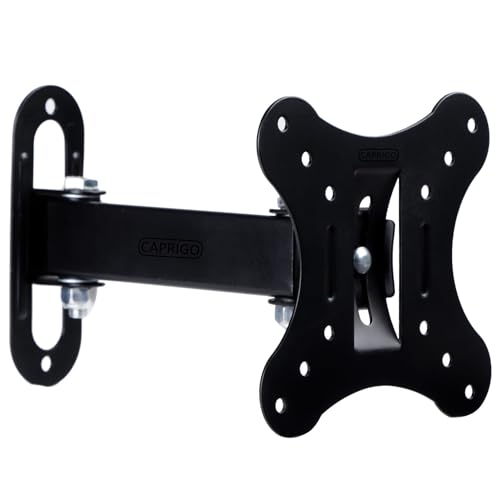
Caprigo M416 is a full-motion wall mount made for 12 to 27 inch TVs and monitors. It suits buyers who want wide compatibility, easy setup, and enough movement for study tables, bedrooms, and office corners.
Pros
- Supports 12 to 27 inch screens
- Full-motion design with tilt and swivel adjustment
- Works with 50×50, 75×75, and 100×100 VESA patterns
- Comes with screw set and DIY installation manual
Cons
- Limited to smaller screens only
- No stated support for larger VESA sizes
- Best suited to light displays, not heavy premium TVs
- Finish and arm reach may feel basic for advanced setups
Caprigo M416 gets the fundamentals right. It supports a wide list of TV and monitor brands and covers the most common VESA sizes used on compact displays. For Indian users with a 19 inch monitor, a 24 inch office screen, or a small bedroom TV, this sort of broad fit is useful because you spend less time guessing whether the mount will line up with the holes on the back panel. The six-way adjustment also gives you enough freedom to move the screen toward your bed, desk, or side seating area.
The movement range is practical for daily use. You get tilt up and down, plus left and right swivel, and the arm extends out from the wall when needed. This helps in homes where the screen is mounted slightly above eye level, which is common in bedrooms and kitchens. Pulling the display out a bit and angling it down can improve comfort a lot. When not needed, the mount folds closer to the wall and keeps the setup neat.
Caprigo as a wall mount brand is seen often on online marketplaces in India, and that matters for buyers who want a simple replacement or standard accessory support. It is not the sort of brand people buy for premium polish. People buy it for fitment ease and value. For smaller screens, that is often enough. If your goal is a clean, usable, budget-friendly setup without overthinking the process, M416 makes sense.
RISSACHI TV Wall Mount 12-27
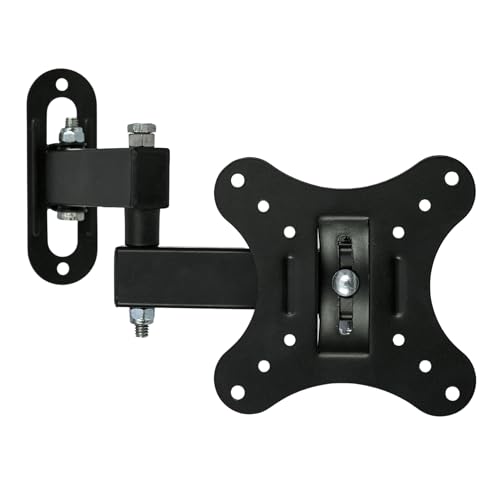
RISSACHI TV Wall Mount 12-27 focuses on compact spaces and adjustable viewing angles. It is a sensible pick for people mounting a small TV or monitor in a corner, home office, or study room.
Pros
- Fits 12 to 27 inch TVs and monitors
- Space-saving design works well in compact rooms
- Tilt and swivel adjustment for better viewing comfort
- Heavy-duty metal build
Cons
- Product details are less specific than some rivals
- VESA support details are not clearly expanded in the listing
- Less suitable for buyers who want detailed load specs before purchase
- Brand presence in India is still limited compared to larger accessory sellers
RISSACHI’s mount is built around one simple idea, save space and keep viewing flexible. That makes it appealing for Indian apartments where a work desk may sit in the same room as a bed, or where a small TV goes on a side wall instead of the main wall. The design is pitched for both TV and monitor use, so it works for a mixed setup too. If you switch between office work in the daytime and streaming at night, this type of mount fits the routine well.
The useful part here is the corner-friendly and movable design. In many homes, a straight head-on wall mount is not ideal because of furniture placement. A mount with angle adjustment helps you place the screen where space exists, then turn it where you need it. This also helps reduce reflections from windows, which is a regular problem in bright Indian rooms, especially during summer afternoons.
RISSACHI is not among the best-known accessory brands, so buyers should double-check screen weight and VESA pattern before ordering. Even so, for light-duty home and office use, the mount covers the expected needs. If you want a simple wall solution for a smaller screen and care more about flexibility than brand name, this one fits the job. Support in India is likely to depend more on the seller platform than a large service setup, so keep installation measurements in hand before you buy.
Robustt Heavy Duty Wall Mount
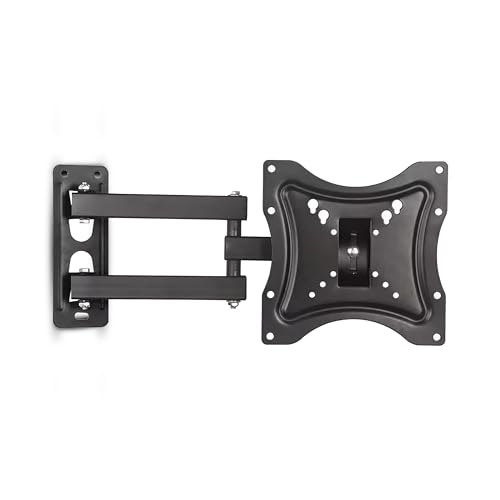
Robustt Heavy Duty Wall Mount is the most versatile option here for buyers with slightly larger TVs or monitors. With support up to 42 inches and VESA up to 200×200 mm, it gives more breathing room for future upgrades.
Pros
- Supports 14 to 42 inch TVs and monitors
- VESA support up to 200×200 mm
- Extendable arm with swivel adjustment
- Rolled steel construction with corrosion resistance
Cons
- Takes more wall space than compact mounts
- May be overkill for tiny 15 or 17 inch displays
- A longer arm needs careful installation on solid walls
- Manual fitting matters more due to broader screen support
Robustt stands out because it covers a wider screen range than most small-screen wall mounts. If you have a 32 inch smart TV today and may move to a 40 or 42 inch model later, this gives you more headroom. The higher VESA support is a big plus too. Many buyers focus only on screen size, then run into mounting issues because the VESA holes do not match. Robustt solves that problem for more models than the usual compact brackets.
The extendable arm is useful in living rooms and bedrooms where seating positions vary. You can pull the TV forward, aim it toward your sofa, then push it back to keep the room tidy. Swivel movement also helps in one-room setups and studio flats, where you may want the same TV visible from both the bed and a side table. The steel build and anti-rust claims make sense for Indian conditions, especially in coastal cities where cheaper untreated metal parts age faster.
Robustt has built a decent name in the accessories segment in India, especially for utility-focused mounts and stands. Buyers usually look at this brand when they want a stronger bracket without stepping into premium enterprise products. The service experience will still vary by seller, but the brand is more familiar than many no-name options in this category. If you want one mount that feels less restrictive and more ready for bigger screens, Robustt is the safest all-rounder in this list.
White Mulberry DIY Wall Mount
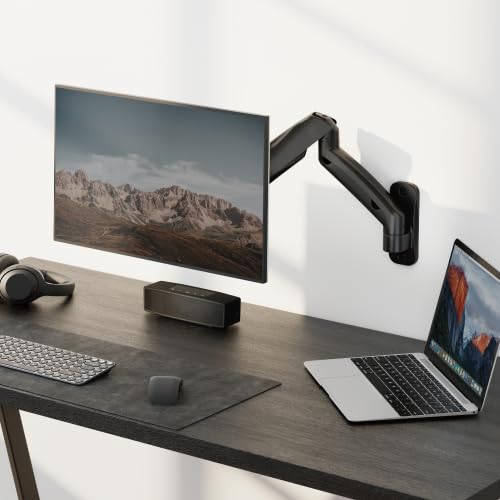
White Mulberry DIY Wall Mount is a monitor-focused wall arm with spring-assisted movement for 15 to 32 inch screens. It is ideal for desk setups where ergonomics and clean cable routing matter more than TV-style mounting.
Pros
- Supports 15 to 32 inch screens
- Spring-assisted design allows easier adjustment
- Integrated cable management keeps setup tidy
- Includes 1-year warranty and dedicated customer care
Cons
- 9 kg load support limits use with heavier displays
- More suited to monitors than TV-heavy setups
- DIY setup may take longer than fixed bracket mounts
- Adjustment mechanism needs careful balancing for best results
White Mulberry takes a different route from the other products here. This is less of a simple TV bracket and more of an ergonomic monitor arm that mounts to the wall. If you work long hours at a desk, this style feels more useful than a standard wall plate with a short arm. You get wide rotation, tilt, and swivel support, which helps you set the screen closer to eye level and adjust posture during work. That matters if you spend the day on spreadsheets, coding, editing, or reading documents.
The spring-assisted movement is the key feature. Cheaper wall mounts often let you move the screen, but the motion feels stiff or limited. A spring-based arm usually gives smoother repositioning once set up properly. Add in cable management, and your desk area looks cleaner, which is helpful in Indian home offices where a study table often shares space with chargers, routers, and extension boards. For remote work users, this type of mount makes the setup feel more thought through.
White Mulberry also earns points for listing a warranty and customer care details clearly. In this category, that is not common. For Indian buyers, visible support details reduce the risk of ordering a mount and then struggling alone with missing parts or setup doubts. The brand is still niche compared with mainstream accessory names, but the after-sales intent looks better than average. If your priority is monitor ergonomics and not TV mounting first, this is the most specialized option in the group.
Gadget Wagon Wall Mount Bracket
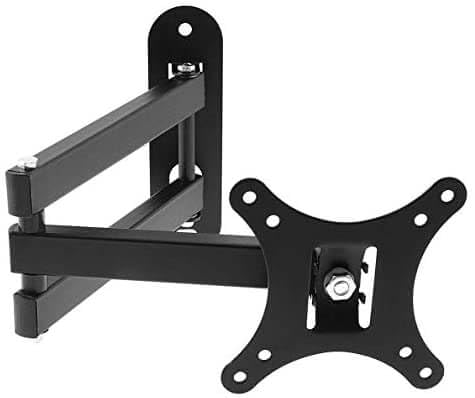
Gadget Wagon Wall Mount Bracket is a compact heavy-duty mount for 10 to 27 inch screens. It suits buyers who want a simple, movable bracket with decent extension and standard VESA 100×100 mm support.
Pros
- Supports 10 to 27 inch displays
- Tilt and swivel adjustment included
- Arm extension offers flexible placement
- Rated load support up to 10 kg
Cons
- Only one VESA size is clearly stated
- Less versatile for unusual monitor mount patterns
- Brand support visibility is limited
- Design feels more functional than refined
Gadget Wagon keeps things straightforward. It is built for smaller LCD and LED TVs or monitors and offers the core features most people need, tilt, swivel, and enough extension to move the display away from the wall. If your screen uses the common 100×100 mm VESA pattern, the mount should fit without much drama. That makes it a practical choice for older 22 inch to 27 inch displays that are being reused in bedrooms, shops, clinics, or study areas.
The stated 10 kg loading capacity and thickened key parts make this more reassuring than ultra-cheap fixed brackets. For Indian buyers, this matters because many smaller TVs are installed in places where people keep adjusting angle often, such as shop counters, kitchen corners, or hostel rooms. A rotating shaft that handles repeated movement without deforming is a useful detail, even if the finish and premium feel are secondary.
Gadget Wagon is more of a utility purchase than a brand-led purchase. You buy this when the measurements match and the feature list covers your use case. Do not expect a large service network or polished packaging. Do expect a functional bracket that does the job for a compact display. If your focus is fitment, movement, and basic durability for a small screen, this one stays in the conversation.
Buying Guide
1. Start with screen size and VESA pattern
Most people check screen size first and stop there. Do not do that. The real fit depends on the VESA pattern on the back of your TV or monitor. Common sizes in this segment include 50×50 mm, 75×75 mm, 100×100 mm, and sometimes 200×200 mm. Check your display manual or measure the distance between the mounting holes before ordering.
2. Know if you need a TV mount or a monitor arm
A small TV in a bedroom and a 24 inch monitor on a work desk do not need the same type of mount. TV mounts are often simpler and built for viewing from a fixed distance. Monitor arms are better for posture, close-up work, and frequent angle changes. If you sit in front of the display for hours, pick a monitor-style wall arm with smoother movement.
3. Check wall type before you buy
This step gets ignored too often in India. Brick and concrete walls are usually fine for these mounts when installed well. Hollow panels, weak partitions, or decorative wood sections need extra care and proper anchors. A strong mount is useless if the wall is weak. If you live in a rented flat, think about drilling permission and hole placement before ordering.
4. Tilt, swivel, and extension change daily comfort
A fixed bracket works if your screen stays at eye level and you always sit in one spot. Many homes do not work like that. Tilt helps when the TV is mounted higher on the wall. Swivel helps when the bed, sofa, and work table are in different positions. Extension helps with corner placement and glare reduction. If sunlight or tube light reflections bother you, these features matter a lot.
5. Weight capacity should stay above your screen’s actual weight
Do not buy a mount that matches your screen weight exactly. Keep some safety margin. Small TVs and monitors are often light, but older models or displays with thick stands removed can weigh more than expected. If the product listing gives only screen size and not a clear load figure, be careful. A stronger arm also tends to feel more stable during movement.
6. Build quality matters more in hot and humid cities
In cities with humidity, dust, and salt in the air, metal quality matters. Rust resistance, thicker steel, and better hinge quality help the mount last longer. Cheap powder coating and loose joints age fast in these conditions. If the mount will be adjusted often, look closely at arm construction and hinge strength, not only at the outer finish.
7. Installation kit and after-sales support save time
A mount with the right screws, spacers, and clear instructions reduces frustration. This product category often gets returns because the included screw set does not suit a specific screen. Brands that mention manuals, warranty, or customer care openly inspire more trust. Even a simple helpline is useful when you are halfway through installation and one step feels confusing.
Feature Importance
| Feature | Importance |
|---|---|
| VESA compatibility | High |
| Screen size support | High |
| Weight capacity | High |
| Wall type compatibility | High |
| Tilt adjustment | Medium |
| Swivel range | High |
| Arm extension | Medium |
| Build material and thickness | High |
| Cable management | Medium |
| Warranty and support | Medium |