
If you use a modern laptop in India, a good USB C dock or hub feels almost mandatory. Slim ultrabooks and MacBooks look clean, but the limited ports become a headache once you connect monitors, hard drives, SD cards, a LAN cable, or a projector in office. A solid dock solves this in one shot, so your work setup at home or office feels neat and reliable.
When you choose a docking station, you need to think about how many monitors you want, what resolutions they support, transfer speeds, power delivery, and how stable the connection stays during long working hours in Indian conditions. Heat, frequent power cuts, and mixed brands of accessories all affect performance. Budget also matters, so the list here covers options from basic hubs for students and casual users to heavy docking stations for serious multi‑monitor setups.
The products covered here are popular and widely available online in India, so replacement, returns, and after‑sales support are easier. Use this guide to pick a dock that fits your laptop, workload, and Indian usage, instead of overpaying for features you never use.
Anker 547 USB C Hub 7‑in‑2 for MacBook
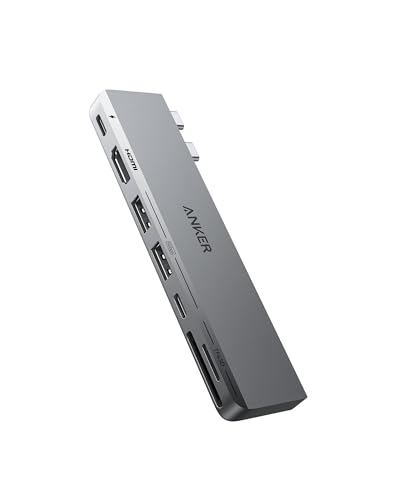
A compact 7‑in‑2 hub for newer MacBook Air and Pro models, ideal if you want to expand ports without a bulky dock.
Pros
- Slim, MacBook‑matching design that sits flush on the side
- High bandwidth multi‑function USB C port with up to 40 Gbps and high resolution output
- 4K at 60 Hz HDMI support for smooth external display
- SD and microSD slots for quick photo and media transfers
Cons
- Works only with specific MacBook models with dual USB C ports on one side
- M1 and M2 MacBooks do not support dual external extended displays
- No Ethernet port for wired internet
- Draws power from MacBook, not a full desk dock with its own power brick
Anker 547 targets MacBook users who want a clean and portable solution instead of a heavy desk dock. It connects directly to the two USB C ports on the side of your MacBook, so you do not have a separate cable hanging around. The aluminum design blends well with MacBook aesthetics and is easy to carry to office, college, or a cafe, which suits many Indian users who move between home and workplace.
You get a multi‑function USB C port that supports high charging power up to 100 W, data transfer up to around 40 Gbps, and video output up to 5K resolution. For most Indian office setups, this is more than enough for a 4K monitor and fast external SSD at the same time. The HDMI port supports 4K at 60 Hz, which feels smoother for day to day work, stock trading charts, or light gaming, compared to 30 Hz docks that feel choppy.
There are dedicated USB C and USB A data ports, along with SD and microSD card slots, useful for photographers, content creators, and students handling media files. A limitation for Indian MacBook buyers is that M1 and M2 base models do not support dual extended displays, so even though the dock has the ports, the laptop restricts usage to mirroring in many cases. Anker has a decent reputation for accessories in India through online channels, though physical service centers are limited and support is mainly through replacement under warranty via Amazon or distributor partners.
Dell WD22TB4 Thunderbolt 4 Dock

A heavy duty Thunderbolt 4 dock suited for office and professional users who need multiple 4K displays and strong wired connectivity.
Pros
- Supports up to single 5K 60 Hz or quad 4K 60 Hz displays with compatible laptops
- Comes with a 180 W power adapter for stable power and charging
- Multiple ports including Thunderbolt 4 and Ethernet for fast, wired network
- Good build quality, ideal for permanent desk setups
Cons
- High price compared to simple USB C hubs
- Overkill for basic users who need only one display and a few USB ports
- Best experience with Dell or other Thunderbolt equipped laptops
- Not as portable as a small travel hub
Dell WD22TB4 is designed as a full dock for serious desk work, suitable for Indian professionals working from home or office who want one cable connection, multiple high resolution monitors, wired LAN, and plenty of USB ports. The Thunderbolt 4 interface gives high bandwidth, so you can run up to single 5K at 60 Hz or even four 4K at 60 Hz displays with a compatible laptop, which suits stock traders, coders with multiple IDE windows, or content creators who need many screens.
The dock has 2 Thunderbolt 4 ports along with several other connectors, and it supplies up to 180 W of power from the included adapter. That means the dock powers your laptop and connected peripherals, reducing reliance on Indian wall outlets that often sit on loose extensions. A wired Ethernet port gives stable internet, which many Indian users prefer over Wi‑Fi for office VPNs, video calls, and large uploads during peak hours.
As a brand, Dell has a strong presence in India with wide service coverage through authorized centers, corporate support channels, and spare availability. So if you already use a Dell Latitude, XPS, or Precision series laptop, pairing it with the WD22TB4 tends to give fewer compatibility surprises. It is not ideal for frequent travel because of weight and power brick, but as a fixed dock on your desk, it gives a clean single cable experience that saves time every day.
UGREEN Revodok Pro 207 USB C Dock

A mid range 7‑in‑1 USB C dock for dual HDMI monitors up to 4K at 60 Hz, suitable for Windows ultrabooks and many USB C laptops.
Pros
- Dual HDMI ports supporting up to 4K at 60 Hz each
- Two 10 Gbps USB C and two USB A ports for fast data transfer
- 100 W USB C PD input with up to around 85 W pass through charging
- Aluminum body with indicator light and multi layer safety features
Cons
- USB A and C data ports do not support charging or video output
- No Ethernet, so not ideal if you want wired LAN
- On macOS, extended monitors mirror due to OS limitation
- Power adapter and cable for PD not included
UGREEN Revodok Pro 207 suits users who want dual 4K HDMI displays from a single USB C port without going for a huge dock. With many Indian professionals now using slim Windows laptops from Dell, HP, Lenovo, or Asus, a dock like this becomes a central point to connect two monitors, keyboard, mouse, and high speed SSDs. Both HDMI ports handle 4K at 60 Hz, which feels smoother for scrolling and multitasking compared to the lower 30 Hz docks common in cheaper hubs.
The dock includes two USB C and two USB A data ports rated up to 10 Gbps, which is useful if you transfer large video projects, RAW photos, or backup archives to external SSDs. The dedicated 100 W USB C PD port supports pass through charging up to around 85 W, enough for most slim laptops, though you need to use your own compatible charger. Note that the PD port handles charging only and does not take data or video, while the data ports do not charge laptops or phones.
UGREEN has become popular in India on Amazon for reliable cables and hubs, and user feedback on docks is mostly positive, especially about thermals and connection stability. Physical service centers are limited and support is usually through online replacement during warranty. The aluminum shell and indicator light help with heat dissipation in Indian summers and give quick status feedback. For Windows users looking for a clean dual monitor desk without paying Thunderbolt dock prices, Revodok Pro 207 is a strong fit.
UGREEN 13‑in‑1 USB C PD Dock

A feature rich 13‑in‑1 dock with Thunderbolt 4 level performance, triple display support, and extensive ports for advanced setups.
Pros
- Thunderbolt 4 with up to 40 Gbps bandwidth
- Supports dual 4K at 60 Hz or single 8K at 30 Hz on supported systems
- Multiple USB C and USB A data ports plus SD, TF, Ethernet, and audio
- Suitable for both Windows and Mac, including many M series models for dual display with Pro or Max chips
Cons
- High price compared to simpler hubs
- Partial dual display support on some Mac models due to chip limits
- Large body better suited for desk than travel
- Requires a quality power adapter and cable for full performance
UGREEN 13‑in‑1 USB C PD Dock is aimed at power users who want one central station for everything, including multiple high resolution monitors, fast storage, wired internet, and card readers. With Thunderbolt 4 ports supporting up to 40 Gbps, you get enough bandwidth for heavy creative workloads, development environments with multiple virtual machines, and serious multitasking. The dock supports dual 4K at 60 Hz or a single 8K at 30 Hz in supported Windows setups, while macOS supports dual 4K at 60 Hz on compatible MacBook Pro or Max chips.
Along with display outputs, the dock includes 10 Gbps USB C and USB A data ports, full size SD and microSD card slots for photographers and videographers, Ethernet for reliable office internet, and audio ports for headsets or speakers. For Indian homes and offices where Wi‑Fi can become unstable due to concrete walls and interference, the wired LAN port is a strong benefit. The dock also supports up to 100 W charging input, which powers most ultrabooks and many bigger laptops, though gamers might still prefer their own bricks.
UGREEN accessories are widely sold on Indian e‑commerce platforms with good user ratings for their hubs and docking stations. Service is handled mainly through online channels with warranty replacements. The metallic build and ventilation design help in hot climates, so even in cities like Delhi or Chennai during peak summer, the dock stays within safe temperatures for long usage. This model suits editors, developers, and office users who want to settle into a long term desk setup without frequent upgrades.
Honeywell 7‑in‑1 Type C Dock
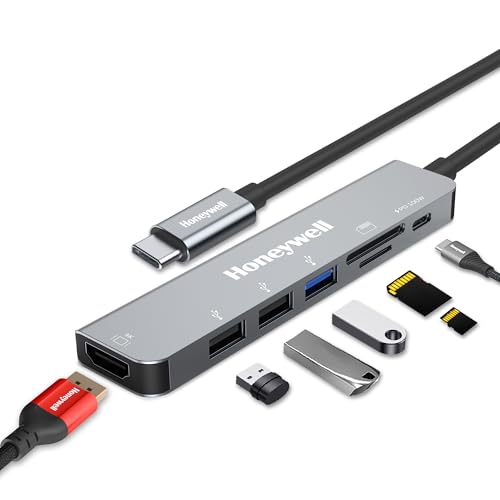
A budget friendly 7‑in‑1 Type C dock that covers HDMI, USB, card readers, and 100 W PD, good for students and office users on a tight budget.
Pros
- Affordable compared to many branded hubs in the same class
- 100 W Type C PD charging support through the hub
- 4K HDMI output for single external monitor at 30 Hz
- SD and microSD card slots with high speed access
- Three year manufacturer warranty in India
Cons
- HDMI output limited to 4K at 30 Hz which feels less smooth
- No Ethernet port for wired internet connection
- USB 2.0 ports are slower for large file transfers
- Plastic and metal mix build feels less premium than some rivals
Honeywell 7‑in‑1 Type C Dock focuses on covering all the basics at a lower price, which suits many Indian students, work from home employees, and casual users who want more ports without heavy spending. It turns a single USB C port into HDMI, one USB 3.0, two USB 2.0, a Type C PD port, and SD and microSD card slots. This covers common needs like attaching a pendrive, connecting a keyboard and mouse, projecting slides in office, or reading camera cards after a trip.
The HDMI port supports up to 4K UHD at 30 Hz. For movies or static work this is acceptable, though for fast scrolling and gaming a 60 Hz dock feels smoother. The USB 3.0 port handles faster data up to around 5 Gbps, while the two USB 2.0 ports suit low bandwidth devices like mouse, keyboard, or printer. The Type C PD 3.0 port supports charging up to 100 W and includes Fast Role Swap, which helps protect connected devices from power fluctuations, something quite relevant in many Indian cities and smaller towns.
Honeywell offers a three year manufacturer warranty, which is longer than many budget hubs that offer only one year. That adds confidence for Indian buyers worried about long term reliability. Brand presence is good in networking and power products, and support is available through authorized partners and email or phone channels. If you want a simple, pocketable dock that handles office presentations, online classes, and light peripheral use, this Honeywell hub provides solid value without overspending on high end features you might never use.
Buying Guide
Set your budget and usage first
Before looking at ports and specs, think about how you work daily. If you only connect one monitor, a keyboard, mouse, and maybe a pendrive, a budget hub like Honeywell 7‑in‑1 or Anker 547 for MacBook users is enough. For multi monitor trading setups, coding rigs, or content creation, you need stronger docks like Dell WD22TB4 or UGREEN 13‑in‑1. Decide if you want a travel friendly hub or a permanent desk dock. This choice will naturally decide your spend level.
Check laptop compatibility and port type
Look closely at your laptop ports. Some models have simple USB C that supports only data and power, while others have full USB C with DisplayPort or Thunderbolt. Thunderbolt docks like Dell WD22TB4 and UGREEN 13‑in‑1 need compatible Thunderbolt 3 or 4 ports for full performance. MacBook users need to remember that many M1 and M2 models limit the number of external extended displays. Always check your laptop manual or manufacturer website for display and power support before selecting a dock.
Decide on monitor count and resolution
Monitor support is the main reason many users buy a dock. If you plan to use a single external monitor for office work, any dock here supports that, though resolution and refresh rate differ. For dual or triple monitor setups, only specific docks handle it well. UGREEN Revodok Pro 207 supports dual 4K at 60 Hz on many Windows laptops. Dell WD22TB4 and UGREEN 13‑in‑1 go further with up to quad 4K setups or even single 8K output on supported systems. For Indian users who stare at screens for long hours, smooth 60 Hz output reduces eye strain compared to 30 Hz options.
Think about data transfer speed and storage use
If you often move big video, RAW photos, or backup archives, focus on docks with 10 Gbps USB C and USB A ports, like the UGREEN models. These speeds shorten transfer times from external SSDs and high speed pendrives. For basic tasks such as documents, music, and phone backups, even 5 Gbps USB 3.0 is fine. The Honeywell dock includes both USB 3.0 and 2.0 ports, which helps you separate high speed devices and low speed ones like mouse or printer.
Power delivery and Indian power conditions
Power delivery, or PD, decides how your laptop charges through the dock. Anker 547 and UGREEN docks support up to around 100 W PD input, which handles most thin and light laptops. For heavier workstations, you might still use the original charger. In Indian homes where power cuts and voltage fluctuations are common, using a dock with its own adapter, like the Dell WD22TB4, and a good surge protector gives extra safety. Features like Fast Role Swap in Honeywell docks help protect connected devices during sudden power changes.
Need for Ethernet and stable internet
Wi‑Fi in many Indian apartments drops due to thick walls and interference from neighbors. If you attend important video calls, trade stocks, or game online, a wired Ethernet port helps. Dell WD22TB4 and UGREEN 13‑in‑1 both include Ethernet, which connects straight to your router for stable speeds. If your work is light and you sit near your router, you might skip Ethernet and choose a smaller, cheaper hub without it, like Anker 547 or Honeywell 7‑in‑1.
Build quality, heat, and Indian climate
Indian summers test any electronics. Aluminum or metal body docks like the UGREEN Revodok Pro and 13‑in‑1 handle heat better and distribute temperature more evenly. Cheaper plastic docks might feel warmer over long days, though for light use they still work fine. Place your dock where air moves freely. Avoid covering it with papers or keeping it on soft surfaces. This small habit increases life and stability.
Warranty, brand service, and availability
For long term use, warranty and service matter. Dell has strong service coverage in India, which helps for corporate or professional buyers. UGREEN and Anker rely more on e‑commerce and online replacements. Honeywell offers a long three year warranty, which is rare at this price level. Also look at part availability and replacement policies on Amazon or other Indian sites. Buying from authorized sellers avoids issues if you need support later.
Feature Importance
| Feature | Importance |
|---|---|
| Laptop port type (USB C vs Thunderbolt) | High |
| Number of external monitors supported | High |
| Supported resolution and refresh rate (4K 60 Hz, 4K 30 Hz, 8K) | High |
| Power delivery wattage | High |
| Availability of Ethernet port | Medium |
| Number and speed of USB data ports | High |
| SD and microSD card readers | Medium |
| Build material and heat management | Medium |
| Physical size and portability | Medium |
| Brand warranty and Indian service network | High |