
If your wrist and fingers start hurting after long hours on the laptop, a Vertical Wireless Mouse can change your daily comfort in a big way. The handshake style grip keeps your wrist in a more natural position, so strain reduces during long office, WFH, coding, or editing sessions. For many Indian users who spend most of the day on Excel, browsing, or design work, this simple switch can mean fewer aches by night time.
When you choose a vertical mouse for Indian conditions, you need to think about grip comfort, build quality, DPI levels, silent clicks for shared spaces, battery type, and multi-device connectivity. Budget also matters because you do not want an expensive accessory that fails after a few months. The five options below are among the more sensible choices available online in India, with good feature sets and strong value for money for students, professionals, and casual users.
Portronics Toad Ergo 4 Vertical
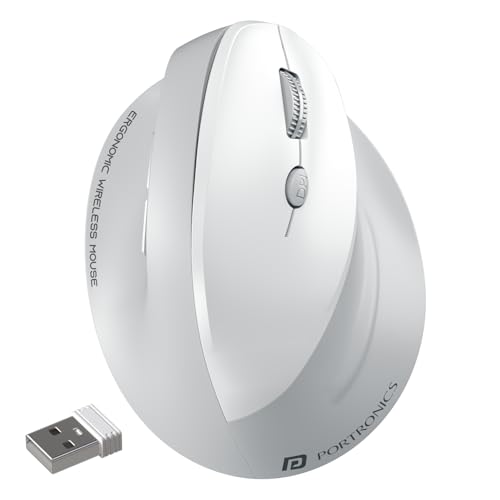
A feature-rich vertical wireless mouse with dual mode connectivity, high DPI, and a rechargeable battery that suits long WFH and office use.
Pros
- Ergonomic vertical design for better wrist comfort
- Dual mode connectivity with Bluetooth and 2.4 GHz dongle
- Rechargeable via Type C, no AA cells needed
- High DPI up to 4000 for precise control
- Forward and back buttons for faster browsing
Cons
- Right hand only, not suitable for left handed users
- Glossy parts can feel a bit slippery in humid weather
- No dedicated slot for storing the receiver on some batches
- RGB or lighting effects are absent for users who like flashy setups
Portronics Toad Ergo 4 Vertical is built around a handshake style grip that suits long Indian workdays in front of a screen. The shape keeps your wrist turned to a more natural angle, which reduces stress on tendons compared to a flat mouse. If you spend many hours daily in Excel, coding, or general browsing, this change in angle can reduce pain over weeks of regular use. The click sound is tuned to be soft, so it feels gentle and suits late night usage in small Indian homes where family members sleep nearby.
The mouse supports both Bluetooth and a 2.4 GHz USB dongle. You can pair it with two devices and switch quickly between a laptop and a desktop, or between a home PC and office laptop. This suits many Indian users who work hybrid or use a tablet with a keyboard for quick tasks. DPI adjustment from 800 to 4000 lets you slow the pointer for photo editing or speed it up for large 4K screens. The 6 button layout, including dedicated forward and back buttons, helps with browsing government portals, GST sites, and long PDFs where constant navigation becomes tiring with a normal mouse.
A built in rechargeable battery with Type C charging reduces the headache of buying AA cells again and again. You plug in a regular phone charger cable, so no special accessory is needed. Portronics as a brand has built a wide presence in India in the low and mid range accessory space, with service centers in major cities and a workable warranty process through both online and offline channels. For users who want comfort, multi device flexibility, and a modern look without going into premium brands, Toad Ergo 4 feels like a balanced pick.
DQST Rechargeable Vertical Mouse

A simple, rechargeable vertical wireless mouse with 2.4 GHz connectivity and 3 level DPI control for basic office and home use.
Pros
- Rechargeable battery, no regular cell replacement
- Vertical ergonomic grip with matte finish for better hold
- Three DPI levels for different usage styles
- Forward and back buttons improve web navigation
Cons
- Only 2.4 GHz, no Bluetooth support
- DPI range suits basic work more than fast paced gaming
- Receiver loss risk because of external nano dongle
- Brand support presence in India is limited compared to bigger brands
DQST Rechargeable Vertical Mouse targets users who want an ergonomic design without too many complications. The body is shaped to support the hand from the base of the palm up to the fingertips. This can reduce wrist twist during long sessions of writing emails, drafting documents, and reading research papers. The surface uses a matte finish, which helps grip in Indian humidity, especially in cities where sweat on the palm is common in summer months.
Connection is through a 2.4 GHz USB receiver, which gives up to around ten meters coverage, enough for normal desk setups and even for TV usage from a sofa. The plug and play approach fits well for users who do not want to bother with Bluetooth pairing issues. You plug in the nano receiver, switch on the mouse, and start using it. Three DPI levels allow you to adjust pointer speed based on your screen size, whether you use a compact 14 inch laptop or an external 24 inch monitor at home.
Since the mouse is rechargeable, your running costs stay low. You charge it periodically over USB and avoid buying disposable batteries, which also helps reduce household waste. Brand visibility of DQST in India is still low, so service options might be limited to seller warranty and online support. For budget focused buyers who want a basic vertical mouse for regular tasks, this model sits in a sensible space, especially as a first step into ergonomic peripherals.
Zebronics Jaguar V Vertical
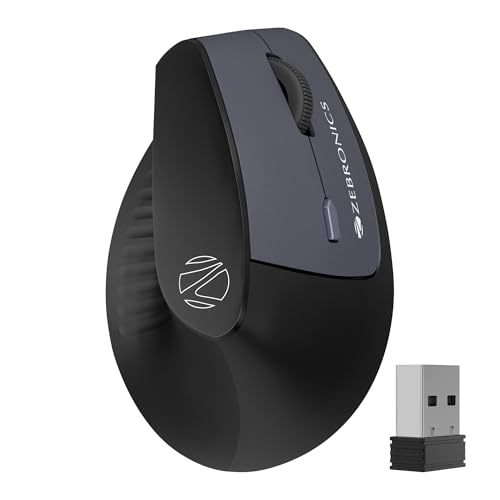
A lightweight vertical wireless mouse with dual mode connectivity and dual Bluetooth support that targets multitasking users.
Pros
- Ergonomic vertical shape for lighter wrist strain
- Dual mode 2.4 GHz and Bluetooth connectivity
- Supports dual Bluetooth connections for three device use
- Simple DPI control up to 1600 for office use
Cons
- Runs on AAA batteries, no built in rechargeable cell
- DPI ceiling of 1600 is modest for large 4K displays
- Body size may feel small for users with large hands
- Plastic feel is basic for users expecting a premium touch
Zebronics Jaguar V Vertical focuses on users who switch between devices during the day. It supports both a 2.4 GHz dongle and dual Bluetooth connections, which means you can pair it with up to three devices. For example, you connect to a Windows desktop through the dongle, to a laptop through Bluetooth 1, and to a tablet or Mac through Bluetooth 2. Swapping control between these devices saves time if you juggle personal and office machines, which many Indian freelancers and IT professionals do.
The ergonomic curve of the body tries to keep your wrist angle natural while still keeping weight low. A light mouse reduces hand fatigue when you use it for long scrolling sessions, such as reading PDFs or checking long Excel sheets. The 1600 DPI limit fits regular office tasks, browsing, and light design work on full HD monitors, though users with large 4K screens might want higher DPI for faster coverage across the screen.
This mouse uses two AAA batteries instead of a built in rechargeable pack. For some users in Indian towns, this is actually more practical because AA and AAA cells are available at every local store. You carry spare batteries and swap them in seconds. Zebronics has a strong distribution network and service centers across India, which helps with warranty claims and after sales issues. For someone who values multi device support, simple design, and easy battery replacement, Jaguar V gives good functional value.
Acer Ergo Vertical Wireless
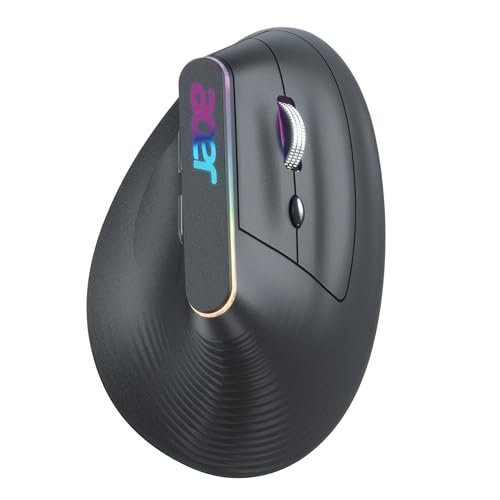
A stylish vertical wireless mouse from Acer with dual mode connectivity, silent clicks, RGB lighting, and a rechargeable battery.
Pros
- Ergonomic vertical grip from a known PC brand
- Dual mode with 2.4 GHz receiver and Bluetooth
- Silent left and right buttons, good for shared rooms
- Adjustable DPI up to 3200 for work and casual gaming
- Built in 500 mAh rechargeable battery with RGB lighting
Cons
- RGB glow may not appeal to users who prefer a plain look
- Slightly taller body needs short adjustment time
- Receiver storage may be tight inside some laptop bags
- Acer service is strong in tier 1 and 2 cities, weaker in smaller towns
Acer Ergo Vertical Wireless Mouse brings a familiar brand name to the ergonomic mouse segment. The design promotes a handshake style posture, which encourages your forearm to stay straighter. Over long coding sessions, video editing, or marathon browsing, this posture can help reduce wrist and finger strain. The surface texture and shaping give a stable grip even when your hands sweat in hot Indian weather or during power cut periods when the fan is off.
One strong point is the focus on silent switches. The main buttons are designed for low noise clicks tested for millions of presses. This works well for students in hostels, shared flats, and office cabins where loud clicking can irritate colleagues. The scroll wheel is tuned for precise steps, which suits detailed work like editing spreadsheets or zooming through timelines. DPI options from 1200 up to 3200 give enough range for both basic navigation and faster movement on high resolution screens, and for light gaming on weekends.
Acer includes dual mode connectivity, so you get both Bluetooth and a 2.4 GHz dongle. Switching between laptop, desktop, and tablet becomes simple. The mouse has a built in 500 mAh rechargeable battery, which you top up over USB, reducing long term running cost. The subtle RGB glow adds a bit of style for users who like a modern desk setup, though you can treat it mainly as a design touch. Acer has a well known service network in bigger Indian cities and many service partners in state capitals. Warranty support for peripherals is usually handled through authorized centers or seller channels. For users who prefer a known brand and want silent clicks with a comfortable upright grip, Acer Ergo Vertical sits in a sweet spot.
Portronics Toad Ergo Vertical

A budget friendly vertical wireless mouse with 2.4 GHz connection, 3200 DPI, and 6D button layout focused on comfort and productivity.
Pros
- Comfortable handshake grip reduces wrist pressure
- High DPI up to 3200 suits large monitors
- Power saving mode extends AAA battery life
- Forward and back side buttons help with navigation
- Lightweight design for long hours of use
Cons
- Only 2.4 GHz, no Bluetooth
- Uses AAA batteries instead of USB charging
- Suitable mainly for right handed users
- No silent click version, sound level is standard
Portronics Toad Ergo Vertical targets users who want ergonomic comfort at an affordable level. The vertical shape supports a handshake type grip, where your thumb rests in a natural groove and your fingers wrap around the buttons. For Indian office workers who spend long stretches on government portals, CRM tools, and chat platforms, this design can reduce strain felt with flat mice. The outer shell keeps a practical finish that handles day to day dust typical of Indian homes and offices.
The mouse runs on a 2.4 GHz wireless connection through a small USB receiver. This suits desktop PCs and laptops that have a regular USB port. Plug in the nano receiver, power on the mouse, and it starts working without driver hunts. DPI up to 3200 gives you a wide speed range, so you can slow down for detailed photo retouching or speed up for large dual monitor setups. The 6D button layout includes left, right, scroll, DPI toggle, and two side buttons for going forward and back during browsing or while working inside file managers.
Power comes from two AAA batteries, and the mouse has a power saving hibernation feature that cuts power draw when inactive. For Indian users, the advantage is that AAA cells are sold in local shops, so you are never stuck if the battery dies during an urgent project. Portronics has grown into a familiar accessories brand with presence in online marketplaces and retail chains, and has developed a network of service partners in major cities. For students and professionals who want an ergonomic upgrade without spending too much, this Toad Ergo Vertical model feels like a strong starting point.
Buying Guide
Why a vertical mouse makes sense for Indian users
Many Indian professionals and students spend long hours on laptops placed on office desks, dining tables, and even beds. Traditional flat mice twist the forearm, which often leads to discomfort in the wrist and fingers after extended use. A vertical mouse shifts the grip into a handshake position. This can lower strain over time, especially for people prone to pain near the thumb, pinky, and forearm. For users who handle long spreadsheets, coding, or digital marketing work, this change can improve comfort without changing the rest of the setup.
Budget planning and value for money
Before you pick a model, decide how intensively you use the mouse and for how many hours daily. If you use a mouse for casual browsing or one to two hours of use, an entry level vertical mouse with simple 2.4 GHz connection might be enough. For heavier use, like full day office work, look at better ergonomics, reliable switches, and higher DPI. Rechargeable models cut long term cost because you do not buy batteries regularly, though AAA based mice are easier to keep running in smaller towns where charging ports are limited. Focus on comfort and reliability rather than only discounts or fancy lighting.
Connectivity options and compatibility
You will find three common pattern combinations in this list, pure 2.4 GHz mice, dual mode 2.4 GHz plus Bluetooth, and in one case dual Bluetooth along with the dongle. Pure 2.4 GHz works well for desktop PCs and laptops with free USB A ports. Dual mode models help if you use a slim laptop that has few ports or if you also want to connect to tablets and phones. Dual Bluetooth is handy for users who toggle between multiple laptops or a mix of work and personal systems. Check the operating systems you use, such as Windows, macOS, Linux, and Android, and confirm that the mouse supports them before buying.
DPI, performance, and type of work
DPI refers to the sensitivity of the cursor. Lower DPI, such as 800 or 1200, suits precise work like photo editing or detailed Excel cell selection. Higher DPI, such as 2400, 3200, or 4000, lets your cursor travel across wide screens with smaller hand movement, helpful for 27 inch or 32 inch monitors and multi monitor setups. For regular office and study use, a mouse with DPI up to 1600 or 2400 is usually enough. For users who work on high resolution design or game occasionally, models with 3200 or 4000 DPI provide more headroom.
Battery type, charging, and power saving
You need to choose between rechargeable models and battery based models. Rechargeable mice save money on AA or AAA cells and reduce waste, which is helpful if you use the mouse heavily every day. You charge using a USB cable, often Type C, which many phones and laptops already use in India. Mice that use AAA batteries give flexibility when there is load shedding or no easy access to charging points, because you can buy cells from any local shop. Power saving features, such as auto sleep or hibernation, increase battery life in both types, which helps Indian users who do not want to change or charge often.
Build quality, comfort, and size
When you pick a vertical mouse, pay attention to how tall and wide it is relative to your hand size. Users with larger hands need a taller body so their fingers do not feel cramped. Weight matters too, because a lighter mouse feels easier to move for long hours, while a slightly heavier one feels more stable for fine control. Surface finish plays a role in Indian climates. A matte grip handles sweat better, while glossy plastic can feel slippery during hot months. Try to pick a shape that supports the whole palm rather than forcing your fingers to hold tightly.
Noise level, buttons, and extra controls
If you often work at night in a shared room, hostel, or quiet office, silent click buttons help reduce disturbance. Some models offer soft click switches tested for millions of presses. Check the button layout. Side buttons for forward and back are very helpful for frequent browsing or jumping between folders. A separate DPI switch on top lets you change sensitivity on the fly, so you adapt quickly between tasks. More buttons are not always better; the ideal number balances function and comfort so your fingers do not stretch awkwardly.
Warranty, brand service, and availability in India
Service quality in India differs for each brand. Larger brands like Acer and Zebronics usually have more widespread service centers in metro and tier 2 cities, so warranty handling is smoother. Brands focused on accessories, like Portronics, lean on both their own service hubs and partner centers, which work fairly well in bigger cities and through online support. Lesser known brands often use seller based warranty, so check reviews and replacement policies of the platform you buy from. Also consider the availability of spare receivers or support for common issues like double click or scroll wheel failure.
Feature Importance
| Feature | Importance |
|---|---|
| Ergonomic vertical design | High |
| Wireless connectivity stability | High |
| DPI range and adjustability | High |
| Battery type and backup | High |
| Multi device support (dual mode or dual Bluetooth) | Medium |
| Silent click switches | Medium |
| Build quality and grip finish | High |
| Weight and size fit for your hand | Medium |
| RGB or lighting effects | Low |
| Brand service network in India | High |