
A good router decides how smooth your internet feels at home. If you play online games, stream on multiple devices, work from home, or run a smart home setup, the router matters more than most people think. In India, weak room-to-room coverage, crowded apartment Wi-Fi, and mixed broadband quality make router choice even more important.
When I look at a router for Indian buyers, I focus on a few simple things. Real speed matters, but so do coverage, port options, heat handling, app quality, security tools, and after-sales support. You should also think about your internet plan, home size, number of users, and whether you want a basic upgrade or a long-term setup for gaming and heavy use.
The five routers below cover different needs. Some are built for serious gaming with faster wired ports and traffic priority tools. Others give strong value for homes moving from ISP routers to something more stable. If you want better ping, better range, and fewer Wi-Fi complaints at home, this list will help you pick wisely.
TP-Link Archer GE400

The Archer GE400 is a gaming-focused Wi-Fi 7 router made for users who want fast wireless speeds, low latency tools, and strong wired connectivity. It suits homes where gaming, streaming, and heavy multi-device use happen at the same time.
Pros
- Wi-Fi 7 support with multi-gig class speed
- Two 2.5G ports help serious wired gaming setups
- Dedicated gaming panel and game acceleration tools
- Six antennas improve coverage in larger homes
Cons
- Most users do not yet own Wi-Fi 7 devices
- Premium gaming design will not suit every room
- Three LAN ports are only gigabit, not multi-gig
- Advanced features need some setup time
TP-Link built the Archer GE400 for buyers who want more than a basic router. You get Wi-Fi 7 support, dual-band performance up to 6.5 Gbps, six external antennas, and beamforming for wider reach. For a modern Indian home with gaming PCs, consoles, smart TVs, and phones all fighting for bandwidth, this kind of hardware makes sense. The two 2.5G ports are a big plus if you use a fast broadband line, a NAS, or a gaming desktop over Ethernet.
What stands out here is the gaming focus. TP-Link adds turbo game acceleration, a live game panel, and RGB lighting on the front. The RGB is mostly for looks, but the game controls are useful if you care about ping and stable sessions in titles where a small delay ruins the match. In flats where multiple people stream video while someone games, traffic control like this helps keep the connection more predictable.
For Indian users, TP-Link usually has better visibility in the retail and online market than many niche brands. Service experience still varies by city, but spare availability, app support, and setup familiarity are usually decent. HomeShield security and EasyMesh support also add long-term value, especially if you plan to cover more rooms later. This router is best for enthusiasts who want a future-ready setup and do not want their router to become the weak link after the next broadband upgrade.
TP-Link Archer AX10

The Archer AX10 is a practical Wi-Fi 6 router for users who want a major step up from an ISP router without spending too much. It works well for small to mid-size homes with regular gaming, streaming, and daily family use.
Pros
- Affordable entry into Wi-Fi 6
- Gigabit ports suit most home broadband plans
- Easy setup through the Tether app
- Good coverage for flats and smaller houses
Cons
- AX1500 speed class is modest for heavy users
- No USB port for file sharing or dongle use
- Limited advanced gaming features
- Less suited for very large homes with many thick walls
The Archer AX10 is the kind of router I often suggest to people who are fed up with their provider router. It brings Wi-Fi 6, OFDMA, MU-MIMO, beamforming, and a triple-core CPU into a simpler package. On paper, 1.5 Gbps combined speed does not sound extreme, but for many Indian homes with broadband plans well below gigabit, the real benefit is stability and better handling of many devices at once.
The four antennas and full gigabit ports make it a clean upgrade for gaming, OTT streaming, online classes, and work calls. If your current router struggles when everyone is online in the evening, this model fixes a lot of that pain without becoming hard to manage. The Tether app is friendly for first-time users, which matters when you do not want to spend an hour in router settings after office hours.
TP-Link has a broad presence in India, and that makes this router easier to recommend for mainstream buyers. Accessories, replacements, and setup guides are easy to find. This is not a high-end gaming router, and I would not pick it for a huge house or a fiber plan where you want advanced tuning. Still, for value, reliability, and everyday comfort, the Archer AX10 hits a sweet spot.
ASUS RT-AX53U

The RT-AX53U is a balanced Wi-Fi 6 router with useful extras like USB support, built-in VPN tools, and AiMesh compatibility. It suits users who want better security and more flexibility than entry-level routers usually give.
Pros
- Wi-Fi 6 with good everyday throughput
- USB port supports 3G or 4G dongle internet sharing
- AiProtection Classic and VPN features included
- AiMesh support helps future expansion
Cons
- AX1800 class limits headroom for heavier usage
- Three LAN ports may feel restrictive for wired setups
- Coverage is good but not meant for very large homes
- ASUS interface has a learning curve for beginners
The RT-AX53U feels like a sensible choice for buyers who want features beyond raw speed. ASUS gives you Wi-Fi 6, dual-band AX1800 throughput, OFDMA, MU-MIMO, and a USB port, which is rare in this segment. That USB support is useful in India, especially if you want backup internet through a 3G or 4G dongle in places where broadband downtime still happens more often than it should.
ASUS also puts a strong focus on network security. AiProtection Classic, powered by Trend Micro, adds useful protection without a paid subscription, and Instant Guard helps when you want a secure VPN link back home. For people who work remotely, store family photos on network drives, or care about parental control, these features matter more than flashy speed numbers. The router also supports AiMesh, so you get a clear upgrade path if your house setup grows later.
In India, ASUS service is often seen more through its laptop and motherboard business, but its networking line also has a loyal user base. Support quality depends on your city, though firmware updates and the feature set are usually a strong point. The RT-AX53U is a smart buy if you want a clean mix of security, backup internet flexibility, and solid daily performance without moving into the expensive gaming tier.
ASUS ROG Rapture GT-AX11000 Pro

The GT-AX11000 Pro is a high-end tri-band gaming router built for enthusiasts who want elite wireless capacity, fast wired ports, and serious traffic control. It fits large homes, premium fiber plans, and users with many gaming and streaming devices.
Pros
- Tri-band Wi-Fi 6 with very high total throughput
- 10G and 2.5G ports add strong wired flexibility
- Quad-core CPU helps under heavy network load
- AiMesh support suits large homes
Cons
- Large size needs proper placement space
- Far more expensive than mainstream routers
- Overkill for basic broadband plans
- Power users will spend time tuning settings
This router is aimed at people who already know why a normal router is not enough for them. The GT-AX11000 Pro offers tri-band Wi-Fi 6 up to 11,000 Mbps, a 2.0 GHz quad-core CPU, wider 160 MHz channels, and premium wired options including 10G and 2.5G ports. If your home has high-speed fiber, gaming PCs, consoles, 4K streaming boxes, and a lot of mobile devices, this hardware has the muscle to keep traffic moving without choking during peak hours.
For gaming, ASUS adds several layers of traffic priority and latency-focused tools. The tri-band design also helps in busy homes because you get more room to separate devices and reduce congestion. In Indian metro cities where apartment Wi-Fi interference is common, a stronger router with better radio handling often improves consistency more than people expect. RangeBoost Plus and AiMesh support also make it suitable for duplex homes or wider floor plans where a single cheap router fails badly.
ROG branding is loud, and the design is unapologetically gaming-first. Some people will love that. Some will want something less flashy. Service and firmware support from ASUS are usually taken seriously in the enthusiast crowd, and the feature depth is one of the biggest reasons users stay with the brand. This model is for buyers who want a flagship setup with room for future broadband upgrades, fast NAS use, and competitive gaming.
ASUS RT-AX86U Pro
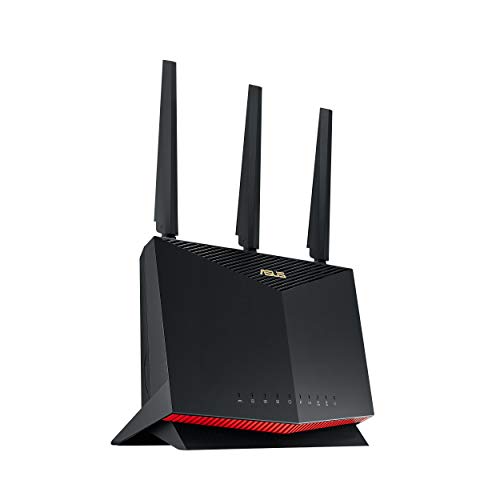
The RT-AX86U Pro is one of the most well-rounded gaming routers here, mixing fast Wi-Fi 6 performance with practical gaming tools and a 2.5G port. It suits buyers who want high-end performance without moving to a huge tri-band flagship.
Pros
- Fast AX5700 dual-band Wi-Fi 6 performance
- 2.5G port supports faster wired networking
- Gaming features include mobile game mode and gaming port
- Strong security tools with AiProtection Pro
Cons
- Dual-band design has less flexibility than tri-band models
- Premium pricing for users with basic needs
- Tall chassis design may not suit every TV unit
- Best features need ASUS app or web tuning
The RT-AX86U Pro sits in a sweet spot for serious users. You get AX5700 dual-band Wi-Fi 6, 160 MHz channel support, a 2.5G port, WAN aggregation options, and gaming-specific tuning. In plain words, this means strong speed for high-end broadband, lower congestion for multiple users, and better support for gamers who want a stable wireless link or a faster wired backbone.
One feature I like for Indian users is Mobile Game Mode in the ASUS Router app. A lot of gaming here happens on phones, not only on consoles or PCs. A one-tap way to prioritize phone gaming traffic feels practical, not gimmicky. The dedicated gaming port and easier port forwarding also help users who want better matchmaking performance or host game sessions without digging through confusing menus.
ASUS adds AiProtection Pro and Instant Guard, which improve the value of the package beyond gaming alone. The router also supports AiMesh, so you can expand later if coverage becomes a problem. ASUS service reputation in India is decent in bigger cities and among enthusiasts, though support comfort still depends on where you live. If you want one router that handles gaming, office work, OTT use, and security with fewer compromises, the RT-AX86U Pro is easy to like.
Buying Guide
Know your internet plan first
Start with your broadband speed. If your plan is under 200 Mbps, a basic Wi-Fi 6 router is often enough. If you use 500 Mbps or faster fiber, look for a model with stronger wireless hardware and at least one multi-gig port. Many buyers spend on a premium router and then use a slow plan, which gives little benefit.
Pick Wi-Fi generation by device age
Wi-Fi 6 is the safe pick for most homes in India today. Phones, laptops, and TVs already support it widely. Wi-Fi 7 is better for buyers building a new high-end setup and planning to keep the router for years. If your current devices are older, you will not see the full benefit on day one, but the router will stay relevant longer.
Coverage matters more than top speed
Router boxes often print big speed numbers, but real home performance depends on walls, floors, placement, and interference from nearby networks. Indian apartments with many neighboring routers often need better antennas and beamforming more than headline speed. For large homes, duplex layouts, or thick concrete walls, choose a router with mesh support so you can add another unit later.
Check the wired ports carefully
If you game on PC or console, wired speed and stability still matter a lot. Look at how many LAN ports you get and whether any port supports 2.5G or 10G. A router with only gigabit ports is fine for most users, but buyers with NAS storage, fast local transfers, or premium fiber should look at multi-gig options.
Gaming features should solve a real problem
Traffic priority, gaming ports, and game acceleration tools help when many devices share one connection. They matter less in a house where only one or two devices stay active at a time. If you mainly play single-player games or casual mobile titles, a good standard Wi-Fi 6 router may serve you well. Competitive players and streamers will get more value from advanced gaming controls.
Security and parental controls are worth checking
A router is the front door of your home network. Built-in protection tools, guest network options, and parental controls add daily value. Brands like ASUS and TP-Link include these features at different levels. If children use the network or you work from home, these tools deserve attention before design or RGB lighting.
Heat, dust, and placement affect long-term use
Indian homes deal with heat, dust, and uneven ventilation, especially in summer. Keep the router in an open area, away from closed TV cabinets and direct sunlight. Larger gaming routers often run warmer because of stronger hardware. Good placement improves performance and helps the router last longer.
Service support in your city matters
Before buying, check whether the brand has decent support in your city. Online reviews often mix product issues with courier issues, so read carefully. TP-Link is widely available in India and easier for many mainstream buyers. ASUS has a strong following among enthusiasts and feature-focused users, though support comfort varies more by location. A router is a long-use device, so service reputation should stay on your checklist.
Feature Importance
| Feature | Importance |
|---|---|
| Wi-Fi standard | High |
| Coverage and antenna quality | High |
| LAN and WAN port speed | High |
| Stability with multiple devices | High |
| Gaming traffic priority tools | Medium |
| Mesh support | High |
| Security features | High |
| App and setup ease | Medium |
| USB port or backup internet support | Medium |
| Design and RGB lighting | Low |