A good WiFi router decides whether your online class buffers or runs smoothly, whether your work call drops or stays stable. With more phones, smart TVs, and laptops in every Indian home, that tiny box in the corner has become as important as the broadband connection itself. Still, many of us use the default router from the ISP and then complain about slow speed and dead zones in the next room.
When you choose a router, you need to think about WiFi standard (WiFi 5 vs WiFi 6), dual‑band support, coverage for your flat or house size, number of devices at home, and simple app control for parents and elders. For Indian buyers, budget is always top of mind, along with after‑sales service and easy replacement. The good part is that in India you get solid WiFi routers under ₹4000 that handle streaming, online gaming, and Work From Home without drama.
TP-Link Archer AX10 AX1500

An affordable WiFi 6 router with a strong triple‑core CPU and four antennas, ideal for busy Indian households that want a fast upgrade from old WiFi 4 or WiFi 5 routers.
Pros
- WiFi 6 standard for better efficiency with many devices
- Triple‑core 1.5 GHz CPU for stable performance under load
- Full gigabit ports suitable for high speed broadband plans
- Easy setup with TP-Link Tether app and Alexa support
Cons
- No USB port for media sharing or 4G dongle
- No mesh system support in this model
- Basic parental controls compared to some rivals
- Plain plastic build, no wall‑mount option in many units
Archer AX10 brings WiFi 6 to a budget level, which suits Indian homes where many users share one connection. WiFi 6 handles multiple phones, smart TVs, and work laptops more efficiently, so you see fewer slowdowns when everyone is online in the evening. With AX1500 speeds, it supports fast broadband plans used in metro cities while still helping in small towns where the line quality is not always stable.
The Triple‑core 1.5 GHz CPU keeps routing tasks smooth. This matters if you stream 4K content on a smart TV while someone else is on a video call and another person plays online games. Four external antennas with beamforming focus the signal towards your devices, useful in 2 to 3 BHK apartments with thick brick walls that are common in Indian construction. You still need proper placement in a central area, but coverage feels more consistent than old single‑antenna routers.
Setup through the TP-Link Tether app is simple enough for non‑tech users. You can manage guest networks and basic parental controls, which helps when you want to limit kids’ screen time. TP-Link has a large presence in India and an established service network in major cities, so warranty support is usually straightforward through service centers or online RMA. For buyers who want a strong value WiFi 6 upgrade without spending too much, Archer AX10 fits well.
D-Link R15 AX1500

A WiFi 6 router with AI‑based optimizations and mesh support, suitable for medium homes and those planning to expand coverage with additional mesh units.
Pros
- WiFi 6 AX1500 with good speed for multi‑device homes
- AI features for channel and traffic optimization
- Supports D-Link Easy Mesh for future expansion
- Three‑year warranty in India with WPA3 security
Cons
- App interface can feel complex for first‑time users
- White body gets dirty faster in dusty environments
- Needs compatible D-Link routers for mesh
- No USB port for storage or printer sharing
D-Link R15 targets users who want more control over their home network. It supports WiFi 6 with up to 1500 Mbps combined speeds and uses four high‑gain antennas to extend coverage in 2 to 3 BHK apartments or small independent houses. For Indian homes with thick walls, placement still matters, but the signal retains decent strength across rooms compared to many entry‑level WiFi 5 routers.
The AI WiFi Optimizer and AI Traffic Optimizer features monitor channel congestion and usage patterns, then adjust settings in the background. In practice, you get slightly more stable performance in apartments where nearby routers create interference. AI Parental Controls help parents block certain content or set internet access times, which supports Indian families trying to manage online study and entertainment schedules for kids.
A key advantage is Easy Mesh support. If you move later to a bigger flat or duplex, you can add more D-Link mesh units to cover dead zones without replacing the main router. The router includes one gigabit WAN and three gigabit LAN ports so you can connect desktop PCs or smart TVs with Ethernet for best stability. D-Link has a long history in India and offers a three‑year warranty on this model, with service centers in most state capitals and larger Tier‑2 cities, which gives peace of mind for long‑term use.
TP-Link Archer C20 AC750
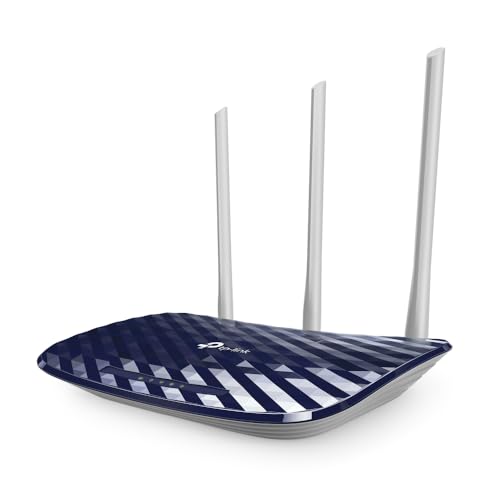
A budget dual‑band WiFi 5 router with three antennas, suitable for small flats and basic streaming on a mix of 2.4 GHz and 5 GHz devices.
Pros
- Dual‑band AC750 support for separation of slow and fast devices
- Three external antennas improve coverage for a small home
- Multiple modes including Router, Access Point, and Range Extender
- Guest network and parental control support
Cons
- Fast Ethernet ports only, no gigabit for very high speed plans
- Older WiFi 5 standard compared to WiFi 6 models
- Limited speed for heavy 4K streaming on multiple screens
- Design feels dated compared to newer routers
Archer C20 focuses on budget buyers who want basic dual‑band WiFi without many extras. With AC750 speeds, you get up to 300 Mbps on 2.4 GHz and 433 Mbps on 5 GHz under ideal conditions. This suits common broadband plans across many Indian cities and towns where internet speed is moderate. Three fixed antennas provide stable signal around a 1 to 2 BHK flat or a small office room.
A practical plus is the multiple operating modes. You can use Archer C20 as a normal router, as an Access Point behind your ISP modem, or as a Range Extender to boost WiFi from another router. This helps in Indian homes where one main router from the ISP sits near the entrance and you need better signal in a bedroom or hall. Guest network support gives visitors WiFi without exposing your main devices, and parental controls help you manage access for children.
Ports are limited to 10/100 Mbps, so this router suits users with basic broadband lines rather than very high speed fiber plans. TP-Link has strong brand presence in India, which means spare units and service are relatively easy to access if something fails. For students, tenants, or small families on a tight budget, Archer C20 still offers solid value if your needs are simple.
TP-Link Archer C24 AC750

A compact dual‑band AC750 router with four antennas and multi‑mode support, ideal for small to medium homes that need tidy design and flexible placement.
Pros
- Four antennas for better coverage in tricky layouts
- Supports Router, Access Point, and Range Extender modes
- Parental controls and guest network features
- Compact body with wall‑mount friendly design
Cons
- Fast Ethernet only, no gigabit ports
- WiFi 5 standard, not as efficient as WiFi 6 routers
- Limited headroom for heavy multi‑user 4K streaming
- No USB port for advanced use cases
Archer C24 delivers AC750 dual‑band WiFi with a focus on compact design. The four antennas help spread the signal in flats where the router needs to sit in a corner or on a shelf instead of the perfect central position. For many Indian homes with L‑shaped halls or multiple concrete walls, those extra antennas often translate into fewer dead spots for normal browsing and HD streaming.
The router supports three modes, so you can use it as the main router, as an Access Point behind your ISP device, or as a Range Extender to cover a specific dead corner. This flexibility suits rental situations where you do not want to disturb the existing network fixed by the landlord or the ISP. Support for IPv6 keeps you ready for future changes from broadband providers.
Parental controls and guest WiFi allow simple management of devices and visitors. Features like IGMP Proxy and VLAN support make the router friendly for IPTV services that some cable and fiber operators in India provide. TP-Link’s service network in India covers most major cities, and replacement processes are usually app or web based. For homeowners who care about clean looks and flexible configuration rather than peak speed, Archer C24 offers a sensible balance.
TP-Link Archer C50 AC1200

An AC1200 dual‑band router with four antennas and decent coverage, suited for families that stream HD and 4K content on multiple devices.
Pros
- AC1200 speed supports smooth HD and some 4K streaming
- Four external antennas improve coverage for 2 to 3 BHK homes
- Supports Access Point mode and IPTV related features
- TP-Link Tether app for smartphone based control
Cons
- Fast Ethernet ports limit benefits on very high speed fiber
- WiFi 5 instead of newer WiFi 6 standard
- Plastic body feels basic and can heat up in closed cabinets
- No mesh support for easy future expansion
Archer C50 steps above entry AC750 routers by offering AC1200 speed, which makes it suitable for Indian homes where multiple people stream HD content or attend online meetings. The combination of up to 867 Mbps on 5 GHz and 300 Mbps on 2.4 GHz gives more headroom than basic routers, especially when you split bandwidth heavy devices on 5 GHz and leave older phones on 2.4 GHz.
Four external antennas help cover medium sized homes, including most 2 to 3 BHK flats. This is useful in Indian apartments with thick brick or concrete walls that usually weaken WiFi quickly. With features like IGMP Proxy and VLAN tagging, Archer C50 works well with IPTV services from some fiber ISPs. The TP-Link Tether app lets you change WiFi passwords, set guest networks, and manage basic parental controls from your phone, which simplifies life for non‑technical family members.
The router supports Access Point mode, so you can use it behind an existing modem or router from your broadband provider if they force you to use their box. While the LAN ports are 10/100 Mbps, so not ideal for future gigabit plans, for many Indian users on moderate speed connections this does not limit daily use. TP-Link’s Indian service support covers warranty claims through online ticketing and partner service centers, giving decent assurance over the product life.
Buying Guide
Set a realistic budget for your home
In the Indian market, you get capable dual‑band WiFi 5 routers and even some WiFi 6 models under a modest budget. Before you shop, think about how long you plan to use the router and what speed your internet provider gives. There is no sense in paying extra for a high‑end model if your broadband line is slow and not likely to upgrade soon. On the other hand, if you already have fast fiber in a metro city, spending a little more on a WiFi 6 model like Archer AX10 or D-Link R15 gives you better long term value. Also factor in the cost of a possible extra range extender or mesh node later if your home is large or has multiple floors.
Understand WiFi standards and speed ratings
Most routers in this list use WiFi 5, also called 802.11ac, while a few support WiFi 6, also known as 802.11ax. WiFi 6 handles multiple devices more efficiently and reduces delay, which helps in busy homes with many phones, tablets, and smart appliances. Speed numbers like AC750, AC1200, or AX1500 represent combined theoretical speeds on both bands. Real life speeds are lower, especially in Indian buildings with thick walls and interference from other routers. For most families with moderate broadband, AC750 or AC1200 is enough. For heavy users, online gamers, or those with fast fiber, AX1500 makes more sense.
Match coverage to your flat or house layout
Coverage depends on the number of antennas, their gain, and where you place the router. For a 1 BHK or compact 2 BHK flat, a three antenna AC750 router can work if you place it centrally. For larger 2 to 3 BHK homes, four antenna models like Archer C24 or Archer C50 offer better coverage. Indian homes often have thick brick or RCC walls and sometimes multiple floors, which reduce WiFi strength sharply. If you live in a duplex or large independent house, choose a router with stronger antennas and consider mesh support as found in D-Link R15 so you can add more nodes later instead of relying on a single box.
Check wired ports and broadband compatibility
Before you pick a router, confirm the type of broadband connection you have. For basic cable or lower speed plans, routers with 10/100 Mbps LAN ports are fine. If you subscribe or plan to subscribe to high speed fiber with speeds near 1 Gbps, you should look for gigabit WAN and LAN ports like those on Archer AX10 and D-Link R15. Also think about how many wired devices you own. Smart TVs, desktop PCs, and gaming consoles run more stable on Ethernet. A router with at least three LAN ports covers most setups, while those with only one or two ports force you to add a switch later.
Consider performance under Indian usage patterns
In many Indian families, evenings are peak usage times when everyone streams videos, scrolls social media, and attends online tuitions at the same time. A weak router tends to drop speed or even restart under such load. Features like dual‑band WiFi, OFDMA in WiFi 6, and a multi‑core CPU help share bandwidth more efficiently. If you have gamers at home or work from home on video calls, choose a router with a decent processor and support for QoS or traffic optimization, like the D-Link R15 with its AI Traffic Optimizer. Also think about heat. Keep the router in a ventilated area, especially in hot states where room temperature stays high in summer.
Build quality, placement, and aesthetics
Router build materials are usually plastic, but design matters. Extra vents help with heat dissipation, which matters in Indian summers when room temperatures are high. Lighter models are easy to wall mount, which often improves coverage compared to placing the router on the floor near the TV cabinet. White routers like D-Link R15 and Archer C24 blend into most interiors but show dust faster, so regular cleaning helps. Darker models hide marks better but might trap more heat in closed cabinets. When possible, keep the router in an open area at chest height for better signal spread.
Parental controls, security, and guest networks
Modern routers include parental controls that allow you to block specific sites, schedule internet time, or control access per device. This is helpful for families with school‑going children. Security protocols matter too. Look for support for WPA2 at minimum, and WPA3 where available as on the D-Link R15. Guest WiFi keeps your main network devices safe by isolating visitors on a separate network. In shared flats or PG style living, this prevents someone from accidentally accessing your personal laptop or NAS over WiFi.
Warranty, service network, and firmware updates
For Indian buyers, strong service support is as important as raw specs. TP-Link and D-Link both have wide service networks in India with authorized centers in major cities and responsive online support. Check warranty duration before you buy, for example the three‑year warranty on D-Link R15. Firmware updates fix bugs and add new features. Make a habit of checking the router app or website for updates every few months. This helps maintain security and performance across changing ISP conditions.
Feature Importance
| Feature | Importance |
|---|---|
| WiFi standard (WiFi 5 vs WiFi 6) | High |
| Number of antennas and coverage | High |
| Gigabit WAN/LAN ports | High |
| Dual‑band support (2.4 GHz + 5 GHz) | High |
| Mesh support for expansion | Medium |
| Parental controls and guest network | Medium |
| WPA2/WPA3 security | High |
| Router CPU and memory | Medium |
| Brand service network in India | High |
| Design, size, and wall‑mount option | Low |