A good Wi-Fi router decides how your home internet feels every day. Slow loading on video calls, buffering during cricket streaming, weak signal in the bedroom, or lag during gaming, many times the broadband plan is not the real problem. The router is. If you work from home, study online, use smart TVs, or have many phones and gadgets connected at once, a better router makes a clear difference.
When you pick a router, look at the Wi-Fi standard first, Wi-Fi 6 or Wi-Fi 7 for newer devices, then check speed class, coverage, number of antennas, ports, mesh support, security, and app quality. Indian homes also bring their own issues. Thick concrete walls, long flats, duplex layouts, power cuts, summer heat, and mixed old and new devices all affect daily use.
In the Indian market, value for money matters more than spec-sheet drama. You want stable performance, easy setup with Airtel, JioFiber, ACT, or BSNL, and service support that does not turn into a headache. I have kept those practical points in mind while selecting these five routers.
TP-Link Archer AX10

A sensible Wi-Fi 6 router for small to mid-sized homes. It suits users who want better speed than old AC routers without making setup or daily use complicated.
Pros
- Wi-Fi 6 support with AX1500 class speed
- Triple-core CPU helps with stable day to day traffic
- Four antennas with beamforming improve range
- Gigabit ports suit modern broadband plans
Cons
- Not the fastest option for heavy gaming households
- No mesh pack included in the box
- Limited headroom for many high-speed users together
- Basic design and feature set compared to newer premium models
The Archer AX10 is the kind of router many Indian users buy as their first proper upgrade from an ISP router. The jump feels noticeable in regular use. Websites open faster, video calls stay steadier, and multiple phones connected at the same time create less chaos. Its AX1500 rating is not aimed at extreme users, but for routine family usage, streaming, work calls, and casual gaming, it does the job well.
TP-Link has added a triple-core processor here, and that helps when your home network gets busy in the evening. OFDMA and MU-MIMO support improve the way the router handles more than one device at a time. In a typical Indian flat with a couple of rooms and a few walls in between, the four antennas and beamforming setup give decent coverage, though larger homes will still need a range extender or mesh system.
What I like is the practical side. You get gigabit ports, app-based setup through Tether, and decent compatibility with common Indian broadband providers. TP-Link also has wide brand presence in India, so finding service or basic support is easier than with lesser-known networking brands. For buyers who want a clean, dependable upgrade, this model still makes sense.
TP-Link Archer AX23

A well-balanced Wi-Fi 6 router with better overall speed and feature depth than entry models. It fits homes with more devices, more streaming, and a stronger need for stable coverage.
Pros
- AX1800 speed class gives better headroom than AX1500 models
- OFDMA support helps when many devices connect together
- OneMesh support gives an easy path for later expansion
- Good parental controls and WPA3 support
Cons
- Still not ideal for very large multi-floor houses on its own
- Dual-core platform is good, though not class-leading
- No USB port for users who want simple network sharing
- Looks familiar and functional, not premium
The Archer AX23 sits in a sweet spot for many Indian homes. It gives enough speed for 4K streaming, office work, online classes, and app-heavy households without moving into expensive enthusiast territory. If you have a family where everyone uses the internet at the same time, this model feels more comfortable than entry Wi-Fi 6 routers.
Coverage is one of its stronger points in this segment. TP-Link uses beamforming, improved algorithms, and high-performance antennas to spread signal more effectively. In practical terms, that means fewer weak corners in an average apartment. If your home is bigger, OneMesh support is useful because you can add a compatible extender later and keep the network experience smoother while moving around.
This router also gets small things right. The Tether app is simple, parental controls are more useful than what many budget routers offer, and WPA3 gives better security for newer devices. TP-Link’s service network in India is one of the reasons these routers stay popular. If you want a router that feels well-rounded instead of flashy, the AX23 is easy to recommend.
D-Link M30

A strong option for bigger homes that need wider coverage and mesh-ready flexibility. It is built for users who want faster Wi-Fi 6 speed with a bigger focus on whole-home reach.
Pros
- AX3000 class speed gives strong bandwidth for heavy use
- Large stated coverage area suits bigger homes
- Mesh-ready design makes expansion simple
- Four gigabit LAN ports help wired devices
Cons
- Single unit performance still depends on home layout and wall thickness
- Newer model means long-term user feedback is still growing
- Larger coverage claims may vary in real Indian homes
- White design may not suit every setup or shelf
The D-Link M30 aims at users who are tired of dead zones. If your current router struggles in the back bedroom, upstairs room, or near the smart TV, this model starts to make more sense. With AX3000 class performance and a design focused on broad coverage, it is suited for bigger flats and independent homes where signal strength matters as much as raw speed.
D-Link talks about 360-degree spherical coverage and AI-assisted performance, and while marketing terms should always be taken with care, the hardware spec does look promising for wide-area use. The extra strength on the 5 GHz side helps for high-quality streaming and heavier downloads, while the gigabit WAN and LAN setup suits modern broadband plans and wired entertainment setups. If you use a smart TV, console, desktop, and NAS together, those LAN ports are useful.
For Indian buyers, the mesh angle is a big plus. You can start with one unit and expand later if your house demands more reach. Security features such as WPA3 and parental controls add some peace of mind for family use. D-Link has been in the Indian networking market for years, and service familiarity helps. Buyers who want coverage first and speed second should keep this one high on the list.
TP-Link Deco X50
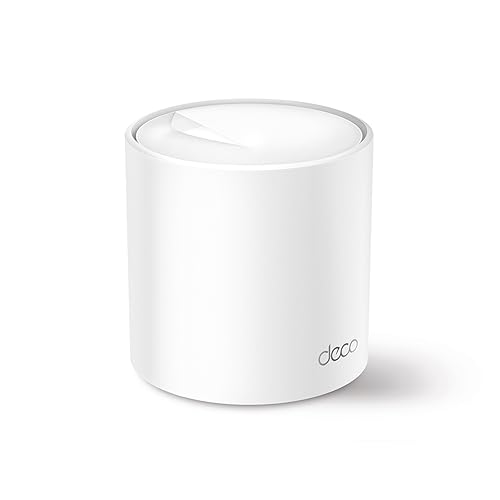
A mesh-style Wi-Fi 6 solution for users who want smooth whole-home coverage and simple app control. It works well in modern homes where moving between rooms often breaks the signal on regular routers.
Pros
- AX3000 speed class with mesh-focused coverage
- Clean app setup with AI-driven network tuning
- Good for many connected devices at once
- HomeShield features add security and parental controls
Cons
- Single-pack unit gives limited mesh benefit unless expanded later
- Three gigabit ports may feel less for wired-heavy users
- Advanced HomeShield features vary by region and plan
- Cylinder design needs open placement for best results
The Deco X50 is different from a regular router in how it approaches home Wi-Fi. Instead of focusing only on one point pushing signal outward, the Deco series is built around mesh networking. Even the single-pack version works well as a strong standalone unit, but its real charm is the easy path to expanding your network later without headaches. For Indian homes with long layouts or multiple rooms, that matters a lot.
Performance is solid for the class. AX3000 speed, HE160 support, and the ability to handle many connected devices make it suitable for streaming, remote work, smart home gear, and gaming in a family setup. The AI-driven mesh tuning is meant to adapt the network based on your home conditions. In daily use, what you notice is simpler, fewer strange drop-offs when moving from one room to another after adding more Deco units.
TP-Link’s Deco app is one of the easiest interfaces in this segment, and that helps people who do not want to study router settings like an exam chapter. Setup is smooth, controls are clear, and the system looks cleaner than antenna-heavy routers. TP-Link service support in India is also easier to access than many niche brands. If your top priority is reliable coverage with less tinkering, the Deco X50 is one of the safer picks.
TP-Link Archer BE400

A future-ready Wi-Fi 7 router for users who want newer wireless tech, stronger wired options, and more long-term headroom. It suits high-speed homes with demanding devices and next-generation upgrade plans.
Pros
- Wi-Fi 7 support with much higher throughput headroom
- 2.5 Gbps WAN and 2.5 Gbps LAN improve wired flexibility
- Six external antennas help with coverage
- EasyMesh support allows later network expansion
Cons
- Benefits depend heavily on having Wi-Fi 7 client devices
- Overkill for basic broadband users
- Only dual-band, not tri-band
- Advanced hardware is wasted on slower internet plans
The Archer BE400 is for buyers who do not want to replace their router again soon. Wi-Fi 7 is still new for many Indian homes, but if you are buying fresh and plan to keep the router for years, this model gives more room to grow. Multi-Link Operation is the standout feature, helping supported devices use wireless resources more efficiently for lower latency and better consistency.
This is also a stronger fit for homes with fast broadband and a mix of wireless and wired devices. The 2.5 Gbps ports are a big step up from the usual gigabit-only layout, so if your plan speed increases later or you use a high-speed local network, the router will not feel outdated too quickly. Six antennas and beamforming also help in reaching more rooms with fewer weak patches.
For Indian users, the key question is simple, do you need a future-facing router or a basic upgrade? If you use flagship phones, a recent laptop, 4K or 8K streaming gear, gaming devices, and lots of connected hardware, the answer may be yes. TP-Link’s support footprint in India adds confidence, and EasyMesh support gives expansion options later. Among these five, this is the one aimed at buyers thinking beyond today’s needs.
Buying Guide
1. Pick the right router type for your home
Start with your house size and wall count. A regular router works well for small flats and open layouts. A mesh-ready product or mesh system makes more sense for bigger apartments, duplex homes, and places with thick concrete walls. Many Indian homes block Wi-Fi harder than foreign test homes, so do not trust coverage claims blindly.
2. Wi-Fi 6 or Wi-Fi 7, what should you choose
Wi-Fi 6 is the practical choice for most buyers today. It gives better device handling, better efficiency, and good speed for common broadband plans. Wi-Fi 7 is for buyers who want long-term headroom and own newer phones, laptops, or gaming gear. If your devices are older and your internet plan is moderate, a Wi-Fi 7 router will not transform the experience by itself.
3. Speed class is not the same as internet speed
AX1500, AX1800, AX3000, or BE6500 numbers are total wireless class ratings, not your final broadband speed. Your actual result depends on your internet plan, wall thickness, device quality, and distance from the router. Use these numbers as a rough sign of performance tier, not a promise of exact speed in your room.
4. Coverage matters more than headline specs
A fast router with poor placement still gives bad Wi-Fi. Keep the router in a central, open spot, not inside a cabinet or behind a TV. In Indian homes, mirrors, kitchen appliances, thick walls, and long corridors hurt signal quality. If one router already struggles, buying a stronger single unit helps only to a point. Mesh expansion is often the better fix.
5. Check ports if you use smart TVs, PCs, or consoles
Many people focus only on wireless speed and ignore wired connectivity. If you use a smart TV, desktop, NAS, gaming console, or IPTV box, gigabit LAN ports are useful. A 2.5 Gbps port adds more future value if your home network is growing. Count how many wired devices you use before buying.
6. Security and parental controls are worth attention
WPA3 support is a good sign on a newer router. It improves wireless security for supported devices. If you have kids at home, parental controls matter too. Features like profile creation, pause schedules, and site blocking are useful in daily family life. App quality matters here because poor apps make these features annoying to use.
7. Service support and app experience matter in India
A router is not a one-day purchase. You may need help during setup, firmware updates, or warranty issues. Brands with better presence in India are easier to live with. Also check the companion app. A stable app saves time when changing Wi-Fi names, setting guest networks, or checking who is using your internet.
Feature Importance
| Feature | Importance |
|---|---|
| Wi-Fi standard, Wi-Fi 6 or Wi-Fi 7 | High |
| Coverage for your home size | High |
| Stability with many devices | High |
| Mesh support or expansion option | High |
| Gigabit or 2.5G ports | Medium |
| Security features, WPA3 | High |
| Parental controls | Medium |
| App quality and ease of setup | High |
| Brand service network in India | High |
| Design and looks | Low |