
A good wireless gaming mouse affects how you aim, react, and even how tired your hand feels after a long Valorant, BGMI, or CS session. In India, more players now prefer wireless because desks are cleaner, laptops are common, and many people game in the same space where they work or study. Modern sensors and low latency wireless have removed most of the old “wireless lag” complaints, even in budget models.
When you pick a gaming mouse, you need to think about sensor accuracy, weight, shape, battery life, and how you connect it with your PC, laptop, or console. You also have to keep an eye on price, discount cycles on Amazon India, and simple things such as how easy service support is in your city. This guide focuses on five wireless gaming mice that give strong performance for Indian users, across price points from entry level to mid premium, with practical notes on grip style, durability, and brand support in India.
Logitech G304 Lightspeed Wireless Gaming Mouse
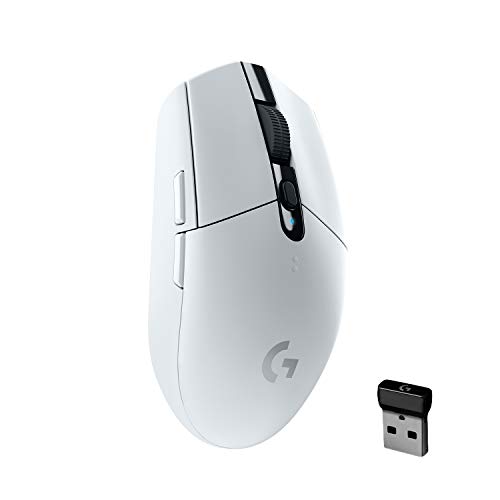
A proven wireless FPS-friendly mouse with Logitech’s HERO sensor, long battery life, and a compact, no-nonsense design suited for competitive play.
Pros
- HERO sensor with up to 12,000 DPI and strong tracking accuracy
- LIGHTSPEED wireless with 1 ms report rate for low latency
- Very long battery life on a single AA cell with performance and endurance modes
- Compact, solid build with on-board receiver storage
Cons
- Runs on AA battery instead of built‑in rechargeable cell
- Only 6 buttons and no dedicated DPI indicator LEDs
- Shape may feel small for very large hands
- No Bluetooth, needs USB receiver
Logitech G304 is a favorite in the budget and mid-range wireless category for Indian FPS players. The HERO optical sensor supports up to 12,000 DPI and 400 IPS tracking, which is enough even for competitive shooters on 1080p or 1440p monitors. LIGHTSPEED wireless uses a 1 ms report rate, so pointer movement feels close to a wired mouse, which matters when you flick to heads in Valorant or track targets in Apex. With six programmable buttons and on-board memory via Logitech G HUB, you can store your DPI steps and button mappings and carry the mouse between PC and laptop without redoing settings.
Power comes from a single AA battery. In performance mode you get around 250 hours of gameplay at 1 ms polling. In endurance mode, with an 8 ms report rate, battery life stretches to several months, which suits office plus casual gaming use. Weight is around 99 g, which sits in a comfortable middle range for most grip styles. The shell feels sturdy, and the compact size works well for claw and fingertip grip users, especially on smaller Indian desks where you do plenty of short flicks.
For Indian buyers, Logitech has an established service network through authorized service centers in most tier 1 and many tier 2 cities. Spares and warranty service are relatively easy compared to many lesser known brands. At around ₹2,495 on Amazon India when on discount, the G304 hits a balance of reliability, performance, and battery life. If you want a mouse that you can carry with a gaming laptop, throw in a backpack, and use both for work and esports-style gaming, this is a strong pick.
Archer Tech Lab Recurve 700
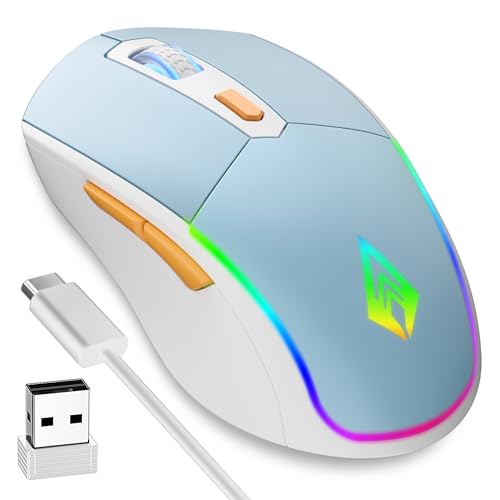
A tri-mode budget wireless gaming mouse with Bluetooth, 2.4 GHz, and wired options, RGB lighting, and a light 86 g body that suits mixed work and play.
Pros
- Tri-mode connectivity with Bluetooth 5.3, 2.4 GHz wireless, and Type C wired
- Rechargeable 500 mAh battery with auto sleep
- Four DPI steps from 1200 to 3200 for office and casual gaming
- Lightweight 86 g design with ambidextrous shape
Cons
- Sensor and 125 Hz polling rate are more suited to casual gaming than high level esports
- Plastic quality feels basic compared to premium brands
- Software support and long term driver updates are limited
- Warranty is only 6 months
Archer Tech Lab Recurve 700 targets gamers and students or professionals who want one mouse for everything. It offers three connection modes. Bluetooth 5.3 for tablets, phones, and laptops without a free USB port. A 2.4 GHz USB receiver for gaming laptops and desktops. A Type C wired mode when you forget to charge or want a simple plug in option. You can pair up to three devices and switch between them, which suits people who jump between office laptop, home PC, and maybe a tablet for media.
The DPI range from 1200 to 3200 with a 125 Hz polling rate is fine for casual shooters, MOBAs, and daily Windows work, though not ideal for serious competitive players who want 1000 Hz polling. RGB fans get seven lighting effects with breathing and static modes that match budget Indian setups that use RGB keyboards and strips. Weight is around 86 g, and the symmetrical shell works for both left and right handed users. Grip comfort is decent for medium hands, and the anti-slip finish helps in humid conditions typical in coastal cities.
The 500 mAh rechargeable battery supports long sessions, and the auto sleep feature saves power when you forget to turn the mouse off. The brand offers a 6 month warranty, which is shorter than big global brands. Service usually happens via online support and replacement through Amazon sellers rather than physical centers. At about ₹549, often with heavy discounts, the Recurve 700 suits users who want flexibility and RGB on a tight budget, more as a fun all rounder than a pure esports tool.
Ant Esports GM700

A lightweight wireless RGB gaming mouse with a honeycomb shell, 2.4 GHz connection, and up to 4800 DPI aimed at budget conscious PC gamers.
Pros
- Honeycomb shell keeps weight around 90 g
- Rechargeable 500 mAh battery with wired or wireless use
- RGB lighting with multiple modes for a bright setup
- DPI range up to 4800 suitable for most casual and mid level gamers
Cons
- Side buttons do not work on macOS
- Honeycomb shell can collect dust in dusty Indian homes
- Sensor specs and polling rate are entry to mid level
- Brand service network is smaller than big global brands
Ant Esports GM700 focuses on a lightweight feel without going into premium pricing. The honeycomb shell keeps the weight down to around 90 g while still feeling strong enough for regular use. This helps reduce wrist strain during long sessions, especially if you play at low DPI and do wide arm movements. The 2.4 GHz wireless connection covers up to about 10 meters, which suits living room setups or when your PC is under a desk. You can also plug in the included 1.5 m Type C cable and use it wired while charging.
You get four DPI steps, 800, 1600, 3200, and 4800, which cover most screen resolutions common in Indian homes. The sensor is not a top tournament grade unit, but for titles like GTA, FIFA, Valorant at mid ranks, and general productivity, it performs well. The six button layout is familiar, and while the buttons are not programmable in advanced ways, you still get a simple and practical layout. RGB lighting is one of its key attractions, with 11 light modes changed by a button on the base.
Ant Esports has gained presence in India with budget gaming gear such as cases, chairs, and keyboards. Service is mostly through online RMA and seller support. Physical centers are limited, so you depend on courier based support for warranty. Priced around ₹880 on Amazon India, the GM700 fits users who want a “gaming” look with RGB, a lighter shell, and wireless convenience for a budget desktop or laptop setup, especially for Windows users, since side buttons do not work on macOS.
Redragon M916AK PRO

An ultra light, anime themed tri-mode gaming mouse with a high DPI sensor, full software customisation, and a 42 g body aimed at competitive gamers.
Pros
- Extremely light at about 42 g for fast flicks and low strain
- Tri-mode connectivity with Bluetooth, 2.4 GHz, and USB C wired
- High DPI sensor up to 26,000 DPI with adjustable steps
- Programmable buttons and software for keybinds and DPI tuning
Cons
- Anime themed design will not suit all setups
- Shell this light feels delicate to some users
- Redragon software is functional but not as polished as Logitech or Razer
- Service support varies by city and seller
Redragon M916AK PRO targets serious players who want very light mice and quick wrist movement. At around 42 g, it is one of the lightest gaming mice you will find on Amazon India. The shell uses selected lightweight materials while keeping an ergonomic shape that follows the natural curve of the hand. This suits long hours in FPS or fast paced games where even small reductions in weight help with precision and reduce fatigue.
The sensor supports five default DPI levels, 1000, 2000, 4000, 8000, and 26,000, with the option to set custom steps between 100 and 26,000 DPI through software. This is overkill for simple office work, but for competitive gamers using 1080p or higher refresh monitors, fine tuning DPI and sensitivity can improve consistency. The tri-mode connection lets you switch between 2.4 GHz for gaming, Bluetooth for laptop or tablet, and wired USB C when you want a direct link. The five programmable buttons, including side buttons, can be mapped to in game commands or macros, which suits MMOs or battle royales.
The anime style design with Redragon character art gives a strong look that some players in India will love and some will avoid for office use. If you stream or like themed setups, this mouse adds a unique visual. Redragon has a growing presence in India and sells through many online retailers. Warranty is usually handled through email support and courier RMA. At around ₹2,789 on Amazon India, the M916AK PRO is aimed at gamers who want top end performance and ultra low weight without entering the very high price bracket of global esports brands.
Kreo Anzu Wireless Gaming Mouse
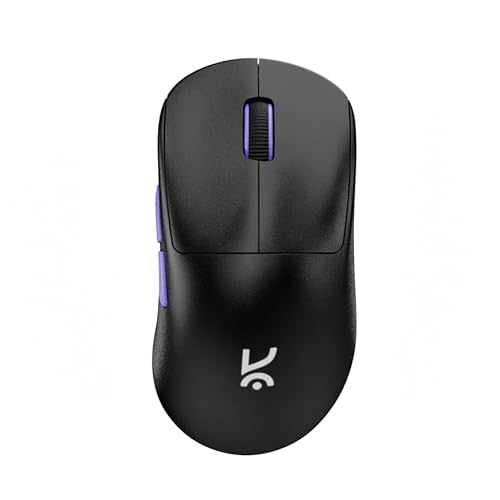
An ultralight 52 g ergonomic wireless mouse with Pixart 3311 sensor, Huano switches, and tri-mode connectivity built for serious gaming on PC and laptop.
Pros
- Very light at 52 g, good for fast FPS and low sensitivity players
- Pixart PAW3311 sensor with up to 12,000 DPI and solid tracking
- Triple mode connectivity with 2.4 GHz, Bluetooth, and USB C wired
- High quality Huano switches rated for 80 million clicks
Cons
- Relatively new brand with a smaller service footprint
- Target shape suits medium to large hands, small hands might struggle
- No flashy RGB for users who want lights
- Price is mid range, above entry level budget models
Kreo Anzu focuses on performance and ergonomics rather than heavy styling. At only 52 g, it is ultralight, which FPS players and low sensitivity users will appreciate. The ergonomic shell suits medium to large hands with palm or claw grip. If you use a wider flicking style on a large mousepad, the low weight reduces strain on your wrist and shoulder, an important factor if you play for hours or work and game on the same PC.
The Pixart PAW3311 sensor supports up to 12,000 DPI, 300 IPS tracking speed, and 30 g acceleration. These numbers are important if you do quick flick shots or fast 180 degree turns in shooters. Tracking stays consistent even during quick swipes. Huano Blue Shell Pink Dot switches provide crisp clicks with a long life rating of 80 million presses. Side buttons and scroll use durable components like a TTC Gold encoder and 3 million click rated Huano side switches.
Connectivity includes 2.4 GHz wireless with a polling rate of 1000 Hz, Bluetooth for portable devices, and USB C wired use. The 300 mAh built in battery gives more than 50 hours of gaming at 1000 Hz, which covers several days of mixed work and play between charges. 100 percent PTFE feet help the mouse glide smoothly on popular Indian pads and even on clean wooden or laminate desks. Kreo is a new name in India but is focusing on enthusiast grade mice. Service is usually online through retailer replacement and brand support. At around ₹2,699 on Amazon India with strong discounts compared to its printed price, the Anzu is aimed at players who want top tier components in a minimal, performance first package.
Buying Guide
Set a clear budget for your gaming mouse
For Indian buyers, prices for wireless gaming mice range from around ₹500 to ₹3,000 in this list, but the wider market stretches much higher. You should first decide whether you want an entry level mouse for casual games and daily use or a more serious esports level device. Under ₹1,000 you get basic sensors, lower polling rates, and simpler builds, which suit school or college use and light gaming. Between ₹1,500 and ₹3,000 you start to see better sensors, lighter shells, more consistent wireless, and stronger brand support. Watch for sale events like Great Indian Festival or bank offers, because prices on Logitech, Redragon, and others tend to drop during those days.
Choose the right sensor and DPI range
Sensor quality affects how precise and consistent your aim feels. Look for known sensors such as Logitech HERO or Pixart units with at least 300 IPS speed and 20 g acceleration if you play shooters. DPI numbers on the box can be confusing. Anything from 800 to 3200 DPI covers most real world use on 1080p and 1440p monitors. Very high DPI such as 12,000 or 26,000 mainly helps fine tune sensitivity in software. For office and casual use, a stable sensor with no jitter or acceleration is more important than having the highest DPI rating. For competitive FPS, combine a good sensor with a high polling rate of 1000 Hz when available.
Check connectivity options based on your setup
Wireless gaming mice now offer different modes. 2.4 GHz USB receiver is best for low latency gaming on PC or laptop. Bluetooth suits productivity, tablets, and when you want to free up USB ports. Many of the mice listed, such as the Recurve 700, M916AK PRO, and Kreo Anzu, include tri-mode connectivity with 2.4 GHz, Bluetooth, and USB C wired. If you use multiple devices, this saves you from buying separate mice. For console players on PlayStation or Xbox, check that the mouse supports standard USB receiver mode without special drivers. If you travel a lot with a gaming laptop, on-board receiver storage in models like the Logitech G304 reduces the chance of losing the dongle.
Weight, grip style, and Indian usage patterns
Mouse weight affects comfort, especially in Indian conditions where rooms can be warm and long sessions lead to sweaty hands. Ultralight options around 40 to 60 g, such as the Redragon M916AK PRO and Kreo Anzu, help if you play FPS titles at low DPI and use large pads. Mid weight models around 85 to 100 g such as the Logitech G304 and Ant Esports GM700 feel more stable for users who prefer medium to high DPI. Think about your grip. Palm grip users with large hands should look for longer, higher shapes. Claw and fingertip users can handle smaller shells. Also think of your desk space. If your table is small, a slightly higher DPI with a lighter mouse can reduce the amount of arm movement needed.
Battery type, life, and charging habits
Wireless mice use either replaceable batteries or built in rechargeable cells. Logitech G304 uses a single AA battery which many Indian users like because you can swap a new cell in seconds, useful in areas with frequent power cuts. Others like the Ant Esports GM700, Recurve 700, Redragon M916AK PRO, and Kreo Anzu use internal batteries charged via USB C. Look at claimed hours of battery life at typical polling rates. Also check whether the mouse works in wired mode while charging. If you travel or attend college, a mouse with auto sleep and decent standby life reduces the chance of finding your mouse dead in your bag.
Build quality, materials, and climate
Indian climate varies from dry and dusty to humid and coastal. This affects both the shell and internal components. Honeycomb shells like on the Ant Esports GM700 keep weight low but can collect dust and sweat, so you should clean them often in dusty cities. Solid shells like the Logitech G304 and Kreo Anzu are easier to wipe with a cloth. Grip coatings matter in hot homes where fans run all day. Look for textured sides or materials that do not become too slippery when your hands sweat. Also check the click rating on switches. Higher rated switches, such as the 80 million click Huano switches on the Kreo Anzu, give more confidence for long term use.
Software, customisation, and compatibility
If you play games that benefit from macros or complex keybinds, you should buy a mouse with decent software. Logitech G HUB is strong for the G304, with on-board memory and easy DPI steps. Redragon provides software for the M916AK PRO that lets you tune DPI in small steps and assign actions to buttons. Some budget brands do not provide deep macro support, so check before purchase. For Mac users, watch out for notes such as the GM700 side buttons not working in macOS. Many gaming mice are tuned for Windows, and while they will move the cursor on macOS, advanced features need Windows software.
Warranty, service, and brand support in India
Brand support can save you time and money. Logitech has one of the stronger service networks in India, with pickup and drop options in many cities. Redragon and Ant Esports rely more on online RMA and reseller support, which works fine in metro areas but can be slower in smaller towns. Newer brands like Kreo and Archer Tech Lab offer email and chat support along with Amazon replacement policies, but they lack a nationwide physical network. Always keep your invoice and packaging for warranty. Check Amazon reviews from Indian buyers to see how the brand handles defects, double clicking problems, or battery issues.
Feature Importance
| Feature | Importance |
|---|---|
| Sensor quality (IPS, acceleration, DPI behavior) | High |
| Wireless latency and polling rate | High |
| Shape and grip comfort for your hand size | High |
| Weight of the mouse | High |
| Battery life and charging or AA support | Medium |
| Connectivity modes (2.4 GHz, Bluetooth, wired) | High |
| Build quality and shell design (solid vs honeycomb) | Medium |
| Software features and button programmability | Medium |
| RGB lighting and aesthetics | Low |
| Brand warranty and service network in India | High |