
If you game on PC or laptop in India, a good wireless gaming mouse changes the whole experience. No wire drag, cleaner desk, quicker flicks in Valorant, BGMI, CS or even during office work. Today, wireless mice with charging docks have become popular because you avoid cable clutter and do not worry about plugging in every time the battery goes low.
When you choose a wireless gaming mouse, you need to think about sensor quality, DPI range, latency, weight, battery life, grip comfort and software support. Indian buyers also care about reliable Bluetooth for laptops, 2.4 GHz dongle stability during power cuts and inverter use, and good service support in cities as well as smaller towns.
This guide focuses on five of the best wireless gaming mice with docks sold in India. All of them support high DPI sensors, gaming‑grade polling rates and multiple connectivity modes. I will break down what suits different types of gamers and Indian setups, from cramped hostel desks to full RGB battle stations at home.
daWg Slay 50 Wireless Gaming Mouse

Lightweight tri‑mode gaming mouse with PixArt PAW3311 sensor, RGB charging dock and Huano switches, ideal for budget and mid‑range Indian gaming setups.
Pros
- PixArt PAW3311 sensor with up to 12000 DPI for accurate tracking
- Tri‑mode connection with dual Bluetooth, 2.4 GHz wireless and wired Type‑C
- Magnetic RGB charging dock with Type‑C support for neat charging
- Huano switches rated for 20 million clicks
- Lightweight body with 6 buttons and software customisation on Windows
Cons
- Advanced software support only on Windows PCs
- DPI and RGB tuning not as advanced as some premium models
- Shape may feel small for users with large hands
- Brand service network still growing compared to big global brands
The daWg Slay 50 Wireless Gaming Mouse targets gamers who want a clean, cable‑free desk without sacrificing sensor performance. It uses the PixArt PAW3311 optical sensor with adjustable DPI up to 12000, which is more than enough for FPS, MOBA and general use on standard 1080p or 1440p monitors that most Indian gamers use. Tracking stays smooth during quick flicks, and the 300 IPS tracking speed with 35G acceleration helps during rapid movements in shooters.
Where the Slay 50 feels strong for Indian users is its tri‑mode connectivity. You get dual Bluetooth connections for laptops, tablets and office use, a 2.4 GHz dongle for serious gaming sessions, and a wired Type‑C mode for those long play nights during tournaments or LAN sessions. This flexibility works well for students who carry the same mouse between hostel, home and college, or for work‑from‑home professionals who game after office hours.
The mouse comes with a magnetic RGB charging dock with Type‑C input. You drop the mouse on the dock and it starts charging, so you avoid fumbling with cables under the desk. The dock has 11 LED modes, which adds some style for people who love RGB setups. Huano switches are rated for up to 20 million clicks, so heavy‑click spammers in MOBAs will feel safe. The weight is light enough for long sessions, even in hot Indian summers where sweaty palms increase fatigue. Brand awareness and service are still building in India, so you should check local support or online replacement policies before purchase, but for gamers who want strong features per rupee, Slay 50 gives a solid overall package.
Ant Esports GM900 Pro Wireless Gaming Mouse
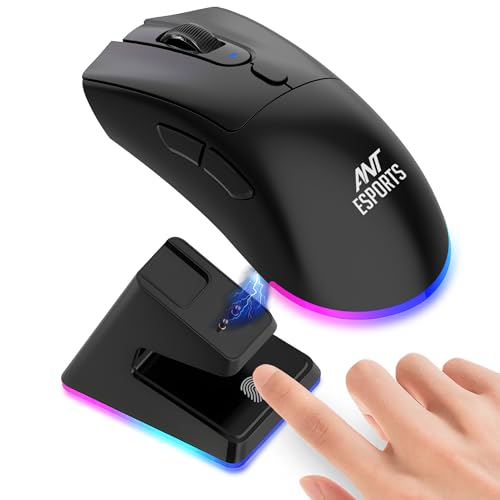
3‑in‑1 wireless gaming mouse with charging dock, RGB lighting and ergonomic shell, aimed at value‑focused Indian gamers.
Pros
- Three connection modes: 2.4 GHz wireless, Bluetooth and wired
- Included charging dock with built‑in rechargeable battery
- Ergonomic shell with anti‑slip sides for multiple grip styles
- RGB rim lighting with custom effects through drivers
- Buttons rated for more than 5 million clicks
Cons
- Sensor tops out at 4800 DPI, lower than some competitors on paper
- Software and driver interface feels basic
- Plastic build feels less premium than higher‑priced models
- Ant Esports service coverage is better in metros than small towns
Ant Esports GM900 Pro is built for Indian gamers who want wireless freedom at a sensible spend. It supports 2.4 GHz wireless, Bluetooth and wired connections, so you can pair it with a desktop, laptop or even console. For PS4 and PS5 users in India who sit a bit away from the TV, this flexibility is handy. Latency over 2.4 GHz stays low enough for casual and mid‑core competitive matches.
The sensor supports up to 4800 DPI, which might look low when you see 12000 or 22000 DPI written on other boxes, but for 1080p displays and common sensitivity settings used in India, 4800 DPI is still practical. Tracking is stable, and the overall feel is more important than the raw number. The anti‑slip sides help during long gaming sessions in humid places like Mumbai, Chennai or Kolkata, where palms tend to sweat.
The charging dock is a big plus. You drop the mouse on the dock after each session, so the built‑in rechargeable battery stays topped up and you do not need to buy disposable cells. RGB lighting runs around the bottom rim, and with the drivers you can change colours and brightness. The clicks are rated for over 5 million presses, which is enough for regular use across a few years. Ant Esports has decent brand presence in Indian gaming communities, and while service centres are more active in metro cities, support through online channels tends to work for most users.
Archer Tech Lab Quest Wireless Gaming Mouse

High‑DPI tri‑mode gaming mouse with PixArt PAW3311, 22,000 DPI support, RGB lighting, programmable buttons and a magnetic charging dock.
Pros
- PixArt PAW3311 sensor tuned up to 22,000 DPI with 300 IPS and 35G acceleration
- Triple‑mode connection: Bluetooth 5.3, 2.4 GHz wireless and wired USB
- 7 programmable buttons with 6 on‑the‑fly DPI levels
- 8 RGB lighting effects for custom setups
- Lightweight 82 g design with 500 mAh battery and magnetic charging dock
Cons
- High DPI levels are overkill for most Indian setups
- Software customisation is more useful on Windows than macOS
- Only 6‑month warranty, shorter than many competitors
- Brand service presence is still limited to select regions
Archer Tech Lab Quest targets serious gamers who want fine control and high sensor performance without spending on imported premium brands. It uses the PixArt PAW3311 sensor, tuned for DPI up to 22,000 with 300 IPS tracking speed and 35G acceleration. For most Indian gamers using 1080p or 144Hz panels, you will use far lower DPI settings, but the extra headroom gives smoother scaling and more options while tweaking sensitivity.
This mouse supports Bluetooth 5.3, 2.4 GHz wireless and wired USB. That combination suits users who shift between work and play on the same desk. You can connect by Bluetooth to your office laptop for daily tasks, then switch to 2.4 GHz for low‑latency gaming on your desktop. If you participate in small LAN events or college tournaments, you can plug in the cable and not worry about battery drains mid‑match.
The Quest has 7 programmable buttons and 6 DPI steps from 800 to 22,000, which helps both gamers and content creators who use macros. FPS players can set one DPI for scoped shots and another for hip‑fire. Video editors can map functions for faster timeline control. RGB lovers get 8 lighting effects including wave and breathing modes, which suit streamers who want their mouse to look good on camera. At 82 g, the body feels light enough for long sessions, and the 500 mAh battery with power saving modes stretches usage between charges. The magnetic charging dock keeps the mouse ready on your desk. Archer Tech Lab offers a 6‑month warranty in India, which is shorter than some rivals, so you should keep the invoice and test the mouse thoroughly during the first weeks.
UNCTRL Rage Wireless Gaming Mouse
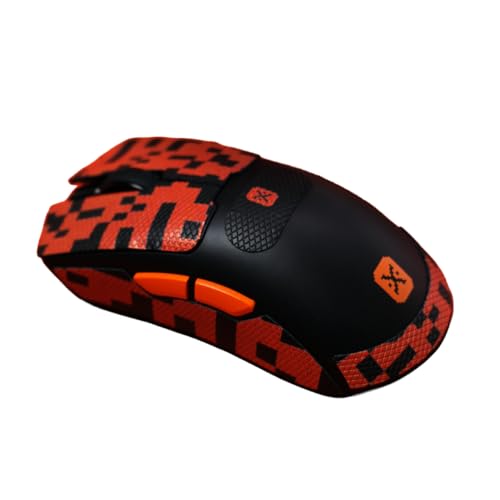
Flagship‑grade wireless gaming mouse with PixArt 3395 sensor, 26,000 DPI, ultralight 62 g shell and magnetic RGB charging dock for competitive Indian players.
Pros
- PixArt 3395 sensor with up to 26,000 DPI and 650 IPS for high‑end tracking
- 1000 Hz polling rate for low‑latency wireless performance
- Ultralight 62 g body for quick flicks and long sessions
- Huano switches rated for 80 million clicks
- Magnetic RGB charging dock with storage for 2.4 GHz dongle
- Battery life up to 100 hours per charge
Cons
- Geared more towards FPS and competitive users than casual gamers
- Sensor performance is high but needs good mousepad and smooth desk
- Premium features make it less suited to tight budgets
- Service support and replacement experience varies by region
UNCTRL Rage is built for Indian gamers who play a lot of fast shooters and want top‑tier tracking in a wireless form factor. The PixArt 3395 sensor goes up to 26,000 DPI with 650 IPS tracking and 50G acceleration, paired with a 1000 Hz polling rate. In real use, this combination brings quick response and fine control even during intense flicks in titles like Valorant or Apex Legends.
The ultralight 62 g body reduces strain on your wrist and forearm, which helps during long weekend sessions or late‑night ranked grinds. In hot and humid Indian weather, where sweat increases friction, a lighter mouse often feels easier to move with less effort. The shape stays comfortable for common grip styles, and the low weight feels especially good with cloth pads used in many Indian homes.
Huano switches on this mouse are rated for about 80 million clicks, which suits players who log thousands of hours over a few years. The internal 300 mAh battery is tuned for up to 100 hours of use per charge. Along with the magnetic RGB charging dock, most users will forget about battery anxiety. The dock also holds the 2.4 GHz dongle, which is handy so you do not lose it while travelling to cafes or friends’ houses. UNCTRL is a newer brand in India, so service quality can vary between cities, but as a performance object for serious players, Rage delivers a strong feature set for esports‑style gaming.
EvoFox Banshee 2 Wireless Gaming Mouse

Tri‑mode gaming mouse with LCD display, PixArt 3311 sensor, 12,000 DPI, smart polling and strong multi‑platform support for Indian work‑plus‑play users.
Pros
- Tri‑mode operation with dual Bluetooth, 2.4 GHz and wired connections
- PixArt 3311 sensor with up to 12,000 DPI and 5 preset levels
- Smart polling management for better battery life across modes
- Onboard LCD display to show DPI, battery and connection mode
- 6 programmable buttons with onboard memory and software support
- Compatible with Windows, Mac, Linux and ChromeOS
Cons
- LCD screen adds some weight and complexity
- Advanced software customisation only works in wired and 2.4 GHz modes
- Plastic finish may not feel premium to all users
- Customer service depends on Redgear/EvoFox support presence in your area
EvoFox Banshee 2 speaks directly to Indian users who use the same mouse for office, study and gaming. With tri‑mode connectivity, you get dual Bluetooth for laptops and tablets, a 2.4 GHz dongle for low‑latency PC gaming, and a wired mode for extended sessions. This suits people living in compact flats or hostels, where one mouse handles everything from Excel sheets to late‑night matches with friends.
The PixArt 3311 sensor supports up to 12,000 DPI with five preset levels at 600, 1600, 3200, 6400 and 12000. Those presets map well to common gaming and productivity use cases. For example, many Indian gamers are comfortable around 1600 or 3200 DPI for FPS with a cloth pad, while 6400 suits fast navigation on large 27‑inch monitors. The smart polling system adjusts rate across modes, using 1000 Hz in wired mode, 500 Hz on 2.4 GHz and 133 Hz on Bluetooth. This balance helps battery life and still keeps gaming inputs responsive.
One standout feature is the real‑time LCD display. You can see current DPI, battery level and connection mode at a glance, which is very handy during long matches or while travelling. There are 6 programmable buttons with onboard memory, so macros and shortcuts stay stored even when you shift PCs. Software for wired and 2.4 GHz modes lets you tune DPI steps, lighting, macros and polling rate to suit your playstyle. EvoFox, connected to Redgear in the Indian market, has decent presence both online and in retail, so warranty and support are easier to access than some newer import‑only brands.
Buying Guide
Set a Practical Budget for Indian Conditions
Before selecting a wireless gaming mouse with dock, think about how often you play and what you expect from the sensor. If you mostly play story games, casual shooters or use the mouse for office work, an entry or mid‑range product already gives smooth performance. Competitive FPS players who grind ranked ladders and attend LAN events benefit from higher polling, better sensors and lighter bodies, which sit slightly higher on the price ladder. Consider local repair options, replacement policies from Indian retailers and seasonal sale discounts on major websites, instead of chasing the highest specification on paper.
Sensor, DPI and Polling Rate
Sensor quality matters more than a huge DPI number. For common Indian setups with 1080p or 1440p monitors, stable tracking at realistic DPI levels from 800 to 4800 matters most. A good sensor like PixArt 3311 or 3395 tracks fast flicks without spin‑outs or jitter. Polling rate around 1000 Hz on wired or 2.4 GHz modes keeps pointer response tight for shooters. For Bluetooth, lower polling is common and suits work, browsing and casual gameplay. When you compare mice, look at IPS rating, acceleration rating and polling rate, not only the top DPI figure printed on the box.
Connectivity Options for Home, Hostel and Office
Indian users often shift between laptop, desktop and sometimes console. A tri‑mode mouse with Bluetooth, 2.4 GHz and wired USB offers strong flexibility. 2.4 GHz dongle mode is best for competitive gaming because latency stays low. Bluetooth suits office laptops, tablets and smart TVs where compact receivers help. Wired mode is useful during long sessions or when you forget to charge. Check how simple it is to switch between modes and whether the dongle has storage inside the mouse or the dock so you do not misplace it while travelling.
Ergonomics, Grip and Weight
Your hand size and grip style decide comfort more than marketing language. If you have larger hands or prefer a palm grip, look for a slightly taller and longer shell. Claw and fingertip users usually prefer shorter, lighter shells. In Indian weather, with long summer months and high humidity, lighter mice reduce fatigue because you exert less force per movement. Textured or anti‑slip sides help when palms sweat. Try to check weight and dimensions from reviews or spec sheets before ordering, and use a decent mouse pad so the sensor tracks properly.
Battery Life, Charging Dock and Daily Use
A charging dock changes how you think about battery life. Instead of plugging cables, you keep the dock on your desk, connected by Type‑C, and drop the mouse on it whenever you take a break. Long‑lasting internal batteries reduce how often you need full charges, useful in Indian homes with frequent power cuts. Look at claimed hours on 2.4 GHz and Bluetooth, and see if the mouse offers auto sleep modes or RGB shutoff to save power. Some docks also store the 2.4 GHz receiver, which lowers the chance of losing the dongle.
Build Quality, Switches and Durability
For Indian gamers, a mouse has to survive daily use, dusty rooms and sometimes crowded shared desks. Good build quality means a solid shell with no flex, high‑quality plastic, and clicks that feel consistent. Switch rating in millions of clicks gives a rough idea of durability. Huano or similar switches with ratings above 20 million clicks handle regular gaming over years. Braided or thick USB cables tolerate being bent around UPS units and power strips. Also consider whether the scroll wheel feels firm, since many cheaper mice develop scroll issues under heavy use.
Software, Customisation and Multi‑Platform Use
If you play different genres and also use your mouse for productivity, customisation helps. Dedicated software on Windows lets you set DPI steps, change RGB effects, remap buttons and create macros. Onboard memory keeps these settings stored even when you plug into another device. For macOS, Linux or ChromeOS users in India, check whether software is needed or the mouse works plug‑and‑play with basic functions. If you switch between multiple PCs, onboard profiles save time because you do not reinstall drivers everywhere.
Warranty, Service Network and Brand Support in India
Before finalising a purchase, check the warranty period and how service works inside India. Some brands provide one‑year coverage, some give six months. Look at whether they have service centres in major cities or rely on courier‑based RMA. For smaller towns and tier‑2 cities, pick brands with responsive online support and easy replacement processes through big e‑commerce platforms. Keep your invoice, box and accessories safe till warranty ends. In Indian conditions where voltage fluctuations, dust and heavy daily use are common, a clear support path provides peace of mind.
Feature Importance
| Feature | Importance |
|---|---|
| Sensor quality and tracking (IPS, acceleration) | High |
| Polling rate in 2.4 GHz and wired modes | High |
| Tri‑mode connectivity (Bluetooth, 2.4 GHz, wired) | High |
| Weight and ergonomics for your grip style | High |
| Battery life and quality of charging dock | High |
| Number of programmable buttons and onboard memory | Medium |
| RGB lighting and custom effects | Medium |
| Software support across Windows, macOS and others | Medium |
| Brand warranty and service network in India | High |
| Aesthetics, colour and design theme | Low |