A wireless numeric keypad looks like a small accessory, but for many people in India, it fixes a daily problem. If you work on spreadsheets, tally entries, GST bills, banking forms, stock sheets, or frequent number input on a laptop, a compact numpad saves time and reduces hand movement. Many slim laptops skip the number pad, and after a few hours of data entry, you feel the difference in speed and comfort.
When you choose one, focus on connection type, key layout, comfort, battery setup, and system support. Some models use a 2.4GHz USB receiver, some add Bluetooth, and some work better with Windows than macOS. Key spacing, tilt angle, and silent keys matter too, especially if you work in a shared office or at home during long sessions.
In the Indian market, value for money matters more than fancy claims. You need something easy to find online, simple to set up, and practical for Indian work use, whether you are a student, accountant, office executive, or small business owner. I also suggest checking after-sales support and brand presence in India, because even a simple accessory feels frustrating when support is hard to reach.
cimetech Wireless Numeric Keypad 18 Keys
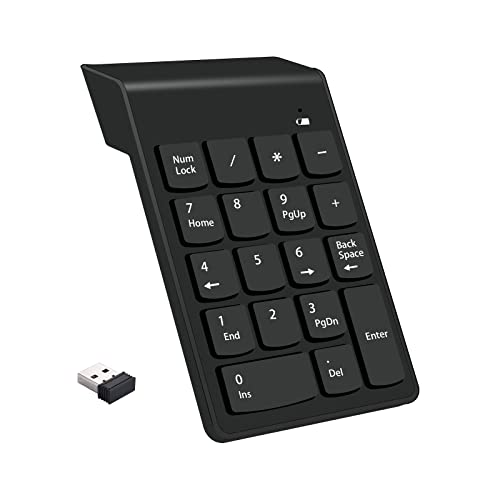
This compact 2.4GHz numpad is made for laptop users who want fast number entry without dealing with drivers or a wired desk setup. Its soft-touch keys and ergonomic tilt make it suitable for office work and spreadsheet-heavy use.
Pros
- Plug and play setup with USB receiver
- Soft and quiet keys suit office use
- Ergonomic tilt helps during long sessions
- Stable wireless use for everyday desk work
Cons
- Function support is limited on Mac
- Uses AAA battery instead of charging port
- Basic design with no backlight or extras
- Brand support in India is not widely established
The cimetech Wireless Numeric Keypad 18 Keys keeps things simple, and for many buyers, that is the whole point. You plug in the mini USB receiver and start entering numbers. There is no software step, no confusing setup, and no learning curve. For Windows laptop users who miss a dedicated numpad, this type of add-on feels instantly useful on Excel sheets, accounting software, and routine office forms.
The keys are soft and quiet, which helps in shared spaces where loud clicking gets irritating after a while. The built-in tilt gives your wrist a more natural angle than a flat slab design. If your workday includes invoices, financial records, or repeated number punching, this shape feels easier to live with. The stated wireless range is enough for normal desk use, and the battery indicator is a small but useful touch.
For Indian users, the main appeal is convenience and portability. You can drop it into a laptop bag and carry it between office and home without any issue. One thing to note is Mac support. Number keys work, but function behavior is limited, so Windows users get the better experience here. Since cimetech is not a major mainstream brand with a large visible India service network, I would treat this as a practical low-complexity accessory rather than a support-heavy purchase.
cimetech Wireless Numeric Keypad USB-A
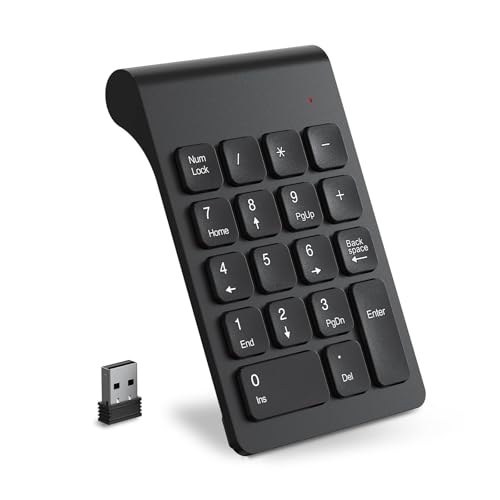
This version adds a slimmer body and a 15 degree tilt angle, making it a good pick for users who want a light and portable number pad for everyday office travel. It is aimed squarely at Windows users who need a no-fuss extension for data entry.
Pros
- Slim and light for easy travel
- 15 degree tilt improves typing posture
- Non-slip base helps on smooth desks
- Easy plug and play setup
Cons
- Best suited to Windows, limited iOS support
- No rechargeable battery
- Small size may feel cramped to some users
- Brand service presence in India is limited
The cimetech Wireless Numeric Keypad USB-A is the more travel-friendly option in this list. Its compact footprint makes sense for students, sales staff, and office users who move between desks or carry a laptop daily. The hidden receiver inside the battery compartment is a smart touch because small dongles are easy to lose. You take it out, connect it, and start working.
Its 15 degree tilt angle gives it a slightly more desk-friendly feel than flat portable keypads. Add the non-slip pads at the base, and you get steadier typing during long sessions. The 18-key layout covers the usual number entry needs without taking much table space. For people who work in billing, inventory, or office administration, that small extra keyboard often saves more time than expected.
For Indian use, this model works well in compact study tables, home offices, and crowded workstations where every inch matters. The trade-off is the ultra-compact body. Users with bigger hands might need a little adjustment period. Like the other cimetech unit, India after-sales visibility is not a big strength, so this suits buyers who want a straightforward accessory and are comfortable with lesser-known imported brands.
OG X NEXSA Wireless Numeric Keypad

OG X NEXSA offers a familiar 18-key layout with ergonomic tilt and simple USB plug-and-play use. It is a practical choice for spreadsheet work, school labs, and office desks where a standard-feel number pad is enough.
Pros
- Full-size 18-key layout feels familiar
- Ergonomic tilt supports wrist comfort
- Works with Windows and claims Mac support
- Long key life claim for regular use
Cons
- Wireless range claim appears modest
- Brand recognition is limited
- Feature set is basic with no recharge option
- Detailed support quality in India is unclear
The OG X NEXSA Wireless Numeric Keypad keeps its focus on the basics. It offers a full-size 18-key layout and concave key design, which helps fingers settle into position with less effort. If you spend hours entering marks, bank data, invoices, or numeric records, this familiar feel matters more than flashy design. The plug-and-play setup also keeps the product friendly for non-technical users.
One part I like here is the clear office-first approach. The keypad is presented for spreadsheet, accounting, and financial work, and the shape supports that use well. The ergonomic tilt aims to reduce wrist strain, and the stated long key life suggests it is built for repeated tapping instead of occasional use. For schools, coaching centres, and small businesses in India, that kind of no-drama utility often matters most.
The brand is not as widely known as larger peripheral names, so buyer trust will depend more on seller reliability and listing quality. The company does mention compatibility with Mac OS and Windows, which makes it more flexible on paper than some rivals here. Service network reputation in India is still not something I would call proven, so this feels best for buyers who want an affordable everyday numpad and do not need premium support assurance.
cartup Wireless Numpad Keyboard

cartup stands out by offering both Bluetooth and USB dongle connectivity, which gives it more flexibility than standard receiver-only keypads. It suits users who shift between laptop, tablet, and desktop and want a compact number pad for mixed-device use.
Pros
- Bluetooth and USB connectivity add flexibility
- Wide device compatibility across major platforms
- Quiet keys suit office and study use
- Compact body is easy to carry
Cons
- Product details on connection mode may feel unclear
- AAA battery use is less convenient than recharge
- Brand reputation is still developing
- Long-term support experience in India is not well known
The cartup Wireless Numpad Keyboard tries to solve a different problem from the usual numpad. Most basic models work only through a USB receiver, but this one mentions both Bluetooth and USB dongle support. That gives extra freedom if your laptop has limited ports or if you want to pair the keypad with a tablet for billing apps, data sheets, or mobile work. For users who switch devices often, this is a useful step up.
Its 18-key layout stays familiar, while the quiet and responsive keys make it fit well in office cabins, libraries, and work-from-home setups. The lightweight design also helps if you carry accessories in a backpack every day. In Indian homes, where people often share one work table between office work, classes, and general computer use, small and portable accessories feel easier to manage.
The main thing to watch is listing clarity. When a product mentions Bluetooth and USB in the same breath, buyers should verify how switching works and which devices support each mode best. If the implementation is clean, this keypad becomes one of the more versatile picks here. Brand service reputation in India is still not widely established, so I would see cartup as a convenience-first option rather than a brand-driven purchase.
Portronics Bubble 3.0 Wireless Keyboard

This is the odd one in the list because it is a full wireless keyboard with an integrated numpad rather than a standalone keypad. It suits users who want one cleaner desk accessory with multi-device pairing, rechargeable battery, and a trusted Indian brand name.
Pros
- Full keyboard with integrated numpad
- Bluetooth and 2.4GHz multi-device support
- Rechargeable Type-C battery is convenient
- Portronics has stronger India brand presence than others here
Cons
- Not a standalone compact numpad
- Takes more desk space than mini keypads
- Less suitable if you only need numeric input
- Portability is lower than pocket-sized options
The Portronics Bubble 3.0 Wireless Keyboard takes a different route. Instead of giving you a separate mini numpad, it gives you a full keyboard with a proper number pad built in. For many Indian users, especially those working from home, this makes more sense. You replace your old keyboard, get cleaner desk management, and still keep dedicated number entry for Excel, Tally-style work, online forms, and office documents.
What makes this model stronger than the generic choices is convenience. You get Bluetooth 5.3 plus a 2.4GHz receiver, so pairing across devices is easier. The Type-C rechargeable battery cuts out the hassle of buying AAA cells every few weeks or months. Dual-angle adjustment helps during long typing sessions, and multimedia shortcuts add daily usefulness beyond number entry. The integrated Copilot key will matter more to some users than others, but the broader feature set feels modern.
For Indian buyers, Portronics also brings a practical advantage, better brand familiarity and a more visible support presence than the smaller names on this list. If service access and easier replacement matter to you, this brand feels safer. The only catch is simple. If you want a tiny number pad to slip beside a laptop, this is not the right format. If you want one main keyboard for office and home use, it is the strongest all-in-one choice in this group.
Buying Guide
Choose the right format first
Before anything else, decide whether you need a standalone numeric keypad or a full keyboard with a numpad. A mini keypad suits laptop users who want to save desk space and carry it in a bag. A full keyboard suits home office users who want one main typing device with number keys built in.
Check connection type carefully
Most budget numpads use a 2.4GHz USB receiver. This is easy and stable for Windows PCs and laptops. Bluetooth is better if your device has limited USB ports or if you want to use the keypad with tablets. Read the listing carefully, because some products mention broad compatibility but give the best experience only on Windows.
Comfort matters during long data entry
If your job includes invoices, stock updates, fee records, or spreadsheet work, wrist comfort becomes important fast. Look for a slight tilt, non-slip feet, and keys with enough spacing. Flat, cramped keypads feel fine for ten minutes and tiring after two hours.
Battery setup changes daily convenience
AAA-powered numpads are common and easy to maintain, but you need to keep spare batteries at home or in the office. Rechargeable models reduce that hassle. In India, where many users buy accessories for simple long-term use, charging through Type-C often feels easier than hunting for fresh cells when the battery dies mid-work.
Windows and Mac support are not the same
Many numeric keypads work best on Windows. Some work only partially on macOS, where number entry may be fine but extra keys or functions do not respond as expected. If you use a MacBook, do not rely on broad words like compatible. Read the fine print and user reviews before buying.
Build quality affects real value
A numpad gets hit repeatedly, often harder than a normal keyboard. Check for stable construction, non-slip pads, and a decent key life claim. In Indian conditions, dust, heat, and frequent packing into backpacks can wear out weak plastic fast. A slightly sturdier body is worth more than a flashy spec line.
Brand support and seller quality matter
For smaller brands, the seller matters almost as much as the product. Look at return terms, delivery quality, and recent buyer feedback. If you want less risk, buying from a brand with a visible presence in India helps. For a simple accessory, smooth replacement support saves a lot of frustration.
Feature Importance
| Feature | Importance |
|---|---|
| Connection stability | High |
| Windows compatibility | High |
| Key comfort | High |
| Portability | High |
| Battery convenience | Medium |
| Mac compatibility | Medium |
| Build quality | High |
| Noise level | Medium |
| Brand support in India | High |
| Extra multi-device support | Medium |