If you are planning a new Ryzen 7000 gaming or productivity PC in India, your motherboard choice matters more than most people think. The right B650 board decides how stable your system runs during long gaming sessions, how far you push your CPU and RAM, and how many fast SSDs and USB devices you attach without random issues. A solid board also saves you from sudden shutdowns in peak Indian summers when room temperatures go high and cabinets sit close to the wall.
When you select a B650 motherboard, you need to think about VRM quality, cooling, DDR5 support, number of M.2 slots, Wi‑Fi and Bluetooth, rear and front USB ports, and future upgrade options. For Indian buyers, things like service support, availability of replacement parts, and long term reliability under heat and dust matter a lot. I have picked 5 B650 boards from Amazon India that offer strong value across budgets, from compact mATX builds to full ATX gaming rigs, without going into extreme prices.
ASUS B650M-AYW WiFi
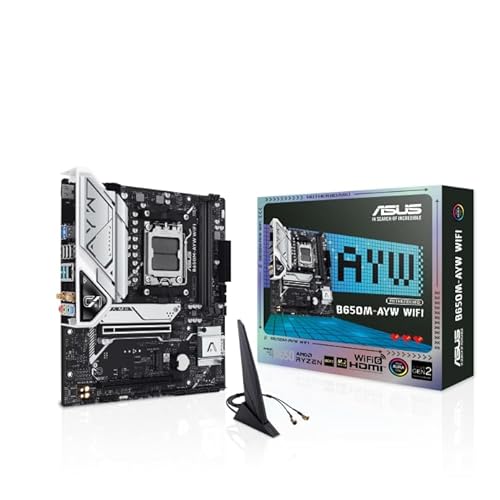
Compact micro ATX B650 board with strong connectivity, Wi‑Fi 6, and PCIe 5.0 M.2 support for future high speed SSDs.
Pros
- AM5 support for Ryzen 7000 desktop processors
- PCIe 5.0 M.2 slot for next gen SSDs
- Wi‑Fi 6 and Realtek 2.5 Gb Ethernet on board
- Good memory layout with ASUS OptiMem II for DDR5 overclocking
- VRM, chipset and M.2 heatsinks included
Cons
- Micro ATX layout limits number of PCIe slots
- Only one PCIe 5.0 M.2 slot
- Fewer premium audio features compared to higher end boards
- RGB headers present but no heavy aesthetic armor
ASUS B650M-AYW WiFi targets those who want a compact AM5 build without sacrificing modern features. The micro ATX form factor fits easily into most mid tower and some smaller cabinets that Indian users prefer to keep under desks. You get support for Ryzen 7000 CPUs, DDR5 memory and a PCIe 5.0 M.2 slot, so a few years later you still plug in faster SSDs without changing the board.
Connectivity is a strong side. The board includes Realtek 2.5 Gb Ethernet for faster local transfers, Wi‑Fi 6 for stable wireless internet in flats where running LAN cables is a headache, and rear USB 10 Gbps ports along with a front USB 5 Gbps Type C header. This helps if you use fast external SSDs or creators gear. ASUS OptiMem II routing improves DDR5 stability, which helps in Indian conditions where cabinet airflow is not always perfect and memory controllers run warm.
Cooling is handled through heatsinks on VRM, chipset and M.2, plus hybrid fan headers controlled through Fan Xpert 2+. For gaming in cities like Delhi or Chennai during hot months, this kind of basic but sensible thermal design keeps the system under control. ASUS has one of the wider service networks in India, so RMA and support are generally easier in metro and tier 2 cities. For budget AM5 builders who want Wi‑Fi, PCIe 5.0 storage and a stable platform without extra show off features, this board fits well.
MSI B650 Gaming Plus WiFi

ATX B650 gaming motherboard with solid 12+2+1 power design, Wi‑Fi 6E, and good DDR5 support for mainstream Ryzen 7000 builds.
Pros
- Supports Ryzen 7000 series processors
- 12+2+1 Duet Rail power system with dual 8 pin CPU power connectors
- DDR5 dual channel with 6000+ MHz OC support
- Extended heatsinks and M.2 Shield Frozr for thermals
- Wi‑Fi connectivity and plenty of USB 3.2 ports
Cons
- No PCIe 5.0 for graphics slot, limited to PCIe 4.0
- ATX form factor needs a full size cabinet
- RGB and design are more understated than MSI gaming flagships
- Pricing sits above entry level B650 boards
MSI B650 Gaming Plus WiFi suits gamers who want a full size ATX board with strong power delivery but do not want to jump to the higher MAG or MPG price bands. With support for Ryzen 7000 processors and a 12+2+1 Duet Rail VRM design, it handles multi core loads and long gaming sessions without VRM stress, which is important when ambient temperatures in many Indian homes stay above 30°C for long months.
DDR5 support with dual channel design and advertised 6000+ MHz OC capability gives plenty of room for tuning memory. This helps both in gaming and productivity workloads like video editing or Blender use. The board includes PCIe 4.0 slots, Lightning Gen 4 x4 M.2 with M.2 Shield Frozr, and USB 3.2 Gen 2×2 for fast external drives. For most current GPUs and NVMe SSDs available easily in India, PCIe 4.0 bandwidth is more than enough.
MSI adds extended heatsinks, MOSFET thermal pads rated for 7 W/mK and extra choke pads, which together keep the VRM cooler and prolong life in dusty, warm environments. Wi‑Fi 6E and Bluetooth 5.3 help if your router sits in another room or you use wireless controllers and headsets. MSI has decent service reach in bigger Indian cities, and spare parts like I/O shields and Wi‑Fi antennas are usually available through local distributors. For mid range gaming builds with RTX 4060, 4070 or similar cards, this board is a strong, balanced choice.
MSI B650M Gaming WiFi

mATX B650 board focused on gaming, with Wi‑Fi 6E, strong VRM cooling, and dual M.2 Gen4 slots for high speed storage.
Pros
- Supports Ryzen 7000 processors on AM5 socket
- DDR5 support with Memory Boost for high frequency kits
- Two M.2 Gen4 64 Gbps slots
- Wi‑Fi 6E, Bluetooth 5.3 and 2.5 Gbps LAN
- Compact mATX design for smaller cases
Cons
- Only two DDR5 DIMM slots
- Primary PCIe slot limited to PCIe 4.0 x16
- Fewer PCIe expansion slots due to mATX layout
- Aesthetic is more functional than show oriented
MSI B650M Gaming WiFi is ideal if you want a compact gaming PC for a smaller room or a simple office table where a full tower looks bulky. The micro ATX size keeps the board short, yet you still get Ryzen 7000 support, DDR5 memory and a reinforced PCIe 4.0 x16 slot with Steel Armor for your graphics card. For most Indian buyers pairing it with mid to upper mid range GPUs, this gives stable performance without signal integrity issues.
Cooling design is a key strength. MSI uses 7 W/mK MOSFET thermal pads, an extended VRM heatsink, chipset heatsink and M.2 Shield Frozr. A 6 layer PCB with 2 oz thickened copper provides better heat spreading and power delivery. For gamers in cities where room air conditioning is not always on, this thermal headroom helps during long sessions of titles like Valorant, BGMI or AAA games.
Storage options include two M.2 Gen4 slots that handle fast NVMe SSDs without throttling. On the networking side, you get AMD Wi‑Fi 6E, Bluetooth 5.3 and 2.5 Gbps LAN so both wired and wireless setups are covered. Rear I/O has HDMI 2.1, DisplayPort 1.4, USB 3.2 Gen 1 Type C and 7.1 HD Audio with Audio Boost, which suits mixed use for gaming, movies and occasional content creation. MSI service is reasonably accessible in many Indian states, so RMA or BIOS help is not a struggle for most users.
MSI PRO B650-S WiFi

Professional looking ATX B650 board with strong DDR5 support, Wi‑Fi 6E and reliable power design for work and mixed use builds.
Pros
- Supports Ryzen 7000 desktop processors
- Dual channel DDR5 with 7200+ MHz OC capability
- 12+2 Duet Rail power system with dual 8 pin CPU connectors
- M.2 Shield Frozr and MOSFET thermal pads for better cooling
- 2.5G LAN with Wi‑Fi 6E for fast networking
Cons
- Design is plain, less appeal for RGB heavy gaming rigs
- No PCIe 5.0 graphics slot, PCIe 4.0 focus
- Fewer gamer oriented extras like debug displays or extra RGB headers
- Price sits close to some gaming focused boards
MSI PRO B650-S WiFi targets users who prefer a clean, office friendly look but still want strong specs. This board works well for creators, programmers and small business owners who run heavy workloads and gaming after work. Support for Ryzen 7000 processors and high frequency DDR5, with dual channel DDR5 7200+ MHz OC capability, gives strong CPU and memory performance for tasks like compiling code, 3D rendering or Lightroom edits.
The power design uses a 12+2 Duet Rail system with P-PAK, along with dual 8 pin CPU power connectors, Core Boost and Memory Boost features from MSI. This helps maintain voltage stability under sustained load, which is important in Indian power conditions where line voltage quality varies. Cooling for VRM and M.2 slots is handled through MOSFET thermal pads rated for 7 W/mK and M.2 Shield Frozr covers that reduce SSD throttling.
For connectivity, you get 2.5G LAN and Wi‑Fi 6E, which is useful in flats where you share internet or have multiple high usage devices. USB 3.2 Gen 2 ports, HDMI and DisplayPort give flexibility for multi monitor setups. The board keeps RGB to a minimum, which many office users prefer. MSI Pro series usually receives BIOS updates for a long time, and service support in India is stable, making this a safe platform if you plan to run the same PC for several years.
MSI MAG B650 Tomahawk WiFi

High strength ATX B650 board with 14+2 phase VRM, triple M.2 Gen4 slots and Wi‑Fi 6E, built for serious gaming and productivity rigs.
Pros
- 14+2 phase Duet Rail VRM with 80A power stages
- Four DDR5 DIMM slots, 6400+ MHz OC support
- Two PCIe 4.0 x16 slots for GPUs or high bandwidth cards
- Three M.2 Gen4 x4 slots, two with Shield Frozr
- Wi‑Fi 6E, 2.5G LAN and rich USB connectivity
Cons
- Price is higher than basic B650 options
- No PCIe 5.0 graphics slot, only PCIe 4.0
- Large ATX board needs a roomy cabinet and good airflow
- Gaming oriented look may not suit very minimal office builds
MSI MAG B650 Tomahawk WiFi is aimed at users who want a long term AM5 platform for high end gaming or heavy productivity without jumping to X670. The 14+2 phase Duet Rail VRM with 80A power stages handles top tier Ryzen 7000 chips under multi core workloads. If you stay in a city with long summers and sometimes weak AC, this VRM strength provides peace of mind during long rendering or streaming sessions.
Memory support is strong, with four DDR5 DIMM SMT slots and advertised 6400+ MHz OC capability. This gives you room to start with 2 sticks and add more later as your work or games demand. Two PCIe 4.0 x16 slots allow multi card setups, for example a main GPU plus a capture card or high speed storage card, which suits streamers and small studios.
Storage flexibility stands out. You get three M.2 Gen4 x4 slots, two covered with Shield Frozr heatsinks that help avoid SSD throttling during large game installs or video edits. Networking includes Wi‑Fi 6E, Bluetooth 5.2 and 2.5 Gbps LAN, so whether you sit near the router or in another room, connection stays fast. Rear I/O provides USB 3.2 Gen 2×2 Type C, HDMI 2.1 and DisplayPort 1.4 along with high performance 7.1 audio. The MAG series has a good record in India for BIOS stability and long support. For gamers who run high refresh monitors and creators who handle large files daily, this board offers a solid base for a serious system.
Buying Guide
Set your budget and CPU target first
Before you pick any B650 motherboard, decide which Ryzen 7000 CPU you plan to use and how much you want to spend in total on the PC. A lower wattage CPU like Ryzen 5 often works fine with mid range VRM, while Ryzen 9 benefits from stronger VRM and more power phases. In Indian markets, prices of boards change based on offers, so keep an eye on sales around festivals. Try to balance the budget so you do not overspend on the motherboard and end up cutting too much on GPU or SSD.
Check VRM quality and cooling for Indian summers
VRM quality strongly affects stability and CPU boost behavior. Look for phase counts and features like Duet Rail or Core Boost style designs, as well as proper heatsinks and thermal pads. In many Indian homes, rooms stay warm and cabinets sit near walls, so VRM cooling matters a lot. Boards with extended heatsinks, thick thermal pads and multi layer PCBs handle this environment better and give longer life, especially if you plan to run heavy workloads.
DDR5 support and future upgrades
All these boards support DDR5, but speed ratings and slot counts differ. If you plan a long term build, prefer four DIMM slots so you upgrade from 2×16 GB to 4×16 GB later. Higher supported OC speeds like 6000 MHz or more help if you want extra FPS in CPU sensitive games or faster exports in creation work. Also check QVL lists on brand websites to see if popular RAM kits sold in India are tested with the board.
Storage needs, M.2 slots and SATA ports
Modern builds in India often start with one NVMe SSD and add more drives later for games, movies or project data. Look at how many M.2 slots each board offers, their PCIe generation and whether they come with heatsinks. PCIe 4.0 NVMe SSDs already reach high speeds and run warm, so a Shield Frozr style cover helps avoid throttling. If you have older 2.5 inch SSDs and HDDs, check SATA port count and positioning so cables route easily inside your case.
Networking, Wi‑Fi and Bluetooth for Indian homes
Many Indian flats have routers placed in the hall while the PC sits in a bedroom or study. Onboard Wi‑Fi 6 or 6E saves you from pulling long cables. Bluetooth 5.x support is useful for wireless headphones, controllers and keyboards. If you transfer large files over local network or plan a home NAS later, 2.5 Gbps LAN adds value. Check antenna design and placement in your cabinet so signals do not get blocked by thick walls or metal panels.
Rear and front USB connectivity
Look at the rear I/O panel for a good mix of USB 3.2 Gen 2, Gen 1 and Type C ports. If you use webcams, capture cards, audio interfaces and external SSDs, port count matters a lot. Front USB Type C header is important for modern cabinets sold in India that offer front Type C ports. Spending a little more on a board with enough ports avoids the need for powered USB hubs later, which saves money and clutter.
Build quality, BIOS and brand service
Check PCB layer count, metal reinforcement on PCIe slots and the general layout. A cleaner layout helps assembly, cable management and airflow. BIOS quality affects how stable RAM overclocking works and how easy it is to update for future CPUs. Brands like ASUS and MSI usually provide regular BIOS updates for AM5. For Indian buyers, service network strength is vital. Before you buy, search for local service centers for the brand in your city and check typical RMA times shared by users on forums or social media.
Compatibility with cabinets and future GPUs
Make sure the form factor of the board, ATX or micro ATX, matches your case. Check GPU slot spacing and the position of M.2 slots so large GPUs do not block SSD access. If you plan to upgrade to a larger GPU later, leave space in the cabinet and ensure power connectors on the board are easy to reach. Also confirm that the board has enough fan headers to support the number of fans you want to run in your case given Indian heat and dust.
Feature Importance
| Feature | Importance |
|---|---|
| VRM phase count and quality | High |
| VRM and M.2 cooling | High |
| Number of DDR5 DIMM slots | High |
| Supported DDR5 OC speed | Medium |
| Number of M.2 PCIe 4.0/5.0 slots | High |
| Onboard Wi‑Fi 6/6E and Bluetooth | Medium |
| 2.5 Gbps LAN port | Medium |
| Rear and front USB Type C ports | Medium |
| Form factor (ATX vs mATX) | Medium |
| Brand service network in India | High |