
If you are building a gaming PC in India, your cabinet choice matters more than people think. Good airflow keeps temperatures low in our hot climate, protects parts during long gaming sessions, and also decides how clean your setup looks on the desk. A solid cabinet gives you better thermals, smoother performance, easier upgrades, and fewer dust problems over time.
When you pick a gaming cabinet, you should think about airflow, fan support, radiator space, GPU length, CPU cooler height, front panel ports, and how easy it is to manage cables. Indian buyers also need to think about power cuts, frequent moving during hostel or PG shifts, and dust in cities and small towns. Spending smartly on the right case saves money in the long run because you reuse the same cabinet across multiple upgrades.
This list covers five of the best value-for-money gaming PC cabinets in India. All of them are mid-tower or micro-ATX friendly, support common Indian budget and mid-range builds, and are easily available online. Prices keep changing during sales, so treat this guide as a feature comparison rather than a price sheet.
Ant Esports Elite 1100

A compact mid-tower cabinet with pre-installed rainbow fans and acrylic side panel, ideal for budget gaming builds focused on airflow and looks.
Pros
- Comes with 4 pre-installed 120 mm rainbow fans
- Supports ATX, m-ATX, and ITX motherboards
- Decent GPU clearance up to 300 mm
- Simple layout that suits first-time PC builders
Cons
- Acrylic side panel scratches faster than glass
- No front USB Type-C port
- Limited drive bays for heavy storage users
- Cable management space is basic
Ant Esports Elite 1100 targets budget gaming builds where you want RGB fans out of the box without spending extra on cooling. You get three 120 mm fans in the front and one 120 mm fan at the rear. For Indian weather where room temperatures stay high for most of the year, this kind of airflow support helps keep CPU and GPU temperatures under control during PUBG, Valorant, or long casual sessions.
The cabinet supports ATX, micro-ATX, and ITX motherboards with a maximum GPU length of 300 mm and CPU cooler height of 160 mm. That covers most entry and mid-range graphics cards commonly used in Indian builds. You get 7 expansion slots and a small but workable storage layout with 1 HDD bay and 2 SSD positions. The acrylic side panel gives you a clear view of your RGB parts, though you need to be a bit careful during cleaning because acrylic marks easily compared to tempered glass.
The front I/O provides one USB 3.0 port, two USB 2.0 ports, audio and mic jacks, and standard power and reset buttons. For students or first-time PC builders on a tight budget, this cabinet offers good value since you do not need to buy extra fans initially. Ant Esports has built a decent presence in India among entry-level gamers and parts are easily available online, which helps when you want matching fans or accessories later.
Zebronics Zium

A stylish compact mid-tower cabinet with acrylic side panel and LED strip on the front, best for simple budget builds that focus on looks more than heavy airflow.
Pros
- Front multicolor LED strip for attractive look
- Acrylic side panel for component visibility
- Supports M-ATX and M-ITX motherboards
- Top panel USB 3.0 and USB 2.0 ports
Cons
- Only one 80 mm rear fan included
- No support for larger ATX motherboards
- Limited airflow for high TDP components
- GPU length support capped at 270 mm
Zebronics Zium suits compact budget builds where desk space is limited and you prefer a smaller micro-ATX system. The cabinet has a clean front design with a multicolor LED strip that makes the setup look stylish even with basic components. An acrylic side panel lets you see the internals, which works nicely if you add RGB RAM or a lit-up CPU cooler later.
The case supports M-ATX and M-ITX motherboards, VGA cards up to 270 mm, and CPU coolers up to 150 mm. That means it is better matched with entry-level or mid-range GPUs. The stock cooling solution includes only one 80 mm rear fan, which is not ideal for heavy gaming or high-heat parts. Indian users who live in hotter cities should consider adding additional fans if their configuration produces more heat.
The top I/O panel features one USB 3.0 port, two USB 2.0 ports, and HD audio connections. Cable routing support is basic but enough for tidy builds if you plan the layout. Zebronics has wide reach in India with service centers in many cities, so warranty and spare parts handling tend to be smooth. This cabinet suits office plus casual gaming PCs, or kids’ and students’ systems, where style and low price are bigger priorities than extreme cooling.
Frontech Arcadia FT-4343

A mid-tower ARGB cabinet with tempered glass front and side panels and four pre-installed 120 mm ARGB fans, ideal for showpiece gaming setups.
Pros
- Four pre-installed 120 mm ARGB fans
- Tempered glass front and side panels
- Good airflow design for gaming loads
- Magnetic dust filter for easier cleaning
Cons
- Heavier due to double tempered glass
- Glass front can restrict intake compared to mesh
- Needs careful handling while moving
- Not ideal for very tight desks
- Exact radiator support information is limited
Frontech Arcadia FT-4343 targets gamers who want strong RGB presence along with usable airflow. You get three 120 mm ARGB fans in the front and one at the rear, which is a solid starting point for cooling out of the box. For Indian gaming rooms where fans or AC usage varies, plenty of case fans helps keep temperatures consistent even during overnight downloads or long ranked matches.
Both front and side panels use tempered glass so the cabinet looks premium. The clear side panel also helps show clean cable management. Since glass adds weight, handling during shifting between hostel, home, or PG needs some care. A magnetic dust filter supports easier cleaning which matters a lot in dusty Indian cities where cabinets collect dust quickly if placed on the floor.
The internal layout is designed for easier installation and upgrades. You get support for common gaming parts, enough space for mid-range GPUs, and standard PSU positioning. Frontech is a familiar name in Indian budget accessories, and while its service reputation is not on the same level as some big international brands, for cabinets you rarely need warranty support unless there is glass damage or hinge issue. Arcadia FT-4343 fits users who want a showy RGB build on a moderate budget without spending extra money and effort on additional fans.
Amazon Basics Mid-Tower
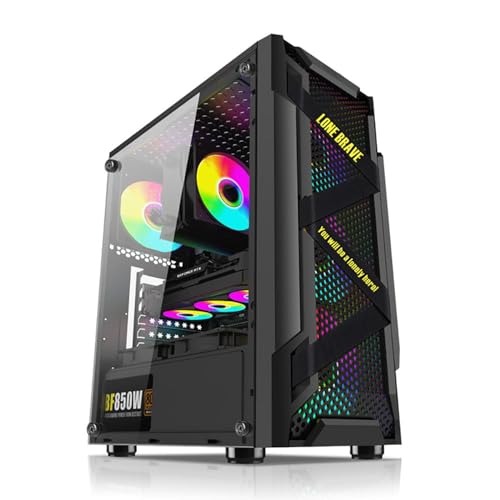
A clean, airflow-focused mid-tower cabinet with support for up to eight fans and 330 mm GPUs, ideal for performance builds and future upgrades.
Pros
- Supports up to eight 120 mm fans
- Mesh front for strong airflow
- Hinged tempered glass door for easy access
- Supports long GPUs up to 330 mm
Cons
- No fans included by default
- Requires extra spending on cooling
- No fancy RGB out of the box
- Slightly larger footprint than compact m-ATX cases
Amazon Basics Mid-Tower suits users who want performance and flexibility more than flashy RGB. The mesh front panel supports strong intake airflow and the chassis supports up to eight 120 mm fans, which is helpful for high TDP CPUs and GPUs often used for heavy gaming or content creation. For Indian conditions where room temperature shoots up in summers, you can populate multiple fan slots to keep the system stable even under load.
The cabinet supports ATX, Micro-ATX, and Mini-ITX motherboards, along with GPUs up to 330 mm. That length covers even larger modern graphics cards. Inside, you get ample storage options, space for routing cables cleanly, and clearance for longer PSUs. The hinged tempered glass side door uses magnets so you can open the build quickly for cleaning or upgrades without dealing with many screws.
Since no fans are included, you have full freedom to pick good quality 120 mm or RGB fans from brands available easily in India like Deepcool, Cooler Master, Ant Esports, or local options. The front panel connectivity is solid with a power button, RGB button support, restart button, mic and audio ports, two USB 2.0 ports, and one USB 3.0 port. Being an Amazon Basics product, support is handled directly through Amazon’s service process which is usually straightforward for metro and tier 2 cities. This cabinet works best for users planning to keep the same case for multiple upgrade cycles.
Ant Esports 100 Air Mini
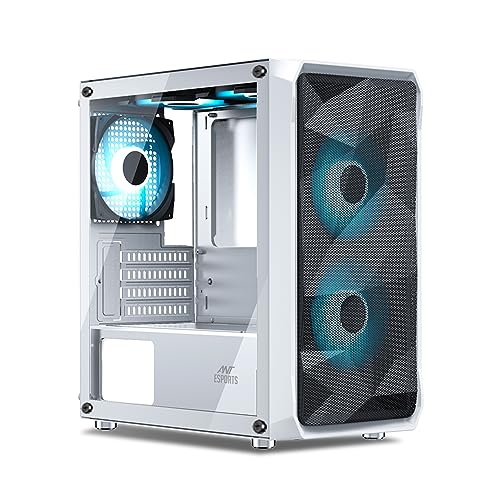
A compact white micro-ATX cabinet with mesh front, dual pre-installed rainbow fans, and strong airflow focus in a small footprint.
Pros
- Mesh front with anti-dust filter
- Two pre-installed rainbow fans at the front
- Supports GPUs up to 340 mm
- Good fan support on front, top, bottom, and rear
Cons
- No tempered glass, only standard panel design
- Limited to M-ATX and ITX motherboards
- Fewer drive bays for heavy storage builds
- White color needs more cleaning in dusty rooms
Ant Esports 100 Air Mini is a smart choice if you want a compact yet airflow-focused PC in white. The mesh front with anti-dust filter and two pre-installed rainbow fans helps pull in fresh air, which is important in Indian homes where rooms are often warm and dusty. The compact dimensions keep the cabinet friendly for smaller desks or TV units, while still giving space for capable hardware.
The case supports micro-ATX and ITX motherboards, GPUs up to 340 mm in length, and CPU coolers up to 160 mm. That combination covers many strong mid-range graphics cards and tower coolers used in budget to mid-level gaming builds. Fan support is generous for a small chassis, with space for 2 x 120 mm at the front, 2 x 120 mm at the top, 2 x 120 mm at the bottom, and 1 x 120 mm at the rear. This allows you to tune airflow based on your parts and your city temperature.
You get four expansion slots, two 3.5 inch drive bays, and two 2.5 inch drive bays. The top I/O panel carries two USB ports, one USB 3.0 port, audio in, mic, and a reset button. White cabinets look clean and modern but need regular dusting, especially in Indian homes near main roads or construction. Ant Esports has become popular among Indian PC builders, and its cabinets and fans are usually easy to find on Indian e-commerce sites. For users who want a small yet capable gaming setup or living room PC, 100 Air Mini is a strong practical option.
Buying Guide
Set a realistic budget for your gaming cabinet
For most Indian PC builds, you should decide the total system budget first, then allocate a fixed part of that for the cabinet. Many buyers put all money in CPU and GPU and pick the cheapest case, which leads to high temperatures, dust build-up, and noise. Try to keep a sensible share of your budget for a case that has decent airflow and at least space for front and rear fans. Remember that you can reuse a good cabinet for many years across CPU and GPU upgrades, so the spend is a one-time investment rather than repeating every cycle.
Check motherboard and GPU compatibility
Before ordering any cabinet, check your motherboard size and GPU length. ATX, micro-ATX, and mini-ITX boards need different internal space and mounting points. Most budget Indian builds use micro-ATX, which fits in both ATX and smaller micro-ATX cases. GPU length support is equally important. Look at the product spec for maximum GPU length and compare it with your graphics card model including any extra space needed for front fans or cables. Buying a case that limits future GPU upgrades can become expensive later.
Airflow and cooling for Indian climate
India sees hot summers and many homes do not have AC running all day. Poor airflow can push temperatures higher which affects performance and long-term part health. Look for cabinets with mesh fronts or good ventilation and support for at least one front intake fan and one rear exhaust fan. Additional top or bottom fan mounts are helpful if you plan higher-end CPUs or GPUs. Pre-installed fans save initial cost, but you should still check their size, placement, and whether you can add more high quality fans if required.
Build quality, materials, and dust management
Cabinet build quality affects how safe your components stay during transport, shifting between hostel and home, or frequent cleaning. Thicker steel panels feel stronger and less prone to bending. Tempered glass gives a premium feel but needs careful handling. Acrylic side panels cost less but scratch faster. Dust filters on the front, top, or bottom help a lot in Indian homes where dust levels are high. Removable magnetic filters make cleaning quick, which means you are more likely to maintain the system regularly.
Front I/O ports and everyday convenience
Front or top I/O ports decide how easily you connect pendrives, headphones, and other everyday gadgets. At a minimum, look for one USB 3.0 port and audio plus mic jacks on the front or top. Extra USB 2.0 ports are useful for low-speed devices. Some cabinets offer an RGB control button which lets you switch fan lighting modes without software. A hinged glass door or tool-free panels reduce friction for adding RAM, cleaning fans, or changing storage drives later.
Size, aesthetics, and desk space
Your cabinet sits on or under your desk for years, so size and look matter. Mid-tower cases support ATX boards and more expansion but need more floor or table space. Micro-ATX cases save space and look neat on compact Indian study tables or bedroom setups. White or RGB-heavy cases stand out more, while plain black designs blend into home and office spaces. Think about where you will place the PC, how often you shift accommodation, and how much weight you are comfortable moving when cleaning the room.
Warranty, brand presence, and service in India
Cabinets do not fail as often as electronics, but panel damage, front I/O problems, or fan failure still occur. Buying from brands with a clear support structure in India reduces headaches. Ant Esports, Zebronics, and Frontech all have visible presence in Indian markets, especially online. Amazon Basics products are usually supported through Amazon itself. Check replacement policies and return windows on the seller page before buying so you can respond fast if there is damage during shipping, especially with tempered glass models.
Planning for future upgrades
When you select a cabinet, think two or three years ahead. Strong fan support, longer GPU clearance, and extra drive bays help when you move from integrated graphics to a discrete GPU or add more storage for games and work. Extra cable routing holes and PSU shrouds keep the build clean even after multiple upgrades. Spending a bit more today for better airflow and space can prevent the need to change cabinet again when you move from a budget GPU to something more powerful.
Feature Importance
| Feature | Importance |
|---|---|
| Airflow and fan support | High |
| Motherboard size compatibility | High |
| Maximum GPU length | High |
| Front mesh or ventilation design | High |
| Front I/O ports (USB 3.0, audio) | Medium |
| Build quality and panel thickness | High |
| Tempered glass or acrylic side panel | Medium |
| Dust filters and maintenance ease | High |
| Aesthetics and RGB features | Medium |
| Brand presence and support in India | Medium |