If your old laptop or desktop feels slow, a simple SSD upgrade can make it feel new again. For most Indian users, SATA SSDs are the easiest way to speed up boot time, app loading and everyday work without changing the whole system. They use the standard 2.5 inch size and SATA cable that most PCs already have, so the upgrade is usually plug and play for a local technician.
When you pick an SSD, you need to look at storage capacity, read and write speeds, brand reliability, warranty and after sales support in India. Power consumption and heat also matter in our climate, especially for laptops that run long hours during work from home or study. In the Indian market, value for money matters a lot, so I focus here on drives that give good speed and reliability without forcing you to stretch your budget too much.
This guide covers five solid SATA SSD options available in India through online platforms and local resellers. I will keep pricing talk general, since prices keep changing with offers and sales, and focus more on what type of user each drive suits best, how reliable the brand is, and what you should watch for before you order or ask your local shop to install one.
Consistent 256GB 2.5 Inch SATA SSD

A budget friendly 256 GB SATA SSD suited for breathing new life into older laptops and desktops that need faster boot and app loading without heavy storage needs.
Pros
- Decent rated speeds up to 550 MB/s read and 500 MB/s write
- Standard 2.5 inch SATA form factor for wide compatibility
- Wear leveling and error correction for better data integrity
- Shock and vibration resistant design with no moving parts
Cons
- 256 GB capacity is limited for heavy media users and gamers
- Lesser known brand compared to global names
- Real world speeds depend on system and SATA port quality
- Service reach outside large cities might be limited
Consistent’s 256 GB SATA SSD targets users who want a simple upgrade from a hard drive without going into high capacity or fancy features. With claimed speeds up to 550 MB/s read and 500 MB/s write, it offers a big jump over a mechanical HDD for Windows boot times, app launches and daily browsing. For office work, online classes, and light editing, this capacity is comfortable as long as you keep large media on an external drive or a secondary HDD.
The drive uses a standard 2.5 inch form factor and SATA interface, so it suits most laptops and desktops sold in India over the past decade. Local technicians in markets like Nehru Place, Lamington Road or any city service lane know this form factor well, so installation is straightforward. Features like wear leveling and error correction are useful in our power cut prone environment, helping reduce the risk of corrupted data during long term use.
Consistent is a lesser known name compared to brands like Crucial or Samsung, so service network depth across India is not as strong. In metro cities you will find better support through distributors and online warranty channels, but in smaller towns you might depend more on courier based RMA. For someone on a tight budget who wants a noticeable speed upgrade on an older machine and does not store huge game libraries, this drive offers decent performance per rupee as long as you are comfortable with a smaller capacity and a lesser known brand.
Consistent 128GB 2.5 Inch SATA SSD

An entry level 128 GB SSD for users who only need faster OS and basic apps, ideal for very old laptops where budget and simple use matter more than storage space.
Pros
- Rated read speed up to about 540 MB/s and write up to about 500 MB/s
- Low power consumption which suits older laptops
- Standard 2.5 inch SATA 6 Gb/s interface
- Good for quick boot and system responsiveness over HDD
Cons
- 128 GB capacity is tight for Windows plus apps and some media
- Not ideal for gamers or content creators with large files
- Brand recognition and support network are modest
- Performance will feel limited if you install many heavy programs
The Consistent 128 GB SSD is aimed at basic users who only need a drive for Windows, office apps and light browsing. With sequential read speeds rated around 540 MB/s and write speeds near 500 MB/s, it offers a clear improvement over any spinning hard disk, especially for boot time and everyday tasks like opening Chrome, Word, or WhatsApp Desktop. For an old Core i3 or Pentium laptop that feels slow, this simple SSD upgrade can extend its life for a few more years without a big spend.
Its SATA 6 Gb/s interface and 2.5 inch size match the ports found in most Indian laptops and desktops that shipped with HDDs. Low power consumption helps in laptops where batteries are already ageing, common in Indian households where a 5 to 7 year old machine is common. The SSD also generates less heat compared to many hard drives, which is helpful in warmer cities where room temperatures stay high in summer and AC is not always on.
As with the 256 GB variant, Consistent does not have the same widespread service network as bigger brands. Warranty support usually works through online channels and partner service points in larger cities. For a student or office user who mainly works on cloud documents and streaming, and stores media on external drives or mobile, this small SSD makes sense. For anyone planning to install many games or keep large offline movies, the 128 GB capacity will feel restrictive, so you should step up to a larger drive or combine this SSD with an internal HDD if your system has two bays.
Crucial BX500 240GB SATA SSD (CT240BX500SSD1)

A trusted 240 GB SSD from a global memory brand, ideal for users who want a balance of speed, efficiency and strong reliability for everyday workloads.
Pros
- Micron 3D NAND from a well known global brand
- Rated speeds up to 540 MB/s read and 500 MB/s write
- More energy efficient than typical HDDs, improves battery life
- Good track record of reliability and firmware support
Cons
- 240 GB can feel small for gamers with large libraries
- No DRAM cache which can affect sustained heavy writes
- Price per GB is higher than some lesser known Indian brands
- Warranty service usually works through courier based RMA
The Crucial BX500 240 GB is one of the most popular entry level SSDs worldwide, including in India. It uses Micron 3D NAND and offers claimed read speeds of 540 MB/s and write speeds of 500 MB/s, which is more than enough for Windows, Office, browsing, and light editing. Compared to a typical 5400 rpm or 7200 rpm hard drive, you see faster boot, snappier app launches and lower stutter when multitasking.
One plus point of the BX500 is energy efficiency. Crucial notes that it is significantly more energy efficient than a typical hard drive, which helps extend battery life in laptops. In Indian conditions where many homes face long power cuts and students work on battery during outages, this lower power draw is useful. The drive also tends to run cooler than HDDs, which reduces thermal stress in packed laptop chassis during long summer days.
Crucial, owned by Micron, has a better service reputation in India than many local brands. You get structured warranty support through official channels and a wide online seller base. That said, physical service centers are not as common as local brand counters, and many replacements work through courier shipping. The BX500 240 GB lacks a DRAM cache that you see in higher end models, so sustained large file transfers might slow down, but for normal Indian users doing browsing, OTT streaming, office work and some casual gaming, the balance of reliability, reasonable capacity and known brand support makes this a safe choice.
Geonix 128GB SATA 2.5 Inch SSD Gold Edition

A locally focused 128 GB SATA SSD with high rated read speeds, designed for quick boot drives in budget desktops and laptops across Indian homes and offices.
Pros
- Rated read speed up to about 560 MB/s and write up to 500 MB/s
- Supports a wide range of operating systems including Windows, Linux and macOS
- Five year manufacturing warranty on paper
- Marketed as best in its segment for budget users
Cons
- 128 GB storage is limited for modern Windows setups
- Brand is lesser known outside some regions
- Consistency of quality can vary between batches
- Service access depends on regional distributors and partners
Geonix positions its 128 GB Gold Edition SATA SSD as a fast, affordable upgrade for basic systems. With claimed speeds up to 560 MB/s read and 500 MB/s write over a SATA 3.0 interface, it targets the common Indian use case of replacing a slow hard drive with a snappy boot drive. For systems used for Tally, office ERP, browsing and online classes, this drive gives a noticeable lift to responsiveness without needing a large budget.
Compatibility is broad, with support for Windows versions from XP up to Windows 10 and 10 Pro, along with Linux and macOS. That helps in small offices and homes where you still find older operating systems and mixed environments. The 2.5 inch form factor fits into most standard laptops and desktops, and technicians in local markets are familiar with this kind of upgrade. High rated speeds and SSD level access times mean your machine starts quicker and loads applications without the lag you expect from HDDs.
Geonix has a presence in Indian IT resellers, especially in some North and West India markets, but its national brand awareness still trails bigger global names. The five year manufacturing warranty looks strong on paper, but user experience depends on local distributor support and how easy RMA processing is in your city. For someone in a metro or tier 1 city where Geonix partners are more active, this drive can be a value choice as a boot SSD, provided you are fine managing storage with only 128 GB or combining it with a secondary HDD for data.
EVM 512GB 2.5 Inch SATA III SSD (EVM25/512GB)
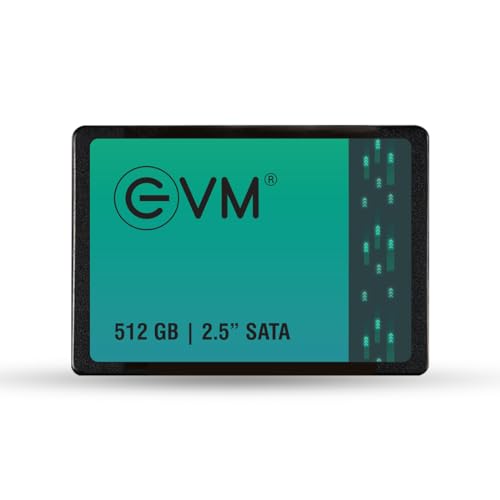
A high capacity 512 GB SATA SSD from EVM, suitable for users who want both speed and enough space for apps, games and media while keeping power use and heat low.
Pros
- Large 512 GB capacity suits heavier users
- Rated speeds up to 550 MB/s read and 500 MB/s write
- Energy efficient with low idle and active power draw
- Wide operating temperature range suitable for Indian climate
- Five year warranty with doorstep pickup and replacement in many locations
Cons
- Brand awareness is lower compared to older global brands
- SATA interface limits peak performance compared to NVMe in new laptops
- Actual service reach depends on your PIN code coverage
- Power users might still prefer NVMe if their system supports it
The EVM 512 GB 2.5 inch SATA III SSD is made for users who want to move fully to solid state storage without juggling files across multiple drives. With 512 GB, you have enough room for Windows, a set of office tools, popular games, photo libraries and offline movies on one drive, which suits many Indian households that share a single PC among family members. Rated speeds of 550 MB/s read and 500 MB/s write bring a big improvement in responsiveness compared to a standard hard drive.
EVM uses 3D NAND flash, which improves durability and stability over time. Power consumption is listed at around 0.195 W idle and 1.535 W at maximum, which is helpful in laptops where you want longer battery life and lower heat. The drive is specified to work from 0°C to 70°C and survive storage down to minus 40°C, so it handles typical Indian room temperatures and non air conditioned rooms well. For users in cities like Delhi, Nagpur or Chennai where summer heat stresses old HDDs, this lower heat SSD upgrade makes practical sense.
One standout aspect is the five year warranty with doorstep pickup and replacement service in many locations. For Indian users who do not want to run around service centers, this is a big convenience, provided your PIN code falls in their coverage area. EVM as a brand focuses on the Indian market and has grown in visibility through online platforms and local resellers. While enthusiasts might still lean toward long established global memory brands, for someone who wants a spacious SATA SSD, clear warranty terms and local focused service, this 512 GB drive is a strong everyday choice.
Buying Guide
1. Decide your budget and capacity needs
Before you shortlist any SSD, think about how you use your PC or laptop. If you only need faster boot and basic apps like browser, Office and Zoom, 120 to 256 GB is enough as a system drive, especially if you keep large media on an external HDD or cloud. For students, freelancers and light gamers, 240 to 512 GB gives more breathing space for apps, a few games and project files. If your budget is tight, go for a smaller SSD for the system and keep your old HDD as a secondary data drive if your desktop has space for two drives. In laptops with only one bay, it is safer to step up to at least 240 GB, otherwise Windows updates and a few games fill the drive quickly.
2. Check interface and physical compatibility
Most older Indian laptops and desktops use a 2.5 inch SATA hard drive, so a 2.5 inch SATA SSD is the simplest drop in upgrade. Before ordering, confirm that your device uses a 2.5 inch drive and not a soldered eMMC or only an M.2 slot. For desktops, open the side panel or ask a technician to check for a 2.5 inch bay and SATA data and power cables. For laptops, search your exact model number online with the term SSD upgrade and see if others have upgraded. Make sure you have a screwdriver and, if needed, a 2.5 inch to 3.5 inch adapter bracket for some desktop cabinets.
3. Understand speed ratings and real world performance
SATA SSDs often advertise around 500 to 560 MB/s read and 450 to 520 MB/s write speeds. In day to day use, you rarely hit those peak speeds, but even lower real world numbers feel far quicker than any HDD. Focus less on small theoretical differences and more on brand reliability and warranty. Also, remember that boot and app launch times depend on other parts too, like your processor and RAM. Upgrading from 4 GB to 8 GB RAM combined with an SSD can transform a slow system for many Indian users who work with multiple browser tabs and apps.
4. Think about reliability, endurance and warranty
An SSD holds your OS and important data, so reliability matters. Look for brands that mention features like wear leveling, error correction and power loss protection. Check warranty length, which is often three to five years for these models, and see how warranty claims work in India. Some brands offer doorstep pickup and replacement, which is helpful in cities where traffic and travel cost time. Also check user reviews about failure rates and support response times, especially for lesser known brands.
5. Consider power consumption and heat for Indian climate
India has hot summers and many homes use laptops in non air conditioned rooms. SSDs use less power and produce less heat than HDDs, which is one reason they extend battery life and help your machine stay cooler. If you work long hours on a laptop or keep a desktop in a cramped cabinet, an SSD upgrade reduces stress on internal components. Look for drives with low active and idle power figures and a wide operating temperature range, especially if you live in hotter regions.
6. Plan for data backup and migration
Before replacing your existing drive, backup your important data to an external drive or cloud service. You can either clone your old HDD to the new SSD using free cloning software, or do a fresh OS install for a cleaner system. Many Indian users take the laptop to a local shop where the technician clones and installs the SSD for a small fee. Decide which route suits you. After the upgrade, keep a regular backup habit, because while SSDs are reliable, no storage medium is perfect and power issues or accidents can still cause data loss.
7. Look at after sales service and local support
Service network is an important factor in India. Some global brands have centralized RMA centers where you courier the drive, while some Indian focused brands offer doorstep pickup or work through local distributors. Check the brand website for service center lists and warranty claim steps. For users in tier 2 and tier 3 cities, courier based RMA is common, so keep original invoices and packaging where possible. A five year warranty has value only if claim process is smooth and responsive in your region.
8. Check reviews and seller reliability before buying
Before you hit buy now, read recent user reviews on Indian ecommerce sites and tech forums, focusing on failure reports, heat issues and actual speeds. Filter out old reviews if there has been a newer batch or firmware update. Also pay attention to seller ratings, because counterfeit or tampered drives sometimes enter the market through unknown sellers. Prefer authorized or highly rated sellers even if the price difference is small, and verify the serial number on the brand site when possible.
Feature Importance
| Feature | Importance |
|---|---|
| Capacity (GB) | High |
| SATA interface compatibility (2.5 inch, 6 Gb/s) | High |
| Sequential read and write speeds | Medium |
| Brand reliability and user reviews | High |
| Warranty length and service quality in India | High |
| Power consumption and heat output | Medium |
| Operating temperature range | Medium |
| Controller and NAND type (3D NAND, TLC, etc.) | Medium |
| Price per GB and value for money | High |
| Included software or cloning tools | Low |