


A good CPU air cooler keeps processor temperatures in check during gaming, editing, compiling, and long work sessions. The stock cooler supplied with some processors often struggles with sustained loads, especially inside a warm Indian room. A better tower cooler also helps the processor hold higher clock speeds for longer while reducing fan noise.
Before choosing, check socket support, cooler height, heat pipe count, fan control, RAM clearance, and cabinet airflow. Indian buyers should also check return terms, warranty handling, replacement fan availability, and local service access. The five models below cover compact single-tower options, a dual-tower design, and a feature-rich cooler with a temperature display. Prices change often on Indian online stores, so use the listed product page to check the current deal.
Cooler Master Hyper 212 Spectrum V3 ARGB

A compact single-tower cooler with four heat pipes, a 120 mm ARGB fan, and broad support for current Intel and AMD sockets. Its 152 mm height suits many mainstream gaming cabinets.
Pros
- Supports Intel LGA1851 and LGA1700 along with AMD AM5 and AM4
- Four nickel-plated heat pipes use direct contact with the CPU
- 120 mm PWM fan offers adjustable cooling control
- ARGB works with Asus, ASRock, Gigabyte, and MSI motherboard systems
Cons
- Single-tower design has less cooling headroom than a dual-tower cooler
- ARGB wiring needs an available 3-pin header for full lighting control
- Tall RAM modules may need placement checks before installation
- One included fan limits airflow compared with dual-fan models
The Hyper 212 Spectrum V3 keeps the familiar single-tower layout simple. Four nickel-plated heat pipes carry heat into the fin stack, while direct contact increases the metal area touching the processor heat spreader. The 120 mm fan uses PWM control, so your motherboard can raise or lower fan speed based on CPU temperature. A 152 mm height gives this model a useful fit advantage in mid-tower cabinets.
For a mainstream gaming processor, office PC, or content-creation system, this cooler offers a sensible step up from a basic stock unit. The ARGB fan works with the main motherboard lighting ecosystems, though you need the right 3-pin header for software control. Cooler Master has a better-known India support process than many small PC accessory brands. Keep the invoice and confirm the service route before purchase, especially if you live outside a major city.
Ant Esports ICE-C400
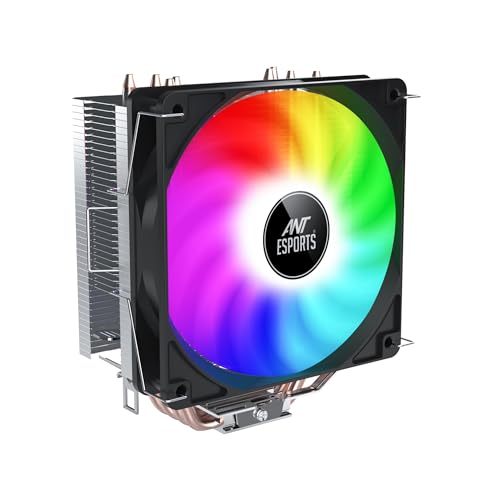
A compact single-tower cooler with four 6 mm copper heat pipes, a 120 mm rainbow LED fan, and wide Intel and AMD socket support. Its 148 mm height suits many compact and mainstream cabinets.
Pros
- Supports AM5, AM4, LGA1700, LGA1200, and older mainstream sockets
- Four 6 mm copper heat pipes spread heat through the tower
- PWM fan control helps balance noise and cooling
- Hydro bearing fan design targets longer service life and quieter operation
Cons
- Rainbow lighting offers less customization than addressable RGB
- Single-fan design gives less thermal capacity than dual-fan options
- Build quality and mounting feel need careful inspection after delivery
- Motherboard lighting software does not control the fixed rainbow effect
The ICE-C400 focuses on basic cooling at a compact size. Its four 6 mm copper heat pipes connect the CPU contact area to the aluminum tower, while the 120 mm PWM fan adjusts speed through the motherboard BIOS. Hydro bearing construction helps keep operating noise in check during normal loads. The 148 mm height also reduces the chance of a side-panel fit issue in smaller cabinets.
This model fits a budget gaming build using a mainstream Ryzen or Core processor, provided your workload does not involve long all-core rendering sessions. The rainbow LED effect adds colour without needing software, but users seeking a clean synchronized lighting setup should select an ARGB model instead. Ant Esports sells widely through Indian online channels. Service experience varies by location, so check the seller’s replacement terms and the nearest Ant Esports service contact before ordering.
Cooler Master Hyper 620S ARGB
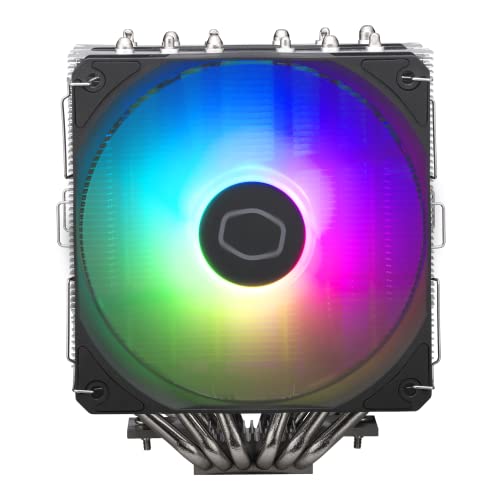
A dual-tower air cooler with six nickel-plated heat pipes, two 120 mm fans, and a CryoFuze thermal paste pack. Its 154.9 mm height offers strong cooling while fitting many mid-tower cases.
Pros
- Dual-tower radiator provides a large fin area for heat dissipation
- Six heat pipes cover the CPU contact zone evenly
- Two 120 mm fans suit sustained gaming and heavy workloads
- Supports automatic ARGB detection and 3-pin ARGB control
Cons
- Needs more cabinet and motherboard clearance than a single-tower cooler
- Dual-fan placement can interfere with tall RAM modules
- Heavier cooler requires careful mounting and transport handling
- Two-year warranty claims use Kaizen Infoserve as the service provider
The Hyper 620S takes a more serious approach to air cooling. Its twin towers create extra fin area, and six heat pipes move heat across both sections. Two 120 mm fans push air through the stack, which gives the cooler more room for sustained gaming, video work, and CPU-heavy software. The supplied CryoFuze thermal paste saves you from buying a separate compound during installation.
At 154.9 mm, the cooler fits many mid-tower cabinets, but you should measure the cabinet’s CPU cooler limit first. Check RAM height too, since the front fan might need a small vertical adjustment. Cooler Master’s India support reputation is generally stronger than small local accessory brands. This model carries a two-year warranty with Kaizen Infoserve handling listed claims, so keep purchase records and follow the stated email process.
Ant Esports ICE-C612 V2

A six-heat-pipe tower cooler with a 120 mm ARGB PWM fan and a 153 mm height. It supports a wide set of Intel and AMD sockets, including LGA1700 and AM5.
Pros
- Six 6 mm copper heat pipes provide good heat transfer capacity
- 153 mm height fits many mainstream mid-tower cabinets
- PWM ARGB fan allows speed control and motherboard lighting control
- Broad socket list helps during an Intel or AMD platform upgrade
Cons
- Single-fan layout has less airflow than dual-fan tower coolers
- ARGB setup needs a compatible 3-pin motherboard header
- Older mounting hardware should be checked against your exact socket
- Tall memory modules may limit front fan placement
The ICE-C612 V2 gives a single-tower cooler a generous heat pipe count. Six 6 mm copper pipes feed heat into the interlocked aluminum fins, while the 120 mm PWM fan controls speed through the motherboard. The 153 mm height strikes a useful balance for Indian PC builders who want more cooling than a stock unit without moving to a large dual-tower assembly.
Socket coverage is one of this cooler’s strongest practical points. Support includes LGA1700 and AM5 along with several older platforms, which helps when upgrading an existing PC. The ARGB fan suits builds with a 3-pin lighting header. Ant Esports has broad online availability in India, while service quality often depends on seller handling and city coverage. Check replacement terms before opening the package and inspect every mounting part against your platform.
Ant Esports V8 Digital

A dual-120 mm tower cooler with six copper heat pipes, a high-density fin stack, ARGB lighting, and a live CPU temperature display. It supports Intel LGA1851 and LGA1700 along with AMD AM5 and AM4.
Pros
- Two 120 mm fans provide stronger airflow through the fin stack
- Six copper heat pipes suit sustained processor workloads
- Built-in temperature display gives a quick thermal reading
- 162.5 mm height still fits many modern mid-tower cabinets
Cons
- Requires more internal clearance than the smaller Ant Esports models
- One-year replacement warranty is shorter than some competing options
- Display cable routing adds another installation step
- Tall RAM and narrow cabinets need careful compatibility checks
The V8 Digital targets builders who want cooling capacity and a visible temperature readout. Two 120 mm fans move air through the high-density fin stack, while six copper heat pipes transfer heat from the CPU. The display gives a quick reading during gaming or stress tests, though you should use motherboard software for detailed logs and fan curves.
The 162.5 mm height needs a cabinet measurement before purchase. Leave room for the front fan, side panel, and memory modules, since dual-tower designs occupy more space around the CPU socket. Ant Esports has broad reach through Indian e-commerce channels, but the replacement experience depends on seller response and local service coverage. The listed one-year replacement warranty makes invoice storage and prompt fault reporting important.
Buying Guide
Match the cooler to your processor
Start with the CPU model and its sustained power draw, not only the socket name. A compact single-tower cooler suits mainstream gaming chips and office processors. A dual-tower model fits better with high-core-count CPUs, long rendering sessions, and heavy multitasking. Check the processor maker’s thermal limits before purchase.
Check socket and mounting support
Socket support changes across cooler revisions. Confirm LGA1851, LGA1700, AM5, or AM4 support as required by your motherboard. Older Intel and AMD sockets need a matching bracket in the box. Read the exact listing and inspect the mounting kit before removing your current cooler.
Measure your cabinet and RAM
Measure the distance from the CPU surface to the side panel. Compare it with cooler height, which ranges from compact 148 mm designs to taller 162.5 mm models in this list. Also check RAM height and the position of the front fan. A cooler might fit the cabinet while covering a memory slot.
Choose the right fan and lighting setup
PWM control lets your motherboard change fan speed with CPU temperature. This helps reduce noise during light work. Rainbow LED lighting works without software but offers limited control. ARGB needs a 3-pin 5 V header and supports motherboard synchronization. Do not connect a 3-pin ARGB plug to a 4-pin 12 V RGB header.
Plan for Indian room conditions
Dust and high room temperatures place extra load on the cooling system. Use a cabinet with front intake and rear exhaust fans, clean filters regularly, and keep the cooler fins free of dust. In hot cities or rooms without air conditioning, a dual-tower cooler gives more thermal headroom during long workloads.
Review installation and motherboard clearance
Large air coolers need a firm backplate and even mounting pressure. Read the manual before applying thermal paste. Check GPU clearance near the top PCIe slot and keep the fan cable away from blades. A clean installation reduces the chance of temperature spikes and rattling.
Check warranty and service handling
Keep the invoice, packaging, and accessory kit until the cooler works properly. Cooler Master lists a two-year warranty for the Hyper 620S through Kaizen Infoserve. The Ant Esports V8 Digital lists one-year replacement coverage. For every product, confirm the current policy, seller return window, and service contact before purchase.
Feature Importance
| Feature | Importance |
|---|---|
| CPU socket support | High |
| Cooler height and cabinet clearance | High |
| Heat pipe count and fin area | High |
| Fan size and PWM control | High |
| RAM clearance | High |
| Cabinet airflow | High |
| ARGB or LED compatibility | Medium |
| Thermal paste quality | Medium |
| Warranty and service access | High |
| Temperature display | Low |


