A good laptop has become a daily need in India. Whether you are a student attending online classes, a working professional juggling meetings, or a casual user watching IPL and movies, your laptop has to handle many roles. With so many similar looking models, choosing the right one often feels confusing, especially when you want solid performance without wasting money.
When you decide on a laptop, you need to think about processor generation, RAM, SSD size, screen quality, build, keyboard comfort, service support, and battery backup. For Indian users, small things like how well the laptop handles summer heat, Wi‑Fi stability in typical home conditions, and after‑sales support in tier 2 and tier 3 cities make a big difference. This guide looks at 5 strong HP and ASUS options and explains where each one fits for Indian buyers who want reliable performance and good value.
HP 15 FD0552TU (Core i5 13th Gen)
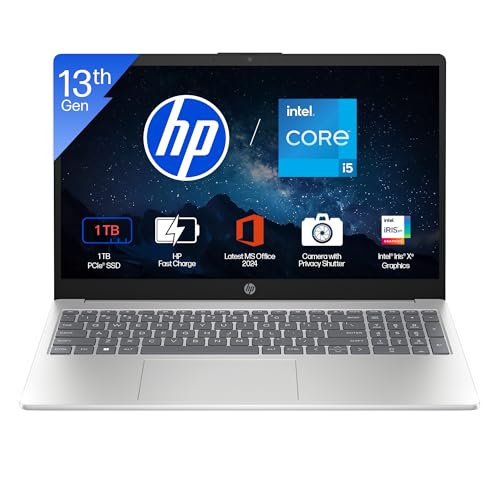
A fast everyday laptop with a 13th Gen Core i5, 16 GB RAM, and a big 1 TB SSD, ideal for students and professionals who want a long term machine.
Pros
- 13th Gen Intel Core i5 with 10 cores and strong turbo speed
- 16 GB DDR4 RAM suitable for heavy multitasking
- Large 1 TB PCIe Gen4 SSD for fast boot and storage
- Full HD anti‑glare 15.6 inch display with slim bezels
- Wi‑Fi 6 and Bluetooth 5.3 for stable connectivity
- Backlit keyboard and FHD webcam with privacy shutter
Cons
- 250 nits brightness is average for bright outdoor use
- 45 percent NTSC color coverage is basic for creative work
- USB‑C port supports only data, no charging or external display
- Battery is 41 Wh, so backup will be moderate under heavy load
HP 15 FD0552TU targets users who want a single laptop for work, classes, and entertainment without frequent upgrades. The 13th Gen Intel Core i5‑1334U comes with 10 cores and up to 4.6 GHz turbo, which handles heavy Chrome usage, coding tools, online meetings, and even some light editing comfortably. Paired with 16 GB DDR4 RAM and a 1 TB PCIe Gen4 SSD, you get quick app launches and enough space for large datasets, project files, and movies, so you do not need external drives early on.
The 15.6 inch Full HD panel has a micro‑edge design and anti‑glare coating. For typical Indian indoor lighting and hostel rooms, 250 nits brightness is fine. For serious photo or color‑sensitive work, the 45 percent NTSC coverage feels limited, but for OTT streaming, YouTube, Excel, coding, and general productivity, it is more than adequate. The Iris Xe graphics handle office workloads, Full HD streaming, and light graphics tasks such as basic Photoshop or Figma practice for students.
For daily use in Indian conditions, features like the HP True Vision FHD camera with noise reduction and a physical shutter matter a lot for privacy‑conscious users on frequent Zoom or Teams calls. The backlit keyboard with a numeric keypad helps during late‑night study sessions or power cuts where you rely on an inverter. Wi‑Fi 6 improves stability in crowded apartment networks. HP has one of the wider service networks in India, including support in many smaller cities, which reduces worry about repairs and parts. The 41 Wh battery with fast charge support up to about half in 45 minutes is decent for travel between office and home, though for long offline sessions you would keep the charger in your bag.
HP 15 FD0573TU (Core i3 13th Gen)

Budget friendly 13th Gen Core i3 laptop with 12 GB RAM and 512 GB SSD, suited for students and home users focused on everyday tasks.
Pros
- 13th Gen Intel Core i3 suitable for daily productivity
- 12 GB DDR4 RAM helps with smooth multitasking
- 512 GB PCIe Gen4 SSD keeps system responsive
- Full HD 15.6 inch anti‑glare panel
- Wi‑Fi 6 (2×2) and Bluetooth 5.3 with higher data rate
Cons
- Integrated Intel UHD graphics not ideal for heavy editing or gaming
- 250 nits brightness and 45 percent NTSC limit display richness
- Only one USB‑C port with data transfer only
- No mention of backlit keyboard, so night use is less convenient
HP 15 FD0573TU suits students, office workers, and family users who mostly use a browser, Office apps, video calls, and light entertainment. The 13th Gen Intel Core i3‑1315U gives you decent speed with 6 cores and up to 4.5 GHz turbo for routine workloads. The key strength here is the 12 GB DDR4 RAM, which handles multiple Chrome tabs, PDFs, and streaming together without frequent slowdowns, ideal for college research and basic WFH tasks.
The 512 GB PCIe Gen4 SSD strikes a balance between speed and capacity. Boot time stays short, and you get adequate space for semesters of notes, projects, and local media. The 15.6 inch Full HD display with anti‑glare coating helps during long study hours under tube lights or ceiling lights common in Indian homes. Colors are standard, not tuned for design work, but text looks clear for reading and typing. Intel UHD graphics handle HD streaming, basic image work, and casual titles at low settings, but this is not built for modern AAA games.
Connectivity is a plus on this model, with Wi‑Fi 6 (2×2) and Bluetooth 5.3 which support higher data rates and better stability. This helps when you rely on mid‑range broadband across multiple devices at home. The HDMI 1.4b port allows easy connection to TVs or external monitors in small offices or coaching centers. Warranty registration through HP support is straightforward, and HP’s service presence in India is extensive, including pickup and carry‑in centers in many regions. For users who want a reliable, branded laptop without stretching budget too much, this is a practical option.
HP 255 G10 (Ryzen 3 7335U)
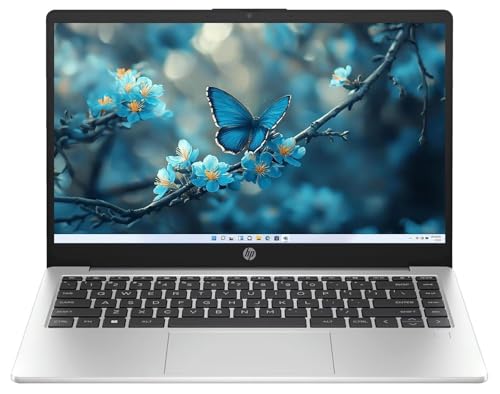
An HP 15.6 inch laptop with AMD Ryzen 3 7335U and fast DDR5 RAM, meant for smooth everyday performance with better memory speed.
Pros
- AMD Ryzen 3 7335U quad core with good efficiency
- 16 GB DDR5 RAM for high bandwidth multitasking
- 512 GB SSD for quick boots and app loads
- IPS Full HD anti‑glare display
- Wi‑Fi 6 and USB‑C port for modern connectivity
Cons
- Ryzen 3 level CPU not for heavy 4K editing or demanding gaming
- Color coverage at 45 percent NTSC is basic
- Design is more office‑oriented, not stylish for some users
- Battery capacity not clearly listed, so backup expectations are moderate
HP 255 G10 targets home and office users who want value and smooth performance. The AMD Ryzen 3 7335U uses a modern 4‑core architecture tuned for day‑to‑day workloads. In practice, this means snappy response for email, web, GST or accounting tools, and HD streaming even when several apps are open. For small businesses, coaching centers, or freelancers who need a reliable system for billing, documents, and calls, this configuration is sufficient without paying for higher tier CPUs you will not fully use.
One standout is the 16 GB DDR5 memory. DDR5 brings higher bandwidth compared to DDR4, which helps when you keep many browser tabs open, use office tools, and run local apps together. The 512 GB SSD offers enough storage for business documents, offline movies, and client data while keeping the system responsive. The 15.6 inch Full HD IPS panel with anti‑glare coating gives better viewing angles than TN panels, useful in group viewing situations such as discussing content with colleagues across a desk.
You get a practical port selection with USB Type‑A, USB Type‑C, HDMI, and a headphone jack. Wi‑Fi 6 support fits well with current broadband routers common in Indian homes and offices, giving stable speeds even when multiple phones and smart TVs are connected. The laptop ships with Windows 11, which is important for software compatibility and security updates. HP’s business lineup, including the 255 series, often sees wider parts availability and service support across Indian cities. This is useful if you plan to use the laptop daily for work in warmer climates, where fans and components face more stress over time.
HP Victus 15 FB3118AX (Ryzen 7, RTX 4050)

A gaming focused HP Victus with Ryzen 7 7445HS and RTX 4050, built for gamers and creators who want strong performance in Full HD.
Pros
- Ryzen 7 7445HS with 6 cores and high boost clock
- NVIDIA GeForce RTX 4050 with 6 GB GDDR6 for gaming and GPU tasks
- 16 GB DDR5 RAM, upgradeable for future needs
- 144 Hz Full HD IPS display with 300 nits brightness
- Wi‑Fi 6 and rich port selection including USB‑C with Power Delivery and DisplayPort
Cons
- 2.29 kg weight makes it heavier to carry daily
- Battery backup will drop quickly during gaming sessions
- 720p webcam is basic for high quality streaming
- Gaming design might not suit formal office settings
HP Victus 15 FB3118AX is aimed at gamers, engineering students, and creators who need strong CPU and GPU performance. The AMD Ryzen 7 7445HS offers up to 4.7 GHz boost with 6 cores and 12 threads, which handles modern games, CAD tools, and compilation tasks without struggle. Paired with the NVIDIA GeForce RTX 4050 6 GB laptop GPU, you get solid frame rates in popular esports titles and good performance in AAA games at Full HD with tuned settings. For Indian gamers who want a laptop for both college and gaming cafes, this configuration hits a sweet spot.
The 16 GB DDR5‑5600 memory and 512 GB NVMe SSD keep loading times low. You can upgrade the RAM later if your workload grows, which increases the life of the laptop. The 15.6 inch Full HD IPS screen with 144 Hz refresh rate and 300 nits brightness gives smoother motion in fast games and a more responsive feel, which matters for competitive players in games like Valorant and CS. The 62.5 percent sRGB color coverage is acceptable for entry level content creation on tools like Premiere Pro or DaVinci Resolve, though color critical professionals would still prefer an external monitor.
HP includes DTS:X Ultra audio and dual speakers, which help for casual gaming without headphones, though in noisy Indian hostels or homes you will anyway prefer a headset. Connectivity is strong, with HDMI 2.1, USB‑A, USB‑C with Power Delivery and DisplayPort, RJ‑45 Ethernet, and Wi‑Fi 6, so you can plug into wired networks in PGs or use high speed fiber. At 2.29 kg, weight is on the higher side for daily metro commuting, so this suits users who move occasionally between home and campus. HP’s gaming support network in India has improved, and Victus series users usually find service centers in major cities with spare parts access, which is important for a laptop that runs hot in Indian summers during intense gaming.
ASUS Vivobook 15 X1502VA (Core i5 13420H)

A performance oriented thin Vivobook with Core i5‑13420H, 16 GB RAM, and 512 GB SSD, aimed at users who want a fast everyday and office laptop.
Pros
- 13th Gen Intel Core i5‑13420H with 8 cores and high boost clock
- 16 GB DDR4 RAM for comfortable multitasking
- 512 GB PCIe 4.0 SSD for quick access
- Full HD display with backlit keyboard
- USB‑C with power delivery support
- Office Home 2024 and Microsoft 365 Basic included
Cons
- 60 Hz panel, so not for high refresh gaming
- 250 nits brightness and basic color range
- Integrated Intel UHD graphics, limited for gaming or heavy 3D
- 42 Wh battery is modest for all day unplugged use
ASUS Vivobook 15 X1502VA suits professionals, students in technical streams, and freelancers who want strong CPU performance in a relatively light body. The 13th Gen Intel Core i5‑13420H is a performance series chip with 8 cores and up to 4.6 GHz boost, which gives a noticeable jump over U‑series chips in demanding tasks. If you work with large Excel sheets, light coding, web development tools, or run multiple communication apps along with browsers, this processor handles them well.
The laptop comes with 16 GB DDR4 RAM and a 512 GB PCIe 4.0 SSD. This combination provides a smooth Windows 11 experience and quick load times for applications. The 15.6 inch Full HD display has a 60 Hz refresh rate, fine for day‑to‑day office work, content consumption, and online meetings. Brightness at around 250 nits is suitable for indoor environments common in Indian homes, offices, and cafes, though direct sunlight use will feel washed out. Integrated Intel UHD graphics are tuned for efficiency, not high end gaming, so this model is better for productivity, streaming, and older or lighter titles.
ASUS adds a backlit chiclet keyboard with numpad, which helps during late evenings and power cut situations. The laptop weighs about 1.70 kg, which is manageable for college bags and frequent metro or bus travel. Port selection includes USB 2.0, multiple USB 3.2 Type‑A, USB 3.2 Type‑C with power delivery, HDMI, and a combo audio jack. The USB‑C power delivery support is useful because you can carry a compact charger, which helps when you travel between office and client sites. ASUS has been expanding its service centers in India in the last few years, especially in metro and tier 1 cities, and Vivobook series usually gets decent support for warranty and spare parts. For those who want a fast daily driver without a gaming GPU, this is a sensible choice.
Buying Guide
Deciding your budget and use case
Before you pick any of these laptops, be clear about how you plan to use it. For simple tasks like browsing, watching videos, and basic office work, 13th Gen Core i3 or Ryzen 3 with 8 to 12 GB RAM is enough. If you run heavier software, many browser tabs, or plan a 4 to 5 year use, look at Core i5 or Ryzen 7 with at least 16 GB RAM. Gaming and content creation users should aim for a dedicated GPU such as RTX 4050. Also think about hidden costs in India like buying a good backpack, surge protector for voltage fluctuations, and maybe a cooling pad for summer months.
Choosing the right processor and RAM
Processor and RAM decide how smooth your day feels. 13th Gen Intel Core i3 suits students doing office work and online classes. 13th Gen Core i5 and AMD Ryzen 7 H series handle coding, light editing, and parallel workloads better. For casual use, 8 GB RAM works, but for 2024 onwards, 16 GB feels safer if you open many tabs, run IDEs, or use heavy Excel sheets. DDR5 RAM, seen in some HP and Victus models, offers higher bandwidth, which helps with multitasking and future software updates.
Storage type and size for Indian users
All the listed models use NVMe SSDs, which load Windows and applications faster than older HDDs. For most Indian users, 512 GB SSD is comfortable if you rely on cloud storage or external drives for large media. Those who keep movies, games, or large course files offline benefit from a 1 TB SSD. SSDs also handle bumps and movement better, useful on Indian roads and local trains. If you plan to store a lot of data, check if the laptop allows adding another SSD later, which spreads cost over time.
Display quality, brightness, and eye comfort
Look at resolution, panel type, brightness, and color coverage together. Full HD resolution on 15.6 inch screens is standard now and good for reading and movies. IPS panels, like in the HP 255 G10 and Victus, provide better viewing angles, useful when you sit with friends or colleagues. Brightness around 250 nits is fine for indoor use, which covers most Indian scenarios, but will feel dull in direct sunlight, such as in bright balconies or near windows. Anti‑glare coatings reduce reflections under tube lights, which helps during long study or office sessions. If you do photo or design work, consider models or external monitors with wider color coverage than 45 percent NTSC.
Graphics needs for gaming and content creation
Integrated graphics like Intel UHD or Iris Xe support HD streaming, office tasks, and older or light games. For serious gaming, 3D work, or advanced video editing, you need a dedicated GPU. Among the listed laptops, the Victus with RTX 4050 suits that crowd. RTX series cards help in popular Indian titles and also accelerate workloads in editing tools. Keep in mind that gaming laptops run hotter and draw more power, so you should use them on a hard surface and preferably in a room with good airflow, especially in Indian summer.
Build quality, portability, and daily comfort
Weight and build matter if you travel by bus, metro, or bike daily. Laptops around 1.5 to 1.7 kg, like the HP 15 and ASUS Vivobook 15, feel manageable for college bags and office commutes. Gaming models like Victus at around 2.3 kg are better for users who do not move around every day. Look at the hinge sturdiness, keyboard layout, and trackpad feel. A backlit keyboard is helpful during late work and when power fluctuates, which is common in many Indian cities and towns. Also check that the laptop body has vents that stay unobstructed when placed on beds or cushions, since blocked airflow increases heat.
Battery backup, charging, and heat in Indian climate
Battery size in watt hours and how you use the laptop both affect backup. Models with 41 to 42 Wh batteries handle office use for a few hours but will drain faster under heavy loads. Gaming laptops drop even quicker during gameplay. Fast charge support that brings the battery to about 50 percent in under an hour is handy for quick top‑ups before heading out. Given Indian summers, expect fans to ramp up on heavy tasks. Keeping the laptop on a table, cleaning vents periodically, and avoiding direct sunlight help reduce long term stress on internal parts.
Warranty, after‑sales service, and upgrade options
For Indian buyers, service quality matters as much as specs. HP has a strong service network with centers in many cities and towns, so getting support is usually easier. ASUS has been expanding its reach, especially in metros and larger cities, and Vivobook series gets reasonable attention. Before purchase, check if onsite warranty is available in your pincode and consider extended warranty if you plan long term use. Also see how easy RAM or SSD upgrades are, since a model with upgrade potential often stays useful for more years. Keeping purchase bills and registration details handy speeds up any future service requests.
Feature Importance
| Feature | Importance |
|---|---|
| Processor (CPU generation and series) | High |
| RAM capacity and type (DDR4 vs DDR5) | High |
| Storage type and size (NVMe SSD) | High |
| Display resolution, panel, and brightness | High |
| Graphics capability (integrated vs RTX) | High |
| Battery size and fast charging support | Medium |
| Weight and build quality | Medium |
| Wi‑Fi 6 and Bluetooth version | Medium |
| Keyboard quality and backlighting | Medium |
| Warranty coverage and service network in India | High |