


A good gaming monitor affects aiming, motion clarity, and comfort during long sessions. High refresh rates help reduce visible blur, while adaptive sync keeps frame delivery smooth when your graphics card output changes. IPS panels also suit buyers who want strong colours and wide viewing angles for work, films, and gaming.
This list covers five monitors suited to different Indian buyers. The selection includes fast Full HD models, a higher-resolution QHD option, and a 320Hz esports monitor. The listed prices run from ₹10,299 to ₹16,421, so your graphics card, desk size, preferred games, and upgrade plans should guide the choice.
Before buying, check the ports on your PC or console, the frame rates your GPU can produce, stand adjustment, VESA support, warranty terms, and service access in your city. Indian rooms also collect dust and often run warm, so sensible ventilation and regular cleaning help protect the panel and ports.
Lenovo Legion 24-10

A 24-inch Full HD IPS monitor with 240Hz refresh and adaptive sync support. Its adjustable stand and wide colour coverage suit competitive players who also use the display for regular desktop work.
Pros
- 240Hz refresh rate for smooth competitive gaming
- 0.5ms MPRT and 1ms OD response modes
- AMD FreeSync Premium, NVIDIA G-SYNC Compatible, and VESA Adaptive Sync support
- Height, swivel, pivot, and tilt adjustments
Cons
- Full HD resolution looks less sharp than QHD on a 24-inch screen
- HDR10 support does not replace a high-zone HDR backlight
- The feature set is strongest with a compatible DisplayPort connection
- Built-in speakers are not listed
The Lenovo Legion 24-10 targets players who value speed over resolution. Its 240Hz IPS panel suits Counter-Strike 2, Valorant, Overwatch 2, and other games where quick camera movement matters. The 99% sRGB coverage also gives desktop work and streaming a balanced colour range, while HDR10 support adds extra signal compatibility for suitable content.
Stand flexibility gives this model a practical edge for Indian desks, where seating and monitor depth often vary. Height, swivel, pivot, and tilt adjustments help reduce neck strain without forcing an extra monitor arm. Use DisplayPort for high refresh PC gaming and keep the screen away from direct sunlight, especially in rooms with strong afternoon heat.
Lenovo has a broad India service and spare-parts network through authorised channels. Service quality still depends on the city and purchase seller, so keep the invoice and check the warranty process before ordering. This model suits buyers seeking a fast 24-inch screen with a useful ergonomic stand.
Dell SE2426HG

Dell’s 24-inch Fast IPS gaming monitor pairs 240Hz motion with HDMI 2.1, DisplayPort 1.4, HDR10, and 99% sRGB coverage. Its eye-comfort rating and rear joystick add useful day-to-day convenience.
Pros
- 240Hz refresh rate and 0.5ms response rating
- HDMI VRR for compatible console gaming
- TÜV Rheinland 3-star eye-comfort certification
- Thin bezels and rear joystick control
Cons
- Tilt-only stand offers less adjustment than the Lenovo models
- Full HD resolution limits desktop workspace
- HDR10 support does not indicate full-array local dimming
- The highest refresh experience depends on source and connection settings
The SE2426HG is a sensible pick for buyers who want one display for a gaming PC and a console. AMD FreeSync Premium supports compatible PC systems, while HDMI VRR helps keep console motion smoother. Fast IPS technology gives wide viewing angles and steadier colours than many older TN panels.
Dell adds small details that matter during daily use. The rear joystick makes menu changes quicker than repeated button presses, and thin bezels work well in a dual-monitor setup. TÜV Rheinland 3-star eye-comfort certification, along with blue-light reduction, suits students and office users who spend long hours at the screen.
Dell has a well-known support setup in India, with online service tools and authorised repair options in many cities. Confirm panel replacement terms and doorstep support for your pin code. Buyers who prefer established support and console-friendly connectivity will find this model easy to live with.
AOC 24G11ZE
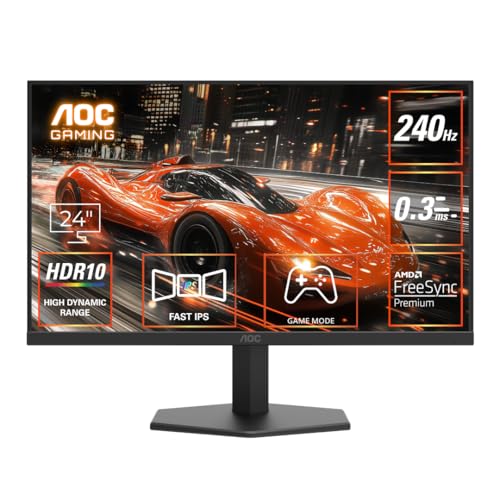
A 23.8-inch Fast IPS monitor built around a 240Hz overclocked refresh mode, 0.3ms MPRT, Adaptive Sync, and HDR10. Its frameless design and gaming controls suit a compact competitive setup.
Pros
- Up to 240Hz refresh through overclocking
- 0.3ms MPRT rating for reduced motion blur
- Adaptive Sync, low input lag, and built-in crosshair options
- Flicker-Free, Low Blue Mode, and VESA mount support
Cons
- 240Hz is an overclocked mode, so menu and source settings need checking
- The stand provides tilt adjustment rather than full ergonomic movement
- Full HD resolution gives less workspace than a QHD monitor
- MPRT figures depend on the selected mode and operating conditions
The AOC 24G11ZE focuses on competitive gaming value. Its 23.8-inch Fast IPS panel keeps the image sharp at Full HD viewing distances, while 178-degree viewing angles help preserve colour when you sit slightly off-centre. Adaptive Sync reduces tearing when frame rates move up and down during a match.
AOC includes practical gaming tools such as a crosshair overlay and preset modes. HDMI 2.0 and DisplayPort 1.4 cover common PC setups, while VESA compatibility lets you add a monitor arm if the basic tilt stand feels limiting. Flicker-Free operation and Low Blue Mode help during late-night sessions, though colour settings need adjustment after enabling comfort modes.
AOC products have authorised support routes in India, but service access differs more by city than with larger laptop and monitor brands. Check the local service listing, seller invoice, and dead-pixel terms before purchase. This model fits a buyer who wants fast motion and a clean three-sided frameless design without moving to QHD.
Lenovo Legion R27qe Gen 2

A 27-inch QHD IPS gaming monitor with a 200Hz refresh rate, 400-nit brightness, HDR10, and a fully adjustable stand. It gives more workspace and sharper text than the Full HD choices.
Pros
- 2560 x 1440 QHD resolution on a 27-inch IPS panel
- 200Hz refresh rate with 0.5ms MPRT mode
- 400-nit brightness, HDR10, 99% sRGB, and 90% DCI-P3
- Height, swivel, pivot, and tilt adjustments
Cons
- A QHD monitor needs a stronger GPU for high frame rates
- 200Hz is lower than the 240Hz and 320Hz options here
- HDR10 support does not provide deep local-dimming contrast
- The larger panel needs more desk depth for comfortable viewing
The Legion R27qe Gen 2 suits buyers who want a better balance between game speed and image detail. QHD resolution gives text more definition and provides extra room for timelines, spreadsheets, and browser windows. A 200Hz refresh rate still feels fast in shooters and racing games when paired with a capable graphics card.
Its 400-nit brightness, 99% sRGB coverage, and 90% DCI-P3 coverage help with games, films, and creative tasks. AMD FreeSync, VESA Adaptive Sync, and NVIDIA G-SYNC Compatible support address frame-rate variation across common GPU setups. Lenovo Smart Artery software adds scenario modes and split-screen tools, though many users will prefer manual calibration.
The adjustable stand works well in Indian home offices where the screen often shares space with books, speakers, or a laptop. Lenovo’s India service reach is broad, with authorised centres and online support in many regions. Buyers should still verify local support before purchase, especially for a large panel that is inconvenient to transport.
Predator XB253Q F3

A 24.5-inch IPS esports monitor with a 320Hz refresh rate, 1ms VRB, FreeSync Premium, HDR10, and a height-adjustable ErgoStand. Dual speakers add convenience for users who want a compact all-in-one setup.
Pros
- 320Hz refresh rate through DisplayPort for esports play
- 1ms VRB and FreeSync Premium support
- 99% sRGB IPS panel with HDR10 compatibility
- 150mm height adjustment, swivel, pivot, and dual 2W speakers
Cons
- 320Hz benefits players with a system producing high frame rates
- The 1ms VRB mode may affect brightness or comfort
- Full HD resolution offers less detail than the QHD Lenovo
- Dual speakers suit basic audio, not serious music or film use
The Predator XB253Q F3 is aimed at competitive players who already own a graphics card capable of feeding very high frame rates. Its 320Hz mode works through DisplayPort, making the cable and GPU output important parts of the setup. FreeSync Premium helps reduce tearing, while 1ms VRB targets blur during fast movement.
Acer gives this monitor a useful ErgoStand with 150mm height movement, swivel, pivot, and tilt adjustment. The two 2W speakers handle system alerts, casual video, and quick gaming sessions without extra desktop speakers. Flicker-less operation, BlueLightShield, and Low-Dimming modes add comfort options for long play sessions, though serious users should tune brightness rather than leave the panel at its brightest setting.
Acer has a broad authorised service network in India and established support channels for monitor buyers. Coverage differs by location, so confirm the nearest centre and warranty process. Choose this model when esports speed matters more than QHD detail and your PC regularly produces frame rates high enough to use the 320Hz panel.
Buying Guide
Set a realistic budget
The listed options cover a compact Full HD segment and a higher-spec QHD segment. Spend first on the panel type, refresh rate, and stand you need. A cheaper 240Hz screen makes sense for a mid-range gaming PC, while the QHD model needs more graphics performance and gives better value for mixed work and gaming. Include the cost of a DisplayPort cable, monitor arm, UPS, or surge protection when planning the setup.
Choose resolution for your GPU
Full HD suits 24 to 24.5-inch screens and helps mid-range GPUs reach high frame rates. QHD gives sharper text and more desktop room at 27 inches, but your graphics card needs more rendering power. Check performance in your main games before selecting a 200Hz or 240Hz QHD setup.
Check refresh rate and response modes
A high refresh rate helps only when your system sends enough frames. Compare the refresh rate available through HDMI and DisplayPort. Also read the response mode carefully. MPRT and VRB figures often rely on backlight strobing, which can reduce brightness or create flicker for some users. Test different modes after installation.
Match ports to your devices
PC gamers should check DisplayPort versions, while console users should check HDMI bandwidth and VRR support. HDMI 2.1 and HDMI VRR improve compatibility with newer consoles, but the console itself still limits resolution and refresh rate. Keep an audio-out port in mind if you use headphones or desktop speakers.
Inspect stand and desk fit
Height, pivot, swivel, and tilt adjustments help place the top of the screen near eye level. A 27-inch monitor needs more viewing distance than a 24-inch model. Measure desk depth, wall clearance, and monitor-arm compatibility before ordering. VESA support helps when the included stand lacks the movement you need.
Consider eye comfort and Indian room conditions
Flicker-Free, Low Blue Mode, and certified eye-comfort features help during long work or gaming sessions. They do not replace sensible brightness, regular breaks, and correct viewing distance. Keep the monitor away from direct sunlight, moisture, and enclosed shelves. Dust the vents and ports with a soft dry cloth, and avoid blocking airflow behind the panel.
Check warranty and service access
Keep the invoice, box, and serial number until the panel passes your checks. Review dead-pixel rules, replacement terms, pickup coverage, and the nearest authorised service centre. Dell, Lenovo, and Acer have broad India support channels, while AOC access varies more by city. Seller reputation also matters for transit damage and return handling.
Feature Importance
| Feature | Importance |
|---|---|
| Refresh rate | High |
| Panel type | High |
| GPU and resolution match | High |
| Adaptive Sync support | High |
| Response-time mode | High |
| Port compatibility | High |
| Stand adjustment | Medium |
| Colour coverage | Medium |
| HDR support | Medium |
| Warranty and local service | High |


