A good case fan helps move hot air away from your CPU, graphics card, and power supply area. This matters more in Indian summers, especially inside compact cabinets or rooms without air conditioning. Better airflow also helps your system hold steady performance during gaming, video work, and long office sessions.
Before choosing a fan, check the mounting size, connector type, airflow, static pressure, speed control, bearing design, and noise rating. A 140mm fan usually moves more air at lower speed than a 120mm fan, but your cabinet must have the correct mounting holes. Dust filters, room temperature, and the number of existing fans also affect the final result.
The Indian PC market has options for tight budgets as well as premium builds. A low-cost fan suits a basic cabinet refresh, while PWM control, better bearings, and a wide speed range make more sense for gaming PCs and workstations. Check stock, seller ratings, warranty terms, and replacement support before ordering.
TAG Windforce 140
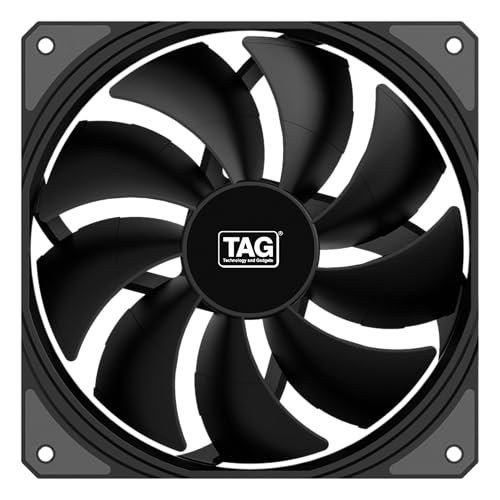
TAG Windforce 140 is a large 140mm PWM case fan built for strong airflow. Its 1800 RPM speed, 89.2 CFM airflow rating, and two ball bearings suit gaming cabinets and high-heat systems.
Pros
- High 89.2 CFM airflow rating
- 1800 RPM maximum speed
- 4-pin PWM connector for automatic speed control
- Two ball bearings and a rated 40,000-hour MTBF
Cons
- Needs a case with 140mm mounting support
- Two ball bearings may produce more bearing noise than a good fluid dynamic bearing over time
- Limited product history compared with long-established international fan brands
- Noise performance depends on mounting, dust filters, and fan speed
The TAG Windforce 140 focuses on airflow first. Its 140mm frame moves a large volume of air, while the 4-pin PWM connector lets your motherboard change fan speed with system temperature. This setup suits a front intake position or a rear and top exhaust position in a cabinet designed for larger fans.
A rated airflow figure of 89.2 CFM gives this model a strong case ventilation profile. The 29.2 dBA rating looks sensible on paper, though your motherboard curve decides how often the fan runs near its upper speed. In dusty Indian rooms, clean the blades and filter often so the fan does not work harder than needed.
TAG lists two ball bearings and a 40,000-hour MTBF rating for long service. TAG support and replacement availability depend heavily on the Indian seller and distributor, so retain the invoice and check the warranty route before purchase. The daisy-chain feature also helps when you plan a multi-fan setup with fewer loose cables.
Arctic P14 PWM PST White

Arctic P14 PWM PST White is a 140mm PWM case fan for builders who want a clean white finish and simple speed control. Its PST design helps connect compatible fans in a chain.
Pros
- 140mm size for efficient case airflow
- PWM control for motherboard-based speed adjustment
- PST support for connecting compatible fans
- White finish suits light-colour PC builds
Cons
- Requires 140mm fan mounting space
- White blades show dust faster than black blades
- Exact acoustic results depend on cabinet design and fan curve
- PST connections need careful cable planning
The Arctic P14 PWM PST White suits a clean, light-colour build where fan appearance matters as much as airflow. A 140mm fan needs less rotational speed than many smaller fans for similar case ventilation, which helps when you want a quieter profile during normal desktop work.
PWM control lets your motherboard adjust the fan according to CPU or motherboard temperature. The PST connection adds value for a cabinet with several compatible fans because one motherboard header can manage a linked group, subject to the header’s current limit and your board manual.
Arctic has a stronger international product history than many budget case-fan brands. Indian service often runs through the seller or local distributor, so check the listed warranty process and return window. The white frame suits showcase-style builds, but regular dust cleaning matters in Indian homes where airborne dust builds up quickly.
Ant Esports Carbonflow 120mm

Ant Esports Carbonflow 120mm is a low-cost black case fan with PWM control, high static pressure, a 1300 RPM speed, and a 40 CFM airflow rating. Its MOLEX connector gives broad compatibility with older power supplies.
Pros
- Low-cost option for basic airflow upgrades
- 1300 RPM speed and 40 CFM airflow rating
- MOLEX connector works with many older PC power supplies
- Rubber corner pads help reduce vibration
Cons
- MOLEX power limits motherboard-based speed control
- 120mm airflow is lower than the larger 140mm models here
- 30,000-hour lifespan rating is below the TAG Windforce rating
- A single fan offers limited benefit in a poorly ventilated cabinet
Carbonflow 120mm targets buyers who need a simple replacement or an extra intake fan without changing the whole cabinet. Its 120mm size fits a wider range of cases than 140mm models, and the 1300 RPM speed gives steady airflow for office PCs, entry gaming systems, and older cabinets.
The supplied specifications list 40 CFM airflow, high static pressure, fluid dynamic bearing construction, and a 30,000-hour lifespan. Rubber pads at the corners help reduce contact vibration. The MOLEX connection improves compatibility with older power supplies, though power through MOLEX usually removes the fine motherboard speed control available through a 4-pin PWM plug.
Ant Esports has broad visibility in India’s budget PC market, with service quality depending on seller handling and local replacement stock. Keep expectations practical. This model works well as an affordable cabinet fan, but demanding gaming systems benefit from stronger airflow planning, more than one fan, and a case with open mesh panels.
TAG Windforce 140 White

TAG Windforce 140 White brings the same large 140mm format and high airflow focus as the black version, with a white finish for light-colour builds. It offers PWM control, daisy chaining, and two ball bearings.
Pros
- 89.2 CFM airflow rating
- 1800 RPM maximum speed
- White finish for matching PC builds
- 4-pin PWM control with daisy-chain support
Cons
- Requires 140mm mounting holes
- White surfaces need frequent dust cleaning
- Two ball bearings are less refined than premium fluid dynamic designs
- TAG’s local warranty route depends on the seller and distributor
The white Windforce model suits a cabinet where you want large airflow fans without breaking a white-and-black colour plan. Its 140mm frame and 1800 RPM ceiling give useful headroom for hot gaming sessions, while PWM control helps reduce speed during lighter work.
Its listed 89.2 CFM airflow and 29.2 dBA noise rating place the fan in the high-airflow category. The practical result depends on front-panel openings, filters, cable obstruction, and the position of your graphics card. Use front fans as intake and top or rear fans as exhaust for a sensible starting layout.
Two ball bearings and a rated 40,000-hour MTBF support long running hours. The included screws simplify installation, and daisy chaining reduces cable clutter in multi-fan builds. TAG replacement and service support varies by Indian seller, so save the invoice and confirm the process before fitting the fan.
ARCTIC P14 Pro PST

ARCTIC P14 Pro PST is a premium 140mm PWM fan for users who need high static pressure and a wide 400 to 2500 RPM speed range. Its fluid dynamic bearing and stop-start function suit both quiet and high-load profiles.
Pros
- Wide 400 to 2500 RPM control range
- High static pressure for radiators and restrictive mesh panels
- Fluid dynamic bearing for smoother operation
- 0 RPM mode below 5% PWM for silent idle periods
Cons
- Needs a compatible 140mm mounting position
- Higher speed settings create more noise
- Premium features offer limited value for basic office cabinets
- PST and PWM wiring need compatible headers and careful current planning
The P14 Pro PST is the most flexible option in this group. Its speed range starts low for quiet idle use and reaches a high level for radiator work, dense filters, or demanding gaming sessions. The 0 RPM mode below 5% PWM gives your motherboard a way to stop the fan during light loads, if the board’s fan control supports the setting.
Arctic lists high static pressure, a redesigned rotor, precise balancing, and a fluid dynamic bearing. These details matter when air meets resistance from a liquid cooler radiator, narrow mesh, or a thick dust filter. For an Indian gaming PC, this gives you room to set a quiet daily curve and raise airflow during hot-weather loads.
Arctic’s established international reputation supports confidence in the design, while Indian warranty handling still depends on the seller or distributor. The P14 Pro PST makes more sense for a radiator or restricted intake than for a basic open cabinet. Clean the filter often, since blocked airflow forces any high-speed fan to run harder.
Buying Guide
Choose the correct fan size
Check the case manual or measure the mounting holes before ordering. A 120mm fan fits more cabinets, while a 140mm fan often moves more air with less rotation. Do not buy a 140mm model for a cabinet designed only for 120mm fans.
Check the connector
A 4-pin PWM connector gives your motherboard control over fan speed. MOLEX draws power directly from the power supply and suits older systems, but it usually offers less control. PST lets compatible fans share a control connection, though you should stay within the motherboard header’s current limit.
Match airflow with placement
Use front or bottom positions for intake and rear or top positions for exhaust. A single fan works better when placed near the main heat source. In a gaming cabinet, two intake fans and one exhaust fan form a useful starting layout, subject to the case design.
Look at static pressure
Airflow helps in open spaces, while static pressure helps push air through radiators, filters, and narrow panels. Pick a high-static-pressure model for a liquid cooler radiator or a restrictive front panel. A normal airflow fan suits an open mesh cabinet.
Set speed for Indian conditions
Room temperature, dust, and humidity affect cooling needs. Start with a moderate motherboard fan curve, then check CPU and GPU temperatures during a long gaming session. Raise the curve during peak summer if temperatures climb. Clean filters and blades every few weeks in dusty rooms.
Consider noise and bearing type
A higher RPM rating gives more cooling headroom but often raises noise. Fluid dynamic bearings usually offer smoother long-term operation, while two ball bearings offer good durability with a different sound profile. Rubber pads help reduce vibration when the case panel is thin.
Review warranty and support
Keep the invoice, packaging, and seller details after delivery. Budget brands often depend on seller replacement support in India. For Arctic products, check the local distributor or seller warranty route. Confirm return conditions before installation, especially for fans sold through marketplace listings.
Plan value around your cabinet
A premium fan gives limited benefit if the cabinet has a closed front panel or blocked filters. Spend first on sensible airflow direction and enough fan positions. Add a stronger fan when your CPU, GPU, radiator, or room temperature demands it.
Feature Importance
| Feature | Importance |
|---|---|
| Correct mounting size | High |
| Connector compatibility | High |
| Airflow rating | High |
| Static pressure | High |
| PWM speed control | High |
| Noise rating | Medium |
| Bearing type | Medium |
| Dust resistance and cleaning access | High |
| Warranty and replacement support | High |
| Appearance and colour | Low |