A good wired gaming mouse changes how your games feel. Better tracking, cleaner clicks, lower input delay, and a shape that fits your hand all matter more than fancy lighting. If you play FPS titles, racing games, story games, or even spend long hours on office work, the right mouse makes your time at the desk easier and more comfortable.
When I look at budget gaming mice for Indian buyers, I focus on a few simple things. Sensor quality matters first. After that, I check DPI options, switch life, cable quality, extra buttons, grip comfort, and brand support. In India, dust, heat, long daily use, and rough desk surfaces put extra pressure on a mouse, so build quality matters a lot even in entry-level products.
The five options below cover different needs. Some are best for first-time gamers, some suit casual users who want extra buttons, and one stands out for buyers who want a more trusted brand and better software support. If your budget is tight and you want value for money, this list keeps things practical and focused on what helps in real use.
EvoFox Spectre

The EvoFox Spectre is a beginner-friendly wired gaming mouse with a 3600 DPI sensor, six buttons, and a braided cable. It suits casual gamers who want gaming looks and usable features without spending much.
Pros
- 3600 DPI with four preset levels
- Braided 1.5m cable with EMI suppressor
- Six-button layout works well for gaming and daily use
- One-year manufacturer warranty with support access
Cons
- No advanced software tuning mentioned
- Sensor range is fine for casual play, not serious competitive use
- Rainbow lighting is fixed, with no custom control
- Brand service reach is smaller than top global brands
The Spectre keeps things simple, and for many buyers, that is the right approach. You get four DPI stages, 1200, 1800, 2400, and 3600, which cover normal office work, browsing, and casual gaming well. The shape looks aggressive, and the white finish works nicely for clean desk setups. For students and first-time PC gamers, this kind of mouse feels like an easy step up from a regular office mouse.
I also like the fact that EvoFox includes a braided cable and mentions an EMI suppressor. In this price segment, cable quality often gets ignored, but Indian users deal with cramped desks, cable pulls, and long hours of use. A stronger cable helps in the long run. The six-button design is also more practical than flashy. You get enough control for browser shortcuts and game actions without making the mouse feel crowded.
For Indian buyers, the big question is support. EvoFox offers a one-year manufacturing warranty and direct contact support through call or WhatsApp, which is useful for quick problem solving. The brand does not have the same long-standing service image as Logitech, but among budget-focused local gaming accessories, EvoFox has built decent visibility. If your aim is low-cost gaming with a bit of style and no complicated setup, Spectre makes sense.
Zebronics Transformer-M

The Zebronics Transformer-M is one of the most familiar budget gaming mice in India. It offers six buttons, up to 3200 DPI, and a compact ergonomic body that suits students and everyday gamers.
Pros
- Widely available across Indian online and offline stores
- Dedicated DPI switch with four sensitivity levels
- Compact ergonomic design suits many hand sizes
- Braided cable and gold-plated USB add some durability
Cons
- Button life is lower than some rivals
- Compact shape may feel small for large hands
- LED lighting is decorative, with limited control
- Sensor performance is better for casual gaming than precision-heavy esports
The Transformer-M has been around for a while, and that matters. A lot of Indian buyers want something easy to find, easy to replace, and easy to service. Zebronics has a strong retail presence in India, so this mouse often becomes the first gaming mouse for school and college users. The sensor goes up to 3200 DPI with steps at 1000, 1600, 2400, and 3200. For Valorant, GTA V, Minecraft, and normal desktop use, that range is enough for most entry-level users.
Its compact shell is one of its main points. If your hands are small or medium, or if you prefer fingertip and claw grip, the mouse feels quick and manageable. The six-button layout also gives useful extra controls for browsing and games. Multi-color breathing LED adds some desk appeal, though this is more about looks than function. Plug-and-play support is a plus for users who do not want software headaches.
Zebronics has one clear advantage in India, and that is reach. The brand is sold in many local computer markets and online platforms, and spare replacements are usually easier to source than niche brands. Service experiences vary by city, but the company is known widely enough that many buyers feel safer with it than with lesser-known options. If you want a familiar budget choice with broad availability, Transformer-M is still relevant.
Ant GM46

The Ant GM46 is a lightweight wired optical mouse made for basic gaming and daily work. It keeps the design minimal and focuses on plug-and-play use across Windows, Mac, and Linux systems.
Pros
- Lightweight body reduces hand fatigue
- Works with Windows, Mac, and Linux
- Simple plug-and-play setup
- Clean feature set for basic gaming and office use
Cons
- Only four buttons, fewer controls than most gaming mice
- 2400 DPI is lower than other options here
- Less suited for fast competitive titles
- Brand support image is still budget-focused
If you want a mouse that feels light and uncomplicated, the GM46 stands out. At around 75 grams, it is easier on the wrist during long browsing or work sessions. For casual gaming, the 2400 DPI optical sensor is enough, especially if you mostly play story games, indie titles, older shooters, or use your PC for mixed work and entertainment. The mouse does not pretend to be a serious esports tool, and that honesty works in its favor.
The four-button layout is both the strength and weakness here. On one side, the simpler design feels less cluttered and easier for first-time users. On the other side, many gamers now expect at least six buttons in this category. Still, for students, home users, and people who shift between a laptop and desktop, the compact form and broad OS support are useful. Mac and Linux compatibility is a nice touch in a segment where many products only talk about Windows.
Ant Esports products have become common in Indian online PC hardware circles, especially among budget builders. Service reputation is decent for the price bracket, though expectations should stay realistic. If your priority is low weight, easy setup, and basic use across multiple systems, the GM46 fits better than feature-heavy models with bulkier shells.
Ant Esports GM100 V2
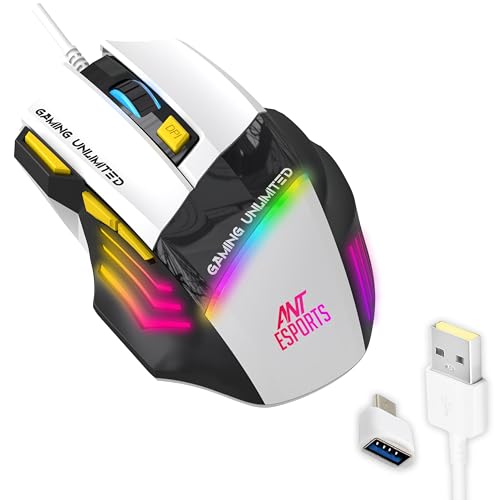
The Ant Esports GM100 V2 packs seven buttons, up to 3600 DPI, RGB lighting, and a shaped ergonomic shell. It is a stronger fit for buyers who want more gaming-focused controls on a budget.
Pros
- Seven-button layout gives more in-game control
- 3600 DPI sensor with gaming-oriented positioning
- Comfortable ergonomic shape with textured sides
- Broad Windows and macOS compatibility
Cons
- PVC cable is less premium than braided options
- Bulkier shell may not suit every grip style
- Brand software ecosystem is limited
- Long-term switch feel may vary with heavy use
Among the affordable options here, the GM100 V2 feels more gaming-first than work-first. The seven-button design gives you room for DPI changes, side commands, and quick in-game actions. If you play shooters, MOBAs, or MMORPGs casually, those extra controls help. Ant Esports also mentions a 4000 FPS optical sensor and DPI up to 3600, which puts this mouse in the practical zone for players who want more responsiveness than a plain office mouse.
The body shape aims for longer sessions. Side texture helps with grip, which matters in Indian summer conditions when hands get sweaty during play. The RGB lighting adds personality without changing the core function. I would have liked a braided cable at this level, but the 1.5m PVC cable still gives stable wired use with no battery worries and no pairing trouble.
Ant Esports has grown fast in India because the brand focuses on entry-level PC gaming gear. Its products are common on online marketplaces and among budget PC builders. Service is acceptable for the segment, though not on the level of a large international gaming brand. For buyers who want a mouse with more buttons and a more gamer-style body, the GM100 V2 offers a better feature spread than simpler entry models.
Logitech G102 Lightsync
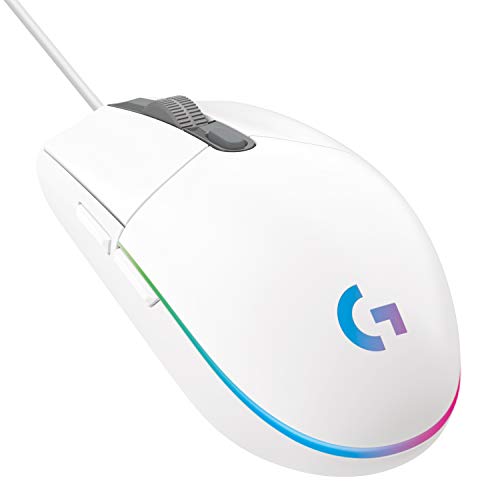
The Logitech G102 Lightsync is the most polished mouse in this list, with an 8000 DPI sensor, six programmable buttons, RGB lighting, and strong software support. It suits buyers who want a safer long-term pick from a trusted brand.
Pros
- Accurate 8000 DPI gaming-grade sensor
- Excellent Logitech G HUB software support
- Reliable click feel with mechanical button tensioning
- Strong brand reputation and service network in India
Cons
- Shape is familiar but not ideal for every large-hand user
- Software is useful, though some users prefer a lighter setup
- Cable is functional, but not the most premium-looking
- Costs more than ultra-budget models in this segment
The G102 Lightsync sits a step above the usual entry-level crowd. The biggest reason is sensor quality. An 8000 DPI sensor gives much finer control and more room to tune sensitivity for different games. Even if you never use the top DPI number, the tracking quality and consistency matter. Logitech also gives you G HUB software, where you set DPI stages, reassign buttons, and tweak RGB effects. For players who want their mouse to grow with their skills, this matters a lot.
The shape is classic Logitech. Simple, light, and comfortable for many users over long sessions. The six-button layout feels clean, and the main click mechanism has a sharper, tighter response than most cheaper rivals. For FPS and fast reaction games, click feel matters as much as sensor specs. The RGB lighting is more polished than the fixed multi-color effects seen in cheaper mice, and the white version looks especially good in minimalist setups.
For Indian users, Logitech brings one major benefit, dependable brand trust. The company has a much stronger service network and better long-term reputation than most budget gaming accessory brands. Availability is also strong across online stores and retail channels. If you want a mouse that feels more refined in daily use, lasts longer, and has better after-sales confidence, the G102 Lightsync is the easiest recommendation in this list.
Buying Guide
1. Decide your main use first
Before you buy, be honest about how you use your PC. If you mostly play story games, GTA, FIFA, Minecraft, or do office work, a basic sensor and simple shape work fine. If you play Valorant, CS2, Apex Legends, or other aim-heavy games, sensor quality and click response matter more than lights. Many buyers spend on RGB and ignore tracking quality. That is the wrong order.
2. Sensor and DPI matter more than RGB
Many gaming mice print a big DPI number on the box. Do not judge on that alone. A stable sensor with clean tracking is better than a high number with poor control. In this list, 2400 to 3600 DPI is enough for many casual users, while the Logitech model gives more headroom for players who want finer tuning. For most Indian desks and screen sizes, proper tracking matters more than extreme DPI.
3. Check the shape and weight for your hand
A mouse may look good in photos and still feel wrong in your hand. Small and medium hands often work well with compact models like the Zebronics Transformer-M. Users who want a lighter mouse for long work hours may prefer the Ant GM46. If you like a fuller grip and extra side control, the Ant Esports GM100 V2 feels more gaming-focused. Shape affects comfort every single day, so do not ignore it.
4. Cable quality is important in wired mice
Since these are wired gaming mice, cable quality matters a lot. Braided cables usually handle rough use better, especially on desks where the wire rubs against edges. PVC cables are common in budget models and work fine, but they feel less premium over time. In homes where the PC setup is moved often, or where younger users pull the mouse cable around, stronger cable construction helps.
5. Extra buttons are useful only if you need them
Some buyers love more buttons. Others never use them. For browsing, office work, and general gaming, six buttons are enough for most people. Seven-button designs help in games where quick commands matter. But more buttons also change the grip and shell shape. If you do not use macros or side controls, a simpler mouse may feel better in daily use.
6. Look at service network and easy replacement options
This is a big deal in India. A budget mouse is only a good deal if support is manageable when something goes wrong. Logitech has the strongest trust and service image in this list. Zebronics benefits from broad retail presence across many cities. EvoFox and Ant Esports are common online and often easier to contact through digital support, but service quality depends more on region and seller. If you live outside major cities, brand reach matters.
7. Think about your environment and desk setup
Indian conditions affect accessories more than many buyers expect. Dust can affect scroll wheels and switches. Heat and sweat affect grip. Rough desks without mousepads wear skates faster. If your room gets dusty or humid, choose a mouse with a comfortable textured grip and keep the sensor area clean. A simple mousepad also improves tracking and reduces wear, even with a budget mouse.
8. Software support is useful for long-term ownership
Many entry-level gaming mice work without software, which is good for plug-and-play users. Still, software support helps if you want to change DPI stages, remap buttons, or manage RGB. Logitech is clearly ahead here with G HUB. On the lower-cost side, most buyers will rely on hardware-level DPI switching only. If you like tweaking settings often, software support should move higher on your list.
Feature Importance
| Feature | Importance |
|---|---|
| Sensor quality | High |
| Shape and hand comfort | High |
| Button durability | High |
| Cable quality | High |
| DPI adjustment | Medium |
| Extra programmable buttons | Medium |
| Software support | Medium |
| RGB lighting | Low |
| Multi-OS compatibility | Medium |
| Brand service in India | High |