


A good Ethernet switch fixes one common problem at home or in a small office, too many devices and too few LAN ports. If you use broadband with a router, desktop PC, smart TV, NAS, CCTV recorder, gaming console, or a work laptop dock, a switch gives each device a stable wired link. In India, where Wi-Fi speeds drop through thick walls, crowded apartments, and long room-to-room distances, a wired setup often feels more dependable for work calls, downloads, and local file transfers.
When you pick an Ethernet switch, look at port count first. Then check whether you need a simple unmanaged unit or a smarter model with VLAN, QoS, and cloud controls. Build quality matters too, especially in hot Indian summers where a metal body and fanless cooling help with long daily use. You should also check wall-mount support, power use, cable compatibility, and after-sales support in India, because service experience matters once the return window ends.
This list focuses on practical options for Indian buyers. I have included simple plug and play models for homes and shops, a smarter Omada option for users who want more control, and one compact Ethernet splitter style device for people who need a two-device extension from a single line. The aim is simple, buy something that suits your setup and gives solid value over time.
TP-Link TL-SG1008D

This is a simple 8-port gigabit switch for homes, small offices, and entertainment setups. It suits buyers who want reliable plug and play networking from a brand with wide visibility in India.
Pros
- 8 gigabit ports for multiple wired devices
- Plug and play setup with no software needed
- Fanless design keeps operation silent
- Wall-mount support helps in tight spaces
Cons
- Plastic body feels less premium than metal units
- No VLAN or traffic control features
- Best suited to basic setups, not managed networks
- Country of origin may vary by batch
TP-Link TL-SG1008D is the sort of switch many people buy once and forget about, which is a good sign for this category. You plug in the router, connect your PC, TV, NAS, or console, and the network starts working. For a flat, a study room, or a billing counter in a small shop, that simplicity saves time. The eight gigabit ports give enough room for a full wired setup without making the desk messy.
The plastic casing is the main compromise, though the fanless design keeps the unit silent and easy to place near a TV unit or work desk. TP-Link also adds green Ethernet support, which reduces power draw based on link status and cable length. Most buyers will not track the wattage, but lower heat and lower power use are always welcome in Indian conditions where devices often stay switched on for long hours.
For Indian users, the biggest comfort here is brand familiarity. TP-Link has strong presence across online and offline stores, and accessories like cables, adapters, and replacement power supplies are easy to find. Service quality varies by city like most networking brands, yet TP-Link still feels easier to live with than many low-name imports.
TP-Link ES208G

The ES208G is an 8-port gigabit switch for users who want plug and play ease with a few smarter networking tools. It fits small offices, CCTV setups, and advanced home networks better than a basic unmanaged switch.
Pros
- 8 gigabit ports in a sturdy metal body
- Supports Omada cloud management
- Useful features like VLAN, port isolation, and QoS
- Silent fanless operation
Cons
- Extra features may feel unnecessary for basic users
- Needs some networking knowledge to use advanced controls
- Newer model, so long-term field feedback is limited
- Cloud-linked setup is more than some homes need
TP-Link ES208G sits in a sweet spot between a basic switch and a full managed office device. On day one, you use it like any normal plug and play switch. Later, if you want tighter control, features like VLAN, QoS, port isolation, loop prevention, and cable test become useful. That makes sense for a small office, retail counter, studio, or CCTV setup where one bad cable or one noisy device ruins the whole network.
The metal casing gives this switch a more reassuring feel than lighter plastic units. In warmer Indian rooms, metal also helps with heat spread during long use. Silent operation matters if you keep networking gear in a bedroom office, editing desk, or reception area. Wall mounting adds flexibility, especially in compact Indian homes and small commercial spaces where every shelf is already full.
TP-Link’s Omada ecosystem is the main reason to pick this model over a standard switch. If you already use Omada access points or plan to expand later, ES208G fits better into that path. TP-Link’s support network in India is fairly visible, and the brand is easy to find both online and through local IT dealers. For a buyer who wants room to grow without jumping to an expensive business switch, this model makes a lot of sense.
FRONTECH NC-0052

FRONTECH NC-0052 is a budget-focused 8-port gigabit switch aimed at buyers who need more ports without spending on brand premium. It works for desktops, printers, gaming consoles, and IP camera links in simple networks.
Pros
- 8 gigabit ports at an entry-level position
- Plug and play use is simple
- Wall-mountable body helps placement
- Works with common home and shop devices
Cons
- Feature set is basic with limited technical detail available
- Brand support is less established than TP-Link
- Long-term durability track record is less proven
- Design and finish feel more utilitarian
FRONTECH NC-0052 is the kind of switch many Indian buyers notice when they want more LAN ports fast and do not want to overthink the purchase. Eight gigabit ports are enough for a router, desktop, NVR, printer, smart TV, and a couple of spare devices. If your need is straightforward expansion, this model covers the basics without pushing you into network settings or apps.
The appeal here is practicality. Plug it in, connect your devices, and get on with your work. For a tuition office, a small retail store, or a home setup with an IPTV box and PC, that is often enough. The wall-mount option helps if you want to place the unit near a router shelf or on a side panel, which is useful in cramped setups where cables already hang everywhere.
FRONTECH is known in India more for budget accessories and entry-level computing products, so expectations should stay grounded. You are choosing value first. Service and replacement experience depend a lot on seller quality and city access, so I would prefer buying this one from a dependable source. If your priority is maximum ports at a lower spend, this model deserves a look.
TP-Link EH210

This compact 1-to-2 gigabit Ethernet splitter is for a niche need, extending one wired line to two devices with powered switching. It suits users who do not need a full multi-port switch and want a tiny, tidy solution.
Pros
- Compact body is easy to place anywhere
- Supports gigabit speed with backward compatibility
- Aluminum alloy casing helps heat handling
- Includes power cable and Ethernet cable in the box
Cons
- Only for two-device expansion, not a full switch replacement
- Requires power input to operate
- Less flexible than buying a multi-port switch
- Use case is narrow compared with regular switches
TP-Link EH210 is different from the rest of this list. This is not a standard 5-port or 8-port desktop switch. Instead, it turns one Ethernet line into two active gigabit connections for a smaller use case. Think of a room where one LAN line reaches the TV unit, but you now want both a smart TV and a gaming console on wired internet. In that situation, this little unit keeps the setup neat.
Its aluminum alloy body is a plus. Small network devices often get warm if left behind a TV panel or inside a cabinet, so better heat handling matters in Indian weather. The package also includes a USB-C power cable and a Cat 5e cable, which reduces last-minute shopping trouble. For non-technical users, the plug and play approach is the biggest advantage. No settings, no app, no headache.
TP-Link’s strong retail reach helps again here, because niche networking items are hard to trust when they come from unknown labels. The only thing to remember is purpose. EH210 is for a specific problem, not for building a larger wired network. If you expect more devices later, a regular switch will be the better buy. If you want a clean two-device extension from one cable run, this one is neat and easy.
LAPCARE Laplink 5-Port Gigabit Switch
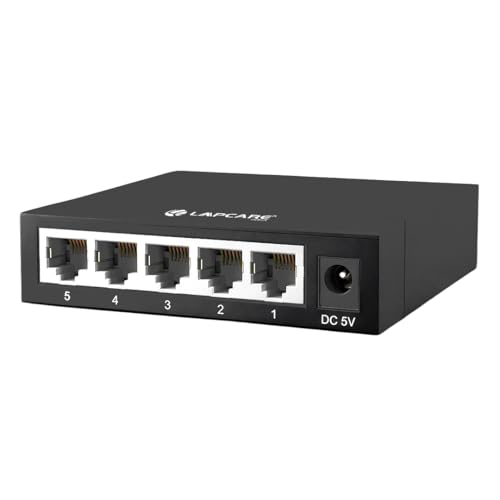
This 5-port gigabit switch is a compact choice for small desks, home offices, and basic wired expansion. It stands out for its metal housing and silent operation in a smaller format.
Pros
- Metal housing feels sturdy for daily use
- 5 gigabit ports suit compact setups
- Auto MDI/MDIX removes cable confusion
- Fanless design keeps the room quiet
Cons
- Only 5 ports, which limits future expansion
- No advanced management features
- Less suitable for larger office or CCTV deployments
- Model visibility and long user feedback are still limited
LAPCARE Laplink 5-Port Gigabit Switch fits buyers who do not need eight ports spread across the room. Many Indian users only want to connect a router, desktop, smart TV, and one extra device such as a NAS or console. In such cases, a smaller switch keeps cable clutter under control and takes less desk space. The metal housing is a welcome touch because entry-level products often cut corners on build.
Performance-wise, the focus is on simple gigabit switching without fuss. Auto MDI/MDIX means you do not need to think about cable types, and silent fanless operation makes it easy to place in a bedroom office or study table. If your broadband plan is fast and you transfer files between systems on your local network, a gigabit link feels far better than older 100 Mbps gear.
LAPCARE has decent recall in India in the budget accessory segment, especially in local computer markets. Service perception depends on region, and I would still place TP-Link ahead for networking reputation. Even so, this switch has a sensible place in the market. If your setup is small, your budget is tight, and you want a metal body instead of plastic, this is a practical pick.
Buying Guide
Choose the right type first
Start with your use case. A normal unmanaged switch is best for most homes, stores, and small offices. You connect the cables and the job is done. If you want VLAN, traffic priority, port isolation, or remote visibility, pick a smarter model such as one with Omada support. If your need is only to split one LAN line between two devices in one room, a compact powered splitter style product fits better than a full switch.
Port count matters more than many buyers think
Count your devices today, then add two spare ports. Many people buy a 5-port switch, fill all ports within a month, and end up buying again. For a typical Indian home with router, PC, smart TV, console, and one extra device, 5 ports are fine. For CCTV, office desks, printer sharing, or a media room, 8 ports feel safer.
Check gigabit speed on every port
Do not buy old 10/100 gear unless your use case is extremely basic. A gigabit switch gives proper headroom for broadband plans, local file transfers, network storage, and 4K streaming. If you move large files between PCs or use a NAS, gigabit is the minimum standard worth paying for now.
Build quality helps in Indian conditions
Heat, dust, and cramped router corners are common here. A metal body often handles heat better and feels more durable over years of use. Fanless design is preferred because small fans collect dust and add noise. Wall mounting is useful if you want to keep the switch off the floor and away from accidental cable pulls.
Think about placement and cable quality
A switch is only as good as the cables attached to it. Use decent Cat 5e or Cat 6 cables, especially for gigabit speeds. Keep the switch in a ventilated spot, not stuffed behind an inverter battery or inside a fully sealed box. If you run long cables through the house, plan the cable path well before you buy the switch.
Advanced features are useful for offices and CCTV
VLAN helps separate devices on the same hardware. QoS gives priority to selected traffic. Port isolation is useful in camera and surveillance setups. Loop prevention saves time when someone connects cables the wrong way. These features are not needed in every home, but for a shop, office floor, or NVR setup, they save trouble later.
Warranty and service should affect your decision
Networking gear often runs for years without attention, but if something fails, support quality becomes important fast. Bigger brands such as TP-Link have wider retail presence in India and easier accessory availability. Budget brands may still offer good value, though I would check seller reliability, invoice clarity, and warranty terms before placing the order.
Feature Importance
| Feature | Importance |
|---|---|
| Gigabit speed | High |
| Port count | High |
| Plug and play setup | High |
| Build quality | High |
| Fanless operation | Medium |
| Wall-mount support | Medium |
| VLAN and QoS | Medium |
| Cloud management | Low |
| Cable compatibility | High |
| Warranty and service network | High |


