


A good monitor changes how you work every day. If you spend long hours on Excel, coding, writing, online classes, casual gaming, or content work, the screen in front of you matters more than many people think. Better sharpness helps you read text without strain. Better color helps with design and media work. A stand with height adjustment saves your neck and shoulders during long office days. In Indian homes, where one monitor often handles office work in the day and movies or gaming at night, picking the right model makes a big difference.
When I shortlist a monitor for Indian buyers, I look at a few things first. Panel type matters, and IPS is usually the safe pick for wide viewing angles and stable colors. Resolution matters because 24-inch Full HD and 24-inch QHD feel quite different in daily use. Refresh rate matters too, especially if you scroll a lot, watch sports, or play games after work. Then there are the practical details, USB-C charging, speaker quality, anti-glare coating, stand movement, and eye-care modes, all of which affect daily comfort.
The Indian market now has many solid monitor options from brands like LG and BenQ, but value for money still depends on your use case. Some models focus on sharpness and color accuracy. Some are made for long office hours with strong ergonomics. Some give you an ultrawide layout for multitasking in tight desk spaces. The five options below are suited to different needs, and each one makes sense for buyers who want a dependable screen without wasting money on features they will never use.
LG 24U631A
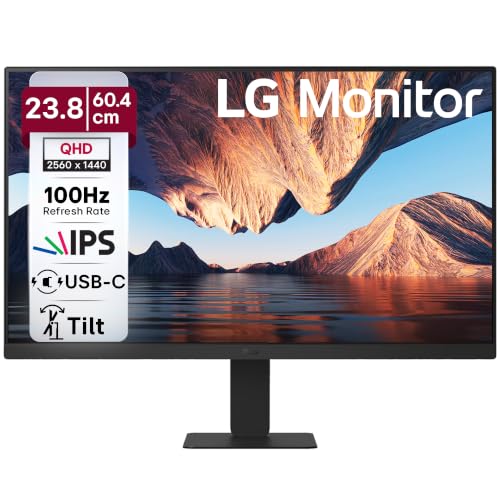
This 23.8-inch QHD IPS monitor suits users who want sharper text and cleaner detail than a standard Full HD screen. It also brings USB-C, HDR10, and a simple borderless design that fits both office desks and home setups.
Pros
- QHD resolution gives sharper text and more workspace
- IPS panel with sRGB 99% is good for regular creative work
- 100Hz refresh rate feels smoother in daily use
- USB-C and HDMI add easy connectivity for laptops and desktops
Cons
- USB-C power delivery is limited for bigger laptops
- Stand adjustment options appear basic compared to office-focused rivals
- No built-in speakers mentioned
- Not aimed at serious competitive gaming
The LG 24U631A makes sense for buyers who want a clean jump in clarity without moving to a larger screen. On a 23.8-inch panel, the QHD resolution looks crisp in spreadsheets, browser tabs, documents, and photo work. If you work with text for hours, this sharpness is something you notice every day. The 100Hz refresh rate also helps the monitor feel smoother while scrolling, moving windows, and watching video.
Color performance is another strong point here. The IPS panel and sRGB 99% coverage make the screen suitable for light photo editing, social media design work, and content viewing. HDR10 support adds some extra punch in compatible media, though you should treat it as a useful add-on rather than a true high-end HDR experience. LG’s Reader Mode and Flicker Safe features are also handy for long work sessions, especially in Indian homes where screen time often stretches from office work into late-night entertainment.
The practical part is where this monitor stays easy to recommend. USB-C makes laptop use simpler, especially if you want a tidy desk with fewer cables, though the 15W power output suits lighter devices better than power-hungry machines. LG has a wide service footprint in India, and that matters when you buy a monitor online. Spare parts access and service reach are usually better than smaller brands, which gives extra peace of mind for long-term use.
BenQ GW2490TC

The BenQ GW2490TC is a 24-inch Full HD IPS monitor built for users who want strong ergonomics, smooth 144Hz motion, and eye-care features in one balanced package. It fits office work, study, and casual gaming equally well.
Pros
- 144Hz refresh rate makes motion smoother than standard office monitors
- Fully ergonomic stand with height, swivel, pivot, and tilt
- USB-C support adds convenience for modern laptops
- Built-in speakers are useful for meetings and casual media
Cons
- Full HD resolution is less sharp than QHD alternatives
- USB-C power delivery is modest for many laptops
- Speaker output is only basic
- White finish may not suit every desk setup
The GW2490TC feels like a monitor designed by people who understand desk work. The biggest strength is balance. You get a 24-inch IPS panel with 144Hz refresh rate, so the screen feels fluid in everything from web browsing to casual gaming. For users who spend all day switching between documents, Chrome tabs, YouTube, and meetings, that extra smoothness is easy to appreciate once you get used to it.
BenQ has also done a strong job with comfort. The stand supports height adjustment, tilt, swivel, and pivot, which is a big deal if your work posture changes through the day or if more than one person uses the same monitor at home. The eye-care suite, ePaper Mode, and TÜV-backed focus on viewing comfort are useful in Indian conditions where many rooms have mixed lighting and long screen hours are common. The 99% sRGB coverage also keeps colors looking consistent for everyday editing and content viewing.
This model is especially good for buyers who want one monitor to handle many roles without drama. The built-in speakers help in calls and casual media sessions. USB-C reduces cable clutter for laptop users. AMD FreeSync is a welcome bonus if you game from time to time. BenQ’s service reputation in India has been fairly solid in the monitor space, especially among office and education users, and that adds confidence if you are buying for work rather than pure entertainment.
BenQ GW2486TC

The BenQ GW2486TC is a work-first 24-inch monitor with USB-C power delivery, daisy chain support, coding-friendly modes, and a highly adjustable stand. It is one of the most practical picks here for programmers, WFH users, and laptop-based setups.
Pros
- USB-C with higher power delivery is useful for many laptops
- Coding Mode and eye-care features suit long work sessions
- Height-adjustable stand and USB hub improve desk usability
- Built-in noise-cancelling microphone is helpful for calls
Cons
- 100Hz is smooth, but less appealing than 144Hz rivals for gaming
- Full HD resolution may feel limiting for users who want extra sharpness
- Built-in speakers are functional, not rich-sounding
- Best microphone features depend on USB-C usage
If your monitor is mainly a work tool, the GW2486TC deserves serious attention. BenQ has clearly shaped this model around office and coding users. You get a 24-inch IPS display with 100Hz refresh rate, which is a nice step up from 60Hz without turning the monitor into a gaming-first product. More importantly, you get features that reduce friction in daily use, USB-C with strong power delivery, a USB hub, daisy chain support, and an ergonomic stand.
The screen modes are where this monitor starts to feel thoughtful. Coding Mode helps with text contrast, and the eye-care features are useful if you stare at lines of code, long reports, or research papers for hours. Brightness Intelligence is also handy in Indian rooms where ambient light changes sharply between daytime and evening. Instead of forcing you to keep adjusting settings, the monitor is built to keep viewing comfort steady through the day.
There are small touches here that office users will appreciate more than spec hunters. The built-in noise-cancelling microphone is rare in this segment and useful for regular meetings. The 65W-class USB-C charging support listed in product naming makes this a better docking-style choice than basic USB-C monitors. BenQ also has good familiarity in professional display categories in India, and this model feels made for users who want their desk to stay simple, clean, and dependable.
BenQ GW2790TC
The BenQ GW2790TC is a 27-inch Full HD IPS monitor for users who want a bigger screen, strong ergonomics, and a fast 144Hz refresh rate. It suits office work, binge watching, and relaxed gaming from a comfortable distance.
Pros
- 27-inch screen feels spacious for multitasking and media
- 144Hz refresh rate improves motion smoothness
- Excellent stand adjustments for posture comfort
- USB-C, DisplayPort, HDMI, and speakers add flexibility
Cons
- Full HD on 27 inches is less crisp than smaller high-density displays
- USB-C charging output is limited
- Large size needs enough desk depth
- White body may show dust more easily in some setups
The GW2790TC is for people who want breathing room on screen. A 27-inch display feels more relaxed for split-screen work, long reading sessions, and movie watching, especially if your desk allows a bit of viewing distance. BenQ keeps the experience smooth with a 144Hz refresh rate, so even routine desktop movement feels cleaner than on old 60Hz panels. If you upgrade from a standard office monitor, this is one of the first things you will notice.
The trade-off is resolution. This is still a Full HD panel, so text does not look as tight as it does on a smaller QHD monitor. Even so, many buyers prefer the larger physical size for comfort, presentation work, and family use. The IPS panel, 99% sRGB color coverage, and BenQ’s viewing modes help the monitor stay pleasant for both work and entertainment. Features like ePaper Mode and the visual optimizer hotkey are practical when room brightness changes through the day.
Ergonomics are a major win here. Height, tilt, swivel, and pivot support make this easy to place correctly, which matters a lot on a 27-inch screen. The built-in speakers also reduce the need for separate audio in office setups. BenQ’s after-sales support in India is usually seen as dependable in the monitor category, and for many buyers, this model works as an all-round family screen that handles office tasks in the morning and IPL or Netflix at night.
LG 29U531A

The LG 29U531A is a 29-inch ultrawide IPS monitor built for multitasking and immersive viewing. The 21:9 layout gives you extra horizontal room, which is great for side-by-side apps, timelines, and wide spreadsheets.
Pros
- Ultrawide 21:9 screen is great for multitasking
- WFHD resolution gives more horizontal workspace than standard Full HD
- 100Hz refresh rate keeps movement smooth
- USB-C, DisplayPort, HDMI, and built-in speakers add convenience
Cons
- No height adjustment mentioned
- WFHD is less sharp than QHD monitors for fine text work
- Ultrawide format is not ideal for every app or game
- Takes more desk width than regular 24-inch monitors
The LG 29U531A is the most different monitor in this list, and for the right user, it may be the most useful. The 29-inch ultrawide format changes how you work. Two windows side by side feel more natural. Long timelines in editing software get more room. Wide sheets and dashboards need less scrolling. If you often juggle documents, browser tabs, chat windows, and meetings, this shape of screen solves a real problem in day-to-day use.
LG pairs the 21:9 panel with IPS viewing angles, sRGB 99% color coverage, HDR10 support, and a 100Hz refresh rate. So while this is not a specialist gaming display, it still feels smooth and pleasant in motion. For movies and sports, the wider frame is fun to use. For work, the anti-glare coating helps in Indian rooms where tube lights, windows, and mixed light sources often create reflections during the day.
This model also scores well on convenience. You get HDMI, DisplayPort, USB-C, and built-in 5W speakers with Maxx Audio, which helps reduce extra clutter on your desk. The stand seems basic with tilt adjustment, so serious ergonomic users may want a monitor arm. Still, LG’s service network in India is one of the stronger points here. For buyers who want one monitor for office work, media, and multitasking without moving to a dual-screen setup, this ultrawide option is easy to like.
Buying Guide
Choose the right screen size for your desk
Start with your desk, seating distance, and work style. A 24-inch monitor is easier to place in small rooms and compact study tables, which is common in many Indian homes. A 27-inch screen feels more spacious, though you need enough depth so text and icons do not feel too close. Ultrawide models need more horizontal space, so measure your table before you order. If your room already has a laptop stand, speakers, books, and a keyboard tray, this step matters a lot.
Resolution affects text sharpness more than most buyers expect
For office work, text clarity matters every single day. On a 24-inch monitor, QHD looks sharper than Full HD and is better for reading, spreadsheets, and detailed design work. Full HD is still fine for many buyers, especially if budget matters more than pixel density. On a 27-inch screen, Full HD gives a larger working area physically, but the image looks less crisp than a smaller high-density panel. If you read for hours, do not ignore resolution.
Refresh rate is not only for gamers
Many people think 100Hz or 144Hz matters only in games. That is not true. Higher refresh rates make cursor movement, scrolling, animations, and window switching look smoother. If you spend all day on screen, your eyes often find higher refresh more comfortable over time. For casual gaming, 100Hz is a nice starting point. If you play esports titles after work, 144Hz feels better.
USB-C changes the daily experience for laptop users
If you use a modern laptop, USB-C support is one of the most useful features to look for. A single cable for display and charging keeps your desk clean and saves time. Still, check the power delivery level. Lower wattage works for lightweight devices, while bigger work laptops need more power. Some monitors also add USB hubs or daisy chain support, which helps if you connect a keyboard, mouse, webcam, or extra display.
Stand adjustment matters for your neck and shoulders
A monitor with height, tilt, swivel, and pivot adjustment is easier to live with than a screen stuck at one angle. This becomes important if you work long hours or share the monitor with family members. Many buyers focus on panel specs and forget ergonomics, then end up using books under the stand. If posture matters to you, put ergonomics near the top of your checklist.
Eye-care features are useful in Indian indoor lighting
Anti-glare coating, low blue light modes, reader modes, and brightness adjustment features make a difference in real homes and offices. In India, room lighting often changes through the day, and many people work with a tube light behind them or a window to one side. A monitor that handles reflections well and offers reading modes feels easier on the eyes during long sessions.
Built-in speakers and extra features should match your routine
Built-in speakers are rarely amazing, but they are convenient for meetings, YouTube, classes, and casual OTT watching. If you do not want separate speakers on your desk, they save space. Other useful extras include a headphone out port, noise-cancelling microphone support, cable management, and VESA mount support. These are small features on paper, but they improve daily use.
Brand service and warranty should influence your final pick
A monitor usually stays with you for years, so after-sales support matters. LG has a wide service reach in India and is often easy to recommend for buyers outside major metros. BenQ also has a good name in monitors, especially among office and professional users. Check the warranty period, dead pixel policy if listed, and service center access in your city before placing the order. This is extra important if you are buying online during sale season.
Feature Importance
| Feature | Importance |
|---|---|
| Panel type (IPS preferred) | High |
| Resolution | High |
| Refresh rate | High |
| Stand ergonomics | High |
| USB-C connectivity | High |
| Color accuracy | Medium |
| Built-in speakers | Medium |
| HDR support | Low |
| VESA mount support | Medium |
| Warranty and service network | High |


