


A good presentation clicker sounds like a small thing until you stand in front of a class, boardroom, seminar hall, or training room. Then you feel the difference in seconds. You stop running back to the laptop, your slides move when you want, and your flow stays intact. For teachers, students, corporate users, trainers, and speakers in India, a reliable wireless presenter saves time and cuts those awkward pauses during a talk.
When you pick a presentation remote, focus on a few basics. Look at wireless range, button layout, software support, USB receiver type, and whether it works with PowerPoint, Google Slides, and Keynote. Laser visibility also matters, though most red lasers do not work well on LED TVs or bright LCD panels. Battery type matters too, since easy-to-find AAA cells are far more practical in India than rare built-in battery designs.
In the Indian market, value for money matters more than fancy branding in this category. Many buyers want something simple, stable, and easy to carry in a laptop bag. At the same time, MacBook users now need USB Type C support, and frequent presenters need better grip, clear buttons, and decent after-sales support. I have kept those practical needs in mind while sorting these five options.
RTS Wireless Presenter 2024-2025

This is a simple plug-and-play presenter for users who want broad device support and a familiar button layout. It suits students, office users, and trainers who need a basic remote for regular slide control.
Pros
- Works with Windows, Mac, Linux, Android, and Chromebook
- Plug-and-play setup with USB receiver storage slot
- Includes slide controls, volume control, and black screen function
- Compact body with ergonomic shape for longer sessions
Cons
- Brand identity and service footprint are not as clear as bigger accessory brands
- Red laser is not suitable for LED, LCD, or TV screens
- Uses AAA batteries, which means extra upkeep
- Feature claims in listing appear slightly mixed, so real-world range may vary by venue
The RTS Wireless Presenter 2024-2025 keeps things simple, and for this category, that is often the right approach. You get core slide functions, a red laser pointer, volume control, and a blackout option in one compact body. For a college presentation or office meeting, these are the functions most people use again and again. The shape looks easy to grip, which helps when you are speaking for twenty or thirty minutes and do not want to fumble with tiny buttons.
Its broad compatibility is the main reason many Indian buyers will find it useful. The listing mentions support for Mac OS, Windows, Linux, Android, Chromebook, and common software such as PowerPoint, Google Slides, Keynote, Prezi, and iWork. That matters in India because many seminar rooms still run old Windows systems, while personal machines now range from MacBooks to budget laptops. A clicker that works across mixed setups saves last-minute stress.
The brand side is less reassuring than established accessory brands, since RTS in this listing feels more like a marketplace label than a known support network. Still, for buyers who want a straightforward clicker for regular use, this one covers the basics well. Keep in mind that laser pointers in this class work better on projector screens than on modern bright displays, which is common in Indian schools and meeting rooms shifting to smart panels.
RTS Professional Red Laser Presenter

This model is built for users who want clear button separation and a stronger focus on ease of use during live presentations. It is a practical pick for classroom teaching, sales pitches, and meeting room work.
Pros
- Simple one-button-one-function layout
- Good software support for PowerPoint, Keynote, Prezi, and Google Slides
- Compact ergonomic body with USB storage under battery cover
- Long claimed laser display range with decent wireless control distance
Cons
- Mac setup may need extra steps
- Red laser still has the usual screen limitations on TVs and LCD panels
- Battery cover storage is handy but easy to forget during rush use
- Support appears seller-dependent rather than backed by a known nationwide service setup
The RTS Professional Red Laser Presenter focuses on one thing, easy control in the middle of a talk. Separate buttons for slide movement and display modes reduce confusion when you are nervous or speaking in low light. That matters more than flashy design. When you are presenting to a class or a client, muscle memory is your best friend, and this layout seems built around that idea.
Its compatibility list is wide enough for most Indian users. Windows laptops remain common in offices and colleges, but many presenters now switch between Mac and Windows depending on venue. This presenter supports Google Slides, PowerPoint, Keynote, Word, and Prezi, which covers most use cases. The claimed wireless freedom also helps in larger classrooms or training rooms where you need to move away from the podium and stay connected with the audience.
Where this model feels less polished is support confidence. The listing asks buyers to identify a specific seller, which tells you after-sales help may vary based on who fulfills the order. In India, that means you should buy only when the seller details look dependable. If your main goal is a no-nonsense clicker with tactile buttons and wide file support, this one still makes sense.
RTS 2-in-1 USB Type C Presentation Clicker
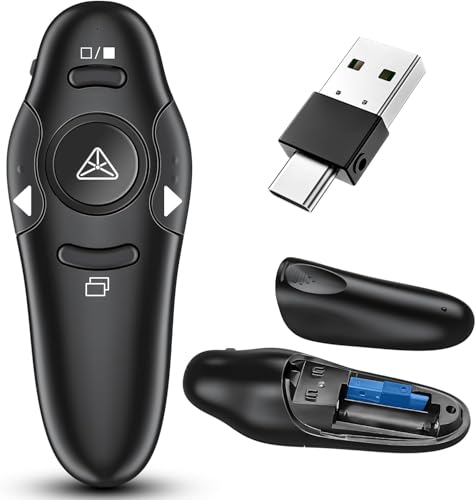
This is the most future-ready option here because it includes both USB A and USB Type C support. It fits MacBook users, newer ultrabooks, and professionals who move between old and new systems.
Pros
- 2-in-1 receiver with both USB A and USB Type C
- Supports volume control, window switching, full screen, and black screen
- Low battery indicator adds day-to-day convenience
- Comes with a stated 2-year warranty
Cons
- Red laser still does not suit LED, LCD, or TV display use
- Listing repeats features, which creates some doubt about polish and documentation
- Brand support is still limited compared with major PC accessory brands
- May offer more functions than casual users need
Among these five, the RTS 2-in-1 USB Type C Presentation Clicker stands out for one practical reason, modern compatibility. Many Indian professionals now carry MacBook Air, Type C ultrabooks, and thin laptops without standard USB A ports. A dual receiver removes the need for a dongle, which is a huge relief when you are about to start a meeting and cannot waste time searching through your bag.
The feature set is also better than average for this segment. Along with page control, you get volume control, window switching, full-screen and black-screen modes, plus a low battery indicator. Those extras help in hybrid work settings where one presentation may involve video clips, multiple windows, or live switching between files. The big-button layout should also help teachers and trainers who use the remote for hours every week.
For Indian buyers, the stated 2-year warranty adds some peace of mind, even if the service network is not as visible as Logitech or other big peripheral brands. In this category, warranty terms often matter because these remotes are tossed into backpacks, laptop sleeves, and travel pouches. If you use newer laptops or handle presentations across many devices, this is the safest all-round pick of the lot.
VIBOTON Laser Pointer Presenter
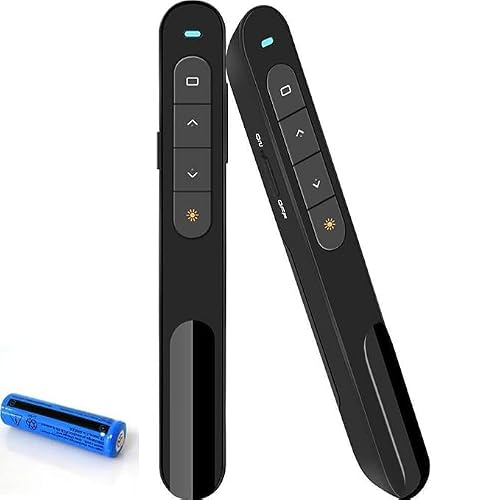
The VIBOTON presenter mixes a pen-style shape with useful extra controls like hyperlink selection and window switching. It suits business users, trainers, and teachers who want more than basic next and previous slide buttons.
Pros
- Supports hyperlink selection and window switching
- Pen-style body with pocket clip is easy to carry
- USB receiver stores inside the base
- Comes with a stated 2-year warranty
Cons
- Wireless range is lower on paper than some rivals here
- Pen-style design may not suit users who prefer bigger buttons
- Red laser has the same visibility limits on many digital displays
- Brand service visibility in India is modest
The VIBOTON Laser Pointer Presenter takes a slightly different path from the usual chunky clicker design. Its pen-like shape and clip make it easy to slip into a shirt pocket or notebook sleeve, which some trainers and lecturers will appreciate. If you move room to room through the day, that portability matters more than people think. You are less likely to leave it behind on a podium or desk.
Functionally, it goes beyond basic slide movement. Hyperlink selection, double-click to open links, and long-press window switching are useful features for users who run interactive decks or jump between files during workshops. In many Indian offices and coaching centres, presentations are rarely a straight line from slide one to slide twenty. People open spreadsheets, jump to web pages, and return to slides. This presenter is better suited for that style.
The trade-off is shape and button feel. Some users prefer a larger remote with more spread-out controls, especially in dark auditoriums. Also, while the 20m range is enough for most classrooms and meeting rooms, huge seminar halls may need more margin. The stated 2-year warranty is a plus, though VIBOTON does not have the same familiar service image in India as top mainstream accessory makers.
RTS Wireless Presentation Clicker
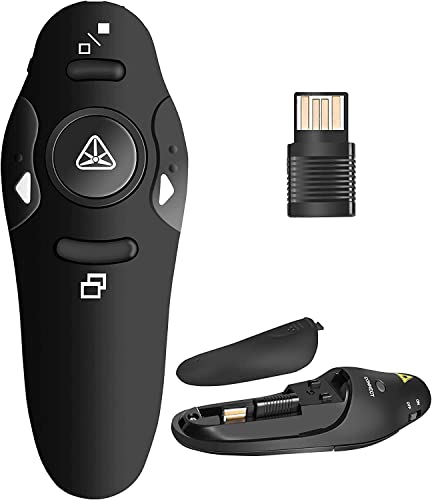
This is another straightforward RTS option for buyers who want a compact remote with wide software support and simple controls. It is best for routine school, college, and office presentation work.
Pros
- Plug-and-play use with common desktop and laptop platforms
- Supports PowerPoint, Google Slides, Keynote, and more
- Compact ergonomic shape with rubber-like finish
- Good enough control distance for most meeting rooms and classrooms
Cons
- Feature set overlaps heavily with the other RTS model, so differentiation is limited
- Mac users may need extra setup
- Laser pointer is not ideal for TV, LED, or LCD screens
- Seller-based support can be inconsistent
The RTS Wireless Presentation Clicker is the kind of device many people buy for one job only, move slides without drama. For that role, it seems well equipped. The plug-and-play setup, compact body, and familiar controls make it approachable even for first-time users. If you are a student preparing seminar presentations or a teacher who needs a backup presenter in the bag, this model fits the brief.
Its software compatibility is wide, covering PowerPoint, Google Slides, Keynote, Prezi, and other common tools. That is useful in India where one day you present from a personal laptop and the next day from an office desktop with older software. The listed wireless control distance should be enough for normal conference rooms, classrooms, and training spaces. The rubber-like feel mentioned in the listing also suggests a better grip than plain glossy plastic bodies.
This model does not stand far apart from the other RTS units in raw features, so your buying decision will likely depend on port type needs, button layout preference, and current listing quality. Service support again seems tied more to the seller than to a strong national brand network. If you want a basic, easy-to-carry presenter for regular use, this one still does the job well.
Buying Guide
1. Pick the right port type first
This is the first filter. Many older office PCs and projectors still rely on standard USB A. Newer MacBooks, premium ultrabooks, and some tablets push you toward USB Type C. If your laptop has only Type C, a normal USB clicker adds one more adapter to carry. For Indian users who present in different venues, a 2-in-1 receiver is the safest option.
2. Check software and operating system support
Do not assume every clicker works equally well with every setup. You need support for Windows, macOS, and sometimes Linux or Android if you use smart boards or hybrid devices. Also check software names. PowerPoint is common, but many teachers and startup teams use Google Slides, while Mac users often depend on Keynote. A wide compatibility list reduces last-minute panic before a presentation.
3. Understand where the laser pointer works
Most budget presenters in India use a red laser. These lasers work best on projector screens and matte surfaces. They usually perform poorly on LED TVs, LCD displays, and bright smart panels, which are now common in schools, coaching centres, and meeting rooms. If your venue mainly uses flat panels, buy the clicker for slide control first, not for laser performance.
4. Focus on button layout and grip
A presentation remote should feel natural in hand. During a live talk, you should find next slide, previous slide, and screen controls by touch. Big, spaced-out buttons help a lot in dark rooms. Pen-style presenters look neat and travel well, but some users find wider remotes easier to control. If you present often, comfort matters more than style.
5. Wireless range should match your room size
For small classrooms and office cabins, modest range is enough. For seminar halls, training rooms, and conference spaces, you need stronger wireless reach so the remote does not miss inputs when you move away from the laptop. Keep in mind that real-world performance changes with walls, people, interference, and receiver placement. Claimed range is one thing, venue conditions are another.
6. Battery type and low battery alerts matter
Many presentation clickers use AAA batteries, and that is good for Indian buyers because replacements are easy to find in local shops and online. Built-in batteries sound neat, but once they degrade, the whole device becomes less dependable. A low battery indicator is a useful extra if you present often. Nobody wants a dead remote five minutes before a viva or sales pitch.
7. Extra controls are useful for some users
Basic users need only slide forward and backward. Teachers, trainers, and office presenters often benefit from black screen, full screen, volume control, hyperlink support, and window switching. These functions help when a presentation includes videos, linked documents, or jumps between tabs. Buy based on your real use pattern, not the longest feature list.
8. Service support in India is worth checking
This product category has many marketplace brands with decent hardware but uneven after-sales support. Before ordering, check seller ratings, warranty details, and return policy. A 2-year warranty sounds good, but only if the seller responds on time. In India, easy replacement often matters more than a long promise on the box.
Feature Importance
| Feature | Importance |
|---|---|
| USB Type C support | High |
| USB A compatibility | High |
| PowerPoint and Google Slides support | High |
| Mac compatibility | High |
| Wireless control range | High |
| Button layout and tactile feel | High |
| Laser pointer visibility | Medium |
| Battery type and life | Medium |
| Hyperlink and window switching controls | Medium |
| Warranty and seller support | High |


