A good USB-C hub fixes one of the biggest problems with modern laptops, too few ports. Many slim notebooks now drop HDMI, Ethernet, SD card slots, and even extra USB ports. If you work on a MacBook, a Windows ultrabook, or a USB-C tablet, a hub saves time every single day. You plug in one accessory and your desk setup starts working again.
When you pick a USB-C hub in India, focus on the ports you will use every week. HDMI output matters for office presentations and external monitors. Ethernet helps if your Wi-Fi acts up during meetings or large downloads. USB 3.0 ports matter for SSDs and pen drives. PD charging support helps if you want power pass-through while the hub stays connected. Build quality also matters because Indian users often carry these hubs in backpacks, use them in hot rooms, and plug and unplug them often.
Value for money is a big part of the buying decision here. Many buyers want one hub for office work, travel, content transfer, and home use. So I have picked five USB-C hubs from the given list that cover different needs, from simple Ethernet and USB expansion to 4K display output and faster wired networking.
Portronics Mport 8
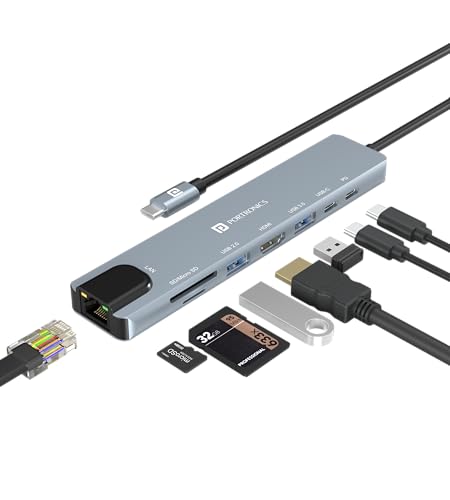
Portronics Mport 8 is a balanced 8-in-1 USB-C hub for users who want HDMI, Ethernet, card readers, USB ports, and PD charging in one compact unit. It fits students, office users, and creators who need a practical everyday adapter.
Pros
- 8 useful ports in one compact body
- Includes HDMI, Ethernet, SD, and microSD readers
- USB-C PD charging support for pass-through power
- Metal body feels better for daily travel use
Cons
- Ethernet is limited to 100 Mbps
- HDMI output tops out at 4K 30Hz
- Only one USB 3.0 port
- Heavy file users might want more high-speed USB ports
Portronics Mport 8 is the sort of hub many Indian laptop buyers look for first. It covers the common gaps on thin laptops without getting too complicated. You get HDMI for a monitor or TV, wired Ethernet for more stable internet, a USB 3.0 port for faster storage use, a USB 2.0 port for keyboard or mouse, plus SD and microSD slots for camera and phone storage. For day to day office work, online classes, and home setups, this mix makes sense.
The HDMI port supports up to 4K at 30Hz, which works well for presentations, movie playback, and regular desktop use on a bigger screen. The Ethernet port is rated at 100 Mbps, so this is more suited to broadband stability than top-end wired speed. If your main need is to avoid Wi-Fi drops during work calls, this still does the job. The PD charging support is also useful if your laptop has only one USB-C port and you do not want to lose charging access.
I also like the metal design here because hubs often get tossed into bags and used in warm Indian conditions. A sturdier shell helps in the long run. Portronics has decent visibility in India, and service access is usually easier than with unknown import brands sold online. If you want one hub that handles a bit of everything, Mport 8 is a safe pick.
Portronics Mport Edge

Portronics Mport Edge is a simpler 5-port dock made for users who mainly need extra USB ports and Ethernet. It suits office desks, shared workstations, and older systems where display output is not the main concern.
Pros
- Simple port layout for basic work needs
- USB 3.0 support for quicker file transfers
- RJ45 Ethernet port for stable network access
- Compact body is easy to carry
Cons
- No HDMI output
- Ethernet is only 100 Mbps
- Type-C port is listed for 5V2A charging, not full laptop PD use
- Less suitable for creators or multi-display users
Mport Edge takes a more basic route. Instead of trying to be a full docking station, it focuses on the ports many desk users need first, USB expansion and wired internet. You get USB 3.0, USB 2.0, a Type-C port, and RJ45 Ethernet in a compact form. If your laptop already connects to a display in another way, or if you only need to attach keyboard, mouse, printer, pen drive, and LAN, this hub keeps things straightforward.
This model makes sense for office environments in India where people still depend on USB accessories every day. A lot of users work with printers, wired keyboards, barcode devices, or data entry peripherals. For such setups, fancy extras do not matter much. What matters is stable connection and easy portability. The 100 Mbps Ethernet port is enough for regular office tasks, web use, and video calls, though heavy local network users will want more.
Portronics products usually get strong online availability in India, and that helps with replacements and basic support. The compact size is another plus if you travel between home and office. Mport Edge is best for people who want fewer frills and a cleaner, simpler hub.
Amazon Basics 9-in-1 USB-C Hub

Amazon Basics 9-in-1 USB-C Hub packs a wide spread of ports, including 4K HDMI, Gigabit Ethernet, three USB 3.0 ports, audio, card readers, and PD charging. It is a strong match for users who want one adapter for work, media, and storage.
Pros
- Gigabit Ethernet is better than 100 Mbps hubs
- Three USB 3.0 ports are useful for accessories and drives
- Includes 3.5mm audio port along with card readers
- Plug and play design is easy for Mac and Windows users
Cons
- HDMI is limited to 4K 30Hz
- Audio port is audio only
- Slightly bulkier than smaller 5-in-1 hubs
- Brand support is more retail driven than device specialist brands
Among the products listed here, the Amazon Basics 9-in-1 hub feels one of the most complete for mixed use. You get 4K HDMI, a 1000 Mbps Ethernet port, three USB 3.0 ports, USB-C PD charging, TF and SD card readers, plus a 3.5mm audio port. For many users, this means one device replaces multiple dongles. If your work includes presentations, wired internet, pen drives, camera cards, and headphones, this hub covers all of them in one go.
The Gigabit Ethernet port is one of the biggest strengths here. Compared with 100 Mbps hubs, this gives more headroom for faster broadband plans, local file transfers, and smoother office network use. The three USB 3.0 ports also make a real difference if you connect an SSD, wireless dongle, and another accessory at the same time. Students, editors, and work-from-home users will get more flexibility from this setup than from minimal hubs.
Amazon Basics usually does well in India because of easy online access and simple return handling through Amazon. That matters for accessories, where buyers often worry about compatibility and early failures. The aluminium body is a good touch for durability. If you want a fuller feature set without stepping into a large dock, this 9-in-1 model stands out.
TP-Link UH6120C

TP-Link UH6120C is the best fit here for buyers who want sharper display output, Gigabit Ethernet, and high power pass-through in a clean 6-port design. It works especially well for professionals with modern laptops and higher-end monitors.
Pros
- 4K 60Hz HDMI is better for smooth display output
- Gigabit Ethernet supports faster wired networking
- 100W PD charging support is great for laptops
- TP-Link has a strong service reputation in India
Cons
- No SD or microSD card reader
- Fewer total ports than 8-in-1 or 9-in-1 options
- Likely less suitable if you need audio jack support
- Focused feature set may feel limited for creators using memory cards
TP-Link UH6120C goes for quality over port count. You get six ports, but the right kind of six for many professional users. The big draw is 4K at 60Hz over HDMI, which gives a smoother experience on compatible monitors than the more common 4K 30Hz output seen on budget hubs. If you spend long hours on spreadsheets, code, design work, or general desktop use on an external display, 60Hz feels nicer on the eyes.
This hub also includes Gigabit Ethernet and up to 100W PD charging support, which makes it a strong partner for office laptops and premium ultrabooks. The USB data ports run at up to 5 Gbps, so attaching SSDs, flash drives, and input devices stays easy. The plug and play support across Windows, macOS, Linux, tablets, and even more platforms adds peace of mind for users who switch devices often.
TP-Link has a stronger networking and accessory support image in India than many low-cost hub brands. That matters if you value reliability and easier service reach. The only clear trade-off is that you do not get SD card slots or extra media-focused ports. So if your priority is cleaner desk use, better display smoothness, and faster wired networking, UH6120C is one of the strongest picks in this list.
Portronics Mport 51
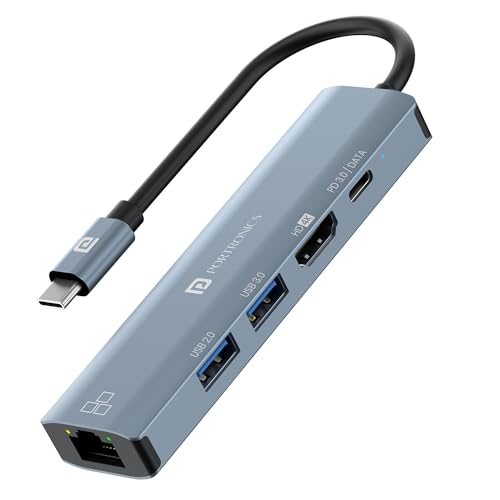
Portronics Mport 51 is a compact 5-in-1 Type-C hub aimed at buyers who want HDMI, Ethernet, USB 3.0, and PD charging in a smaller footprint. It is a practical pick for travel use and everyday office tasks.
Pros
- Compact 5-in-1 design is easy for travel
- Includes HDMI, USB 3.0, Ethernet, and PD charging
- Good fit for basic laptop expansion
- Portronics has wide online availability in India
Cons
- Fewer ports than larger hub options
- Ethernet speed is not positioned as Gigabit in the provided data
- Less suitable for users with memory cards and many peripherals
- 4K support is present but refresh details are not fully stated
Portronics Mport 51 keeps things simple and portable. It gives you the most commonly requested ports on modern laptops, HDMI for an external display, USB 3.0 for storage or accessories, RJ45 Ethernet for stable internet, and PD quick charge support so your laptop does not lose charging access. For many users, this is enough to turn a single USB-C port into a workable setup at home or in the office.
This model is easy to recommend to people who travel often or move between desks. Bigger hubs look better on paper, but they also add cable clutter and take more space in your laptop bag. Mport 51 stays lighter on features and focuses on core use. If your routine includes connecting to a projector in meetings, plugging in a pen drive, and switching to wired internet when Wi-Fi struggles, this hub fits the job well.
Portronics has built decent trust in the Indian accessories segment through broad online reach and regular launches in affordable categories. That does help buyers who want a familiar brand instead of an obscure listing. Mport 51 is for people who want a neat, everyday Type-C hub without stepping into a heavier dock style product.
Buying Guide
Check your laptop’s USB-C port first
This is the first thing I tell people. A USB-C shaped port does not always support video output, charging input, or full data features. Some laptops support only data over USB-C. If your laptop lacks DisplayPort Alt Mode, HDMI on a hub will not work. If your laptop does not accept charging through USB-C, PD pass-through on the hub will also be wasted. Look at your laptop specification page before buying.
Pick ports based on your real daily use
Do not buy a hub only because the port count looks big. Think about what you connect every day. Office users often need HDMI, a mouse receiver, keyboard, and Ethernet. Students often need pen drive support, projector output, and charging pass-through. Photographers and video editors should look for SD and microSD slots. If you use an external SSD, prefer more USB 3.0 ports over extra low-speed ports.
HDMI output matters more than many buyers think
A lot of hubs mention 4K HDMI, but the refresh rate changes the experience. For presentations and movies, 4K 30Hz is fine. For long desktop use, smoother cursor movement, and better screen comfort, 4K 60Hz feels better. If you own a high-resolution monitor and plan to work on it every day, this point matters. If you only connect to a meeting room display once in a while, 30Hz is enough.
Ethernet speed is a major separator
Some hubs in this list offer 100 Mbps Ethernet while others offer 1 Gbps. This is a big difference. For regular browsing, office portals, and video meetings, 100 Mbps is enough. For faster broadband plans, NAS transfers, large file movement, or heavy downloads, choose Gigabit Ethernet. Many Indian homes and offices now have faster fibre plans, so a 100 Mbps port can become the limiting factor.
Power delivery support helps if your laptop has one USB-C port
Pass-through charging is one of the most useful features in a USB-C hub. If your laptop charges through USB-C and also uses that same port for accessories, a PD-enabled hub makes life easier. Still, check the wattage support. Thin laptops work well with lower power needs, while performance laptops need much more. A 100W-rated hub gives more breathing room for larger chargers and power-hungry machines.
Build quality matters in Indian conditions
USB-C hubs often heat up during file transfers, display output, and charging. A metal body usually handles heat better than cheap plastic. This matters if you work in non-air-conditioned rooms or carry the hub in a crowded backpack every day. Cable strain relief also matters. Many hubs fail first at the connector or fixed cable, so look closely at product construction and user feedback before buying.
Brand support and return handling should not be ignored
With accessories, failures often show up early. A hub might have loose ports, HDMI detection issues, or charging instability. This is why brand trust matters. TP-Link has a stronger support image in India for networking gear. Portronics has broad online availability and good consumer visibility. Amazon Basics often benefits from simple platform-side returns. For many buyers, easy replacement is as important as the feature list.
Feature Importance
| Feature | Importance |
|---|---|
| USB-C compatibility with your laptop | High |
| HDMI output support | High |
| HDMI refresh rate and resolution | High |
| Ethernet speed | High |
| USB 3.0 data transfer ports | High |
| PD charging pass-through | High |
| SD or microSD card reader | Medium |
| Build quality and heat handling | Medium |
| Portability and cable design | Medium |
| Warranty, returns, and service support | High |