


Quick answer: my top pick here is TP-Link UE300C. TP-Link UE300C is a compact USB-C to RJ45 adapter with USB 3.0 and gigabit Ethernet support. Also in this guide: Tobo TD-214TC, Foxin FLA 100C, Amazon Basics USB Type-C Hub Dock, ZEBRONICS Zeb-CTE100.
A USB-C to Ethernet adapter gives your laptop a wired network connection when Wi-Fi feels slow, unstable, or crowded. It helps with office video calls, large file transfers, online classes, cloud backups, and gaming. A wired link also helps in rooms where the router signal drops behind thick walls.
Before buying, check the network speed, USB-C port support, operating system compatibility, cable length, heat handling, and build quality. Indian homes and offices often use gigabit broadband, so a 1000 Mbps adapter makes more sense for users with fast fibre plans. A 100 Mbps model still suits basic browsing, work calls, and older broadband connections.
The five picks below cover single-port adapters and a multiport hub. Consider your broadband plan, laptop ports, travel needs, and support access in India before choosing. A low-cost adapter looks attractive, but stable drivers and dependable after-sales help matter when the network becomes essential for work.
TP-Link UE300C

TP-Link UE300C is a compact USB-C to RJ45 adapter with USB 3.0 and gigabit Ethernet support. Its foldable form suits laptops and tablets used at home, in offices, or during travel.
Pros
- Supports Ethernet speeds up to 1000 Mbps
- Plug-and-play support across Windows, macOS, iPadOS, Chrome OS, and Linux
- Foldable body fits easily in a laptop sleeve
- USB 3.0 helps support high-speed network transfers
Cons
- Single Ethernet port with no extra USB or display outputs
- White finish shows dust more easily in regular travel use
- Performance depends on the laptop USB-C port and network equipment
- A little more costly than basic 100 Mbps adapters
The UE300C is a sensible pick for a USB-C laptop with a fast fibre connection. Its gigabit rating gives your wired network enough headroom for large downloads, NAS transfers, office backups, and low-latency gaming. The foldable design also keeps the connector protected inside a bag.
Setup is simple on supported operating systems, with no separate driver routine for common devices. The small body works well in Indian offices, college hostels, and homes where Wi-Fi congestion is common. Keep the adapter ventilated during long transfers, especially in hot rooms during summer.
TP-Link has a broad retail and support presence in India, so replacement and warranty queries are easier to route than with many unbranded accessories. Choose this model when network speed and dependable brand support matter more than having extra ports.
Tobo TD-214TC
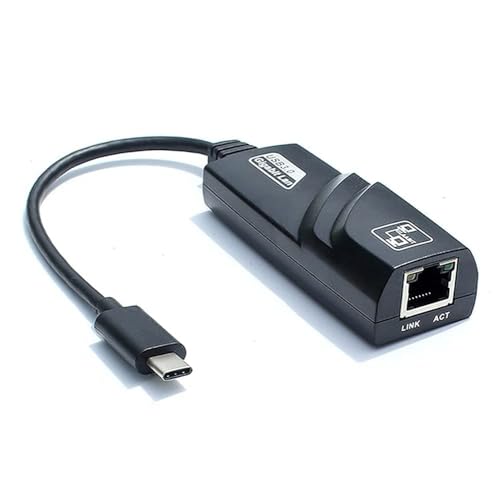
Tobo TD-214TC is a compact USB-C to RJ45 adapter aimed at basic wired networking. Its foldable body and broad operating system support suit budget laptop users.
Pros
- Supports USB-C connectivity for laptops and desktops
- Compact, lightweight body with a non-slip surface
- Works with Windows, macOS, Chrome OS, Android, and Linux
- Useful for video calls, browsing, streaming, and office work
Cons
- Product details list 10/100 Mbps support, so gigabit performance should not be expected
- Limited public information about long-term driver updates
- Seller or brand support becomes important for warranty handling
- No extra ports for charging, storage, or video output
The TD-214TC targets users who need a stable wired link without spending much on a feature-heavy accessory. A 10/100 Mbps connection suits older broadband plans, office networks, routers with Fast Ethernet ports, and everyday tasks such as browsing, email, streaming, and video calls.
Its small body takes little space beside a laptop, while the non-slip finish helps during repeated plug and unplug use. For Indian users in shared flats or crowded apartment networks, a wired link often offers steadier performance than a busy 2.4 GHz Wi-Fi connection.
Tobo provides contact-based service support, but its India-wide service footprint appears smaller than established networking brands. Keep the invoice and packaging for warranty communication. This model fits a tight budget when your network does not need gigabit speed.
Foxin FLA 100C

Foxin FLA 100C is a USB-C to LAN adapter with a 9 cm cable and 100 Mbps Ethernet support. Its simple plug-and-play design suits work laptops, desktops, and selected gaming consoles.
Pros
- RTL8152 chipset supports stable 100 Mbps data transmission
- Short 9 cm cable reduces strain around the laptop port
- Works with Windows, Mac, and Linux systems
- Includes a 1-year manufacturing warranty
Cons
- 100 Mbps speed limits use with fast fibre plans
- Short cable gives less placement flexibility beside some ports
- No charging, HDMI, or USB expansion features
- Console compatibility depends on the specific console and operating system
The FLA 100C works best for users who need a basic wired connection for office work, browsing, streaming, or remote classes. Its RTL8152 chipset and plug-and-play setup reduce the need for manual configuration. The short cable also keeps the adapter away from direct pressure on the USB-C port.
A 100 Mbps ceiling makes this model less suitable for gigabit broadband or large local file transfers. It still fits many Indian homes with entry-level fibre plans, older routers, and work setups where consistent connectivity matters more than maximum throughput. The ABS body keeps the adapter light for daily carrying.
Foxin includes a one-year manufacturing warranty, a useful safety net for a low-cost accessory. Foxin has an India-focused retail and support presence, though service handling often depends on the seller and city. Confirm the warranty process before purchase and retain the bill.
Amazon Basics USB Type-C Hub Dock 8-in-1
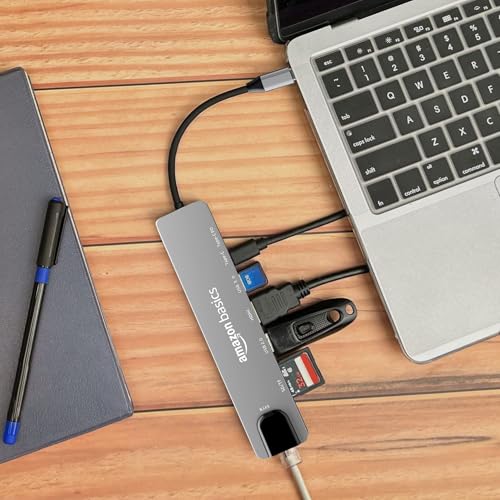
This Amazon Basics 8-in-1 hub combines a 100 Mbps Ethernet port with 4K HDMI, USB, SD, TF, and USB-C power delivery features. It suits laptop users who need one compact desk hub instead of a single network adapter.
Pros
- Adds Ethernet, 4K HDMI, USB 3.0, SD, TF, and USB-C PD functions
- Useful for Mac and Windows laptops with limited ports
- Aluminium body suits regular desk use
- One hub handles display, storage, charging, and wired networking
Cons
- Ethernet speed is limited to 100 Mbps
- Multiport use shares bandwidth and power through one USB-C connection
- 4K HDMI output runs at 30 Hz
- A hub takes more bag space than a single-purpose adapter
The Amazon Basics 8-in-1 hub is a strong choice for a home office or desk setup. Its Ethernet port handles basic wired networking, while HDMI connects a 4K display and the card readers help photographers, students, and content workers move files. USB 3.0 adds room for a drive, keyboard, or other accessory.
The 100 Mbps Ethernet limit matters for users with fast fibre plans. HDMI output at 30 Hz works well for documents, presentations, and films, but users wanting high-refresh gaming should choose a different display solution. USB-C power delivery also helps reduce cable clutter, though charger and laptop support still decide charging performance.
Amazon Basics uses Amazon’s order, return, and customer-support process in India, which gives buyers a familiar route for service questions. This hub makes sense when port expansion matters as much as wired internet. For a single gigabit network connection, a smaller adapter is the better fit.
ZEBRONICS Zeb-CTE100

ZEBRONICS Zeb-CTE100 is a USB-C to RJ45 adapter with support for 10, 100, and 1000 Mbps connections. Auto sensing and duplex support make it a practical choice for mixed home and office networks.
Pros
- Supports speeds up to 1000 Mbps
- Auto sensing adjusts to the connected network speed
- Supports half-duplex and full-duplex operation
- Works with Windows, Mac, and Linux systems
Cons
- Single-purpose design offers no extra ports
- USB-C 2.0 and 3.0 specification wording needs device-side checking
- Long transfers can create heat in a compact adapter
- Driver behaviour varies across older operating system versions
The Zeb-CTE100 suits users who want gigabit support without moving to a full USB-C hub. Auto sensing helps the adapter work with different router and switch speeds, while full-duplex support fits modern wired networks. It is a useful option for broadband users who regularly download large files or work with network storage.
Its black finish hides marks better during daily travel, and the small form works beside most laptop ports. Indian users should still check whether the laptop USB-C port supports data transfer, since some USB-C ports handle charging or display output only. Router and cable quality also affect the final speed.
Zebronics has a strong Indian retail presence and a familiar service network for computer accessories. Service access is often easier through the purchase channel and local dealers than with small imported brands. Pick this model when gigabit speed, local brand familiarity, and a simple single-port setup fit your needs.
Buying Guide
Match the adapter to your broadband speed
Check your internet plan and router port before choosing. A gigabit adapter suits fibre plans above 100 Mbps and local file transfers. A 100 Mbps model works for basic browsing, office calls, streaming, and older network equipment. Your actual speed also depends on the Ethernet cable, router, ISP, and laptop port.
Check the USB-C port
USB-C describes the connector shape, not its full capability. Your laptop needs a USB-C port with data support. Some ports handle charging or display output only. Check the laptop manual or manufacturer specification before ordering. Thunderbolt 3 and USB4 ports usually support USB data devices, but device compatibility still needs confirmation.
Consider operating system support
Windows, macOS, Chrome OS, Linux, iPadOS, and Android handle adapters in different ways. Plug-and-play support reduces setup work. Older Windows systems and some tablets might need a driver or a powered hub. Read the product page for your exact operating system version.
Choose a hub only when you need extra ports
A single Ethernet adapter takes less room and gives a simpler connection. An 8-in-1 hub suits users who need HDMI, card readers, USB accessories, and USB-C power delivery. Remember that all hub ports share the laptop connection, so heavy simultaneous transfers reduce available bandwidth.
Check heat and build quality
Compact adapters often become warm during long downloads. This is normal within reason, but keep the body away from cushions and direct sunlight. Aluminium housings help with physical durability, while a short cable or foldable plug reduces strain. Indian summer temperatures make ventilation useful during long transfers.
Review warranty and service access
Keep the invoice, packaging, and product serial details. TP-Link, Amazon Basics, Foxin, and Zebronics offer more familiar support routes in India than small accessory sellers. Tobo support is more contact-led, so confirm seller terms before ordering. A local replacement route matters when wired internet supports office or study work.
Use the right Ethernet cable
A gigabit adapter needs a suitable Ethernet cable and a gigabit router or switch. Cat5e cable is enough for normal gigabit home use, while damaged or poorly terminated cables reduce speed. Keep the cable length practical and avoid sharp bends near the adapter.


