


Quick answer: my top pick here is HP 15 fc0499AU Ryzen 3 7320U. This HP 15 offers a 15.6-inch Full HD screen, a 512GB NVMe SSD, Windows 11, and Office Home 2024. Also in this guide: Acer Aspire One A114-43 Ryzen 5-40, HP Professional 15 Core 3 100U DOS, HP Professional 15 Core 3 100U, Lenovo V15 G4 Athlon Silver 7120U.
A dependable laptop helps with office work, online classes, banking, video calls, accounting software, and home entertainment. In this segment, fast SSD storage, a clear display, sensible battery life, and reliable service matter more than gaming-grade hardware.
The shortlisted models cover entry-level and business-focused use. Check the processor generation, RAM type, screen resolution, operating system, upgrade options, webcam, keyboard, and port selection before ordering. Indian buyers should also consider heat, dust, power cuts, Wi-Fi quality, and service access in their city.
The supplied listings sit below the Rs 50,000 mark, with prices ranging from Rs 46,999 to Rs 49,990. Windows and Office bundles add value for students and office users, while the DOS model suits buyers who already own a Windows licence or prefer a fresh installation.
HP 15 fc0499AU Ryzen 3 7320U

This HP 15 offers a 15.6-inch Full HD screen, a 512GB NVMe SSD, Windows 11, and Office Home 2024. The Ryzen 3 chip suits study, browsing, documents, video calls, and routine home work.
Pros
- Full HD anti-glare display with micro-edge bezels
- 512GB PCIe NVMe SSD for quick boot and file access
- Windows 11 and Office Home 2024 included
- 1080p camera for clearer video calls
Cons
- 8GB memory is onboard and limits later upgrades
- 250-nit panel suits indoor use better than bright outdoor spaces
- Radeon integrated graphics are not meant for modern gaming
- Ryzen 3 performance is modest for heavy editing
The HP 15 fc0499AU takes a sensible office-first approach. Its Ryzen 3 7320U has four cores and eight threads, while the 512GB SSD keeps Windows startup, browser loading, and document access brisk. Eight gigabytes of LPDDR4 memory handle everyday work, though buyers planning large spreadsheets or frequent multitasking should keep the fixed memory in mind.
The 15.6-inch Full HD anti-glare panel gives text and video a sharper view than a basic HD screen. A 1080p camera helps during classes and meetings, while the 1.59 kg body is manageable for occasional travel. The 250-nit brightness suits desks and rooms, not strong sunlight.
HP has a broad service presence across Indian cities, with online support and warranty registration through the invoice. Check the nearest authorised centre before purchase, especially if you live outside a major city. Windows, Office, and Microsoft 365 Basic reduce setup work for families and students.
Acer Aspire One A114-43 Ryzen 5-40

The Acer Aspire One A114-43 is a light 14-inch laptop with an AMD Ryzen 5-40 processor, LPDDR5 memory, a 512GB SSD, and Windows 11. The compact body suits students and commuters.
Pros
- Light 1.48 kg design for daily carrying
- LPDDR5 memory and 512GB SSD support quick routine work
- Windows 11, Office 2024, and M365 Basic included
- Acer BlueLight Shield and narrow display border
Cons
- 1366 x 768 resolution is lower than Full HD
- Only 8GB RAM is fitted
- Wi-Fi 5 is older than Wi-Fi 6
- The compact screen gives less workspace for large sheets
Acer keeps the Aspire One A114-43 easy to carry. The 14-inch WXGA panel works for documents, browsing, streaming, and online classes, while the 1.48 kg weight fits a college bag without adding much load. Acer BlueLight Shield offers a useful setting for long reading sessions.
The Ryzen 5-40 runs at up to 4.3 GHz and works with 8GB LPDDR5 memory and a 512GB SSD. This combination feels responsive in office apps and browser work. The lower screen resolution is the main compromise, especially for users who keep two windows open side by side.
Acer’s Indian support network covers many cities through authorised service partners. Ask about local pickup and spare-part availability before ordering. The silver body, optimised camera, and dual-band Wi-Fi 5 suit remote work in homes with stable broadband.
HP Professional 15 Core 3 100U DOS

This HP Professional 15 pairs a 14th Gen Intel Core 3 100U processor with upgradeable memory, a 512GB SSD, Wi-Fi 6, and a 15.6-inch display. DOS keeps the base setup flexible for buyers with their own software plan.
Pros
- Six cores and eight threads for stronger office multitasking
- RAM supports expansion up to 32GB
- SSD storage supports expansion up to 1TB
- Wi-Fi 6, HDMI, USB-C, and two USB-A ports
Cons
- DOS means Windows and Office need separate installation or purchase
- Display specifications list 250 nits and 45% NTSC
- Integrated Intel UHD graphics suit work rather than gaming
- Setup requires extra time after delivery
The HP Professional 15 Core 3 100U stands apart through upgrade support. The 14th Gen chip reaches up to 4.7 GHz and carries six cores with eight threads. For spreadsheets, browser tabs, billing tools, and remote work, this gives more headroom than the entry-level processors in this list.
Eight gigabytes of DDR4 memory support expansion up to 32GB, and the SSD supports expansion up to 1TB. Wi-Fi 6 helps on compatible routers in crowded homes and offices. USB-C, two USB-A ports, HDMI, and a headphone combo jack cover common desk accessories.
DOS lowers the included software bundle and suits technical users who already own a Windows licence. HP’s service network has strong reach in India, though warranty registration and invoice records need careful handling. A local technician or HP centre will help with the initial operating system setup.
HP Professional 15 Core 3 100U
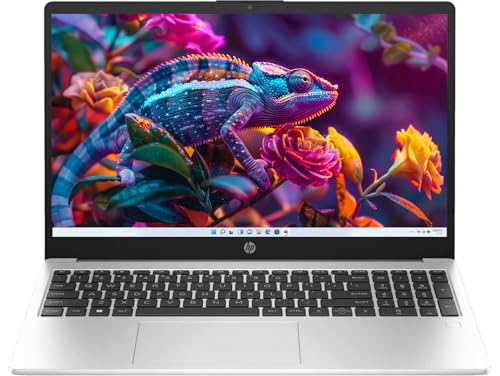
This Windows 11 Pro version adds DDR5 memory, a Full HD panel, a fingerprint reader, a numeric keypad, and lifetime Office validity. The model fits small businesses and home-office users.
Pros
- Windows 11 Pro and lifetime-validity Office included
- Full HD anti-glare screen
- DDR5 RAM supports expansion up to 32GB
- Fingerprint reader, numeric keypad, and spill-resistant keyboard
Cons
- 41Wh battery is modest for a 15.6-inch work laptop
- Intel UHD graphics are limited for creative workloads
- 250-nit brightness is better indoors
- The 8GB starting memory suits moderate multitasking
The HP Professional 15 Core 3 100U gives office users a fuller package. Windows 11 Pro adds business-oriented controls, while the included Office licence reduces recurring software expense for eligible buyers. The fingerprint reader speeds sign-in, and the full-size keyboard with numeric pad helps with invoices and data entry.
DDR5-5200 memory and the six-core Core 3 100U handle documents, meetings, browser tabs, and accounting tools with ease. The 15.6-inch Full HD anti-glare screen gives a cleaner workspace than the WXGA option in this group. Wi-Fi 6 and Bluetooth 5.4 help with newer routers and accessories.
The 41Wh battery asks for realistic expectations during long travel days, especially with high screen brightness and video meetings. HP’s authorised service reach is a practical advantage for business users across India. Keep the invoice and warranty details stored safely for faster support.
Lenovo V15 G4 Athlon Silver 7120U
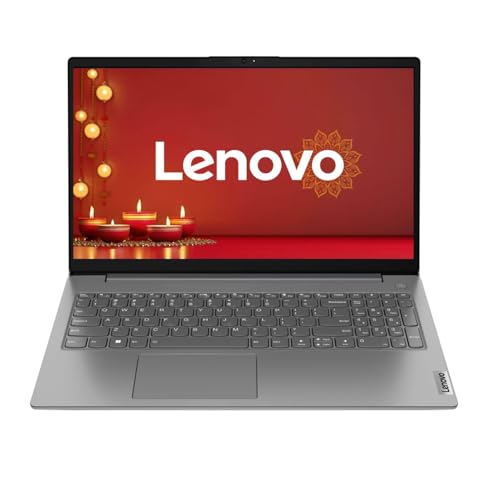
The Lenovo V15 G4 combines an Athlon Silver 7120U processor with LPDDR5 memory, a 512GB SSD, a Full HD screen, Windows 11, and Wi-Fi 6. The model targets basic office and learning tasks.
Pros
- Full HD anti-glare 15.6-inch display
- 8GB LPDDR5 memory and 512GB PCIe SSD
- Windows 11 Home with stated lifetime validity
- Physical webcam shutter and Wi-Fi 6
Cons
- Athlon Silver has two cores and four threads
- Memory is less flexible for future upgrades
- Not suitable for heavy editing or demanding games
- The 1.65 kg body is heavier than the Acer option
The Lenovo V15 G4 makes sense for simple daily computing. The Athlon Silver 7120U reaches up to 3.5 GHz and pairs with a 512GB PCIe SSD. Office documents, online learning, email, accounting software, and streaming fit the intended workload. Heavy multitasking needs a stronger processor.
The Full HD anti-glare screen gives comfortable text space for work, while Radeon 610M graphics handle video playback and basic display duties. A physical webcam shutter adds privacy during home use. Wi-Fi 6 is useful in apartments with many connected devices and newer routers.
Lenovo has a wide authorised support network in India, with service availability varying by location. Confirm warranty details and the meaning of the stated Windows validity on the seller page. At 1.65 kg, the V15 remains portable for occasional movement between home, classroom, and office.
Buying Guide
Set a realistic budget
The supplied choices range from Rs 46,999 to Rs 49,990. Keep part of the budget for a mouse, laptop sleeve, surge protector, and extended support if needed. A Windows and Office bundle often saves setup effort. The DOS HP suits buyers with an existing Windows licence, while the Windows models fit first-time buyers.
Pick the processor for your workload
For documents, browsing, classes, and video calls, the Ryzen 3 7320U and Athlon Silver 7120U work well. The Ryzen 5-40 adds headroom for routine multitasking. The Core 3 100U models offer six cores and eight threads, making them better fits for large spreadsheets, business software, and longer work sessions.
Check memory and storage
Eight gigabytes is enough for normal work, though browser-heavy users should prefer expandable RAM. The HP DOS and Windows Pro models support memory expansion up to 32GB. A 512GB NVMe SSD gives faster startup and app loading than a hard drive. Confirm whether the SSD slot supports a later replacement before buying.
Choose the right screen
Full HD gives sharper text and more usable workspace on a 15.6-inch panel. The Acer’s 1366 x 768 screen keeps the laptop light but offers less room for spreadsheets. A 250-nit panel suits rooms and offices. Users working near windows should look for a brighter screen in another model.
Review ports and wireless features
USB-C, USB-A, HDMI, and an audio jack cover common accessories. Wi-Fi 6 offers a newer wireless standard for compatible routers, while the Acer uses Wi-Fi 5. Check port placement if you plan to connect a monitor, wired mouse, printer, or external drive.
Consider heat, battery, and build
Indian summers put extra pressure on laptop cooling. Use the laptop on a hard surface and keep air vents clear. A 15.6-inch laptop gives a larger keyboard and screen but takes more room in a bag. Battery results vary with brightness, video calls, Wi-Fi, and background updates, so carry the charger during long travel.
Check warranty and local service
Save the invoice, serial number, and warranty details after delivery. HP, Acer, and Lenovo have broad Indian support coverage, though centre availability differs by pin code. Confirm doorstep support, pickup terms, accidental damage coverage, and service-part access before payment.


