


Quick answer: my top pick here is Acer Aspire Lite AL15-41. Also in this guide: HP 245 G8, HP 15 fc0500AU, Acer Aspire 3 A325-45 Pentium, Acer Aspire 3 A325-45 Celeron.
A budget laptop still matters a lot in India. Students need one for classes, assignments, browsing, and video calls. Office users need one for Excel, documents, web apps, and long typing sessions. Many families also want a single laptop for study, bill payments, OTT streaming, and light daily work. If you pick the right model, you save money and avoid the headache of a slow machine after a few months.
When I look at entry-level laptops, I focus on the processor first, then RAM, SSD storage, display quality, port selection, and service support. A good keyboard also matters if your daily routine includes long notes or office work. For Indian buyers, heat, dust, and frequent travel also affect long-term use, so build quality and after-sales support should not be ignored.
The Indian market has many low-cost laptops, but the difference between a usable machine and a frustrating one is huge. Some models look fine on paper but feel slow in real use, especially with Windows updates and browser tabs. The five laptops below cover different needs, from basic study use to better all-round performance, while keeping value for money at the centre.
Acer Aspire Lite AL15-41

This is the most balanced pick here for buyers who want a proper everyday laptop with a strong processor, SSD storage, and a Full HD screen. It suits students, home users, and office work far better than most entry-level options.
Pros
- AMD Ryzen 3 5300U handles daily work smoothly
- 15.6-inch Full HD IPS display looks better than HD panels
- 512GB NVMe SSD gives fast boot and app loading
- Useful port mix with USB-C, USB-A, and HDMI
Cons
- Integrated graphics limit gaming to light titles only
- Base 8GB RAM may feel tight for heavy multitasking later
- Brand service quality depends on city and service centre
- Battery details are not a major selling point here
Acer Aspire Lite AL15-41 gets the basics right in a way many low-cost laptops do not. The Ryzen 3 5300U is a proper mainstream chip for daily use. You get enough muscle for Chrome tabs, Word, PowerPoint, YouTube classes, email, and routine office work without the lag common on weaker Pentium and Celeron machines. The 512GB SSD also helps a lot in daily life. Windows boots faster, apps open faster, and the system feels less irritating over time.
The display is one of the stronger reasons to pick this model. A 15.6-inch Full HD IPS panel is a real upgrade over plain HD screens. Text looks sharper, spreadsheets are easier to read, and OTT content looks cleaner. If you study for long hours or work on documents every day, this screen matters more than people think. Acer ComfyView also helps reduce glare in bright Indian rooms where tube lights or window light often reflect on the panel.
For Indian users, this laptop makes sense because it covers common needs without wasting money on flashy extras. The independent numeric keypad is handy for data entry and online forms. The port selection is practical for pen drives, projectors, and external displays. Acer’s service network in India is broad enough in major cities and decent in many tier-2 locations, though service experience still varies by centre. As a full package, this is the safest all-round pick in this list.
HP 245 G8

HP 245 G8 fits buyers who want a basic work machine from a brand with a familiar service footprint. It is more suitable for simple office tasks and web use than demanding multitasking.
Pros
- HP has a wide service presence in India
- Full-size keyboard is useful for typing work
- Good port selection including USB-C, HDMI, and RJ-45
- 1TB HDD gives large file storage capacity
Cons
- AMD Athlon Silver 3050U is weak for heavier workloads
- HD display feels dated and less sharp
- HDD storage is slower than SSD-based rivals
- Ships with DOS, so setup needs extra effort
HP 245 G8 is a straightforward machine for buyers with simple needs. The Athlon Silver 3050U works for typing, billing, basic browsing, web portals, and light educational use. If your routine is built around documents, PDFs, email, and one or two browser tabs at a time, this laptop does the job. The big 1TB hard drive suits people who store many files, scanned documents, photos, or offline media.
The weak point is speed in daily use. A hard drive feels slower than an SSD during startup, file search, and app loading. In 2026, many users will notice this on day one. The HD display is another compromise, especially if you read a lot of text. For long sessions, sharper Full HD panels are easier on the eyes. So this laptop makes more sense for fixed-purpose use in a shop, front desk, basic office setup, or home admin work rather than as a future-ready all-rounder.
Where HP still pulls buyers is service familiarity. In India, many users feel more comfortable with HP because service centres and spare parts are easier to find in many places. The keyboard is practical, and the RJ-45 port helps in offices where wired internet still matters. Since this model comes with DOS, you need to plan for OS installation before regular use. If you value brand reach over raw performance, this one stays relevant.
HP 15 fc0500AU
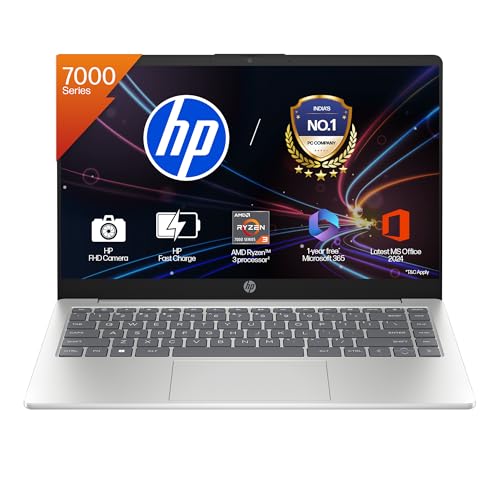
HP 15 fc0500AU is a smart choice for students and office users who want a newer platform, Full HD screen, modern wireless support, and bundled software. It feels more current than most basic laptops in this segment.
Pros
- Ryzen 3 7320U gives solid day-to-day performance
- Full HD anti-glare display is better for study and work
- Wi-Fi 6 support helps on modern home networks
- Includes Windows and Office, which adds practical value
Cons
- Onboard memory limits future RAM upgrade options
- USB-C port does not support charging or display output
- 45 percent NTSC panel is fine for daily use, not colour work
- Integrated graphics are meant for casual use only
HP 15 fc0500AU is one of the more polished options in this group. The Ryzen 3 7320U gives a fresher platform than older Athlon, Pentium, or Celeron systems. In normal use, you get a cleaner experience while handling classes, office documents, video meetings, browsing, and streaming. For many Indian buyers, the bundled Windows 11 and Office package also remove extra setup cost and hassle, which makes daily ownership simpler.
The screen and webcam setup deserve attention. A 15.6-inch Full HD anti-glare panel is easier to live with in classrooms, homes, and offices where harsh lighting is common. The FHD camera with privacy shutter is useful if you spend time on online meetings or interviews. Dual speakers and a full-size keyboard with number pad make the machine more practical for daily routines. Wi-Fi 6 support also helps in homes where multiple devices fight for network bandwidth.
For Indian users, HP’s service network is still a strong point, especially in cities and larger towns. This model feels like a safer long-term buy than older low-end machines because the base platform is newer and the everyday feature set is better. The onboard memory means future upgrades are limited, so you should buy it only if 8GB suits your workload. For students, teachers, and office users, though, this is one of the cleanest choices here.
Acer Aspire 3 A325-45 Pentium

This Acer Aspire 3 variant works for light home use and study where extra RAM matters more than processor speed. It is a decent fit for web browsing, online classes, and media consumption.
Pros
- 12GB LPDDR4X RAM is generous for this class
- 512GB SSD keeps the system responsive
- Slim 1.5kg design is easy to carry
- Multiple ports and HDMI add flexibility
Cons
- Intel Pentium N6000 is still an entry-level processor
- HD display lacks sharpness for text-heavy work
- LPDDR4X memory is not meant for easy upgrades
- Not ideal for heavy office multitasking or editing
Acer Aspire 3 A325-45 with Pentium N6000 takes an unusual route. The processor sits in the basic segment, but the 12GB RAM and 512GB SSD help the laptop feel more usable than many low-end machines with weaker memory and small storage. For school work, browser-based study platforms, video lectures, document editing, and OTT use, the setup is serviceable. The SSD keeps boot times and app loads in check, which matters a lot in daily use.
The main compromise is the display. The 15.6-inch HD panel is passable for casual work, but text is not as crisp as on Full HD screens. If your day includes large spreadsheets, long PDFs, or side-by-side windows, you will feel the limit. The Pentium N6000 is better than very old entry chips, yet it still sits below mainstream Ryzen 3 and Core i3 options. So expectations should stay realistic. This is a light-duty laptop, not a productivity workhorse.
For Indian buyers, the 1.5kg weight is a plus if the laptop moves between home, tuition, and office. Acer’s broad presence helps in bigger markets, though service quality depends on location. BlueLight Shield is a nice touch for long YouTube classes and late-night browsing. If you want a simple Windows laptop with decent memory and SSD storage, this one works, provided you accept the screen and processor limits.
Acer Aspire 3 A325-45 Celeron

This is the most basic laptop in the list, aimed at buyers with light workloads and strict budgets. It handles web use, notes, online classes, and simple home tasks better than old HDD-based machines.
Pros
- 12GB LPDDR4X RAM is rare at this level
- 512GB SSD improves startup and basic responsiveness
- Thin and light body suits students on the move
- Useful for simple tasks like browsing and online learning
Cons
- Celeron N4500 is the weakest processor in this list
- HD screen is not great for long reading sessions
- Limited headroom for future workload growth
- Not suitable for serious multitasking or content work
Acer Aspire 3 A325-45 with Celeron N4500 is built for the most basic computing jobs. If your use starts and ends with web browsing, online forms, school portals, YouTube classes, and document typing, it stays usable. The good part is the 12GB RAM and 512GB SSD combo. Those two specs stop the laptop from feeling painfully outdated during startup and routine tasks. Compared with older machines using 4GB RAM or a hard drive, daily use feels cleaner.
The processor is where limits show up fast. The Celeron N4500 is fine for one thing at a time, but workload pressure builds quickly with many tabs, large updates, or multitasking. The HD display also keeps this laptop in the basic category. You can watch videos and attend classes on it, though long hours of reading and spreadsheet work are easier on a Full HD panel. So this model works best as a first laptop for school use or a secondary home machine.
Acer’s service reach in India gives some comfort, especially in urban areas where support access is easier. The 1.5kg weight and slim body are practical for carrying around. Dual-band Wi-Fi 5 is enough for standard home broadband setups. I would suggest this model only when your workload is clearly light and you want SSD storage plus enough RAM without spending more on a stronger processor.
Buying Guide
1. Pick the processor before anything else
In budget laptops, the processor decides whether daily use feels smooth or tiring. Among these five, Ryzen 3 options are clearly stronger than Athlon, Pentium, and Celeron chips. If your work includes many browser tabs, Office files, classes, video calls, and streaming in the same day, pick Ryzen 3 first. Pentium and Celeron machines suit lighter use like notes, portals, and basic browsing.
2. SSD matters more than extra storage on a hard drive
Many buyers see 1TB HDD and think bigger is better. In real use, an SSD changes the laptop far more. Boot time, app opening, Windows updates, and file access all feel quicker. A 512GB SSD is a better fit for most students and office users than a 1TB HDD. If you need more space later, you can add external storage.
3. Do not ignore display resolution
A Full HD display makes a visible difference when you read PDFs, prepare assignments, attend classes, or work on spreadsheets. HD screens look softer and feel dated, especially on 15.6-inch laptops. For long study hours in Indian homes with mixed lighting, an anti-glare Full HD panel is easier to live with. If your budget allows only one major upgrade, I would choose better screen quality over flashy extras.
4. RAM is important, but type and upgrade path also matter
8GB RAM is enough for common student and office work today, but only if the processor is decent. A weaker chip with more RAM does not always beat a stronger chip with 8GB. Also check whether memory is onboard or upgradeable. Some laptops use soldered memory, so what you buy today is what you keep for years. If you plan to keep the laptop for a long time, think ahead.
5. Ports and connectivity affect daily convenience
A budget laptop should still handle your normal accessories without trouble. HDMI helps during presentations or TV connection. USB-A ports still matter for pen drives, printers, and wired peripherals. USB-C is useful, but check what it does because some ports support only data transfer. Good Wi-Fi also matters in Indian homes where several phones, TVs, and laptops share one router.
6. Service network is a real buying factor in India
This part gets ignored until something goes wrong. Brands like HP and Acer have broad service presence in Indian cities and many tier-2 markets, but quality still changes by local centre. Before buying, check if there is an authorised service point near your area. For working professionals and students, faster repairs matter more than fancy spec sheets.
7. Match the laptop to your actual use case
If the laptop is for school, online classes, browsing, and movies, a lower-end model is enough. If you plan to run office apps daily, keep many tabs open, and attend meetings, buy at least a Ryzen 3 laptop. If the machine will be shared by family members, pick a model with SSD storage, Full HD display, and a decent keyboard. Buying one level above your current need often saves money later because the laptop stays useful for longer.
More models worth a look
These came up in earlier guides on the same topic and are still on sale.
Lenovo V15 G4 Ryzen 5 7520U
A sensible 15.6-inch laptop for office work, study, browsing, and daily multitasking. The mix of Ryzen 5, 16GB DDR5 RAM, and 512GB SSD makes it one of the easier choices for people who want smooth everyday use. See it on Amazon
HP OmniBook fn0074AU Ryzen AI 5 330
This HP model targets users who want more memory, more storage, and a modern feature set. With 24GB DDR5 RAM, 1TB SSD, fingerprint reader, backlit keyboard, and FHD camera shutter, it feels ready for serious office and multitasking use. See it on Amazon
Dell Inspiron 5440
A compact 14-inch notebook for users who prefer portability and a cleaner software setup with Ubuntu. It brings a modern Intel Core 3 100U processor, FHD+ display, and useful security features in a light daily-use package. See it on Amazon


