


Portable monitors make a lot of sense if you work from a laptop, travel often, study in hostels, or want a second screen without carrying a full desktop setup. I like this category because it solves a real problem. A 15.6-inch portable display gives you more room for spreadsheets, coding, editing, meetings, and even casual gaming, while still fitting inside a backpack. For many Indian users, this is a smarter buy than upgrading to a larger laptop.
When you pick a portable monitor, focus on the panel type, brightness, ports, stand quality, speaker quality, touch support, and how the monitor draws power. USB-C support matters a lot because some devices send video and power through one cable, while others need separate power input. You should also check if your phone, laptop, console, or tablet supports video output. In India, heat, dust, rough travel, and patchy after-sales service also matter more than many buyers expect.
The good part is that the Indian market now has more options than before. You will find models from large brands, value-first Indian brands, and generic touchscreen options. Some are better for office work, some for gaming, and some for users who want touch input for presentations or mobile workflows. The five picks below cover these different needs in a practical way.
Acer PM161Q B1
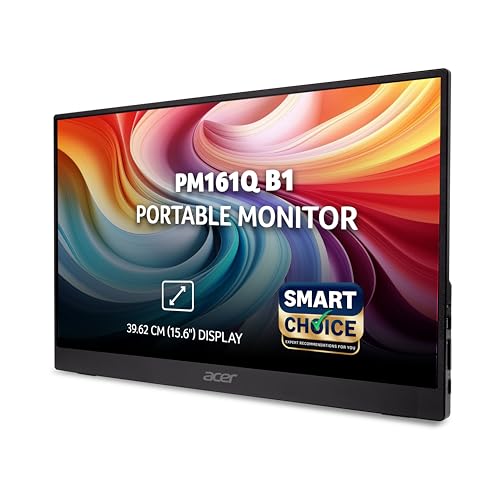
Acer’s portable monitor is a safe, balanced pick for office users and frequent travellers who want a slim Full HD screen from a known brand. It covers the basics well and keeps day-to-day use simple.
Pros
- Slim and light design at around 700 g
- IPS panel with Full HD resolution and wide viewing angles
- Two USB-C ports plus HDMI add flexibility
- Acer VisionCare features help during long work sessions
Cons
- No touchscreen support
- Built-in speakers are functional, not rich
- Brightness details are modest for outdoor use
- More suited to work than fast gaming
The Acer PM161Q B1 feels like the practical choice in this list. You get a 15.6-inch Full HD IPS panel, a fast-enough 4 ms response time for normal media use, and a body that stays light enough for daily carry. If your routine includes college, office, co-working spaces, or train and flight travel, this size and weight combination works well. The screen is easier on the eyes during long sessions because Acer includes VisionCare and BlueLightShield features.
What I like here is the port layout. Dual USB-C and HDMI give you fewer headaches when switching between a laptop, a phone, and another source like a console or mini PC. For Indian buyers, this matters because many people use a mix of work and personal devices. The built-in speakers are fine for video calls or YouTube in a quiet room, though you will still want earphones for better sound.
Acer also has better brand recall and service reach in India than many smaller portable monitor sellers. That does not mean every service case goes smoothly, but it gives more peace of mind than an unknown label. If your goal is stable day-to-day use, clean design, and fewer surprises, this monitor stays easy to recommend.
Riitek 15.6 Touchscreen Monitor
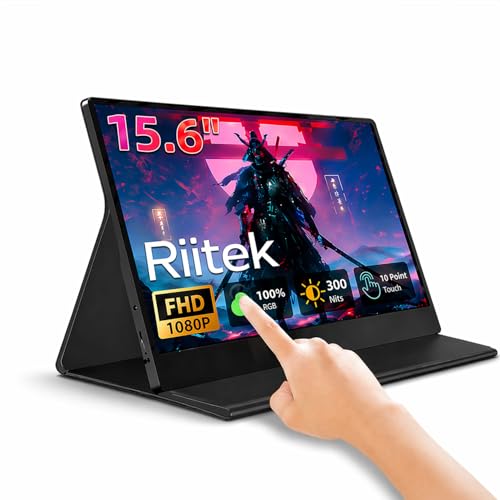
This Riitek model targets buyers who want touchscreen input on a portable monitor for presentations, casual gaming, and phone-friendly use. The Full HD IPS panel and touch layer make it more flexible than a standard display.
Pros
- Capacitive multi-touch support adds extra utility
- Full HD IPS screen with 178-degree viewing angle
- Good fit for phone, PC, and travel use
- Protective case improves portability
Cons
- Brand support in India is less established
- Detailed brightness and colour specs are limited
- Touch compatibility depends on the connected device
- Mini HDMI and USB-C setup may need extra cable care
Riitek’s 15.6-inch touchscreen portable monitor is for users who want more than an extra screen. The touch panel changes the experience. You can tap through menus, scroll documents, use touch-friendly apps, or pair it with a compatible phone or mini PC for a more tablet-like setup. For students, sales teams, and users who do demos, this makes a visible difference.
The screen itself uses a Full HD IPS panel with wide viewing angles, so shared viewing works better during meetings or entertainment. If you plan to connect a gaming console for short sessions in a hotel room or at a friend’s place, the form factor stays convenient. The included cover also helps during travel, which matters in Indian conditions where dust and bag pressure are part of normal use.
The weak point is confidence around long-term support. Riitek is not as well known in India as Acer or Zebronics, so you should buy this model only if touchscreen use is a real priority for you. If touch matters, the extra flexibility is worth it. If touch does not matter, a standard non-touch model from a stronger local brand may feel safer.
Zebronics Pixigo A16S

The Pixigo A16S is a sensible pick for Indian buyers who want a portable monitor from a familiar budget brand with broad availability. It mixes a clean Full HD panel with a metal stand and useful connectivity.
Pros
- Adjustable metal stand adds better stability
- Type-C, Type-C DP, and mini HDMI ports cover many devices
- Anti-glare screen is better for mixed lighting
- Zebronics has wide retail presence in India
Cons
- 250 nits brightness is average
- No touchscreen support
- Built-in speakers are basic
- Less appealing for serious colour work
Zebronics has built a strong place in the Indian accessories market, and the Pixigo A16S fits that image well. It uses a 15.6-inch Full HD display with anti-glare treatment, which is a practical feature in bright rooms, classrooms, and office spaces with overhead lighting. The 60-degree adjustable metal stand is a good touch because many cheaper portable monitors feel flimsy on a desk. This one should feel steadier during typing, tapping nearby devices, or frequent angle changes.
The connectivity options are also better than expected. You get Type-C input, Type-C DP input, and mini HDMI, so the monitor fits modern laptops as well as older machines and consoles with the right cable. The 16.7 million colour support sounds good on paper, though I would still place this model more in the productivity and entertainment bracket than professional photo or design work.
For Indian users, Zebronics brings one clear advantage. Service access and product availability are usually easier than on obscure imported brands. If you want a portable monitor for coding, documents, OTT content, or a side screen for office work, the Pixigo A16S gives a nice balance of familiarity, decent hardware, and practical usability.
FRONTECH MON-0023

FRONTECH’s portable monitor is a budget-friendly option for users who want simple plug-and-play use with laptops and consoles. The 180-degree stand and bundled accessories make setup easy for first-time buyers.
Pros
- Dual Type-C and mini HDMI improve compatibility
- 180-degree adjustable stand gives flexible positioning
- Works with laptops, phones, PS5, and Switch
- Comes with essential cables in the box
Cons
- 220 cd/m2 brightness is on the lower side
- 20 ms response time is slow for competitive gaming
- Audio output is basic
- Brand image is more value-focused than premium
The FRONTECH MON-0023 feels aimed at buyers who want a no-fuss second screen. You get a 15.6-inch Full HD IPS panel, dual Type-C ports, mini HDMI, built-in speakers, and a wide-angle stand that folds back up to 180 degrees. That makes the monitor useful in many small spaces, whether you are working from a dining table, a hostel desk, or a temporary setup during travel.
Its weak spots are easy to see from the spec sheet. Brightness is rated at 220 cd/m2, so outdoor or near-window use will be less comfortable. The 20 ms response time also means this is not the best pick for fast shooters or users who care about motion clarity. For office work, Netflix, presentations, and casual console gaming, the panel should still do the job without drama.
FRONTECH has been around in India’s budget accessories space for years, and many buyers know the brand from keyboards, UPS units, and basic PC gear. Service quality varies by city, but the 1-year warranty and included cable bundle do add some comfort for first-time portable monitor users. If your main goal is a simple extra display for daily work and light entertainment, this model keeps things straightforward.
LEOXSYS 15.6 Touchscreen Monitor

This LEOXSYS portable touchscreen monitor suits users who want touch support, broad compatibility, and a travel-friendly design for work and entertainment. It is one of the more feature-packed options in this group.
Pros
- 10-point capacitive touch adds better control
- HDR mode improves perceived contrast in supported content
- Dual Type-C and mini HDMI support many devices
- Scratch-resistant design and folding stand help in travel
Cons
- Generic branding reduces buyer confidence
- Actual touch support depends on source device and OS
- Speaker quality is limited by size
- Long-term service network in India is unclear
The LEOXSYS 15.6 Touchscreen Monitor tries to give you a bit more than the usual portable screen. The main draw is its 10-point capacitive touch layer, which makes navigation smoother for touch-ready laptops, mini PCs, and a few mobile workflows. If you do client presentations, POS-style work, casual design sketching, or simply prefer touch controls, this extra function changes how useful the monitor feels.
You also get Full HD IPS resolution, built-in speakers, HDR mode, and the usual mix of dual Type-C plus mini HDMI connectivity. The one-cable support for compatible USB-C devices is a big plus because cable clutter is a common annoyance with portable monitors. For Indian users moving between office desks, classrooms, and home setups, a cleaner one-cable arrangement saves time and keeps things less messy.
The issue is trust. LEOXSYS is not a mainstream display brand, so you need to go in with clear expectations. Read the compatibility details, especially if touch is the main reason for your purchase. If your source device supports proper video and touch routing, this monitor offers a flexible package. If you want safer after-sales support, Acer or Zebronics will feel more reassuring.
Buying Guide
1. Decide why you need a portable monitor
Start with your use case. A coder, stock trader, student, and gamer do not need the same thing. If you mostly want extra space for Excel, docs, and web tabs, a normal Full HD IPS monitor is enough. If you plan to present, sketch, or control apps with your fingers, look for a touchscreen model. If you want console use, check HDMI support, speaker quality, and stand stability.
2. Check USB-C compatibility before you buy
This is where many buyers get confused. A USB-C port on your laptop or phone does not always mean video output works. Your device should support DisplayPort Alt Mode over USB-C, or another supported video method, for single-cable display use. Some devices also need separate power for the monitor. Read your laptop and phone specs first, otherwise you may end up with a monitor that powers on but shows no image.
3. Brightness matters more in India
On paper, many portable monitors look similar. In real use, brightness changes everything. If you work near windows, in bright offices, or while travelling in daytime, a dim panel feels tiring. Around 220 to 250 nits is usable indoors, but not ideal for harsh light. Anti-glare coating also helps a lot in Indian rooms where tube lights, sunlight, and reflections are common.
4. Touchscreen is useful, but only for the right buyer
A touchscreen portable monitor sounds attractive, and for some users it is worth paying attention to. Teachers, presenters, retail users, and people pairing the monitor with mini PCs or touch-friendly apps will enjoy it more. For regular office work, a non-touch screen is often simpler, lighter on the pocket, and easier to maintain. Touch models also need better compatibility checks.
5. Stand quality and travel durability are easy to ignore
Many people focus only on resolution and ports. I would not do that. The stand decides whether the monitor feels usable on a train table, hostel desk, hotel room table, or cramped work corner. A weak folding case or shaky kickstand gets annoying fast. If you travel often, also look for a solid frame, scratch resistance, and a design that handles frequent packing and unpacking.
6. Built-in speakers are a bonus, not a reason to buy
Almost every portable monitor mentions speakers. Keep expectations low. Small speakers inside a thin body work for meetings, YouTube, and short videos in a quiet room. For movies, gaming, and music, earphones or external speakers will sound better. Treat onboard audio as backup convenience, not as a core feature.
7. Brand service and warranty matter in the Indian market
Portable monitors are still a niche category, so after-sales support is uneven. Bigger brands or brands with wider Indian presence usually feel safer. A one-year warranty is common, but what matters more is whether parts, service centres, and seller support are easy to access in your city. If you are buying from a less known brand, read recent user feedback and return policy details with care.
Feature Importance
| Feature | Importance |
|---|---|
| IPS panel quality | High |
| Full HD resolution | High |
| USB-C video support | High |
| HDMI connectivity | High |
| Brightness level | High |
| Stand stability | High |
| Touchscreen support | Medium |
| Built-in speakers | Medium |
| Weight and portability | High |
| Warranty and service support | High |


