


A good laptop changes your day in a simple way. Classes feel easier, office work moves faster, and entertainment feels smoother when the machine does not fight you at every step. In India, buyers usually want one device for study, browsing, video calls, OTT streaming, light work, and maybe some app-based creativity too. That is why the right pick depends on your real usage, not on specs alone.
When I shortlist laptops for Indian users, I look at performance, screen quality, battery life, keyboard comfort, storage, ports, and after-sales support. Software matters a lot too. Some people will be happier with Windows for desktop apps, some with ChromeOS for browser-first work, and some with Android-based systems if they live inside mobile apps and want long battery life. Weather and travel matter as well. Heat, dust, frequent movement, and patchy power in some areas make efficiency and build quality more important than many people think.
This list mixes compact budget-friendly options with full-size Windows machines. So whether your need is online classes, typing assignments, remote work, or a family laptop for shared use, you will find a more practical direction here for the Indian market.
Primebook 2 Pro
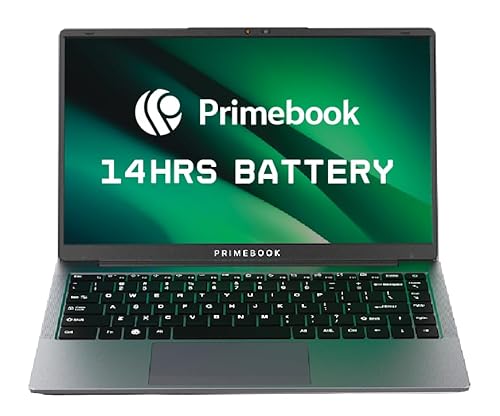
Primebook 2 Pro suits students and app-first users who want a laptop form factor with Android familiarity. Its 14.1-inch FHD screen, 8GB RAM, and long battery life make it a clean fit for study, browsing, and content use.
Pros
- 14.1-inch FHD IPS anti-glare display is good for long sessions
- 8GB RAM with 128GB UFS storage feels responsive for everyday app use
- Battery life is rated up to 14 hours, useful for classes and travel
- Backlit keyboard, Type-C charging, and microSD expansion add convenience
Cons
- Android-based workflow will not suit users who need full Windows software locally
- Cloud PC access for desktop-style apps depends on internet quality
- Brand ecosystem is smaller than major laptop brands
- Heavy professional workloads are outside its core use case
Primebook 2 Pro takes a different route from regular entry-level laptops. Instead of forcing weak desktop hardware to run heavy software, it leans into Android 15 on PrimeOS 3.0. For many Indian students, this makes day-to-day use feel familiar. Apps open quickly, navigation feels simple, and the desktop-style tweaks such as multi-window support, file manager access, keyboard input, and trackpad controls make the device more laptop-like than a large tablet with keys.
The 14.1-inch Full HD IPS anti-glare panel is one of the stronger points here. If you spend hours attending lectures, reading notes, watching YouTube tutorials, or working in bright room lighting, this screen makes life easier. The Helio G99 chip with 8GB LPDDR4X RAM is tuned for light productivity and fast app handling. You also get 128GB UFS storage, which is better than basic slow storage found in many low-cost machines. The option to add extra storage via microSD helps students who keep PDFs, lectures, and offline media.
What makes this model stand out is how clearly it targets Indian usage habits. Many buyers use web tools, Android apps, streaming services, and online study platforms more than legacy PC software. For that crowd, Primebook’s approach makes sense. The brand is still smaller than ASUS or Acer, so service reach and long-term support confidence are not at the same level as larger names, but Primebook has built a visible identity in the student-focused segment. If your work lives inside apps and the browser, this machine feels smart and easy to live with.
ASUS Chromebook CX1405

ASUS Chromebook CX1405 is a sensible pick for users who spend most of their time in Chrome, Google apps, and web tools. It keeps things light, boots fast, and brings the backing of ASUS service in India.
Pros
- ChromeOS is fast, clean, and easy to maintain
- 14-inch FHD anti-glare display with 300 nits brightness is practical indoors
- Wi-Fi 6 and modern Type-C connectivity improve day-to-day usability
- ASUS has a wide service presence across India
Cons
- Local offline software choices are narrower than Windows
- Intel N50 is meant for basic tasks, not demanding workloads
- 720p webcam is average for frequent video calls
- eMMC storage is functional but not as fast as stronger SSD setups
ASUS Chromebook CX1405 works best for people who want a laptop that starts fast and stays simple. ChromeOS is the main reason to buy this machine. You open the lid, sign in, and get to your browser, Docs, Sheets, Gmail, Meet, and Android apps without the baggage of a heavy desktop setup. For school work, writing, form filling, research, web-based office tasks, and family use, that ease matters a lot.
The hardware is balanced for this style of use. You get an Intel N50 processor, 8GB LPDDR5 RAM, and 128GB storage, paired with a 14-inch Full HD anti-glare display. The 300-nit brightness is useful in Indian homes where lighting is often harsh during the day. Port selection is good too, with dual Type-C ports, one Type-A, HDMI, and a headphone jack. Wi-Fi 6 support also helps if you have multiple devices fighting for bandwidth at home.
ASUS is one of the safer brands for after-sales support in India, and that adds trust for first-time buyers. Chromebook buyers do need to be honest about software needs. If your college or office asks for Windows-only applications, this is not the right fit. But if your life runs on browser tabs, Google tools, online classes, and Android apps, the CX1405 feels neat, low-stress, and dependable.
Primebook 2 Neo

Primebook 2 Neo targets users who want the lightest and easiest machine for classes, note-taking, and web-based work. Its compact 11.6-inch body and low weight make it easy to carry every day.
Pros
- Compact 11.6-inch design is easy to carry in small bags
- Helio G99 chip handles everyday app tasks smoothly
- 128GB storage with microSD expansion gives flexibility
- Android 15-based PrimeOS keeps app usage simple for beginners
Cons
- HD resolution is less sharp than Full HD panels
- Small display size will feel cramped for heavy multitasking
- Best suited to app-first and browser-first users, not desktop-heavy work
- Primebook service network is less established than top mainstream brands
Primebook 2 Neo is built for mobility first. At around 1.1 kg, it is the sort of device you carry to school, tuition, library, cafe, or office desk without thinking twice. Many buyers in India want a low-fuss machine for learning platforms, YouTube lessons, Google services, note viewing, and light typing. This model speaks to that need directly. The 11.6-inch IPS panel keeps the body small, and the Helio G99 gives enough headroom for routine multitasking.
PrimeOS 3.0 based on Android 15 shapes the whole experience. If you already do most of your work through apps, this feels familiar from day one. The global AI search and on-screen assistant add convenience for students who want quick summaries or context while reading. Storage is another useful touch. You get 128GB built in and expansion through microSD, which is handy for lecture files and offline content when internet access is unstable.
There are trade-offs, and you should know them before buying. The HD display is fine for basic work but does not give the sharper feel of a Full HD panel. The compact screen also means split-screen productivity has limits. Still, for buyers who want low weight, simple software, and all-day casual use, this is one of the easier machines to recommend. Primebook as a brand is still growing in India, so service confidence is not in the same bracket as ASUS or Acer, but the product idea is clear and focused.
ASUS Vivobook S16

ASUS Vivobook S16 is the performance-focused choice in this list. With a 14th Gen Intel Core 5 210H, 16GB DDR5 RAM, 512GB SSD, and a large 16-inch 144Hz display, it suits demanding students, office users, and multitaskers.
Pros
- Intel Core 5 210H offers strong everyday performance
- 16GB DDR5 RAM and 512GB PCIe 4.0 SSD give good headroom
- 16-inch FHD+ 144Hz display is spacious and comfortable
- ASUS service support in India is widely available
Cons
- Integrated Intel UHD graphics limit gaming and heavy creative work
- 1.7 kg weight is portable but not ultra-light
- 45% NTSC panel is fine for regular use, not ideal for color-critical work
- Larger chassis needs more bag space for daily travel
ASUS Vivobook S16 is for buyers who are done compromising on screen size and multitasking speed. The Intel Core 5 210H, with 8 cores and 12 threads, gives this machine a clear edge over budget-friendly app-first options. If your day includes many browser tabs, spreadsheets, classes, office files, video meetings, coding practice, and light editing, this system feels far more relaxed under pressure. The 16GB DDR5 RAM is a big plus for long-term use.
The 16-inch FHD+ display with a 16:10 aspect ratio changes the working experience in a useful way. You get more vertical space for documents and websites, which means less scrolling. The 144Hz refresh rate makes movement look smoother, and the anti-glare finish works well in bright Indian rooms. ASUS also includes a backlit keyboard with Num-key, which helps students handling data entry, finance work, and frequent typing. Bundled Office access adds practical value for people who want a ready-to-use machine from day one.
ASUS has one of the stronger service networks in India, and that matters more on a main-work laptop. This model is not meant for serious gaming or advanced graphics jobs because it relies on integrated Intel UHD graphics, but for mainstream productivity, study, and home-office use, it is a strong all-rounder. If you want one laptop for several years of daily work, this is the most complete package in the list.
Acer Aspire Lite AL15-52H

Acer Aspire Lite AL15-52H gives you a practical Windows laptop with an H-series Intel Core i5, 12GB RAM, and a 15.6-inch FHD IPS display. It is a balanced fit for students, office users, and home buyers who need proper desktop-style productivity.
Pros
- Intel Core i5-12450H handles office work and multitasking well
- 12GB LPDDR5 RAM is useful for smoother day-to-day performance
- 15.6-inch FHD IPS display is good for study and media use
- Acer has a known service setup across India
Cons
- USB port mix includes older USB 2.0 ports
- Integrated graphics limit gaming and GPU-heavy workloads
- 1.7 kg weight is average, not ideal for constant travel
- Design is simple and function-first
Acer Aspire Lite AL15-52H is one of those laptops that makes sense for a wide range of Indian buyers. The 12th Gen Intel Core i5-12450H is still a solid chip for work and study. Compared with lower-end processors, it gives better responsiveness while opening many tabs, handling office apps, switching between classes and documents, or running routine coding tools. The 12GB LPDDR5 RAM adds extra breathing room, which helps the laptop feel less stressed in daily use.
The 15.6-inch Full HD IPS panel is a familiar sweet spot. It is large enough for spreadsheets, assignments, streaming, and family use without making the laptop too bulky for occasional travel. Acer also includes a backlit keyboard and numeric keypad, both useful for people typing at night or working with numbers. Storage is handled by a 512GB SSD, which gives enough room for documents, photos, software, and offline video content.
Acer’s service and spare availability in India are better known than smaller brands, and that lowers risk for long-term ownership. This laptop does not chase premium styling. It focuses on getting the basics right for regular Windows users. If you want a machine for college, office work, browsing, classes, and some light editing without stepping into a larger premium budget bracket, Aspire Lite is a grounded and sensible option.
Buying Guide
1. Pick the right operating system for your work
Start with software, not with processor names. If your day runs on Chrome, Gmail, Docs, web portals, and Android apps, a Chromebook or Primebook-style machine will feel easier and often give better battery life. If you need desktop software such as full Excel workflows, coding tools, Tally, Windows-specific office apps, or offline utility programs, choose a Windows laptop. This single step removes most buying mistakes.
2. Match screen size with your travel routine
A compact laptop feels great on buses, metros, and campus runs. An 11.6-inch or 14-inch model is easier to carry and store. A 15.6-inch or 16-inch machine is better if you spend long hours reading, typing, or working on two windows side by side. In India, many buyers use one laptop for study and home entertainment, so bigger screens often feel more comfortable if portability is not the top concern.
3. Do not ignore display quality
Screen quality affects your eyes every day. Look for at least Full HD resolution if your budget allows. IPS panels are better for viewing angles and color consistency. Anti-glare coating helps in bright rooms, especially during daytime use near windows. Higher brightness is useful in Indian homes where tube lights, sunlight, and reflective surfaces often make cheap displays look dull.
4. RAM and storage matter more than many buyers think
For smooth use in 2026, 8GB RAM is a safe starting point for light work. If you keep many tabs open or use Windows for office and study, 12GB or 16GB gives a better long-term experience. For storage, faster options such as SSD or UFS feel better than basic slow storage. Also check expansion options like microSD or easy cloud integration if you save lectures, PDFs, and videos.
5. Battery life should suit Indian daily use
Battery claims on paper are one thing, daily life is another. If you attend classes, travel often, or deal with uneven charging access, choose a laptop known for strong battery backup. Efficient processors, lighter operating systems, and Type-C charging help a lot. Type-C charging is useful because you may already carry a compatible charger or power setup for your phone and other gadgets.
6. Ports, keyboard, and webcam shape your daily experience
Many people focus only on chipset and forget comfort. Check for Type-C, regular USB-A, headphone jack, HDMI if you connect to projectors or TVs, and microSD if you move files from phones or cameras. A backlit keyboard helps in low light. A good keyboard layout with enough spacing matters if you type notes or assignments for hours. Webcam quality also matters if classes and meetings are part of your week.
7. Service support in India is a real buying factor
A laptop is not only a spec sheet. Repair time, spare availability, and support centers matter after the sale. ASUS and Acer usually offer stronger service confidence due to wider presence. Smaller brands with focused products often give good value, but you should check support availability in your city before buying. For students living away from home, this matters even more.
8. Buy for your real workload, not for bragging rights
If your use is notes, streaming, browsing, PDFs, and online classes, you do not need a heavy machine. If you handle many apps, office files, coding practice, or long typing sessions, spend more on RAM, SSD, and a better processor. A balanced laptop feels better for years than a spec-heavy machine with weak screen, bad battery, or poor support.
Feature Importance
| Feature | Importance |
|---|---|
| Operating system compatibility | High |
| Processor performance | High |
| RAM capacity | High |
| Storage speed and capacity | High |
| Display resolution and panel quality | High |
| Battery life | High |
| Port selection | Medium |
| Weight and portability | Medium |
| Keyboard quality and backlight | Medium |
| Warranty and service network | High |


