


A separate numeric keypad helps when your laptop lacks a number block or when your desk setup keeps the mouse and keyboard apart. Account entries, spreadsheet work, billing, coding shortcuts, classroom tasks, and repeated calculations all feel easier with dedicated number keys. A compact pad also travels well with a laptop for office visits and work from home.
Before choosing one, check the key layout, connection type, battery needs, operating system support, wrist angle, cable length, and desk grip. Wireless models reduce cable clutter, while wired models avoid battery changes and receiver management. Mac users need extra care because several affordable pads support number entry but lose function-key support on macOS.
The Indian market has many low-cost compact models, so price alone does not tell the full story. Look for a layout suited to your daily work, protection against small desk spills, reliable USB connectivity, and a practical return policy. The five picks below cover wireless portability, accounting-focused keys, and stable wired use.
NOOX Wireless Number Pad

The NOOX Wireless Number Pad suits laptop users who want a small separate keypad for spreadsheets, accounts, shortcuts, or study work. Its plug-and-play USB setup and compact body keep the desk simple.
Pros
- Compact body fits easily in a laptop bag
- Plug-and-play USB receiver setup
- Responsive keys with a comfortable layout
- Works with Windows, ChromeOS, Linux, and most USB-equipped PCs
Cons
- Mac hotkeys do not receive full support
- Wireless use adds battery dependence
- Brand service network information in India is limited
- No dedicated accounting 000 key is listed
NOOX keeps the layout familiar and the setup simple. Connect the USB receiver, place the pad beside your laptop, and start entering figures without installing software. The small footprint suits narrow study tables and shared office desks, while the light body works well for users who carry a laptop between home and work.
The key response should suit regular spreadsheet entry and basic calculations. Users who need shortcut keys for design or gaming also get extra input space without replacing a laptop keyboard. The product data lists broad Windows, ChromeOS, Linux, and PC support, while Mac users should expect number keys to work with limited hotkey support.
NOOX does not have the service presence of a large keyboard brand, so check seller ratings, return terms, and receiver replacement options before ordering. For Indian users working in dry rooms or office setups, the pad offers a useful low-cost way to add a number block without taking much desk space. Keep the receiver stored safely when travelling.
cimetech Wireless Numeric Keypad 18Keys
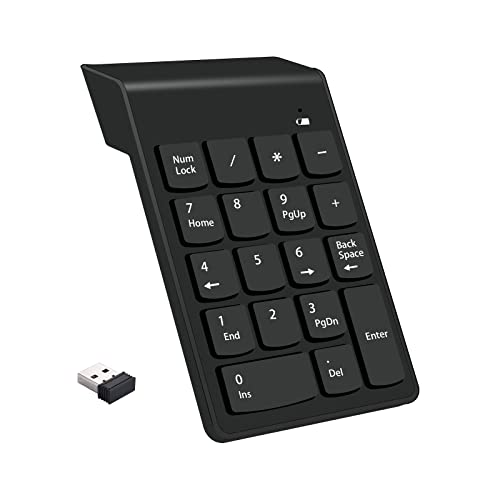
This cimetech 18-key pad adds number, direction, and function-style controls to a laptop or desktop. Soft-touch keys, a slight ergonomic tilt, and a 2.4G receiver suit long spreadsheet sessions.
Pros
- 18-key layout includes direction controls
- Soft-touch keys help reduce typing noise
- 2.4G wireless connection works without drivers
- Battery indicator gives a low-power reminder
Cons
- Mac function keys have limited support
- Wireless range is listed at about 33 inches
- Requires an AAA battery
- Older Windows compatibility claims do not cover every modern setup equally
The 18-key arrangement gives this model more controls than a basic ten-key pad. Direction buttons help with sheet navigation, while the soft-touch design suits offices where loud key presses become distracting. A slight tilt supports a more relaxed hand position during repeated entries in accounting files and financial applications.
The 2.4G receiver uses a standard USB port and needs no driver installation. The listed range is around 33 inches, so the pad fits best close to the laptop or desktop rather than across a large room. A battery indicator gives a useful warning before the AAA cell runs down, an easy detail to appreciate during workdays.
cimetech has limited publicly known service coverage in India compared with Logitech or Dell. Buyers should rely on the seller’s return process and retain the receiver, since a lost receiver reduces the product’s usefulness. Windows users receive the widest support, while Mac buyers should expect number entry with reduced function-key support.
Tobo TD-K3 Wireless Numeric Keypad

The Tobo TD-K3 focuses on accounting and billing work with a 19-key layout and a dedicated 000 key. Its raised keycap design, anti-slip base, and splash-resistant construction suit busy desks.
Pros
- Dedicated 000 key speeds large-number entry
- 10-metre wireless range is useful in flexible setups
- Raised keycaps offer added spill protection
- Anti-slip base and spaced keys support accurate typing
Cons
- AAA battery is not included
- Wireless receiver occupies a USB port
- Limited brand service information is available in India
- The larger 19-key layout takes more space than a basic ten-key pad
The dedicated 000 key gives the TD-K3 a clear purpose for billing, invoicing, accounting, and other Indian office tasks involving repeated large numbers. The layout also includes Num Lock, arithmetic operators, Enter, Backspace, and Delete, so you do not need to reach across the main keyboard for common corrections.
Raised crater-style keycaps sit above the lower board and offer extra protection against small splashes from tea or coffee. The anti-slip rubber mat keeps the pad steady during one-hand entry, while roughly 5mm spacing between keys helps reduce accidental presses. These details suit work from home desks where drinks often sit beside the laptop.
The USB receiver provides a listed range of up to 10 metres, though close-range use usually gives the most reliable experience in crowded offices. Tobo’s India service network is not widely documented, so seller support matters. The pad uses one AAA battery, and the missing cell adds a small setup step for buyers.
viboton USB Numeric Keypad

The viboton USB Numeric Keypad is a wired choice for users who want stable input without batteries or wireless pairing. Its 18-key layout, ergonomic tilt, and long protected cable fit desk-based number entry.
Pros
- Stable USB 2.0 wired connection
- Works with Windows and Mac systems
- 18 concave keys support accurate entry
- Cable reaches up to 75cm and the key lifespan is listed above 10 million presses
Cons
- Cable limits flexible desk placement
- Uses a USB port at all times
- No wireless option for travel
- Brand service network information in India is limited
viboton takes the straightforward route with a wired USB connection. Plug the pad into a compatible port and begin working without a receiver, pairing step, or battery replacement. This suits office computers, desktop setups, and laptop users who work in one location for long periods.
The 18-key layout includes full-size concave keys and an ergonomic tilt for repeated spreadsheet and accounting tasks. A 75cm TPE-protected cable gives reasonable reach beside a laptop, while the listed 10-million-keystroke lifespan offers reassurance for frequent daily use. Wired input also avoids the small delays and battery checks associated with wireless pads.
The model supports Windows versions through Windows 11 and Mac OS, giving it wider stated compatibility than several wireless rivals. Mac users should still confirm the exact function-key behaviour for their software. viboton has limited service visibility in India, so keep purchase records and check the seller’s replacement policy before relying on the pad for office work.
cimetech Wireless Numeric Keypad 18Keys, 2025
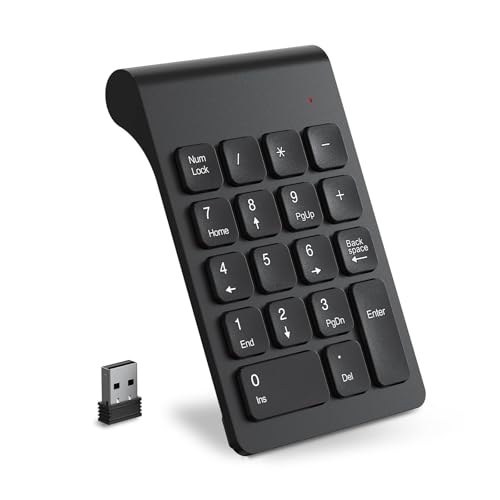
This newer cimetech wireless keypad adds an 18-key number block in a slim, lightweight body. A 15-degree tilt, non-slip pads, and a hidden USB receiver support portable office use.
Pros
- Slim body measures about 8.6 x 13.3 x 0.9 cm
- 15-degree tilt supports a comfortable wrist angle
- Receiver stores inside the battery compartment
- Works with Windows and GNU/Linux systems
Cons
- Not fully compatible with iOS
- AAA battery use adds ongoing maintenance
- No dedicated 000 key is listed
- cimetech service support in India is not widely documented
This cimetech model suits users who value portability. The compact dimensions fit small laptop sleeves and crowded workstations, while the USB receiver stores inside the battery compartment during travel. Four non-slip pads keep the unit from sliding when you enter figures beside a laptop keyboard.
The 15-degree tilt gives the hand a more natural working position during spreadsheet sessions. An 18-key layout provides the expected number-entry controls without taking the space of a full keyboard. Windows users get the broadest stated support, and GNU/Linux users also have a listed compatibility path.
The main trade-off is battery management and limited iOS support. Apple users should check their exact workflow before ordering, especially if function keys matter. cimetech does not have a widely established India-wide service network, so seller return coverage and receiver availability deserve attention. For students, remote workers, and travelling professionals, the slim build has a practical advantage.
Buying Guide
Choose wired or wireless first
A wired keypad suits a fixed desk, shared office computer, or long work session where you want steady input without battery changes. Wireless models suit laptop users who shift between rooms or want a cleaner desk. A wireless receiver uses one USB port, so check whether your laptop has enough ports or needs a hub.
Match the layout to your work
A basic ten-key layout works for occasional calculations and quick number entry. An 18-key model adds direction or function-style controls. A 19-key model with a dedicated 000 key makes more sense for invoices, billing, accounting, and large-number entry. Count the keys you use each day before choosing a compact design.
Check operating system support
Windows users receive the broadest support across these models. ChromeOS and GNU/Linux support appears on selected products. Mac and iOS users need extra care because number keys often work while hotkeys or function keys do not. Check the seller listing and return terms if your workflow depends on shortcuts.
Think about desk comfort
A slight tilt reduces awkward wrist angles during repeated entry. Spacing between keys helps users who type quickly, while concave or responsive keycaps support more accurate presses. A non-slip base matters on glass, laminated, or polished desks. For Indian workspaces, choose a body that stays stable when the desk gets crowded.
Consider spills and local conditions
Raised keycaps and splash-resistant construction offer useful protection from small tea or coffee spills, but they do not make a keypad waterproof. Keep the pad away from direct sunlight, damp storage, and dust-heavy corners. Wipe the surface with a dry or lightly damp cloth and avoid pouring cleaner into the key gaps.
Review battery and receiver details
Wireless models need a compatible AAA battery and safe receiver storage. A battery indicator helps prevent surprise shutdowns during office work. Before travelling, place the receiver inside its storage slot or a small pouch. Wired models remove these concerns but keep one USB port occupied.
Check warranty, returns, and seller support
The brands in this list have limited publicly documented service networks in India. Seller return coverage therefore matters more than a familiar brand name. Confirm the return window, receiver replacement terms, and invoice availability. Test every key soon after delivery, especially Num Lock, Enter, Backspace, direction controls, and the 000 key where present.
Feature Importance
| Feature | Importance |
|---|---|
| Operating system compatibility | High |
| Correct key layout for your work | High |
| Connection stability | High |
| Comfortable tilt and key spacing | High |
| Wireless range | Medium |
| Battery indicator and battery life | Medium |
| Spill resistance | Medium |
| Anti-slip base | Medium |
| Portability and weight | Medium |
| Warranty and seller return support | High |


