
A good 27-inch monitor gives your desk more working space without taking over the room. A 4K panel suits photo work, spreadsheets, coding, and movie viewing, while a fast QHD panel fits gaming better. IPS panels in this list offer wide viewing angles and consistent colour from different seating positions.
Before choosing, check resolution, refresh rate, response time, ports, stand movement, HDR support, colour coverage, and eye-care modes. Your graphics card also matters. A mid-range PC often handles QHD gaming more comfortably than 4K gaming, while office work benefits from the sharper text offered by 4K.
The listed options suit Indian buyers with different needs. Current listed prices run from ₹13,999 to ₹31,490. Check sale changes before ordering, and keep room heat, desk depth, power quality, service access, and warranty terms in mind.
LG 27US500
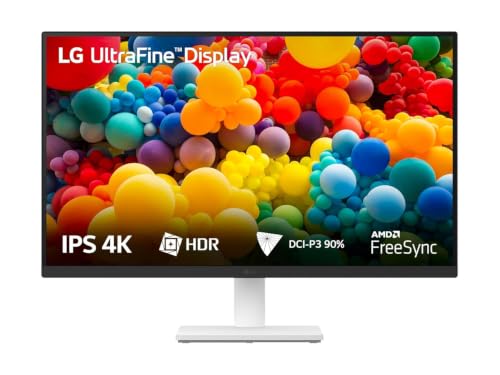
LG 27US500 is a 27-inch 4K IPS monitor for office work, editing, and home entertainment. DCI-P3 coverage, HDR10, Reader Mode, and a three-side slim design give the monitor a useful mix for daily desk work.
Pros
- Sharp 4K resolution for text, images, and video
- DCI-P3 coverage up to 90 percent with HDR10 support
- Reader Mode and Flicker Safe features for long sessions
- Two HDMI ports and a tilt-adjustable stand
Cons
- 60Hz refresh rate is less suitable for fast gaming
- No USB hub or USB Type-C input
- Stand offers tilt adjustment but no height movement
- HDR brightness is limited compared with premium HDR displays
The 3840 x 2160 IPS panel gives text a clean edge, which helps when you keep several documents or browser windows open. DCI-P3 coverage up to 90 percent gives photos and video a broader colour range than a basic office screen. HDR10 support adds a suitable mode for compatible films and games, though buyers should keep expectations modest because peak brightness is not listed as a premium HDR level.
LG’s OnScreen Control software lets you divide the desktop into practical window layouts. Reader Mode and Flicker Safe support long work sessions in warm Indian rooms where you might sit at a desk for hours. The anti-glare surface also helps near windows, though direct sunlight still reduces visibility.
LG has a broad service presence across Indian cities and towns, which helps with warranty coordination and panel-related support. The missing USB-C port and basic tilt-only stand matter for laptop users. For a desktop connected through HDMI, this monitor offers a clean 4K setup without unnecessary extras.
Lenovo LOQ 27Q-10

Lenovo LOQ 27Q-10 is the gaming-focused choice here, with QHD resolution, a 180Hz refresh rate, Adaptive Sync support, and 99 percent sRGB coverage. The panel suits competitive PC gaming and everyday productivity.
Pros
- 180Hz refresh rate for smooth gameplay
- QHD resolution gives a useful balance of sharpness and frame rate
- 0.5ms MPRT and Adaptive Sync support
- 99 percent sRGB coverage and console support
Cons
- QHD resolution is less sharp than 4K for fine text
- HDR10 compliance does not replace high-brightness HDR
- Stand provides tilt movement only
- No USB-C port or built-in speakers
QHD at 2560 x 1440 fits a 27-inch screen well. Text looks sharper than Full HD, while a gaming PC has an easier workload than with 4K. The 180Hz refresh rate suits shooters, racing games, and sports titles where quick movement benefits from a higher refresh rate. The listed response modes range from 0.5ms MPRT to slower levels, so choose the mode after checking for overshoot or visible inverse ghosting.
AMD FreeSync and VESA Adaptive Sync help reduce tearing when frame rates change. Lenovo also lists support for PS4, PS5, Xbox One X, Nintendo Switch, and Legion Go. Smart Artery software adds scenario modes and split-screen tools, giving office users a simple way to switch between work and gaming profiles.
Lenovo has a strong Indian retail and service network through authorised centres, online support, and large-city coverage. Service access still depends on your pin code, so check local availability before purchase. This monitor makes more sense for a gamer who values refresh rate over 4K detail, especially when the PC uses a mainstream graphics card.
BenQ EW2790U

BenQ EW2790U is a 4K entertainment monitor with USB Type-C power delivery, built-in speakers, three HDMI ports, and a height-adjustable stand. The feature set suits laptop users, console owners, and home offices.
Pros
- 4K IPS panel with 95 percent P3 coverage
- USB Type-C connection with 65W power delivery
- Three HDMI ports, a USB hub, and built-in treVolo speakers
- Height, swivel, tilt, and pivot adjustments
Cons
- 60Hz refresh rate limits high-frame-rate gaming
- Premium feature set makes the monitor costlier than basic 4K models
- Speakers suit casual viewing more than serious audio work
- USB-C charging performance depends on the connected laptop
BenQ places useful desk features alongside the 4K panel. The 95 percent P3 coverage suits photo viewing and video work, while HDR10 and DisplayHDR 400 support add extra picture modes for compatible content. BenQ’s HDRi modes adjust picture settings for different viewing needs, and High Pixel Contrast changes local contrast behaviour without altering the whole screen in the same way.
The USB Type-C input with 65W power delivery is useful for a modern laptop desk. One cable handles video, data, and charging for compatible systems, which reduces cable clutter. Three HDMI inputs help users keep a PC, console, and streaming device connected. The 5W dual speakers handle calls, music, and casual films without forcing you to buy speakers at once.
BenQ lists a three-year manufacturer warranty for this model. The brand has authorised support and service channels in India, though coverage differs between cities and towns. A height-adjustable stand matters during long workdays, especially when you switch between a laptop and a desktop. This is a strong pick for a mixed work, media, and console setup where USB-C matters more than a 120Hz or 144Hz refresh rate.
Acer Nitro VG270K V2

Acer Nitro VG270K V2 targets gamers who want 4K detail with a 144Hz mode and a separate Full HD 288Hz mode. HDMI 2.1, FreeSync Premium, eye-care tools, and a Smart Dial add useful flexibility.
Pros
- 4K at 144Hz for supported gaming hardware
- Full HD 288Hz mode for competitive esports play
- HDMI 2.1, DisplayPort, FreeSync Premium, and dual speakers
- Smart Dial, Display Widget, and VisionCare features
Cons
- 4K 144Hz gaming needs a strong graphics card
- Dynamic Frequency Resolution switches to Full HD for 288Hz
- Stand movement is limited compared with a full ergonomic stand
- Dual 2W speakers offer basic sound output
This Acer model gives you two distinct gaming paths. Use 4K at up to 144Hz for detailed single-player games, racing, and console play, or switch to Full HD 288Hz through Dynamic Frequency Resolution for esports titles where motion speed matters more than resolution. The 1ms VRB mode helps reduce blur, though backlight strobing modes often affect brightness and work best after personal testing.
The 99 percent sRGB IPS panel suits regular work and gaming, while HDR10 support adds compatibility for HDR content. HDMI 2.1 helps with newer consoles and high-bandwidth sources. The Smart Dial and Acer Display Widget make picture presets easier to change, useful when your desk serves as both a gaming station and a work setup.
Acer has broad service coverage in India through authorised service centres and online warranty support. Check the nearest centre before purchase, especially outside major cities. Indian buyers should also give the monitor ventilation around the rear panel during hot months. This model fits users who own a capable GPU and want one screen for high-detail games, competitive play, and console use.
Samsung LS27H700EAWXXL

Samsung LS27H700EAWXXL is a 27-inch 4K IPS monitor for office work, content viewing, and multitasking. Picture-in-Picture, Picture-by-Picture, 99 percent sRGB coverage, and a three-year warranty add practical value.
Pros
- 4K IPS display with 99 percent sRGB coverage
- Picture-in-Picture and Picture-by-Picture modes
- 3000:1 listed contrast ratio and HDR10 support
- DisplayPort, HDMI, headphone output, and three-year warranty
Cons
- 60Hz refresh rate is not aimed at competitive gaming
- Only one HDMI input is listed
- Stand offers limited movement
- No USB-C input or integrated speakers
The 4K resolution gives spreadsheets, timelines, and web pages extra room at 27 inches. Samsung lists 1.07 billion colours, 99 percent sRGB coverage, and a 3000:1 contrast ratio. IPS viewing angles remain useful when two people look at the screen, while the 300 cd/m2 typical brightness suits indoor rooms better than bright outdoor-facing desks.
PIP and PBP modes help when you need two sources on one display. A work laptop and desktop system, for example, can share the screen without repeated cable changes. Eye Saver Mode and reduced flicker support longer reading sessions. The single HDMI input means a multi-device setup should use DisplayPort for one source or add a switch.
Samsung’s three-year manufacturer warranty is a strong point for buyers who want a clear support period. Samsung service access is broad in India, with online help and authorised centres in many cities. The limited stand and lack of USB-C keep the setup simple. Choose this monitor for sharp productivity work and source multitasking rather than high-refresh gaming.
Buying Guide
Set a realistic budget
The current list starts at ₹13,999 and reaches ₹31,490. QHD models often give better gaming value because a mid-range GPU handles 1440p more easily. A 4K monitor makes more sense for design work, text-heavy tasks, detailed media, or a future PC upgrade. Keep a separate amount for a monitor arm, surge protector, HDMI cable, or USB-C cable if your desk needs them.
Choose resolution for your PC
QHD at 2560 x 1440 gives a good balance between clarity and frame rate on a 27-inch screen. 4K at 3840 x 2160 gives sharper text and more workspace, but games need a stronger GPU. Check graphics memory, output support, and the ports on your computer before selecting 4K 144Hz.
Match refresh rate and response mode
Choose 60Hz for office work, coding, editing, and film viewing. Pick 144Hz or 180Hz for fast games. A listed 0.5ms or 1ms figure often depends on a particular overdrive or strobing mode. Test the setting for ghosting and overshoot rather than selecting the lowest number without checking picture quality.
Check ports and device support
HDMI suits consoles and general devices. DisplayPort often suits a gaming PC at a higher refresh rate. USB Type-C with 65W power delivery, as offered by BenQ, helps laptop users reduce desk cables. HDMI 2.1 helps newer consoles and high-bandwidth gaming sources. Count your devices before ordering, especially if you want a PC, console, and streaming box connected together.
Look at stand movement and desk fit
Measure desk depth and check VESA support before purchase. Height adjustment helps reduce neck strain more than tilt alone. Pivot movement suits long documents and coding. A 27-inch screen needs enough viewing distance for comfortable 4K scaling. A monitor arm also helps in compact Indian work-from-home setups.
Consider heat, glare, and eye comfort
Indian rooms often get warm during summer. Leave airflow around the rear vents and avoid placing the monitor against a wall. Anti-glare coating helps near windows, while Reader Mode, low-blue-light settings, and flicker reduction help during reading sessions. These modes do not replace regular breaks or suitable room lighting.
Check warranty and local service
Read the warranty terms for panel defects, dead pixels, transport damage, and replacement procedure. LG, Samsung, Lenovo, Acer, and BenQ offer Indian support channels, though centre availability varies by pin code. Save the invoice, serial number, packaging, and delivery photos. Inspect the panel soon after delivery and report defects within the seller’s stated window.
Think about colour work and HDR
sRGB coverage suits office work, web content, and general editing. DCI-P3 coverage helps wider-gamut video and photo workflows, but calibration still matters. HDR10 support alone does not promise strong HDR impact. Check brightness, contrast behaviour, local dimming, and your room lighting before paying extra for HDR features.
Feature Importance
| Feature | Importance |
|---|---|
| Panel resolution | High |
| Refresh rate | High |
| Panel type and viewing angle | High |
| Response time behaviour | High |
| Ports and device compatibility | High |
| Stand adjustment | Medium |
| Colour coverage and accuracy | High |
| HDR brightness and support | Medium |
| Eye-care features | Medium |
| Warranty and Indian service access | High |