


Quick answer: my top pick here is Logitech G502 Hero. Also in this guide: Razer DeathAdder V2 X HyperSpeed, Logitech G203 Lightsync, HyperX Pulsefire Haste 2, Redgear A-15.
A great gaming mouse can significantly improve your PC gaming. It is your direct link to the game world. A precise, comfortable mouse makes a big difference in performance and enjoyment. It allows for quicker reactions and more accurate aim.
When choosing a gaming mouse, several factors come into play. Consider the sensor’s accuracy, the mouse’s comfort in your hand, and its build quality. For Indian consumers, value for money and availability of local support are also crucial. The climate here means durability is important too. Let’s explore some top choices that balance performance and budget.
Top 5 Gaming Mice Under INR 5000
Here are our top picks for best 5 gaming mouse in india that suit the needs of Indian users. Check out the list below to find the best option for your build.
Logitech G502 Hero
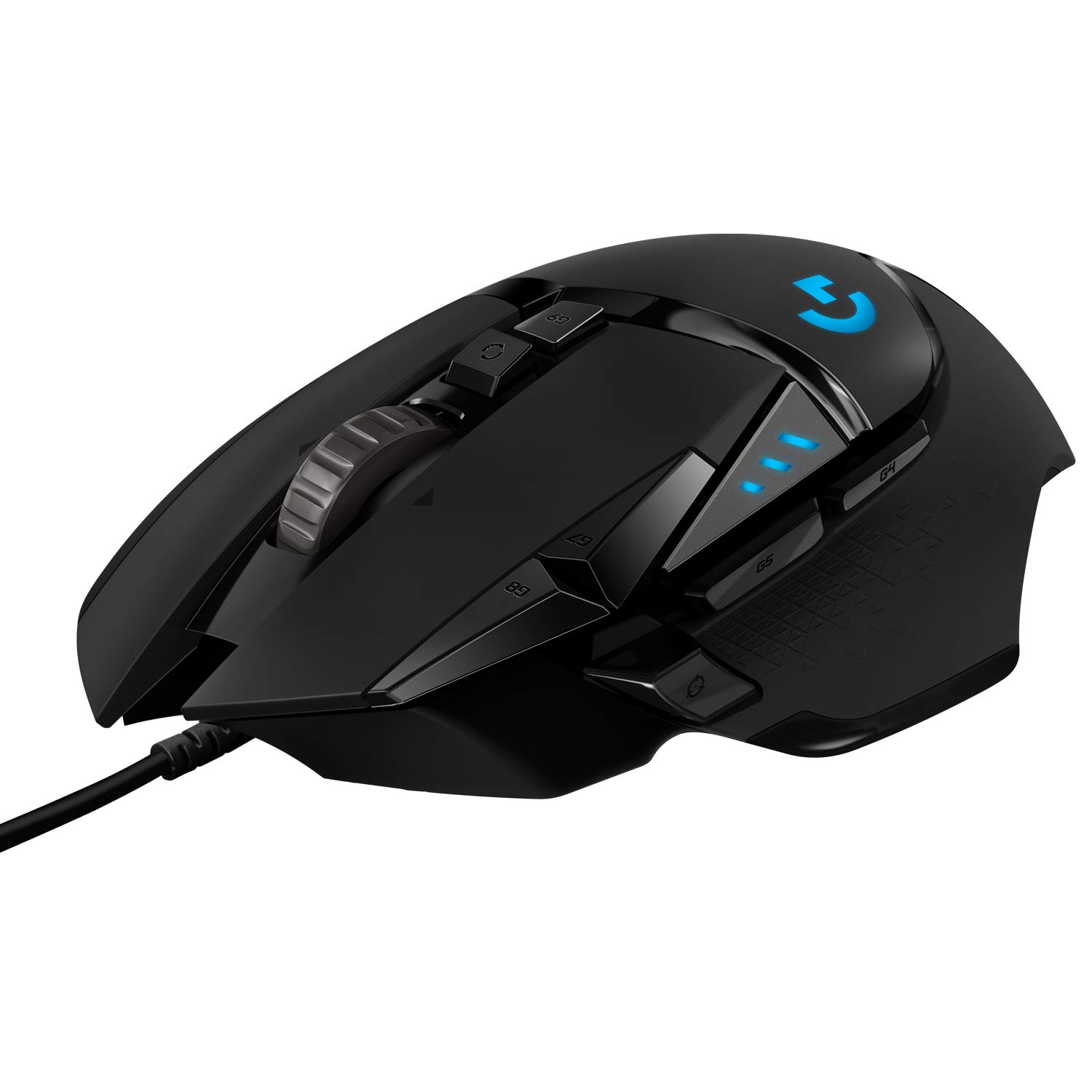
A popular and versatile mouse known for its high-performance sensor and customizable design, a favorite among many gamers.
Pros
- Excellent high-precision Hero 25K sensor
- Adjustable weight system for customization
- Many programmable buttons for versatile control
- Durable build quality and reliable switches
Cons
- Can feel heavy for some users
- Not an ambidextrous design
- Logitech G Hub software can be complex initially
The Logitech G502 Hero uses a high-precision Hero 25K sensor. This sensor tracks movements accurately across different surfaces. It has no smoothing, filtering, or acceleration. This makes it a great choice for competitive gaming. The mouse features 11 programmable buttons, allowing for extensive customization. You can assign macros or specific in-game actions to these buttons.
Its ergonomic design is comfortable for palm and claw grip users. The mouse also comes with adjustable weights. You can fine-tune its balance and feel. This adaptability helps you match it to your personal play style. Logitech has a good service network in India, which adds to its appeal. It is a durable mouse built to last many gaming sessions.
Razer DeathAdder V2 X HyperSpeed

A lightweight wireless option that offers great performance without a high price, giving you freedom of movement.
Pros
- Reliable wireless freedom with low latency
- Exceptional battery life on a single battery
- Comfortable and classic DeathAdder ergonomic shape
- Good optical sensor for precise tracking
Cons
- Uses AA/AAA battery, not rechargeable
- Fewer programmable buttons than some rivals
- Build feels lighter, which some users might not prefer
The Razer DeathAdder V2 X HyperSpeed brings reliable wireless performance to a wider audience. It runs on a single AA or AAA battery, offering long battery life. The mouse connects via Razer HyperSpeed Wireless for low-latency gaming. This ensures your commands are instant. Its ergonomic shape is comfortable for various hand sizes and grip styles. Many gamers find it easy to hold for long periods.
It uses a good optical sensor for accurate tracking across games. This mouse is a strong choice for those wanting to cut the cord without spending too much. Razer products have a good reputation for gaming peripherals. The brand is well-recognized in the Indian market. Its simple, effective design makes it a solid performer for everyday gaming and competitive play.
Logitech G203 Lightsync

An excellent entry-level gaming mouse that delivers reliable performance, great looks, and value for its affordable price.
Pros
- Very affordable price point
- Reliable sensor performance for its class
- Vibrant and customizable RGB Lightsync lighting
- Lightweight and comfortable design for most hands
Cons
- Wired only, no wireless option
- Simpler design, not many advanced features
- Might feel too small for users with very large hands
The Logitech G203 Lightsync is a fantastic choice for new gamers or those on a tight budget. It offers a solid gaming experience without complex features. Its sensor is accurate enough for most gaming needs, providing consistent tracking. The mouse has a classic, ambidextrous design. This makes it comfortable for many users. The RGB lighting is customizable. It adds a nice aesthetic touch to your setup.
This mouse is known for its durability. It holds up well to regular gaming. It is widely available across India, making it easy to purchase. The G203 provides a great balance of performance and affordability. It is a smart buy for anyone needing a dependable wired gaming mouse. It is perfect for both casual and competitive players looking for value.
HyperX Pulsefire Haste 2

Designed for speed and agility, this ultralight mouse helps competitive gamers make quick, precise movements.
Pros
- Extremely lightweight for rapid movements
- Flexible paracord cable reduces drag
- High-performance optical sensor
- Smooth PTFE glide skates for effortless motion
Cons
- Minimalistic design, fewer extra features
- Could feel too light for some users
- Not ideal for users who prefer heavier mice
The HyperX Pulsefire Haste 2 focuses on one thing: speed. Its ultralight design reduces fatigue during long gaming sessions. It allows for incredibly fast flicks and precise aiming, especially in FPS games. The flexible paracord cable minimizes drag. This makes the mouse feel almost wireless. The sensor is highly accurate, ensuring your movements translate directly onscreen. It has a high polling rate for instant response.
This mouse is perfect for competitive players. It suits those who prioritize a lightweight feel and quick reactions. It is a durable mouse built with quality components. HyperX is a trusted brand among gamers. Its clean, no-frills design appeals to those who want performance without unnecessary bulk. It balances great build quality with its lightweight nature. This ensures longevity even with intense use.
Redgear A-15

An incredibly budget-friendly option for Indian gamers, offering customizable DPI and RGB lighting at a very accessible price point.
Pros
- Very budget-friendly and accessible price
- Customizable DPI settings on the fly
- Features attractive RGB lighting
- Widely available in the Indian market
Cons
- Sensor performance can be inconsistent for serious gaming
- Build quality is basic compared to premium brands
- Software for customization is often rudimentary
The Redgear A-15 is a popular choice for gamers on a very tight budget in India. It offers essential gaming features at an extremely low price. The mouse features adjustable DPI settings. This allows users to switch sensitivity on the fly. It comes with decent RGB lighting, adding a gaming aesthetic. It is readily available in local stores and online. This makes it a convenient pick for many.
While it may not match premium mice in sensor precision or build quality, it performs well for casual gaming. It is a good starting point for new PC gamers. It lets them experience gaming mouse features without a big investment. The A-15 shows that even budget options can offer a satisfying experience. It is a true value champion for the Indian market, especially for those just getting into PC gaming.
Buying Guide
Budget Considerations
Your budget sets the stage. Gaming mice range from budget-friendly options to premium models. Decide how much you can spend first. Look for features that give you the best performance for your money. Sometimes a slightly higher investment pays off with better durability and precision.
Understanding DPI and IPS
DPI (Dots Per Inch) tells you how sensitive the mouse is. A higher DPI means the cursor moves further with less physical mouse movement. IPS (Inches Per Second) indicates how fast the sensor can track without losing accuracy. Look for a sensor that offers high and consistent tracking. A good sensor avoids skips or jitters. It provides reliable tracking, especially in fast-paced games.
Ergonomics and Grip Style
Comfort is vital. Choose a mouse that feels good in your hand for long gaming sessions. Consider your grip style: palm, claw, or fingertip. Some mice favor specific grip types. An ergonomic design prevents strain and improves control. Try to hold different shapes if possible before you buy.
Wired vs. Wireless Connectivity
Decide between wired or wireless. Wired mice offer zero latency and never run out of battery mid-game. Wireless mice offer freedom of movement and a clutter-free desk. Modern wireless technology has low latency, often comparable to wired. Consider battery life for wireless models.
Buttons and Programmability
Look at the number and placement of buttons. More buttons are useful for MMOs or productivity tasks. Ensure they are programmable. Good quality switches provide a satisfying click and last for millions of clicks. A crisp click response is important for competitive play.
Build Quality and Durability
A durable mouse lasts longer. Check the materials used for the body and switches. A braided cable is more resistant to fraying. Look for robust construction that can handle intense use. Good build quality also means better internal components, leading to a more consistent performance. Consider the Indian climate, where heat and humidity can impact materials.
Software Ecosystem
Most gaming mice come with dedicated software. This software lets you customize DPI settings, RGB lighting, and program buttons. Good software is user-friendly and offers many customization options. It allows you to create profiles for different games, saving your settings.
Warranty and Support
After-sales service is important. Check the warranty period and ease of claiming warranty in India. Brands with a strong service network offer peace of mind. Local support can be a huge benefit if you face any issues with your device.
Weight and Balance
Some mice offer adjustable weights. This allows you to fine-tune the mouse’s balance and overall weight. A lighter mouse is great for quick, precise movements in FPS games. A heavier mouse might feel more stable for some users. Find what feels right for your play style.
| Feature | Importance |
|---|---|
| Sensor Accuracy (DPI/IPS) | High |
| Ergonomics/Comfort | High |
| Build Quality/Durability | High |
| Price/Value | High |
| Warranty/Support | High |
| Connectivity (Wired/Wireless) | Medium |
| Programmable Buttons | Medium |
| Weight | Medium |
| Software Customization | Medium |
More models worth a look
These came up in earlier guides on the same topic and are still on sale.
EvoFox Phantom Air Ultra, Red
This 54g wired mouse suits FPS players who want quick flicks, high sensitivity control, and programmable buttons. A 1000Hz polling rate, 12800 DPI sensor, and onboard memory give the model a strong feature set for its class. See it on Amazon
Ant Esports GM700
The GM700 offers wireless play, a rechargeable battery, adjustable sensitivity, and a light honeycomb body. A 2.4GHz receiver suits PC and laptop users who want fewer cables without moving to a premium mouse. See it on Amazon
Tobo TD-598KM-01
The TD-598KM-01 is a simple wired honeycomb mouse with seven DPI settings and RGB lighting. It fits first-time gamers and office users who want a low-cost mouse with a sporty shape. See it on Amazon






Is the Razer DeathAdder V2 X HyperSpeed really good for small hands I use a claw grip and some mice feel too bulky Any personal experience comments
Good review on the G203. Maybe you could add a section on sensor performance specifics for each mouse in future posts. That would be really helpful for competitive gamers.
Dude this list is so helpful! I was literally searching for a new gaming mouse under 5k. Bahut achha content hai, thanks yaar!
G502 Hero is a classic but it’s gotten a bit heavy now. My wrist starts paining after long sessions. Still, solid choice for many, especially if you like weighty mice.
omg the pulsefire haste 2 is like so light na! i bought it last month and it’s been a game changer for valorant. definitely recommend it to everyone reading this.